> ## Documentation Index
> Fetch the complete documentation index at: https://help.fieldpulse.com/llms.txt
> Use this file to discover all available pages before exploring further.
# How to Block a Phone Number
> Block contacts, customers, or unknown numbers in FieldPulse Engage to stop unwanted calls and texts for your whole team, and unblock them anytime.
> **Who uses this:** Admins, Team Managers, and Service Agents — Limited Agents don't have access to Engage; a block applies to your whole team. **Availability:** United States and Canada · Requires the Engage add-on.
Blocking a number in [Engage](https://www.fieldpulse.com/features/engage) stops calls and texts to and from that number for you and everyone on your team. You can block a contact, a customer, or an unknown number, and you can add a number to the block list even if it has never contacted you — useful for shutting down known spam before it reaches your crew.
## Overview
A block in Engage is team-wide. Once a number is blocked, no one on your team can call or text it and it can't call or text any of you — all communication in both directions stops. You can block a number from three places, and you manage every blocked number from one **Blocked Contacts** list in Engage settings. There is no limit to how many numbers you can block.
## Video walkthrough
Watch the [blocking a phone number walkthrough](https://www.loom.com/share/5d1aa642796f480f99739c18385df4e3) for a full run-through. The written steps below stand on their own.
## Block a number
You can block a number from three places in Engage.
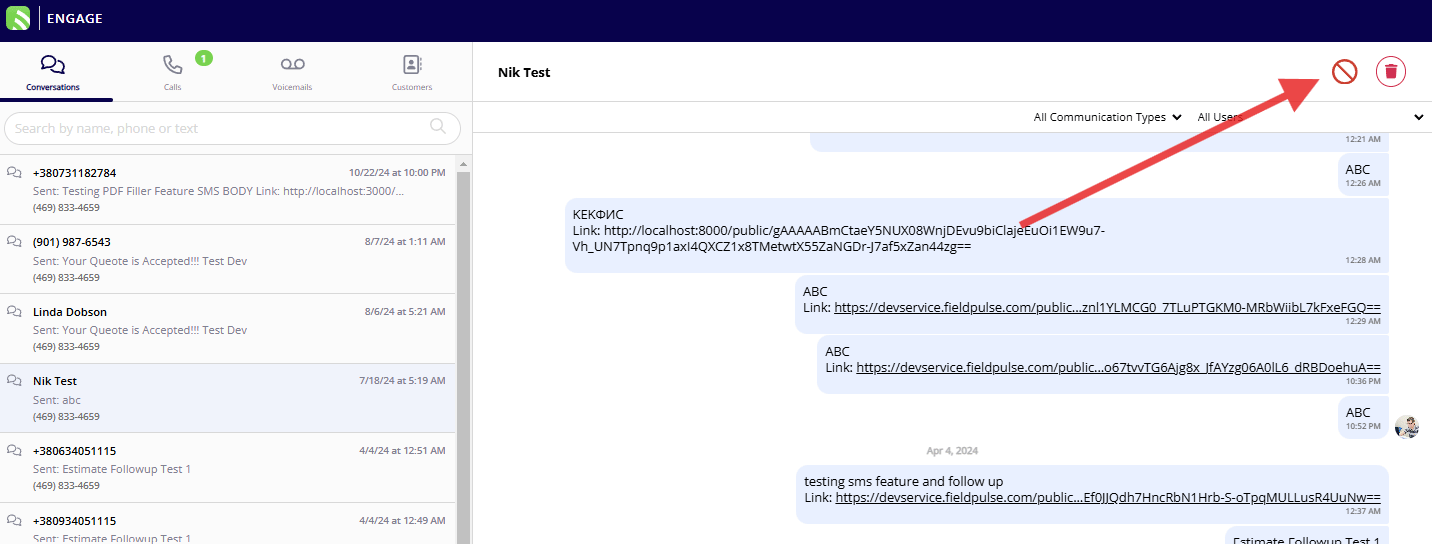
### From a conversation
1. Open the conversation thread in Engage.
2. Select the **block** icon in the top-right corner of the screen.
3. Confirm when prompted to block the number.
 ### From a list view
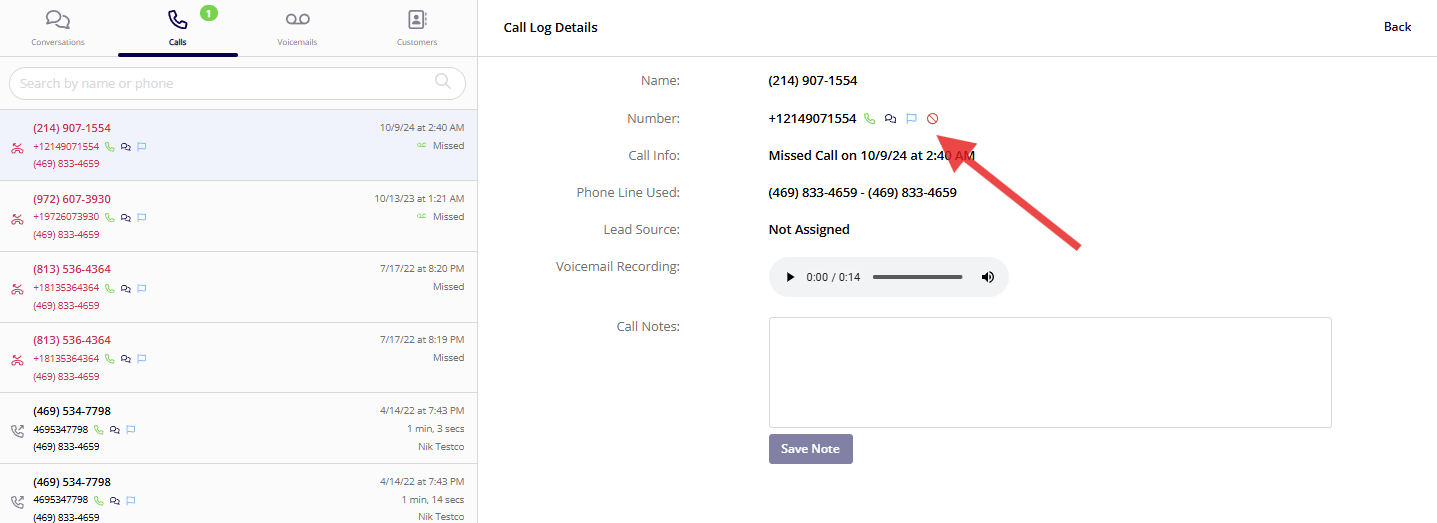
1. Go to any list view, such as calls or voicemails.
2. Select a number to open it.
3. Select the **block** icon on the call log detail or voicemail page.
### From a list view
1. Go to any list view, such as calls or voicemails.
2. Select a number to open it.
3. Select the **block** icon on the call log detail or voicemail page.
 ### For a customer
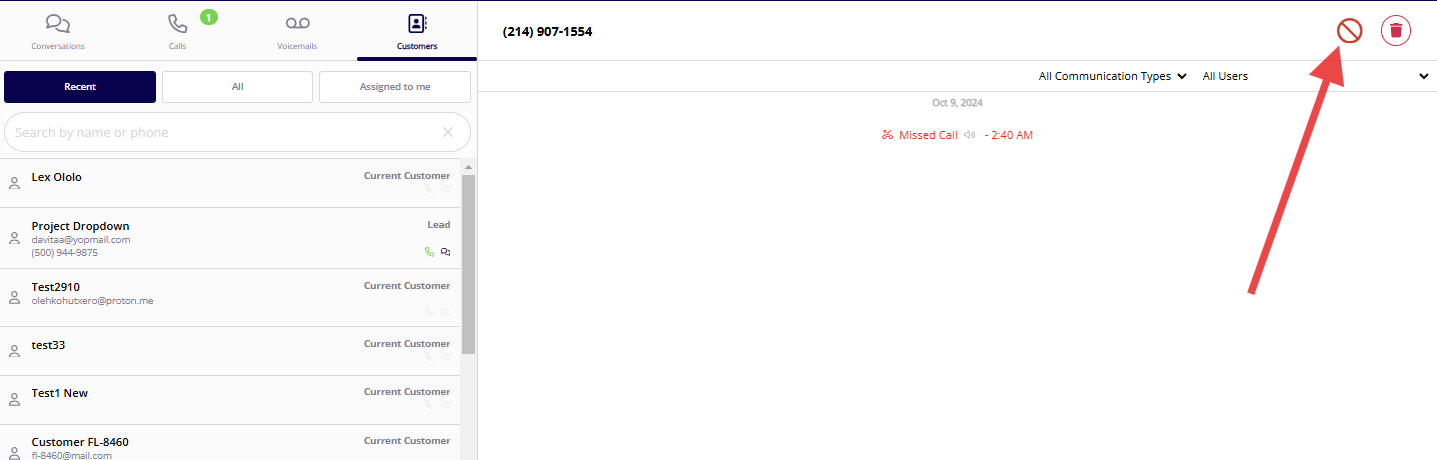
1. Open the customer's details.
2. Select the **block** option to stop all communication with that customer.
### For a customer
1. Open the customer's details.
2. Select the **block** option to stop all communication with that customer.
 ## Block a number preemptively
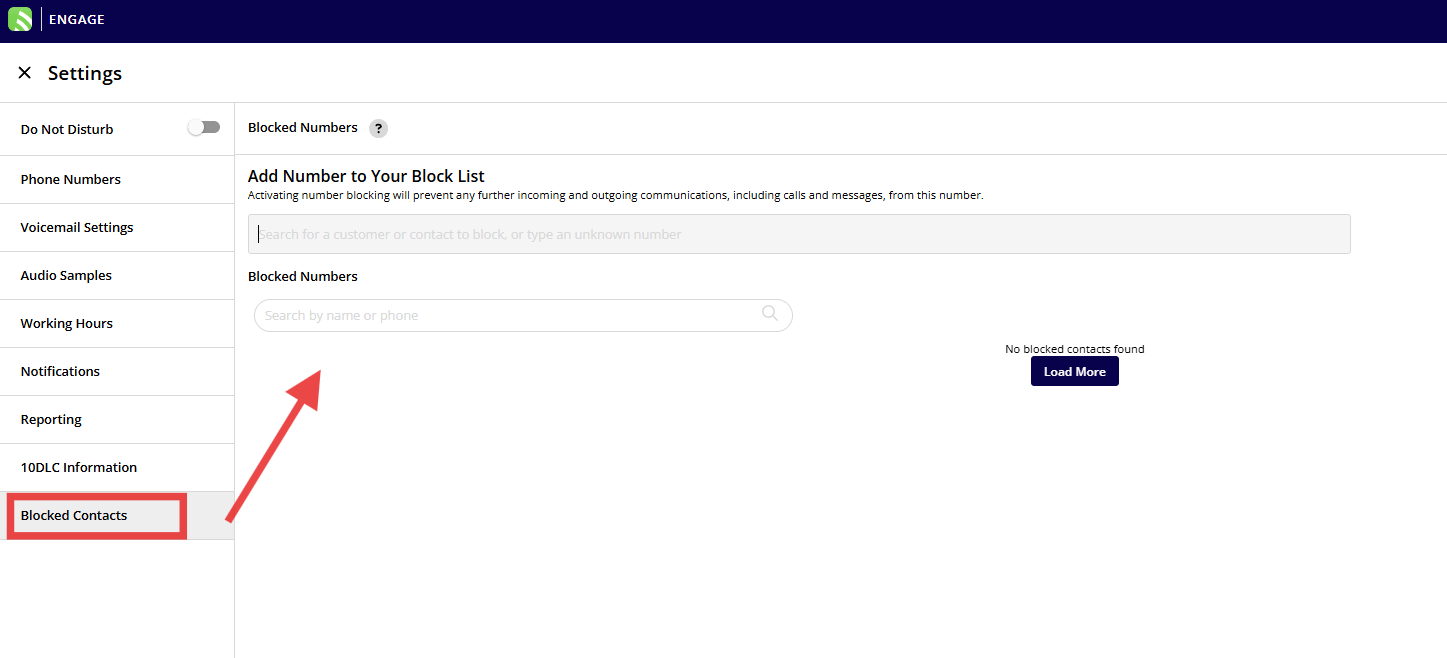
You can add a number to the block list even if it has never contacted you and isn't saved in your contacts. This is useful for blocking known spam numbers before they reach your team. In the **Blocked Contacts** section of Engage settings, use the **Add Number to Your Block List** field — search for a customer or contact to block, or type an unknown number.
## Block a number preemptively
You can add a number to the block list even if it has never contacted you and isn't saved in your contacts. This is useful for blocking known spam numbers before they reach your team. In the **Blocked Contacts** section of Engage settings, use the **Add Number to Your Block List** field — search for a customer or contact to block, or type an unknown number.
 ## Manage and unblock numbers
1. Go to the **Blocked Contacts** section in your Engage settings. This lists every blocked number, with a search function to find a specific one.
2. To unblock, select the number and confirm to allow communication again.
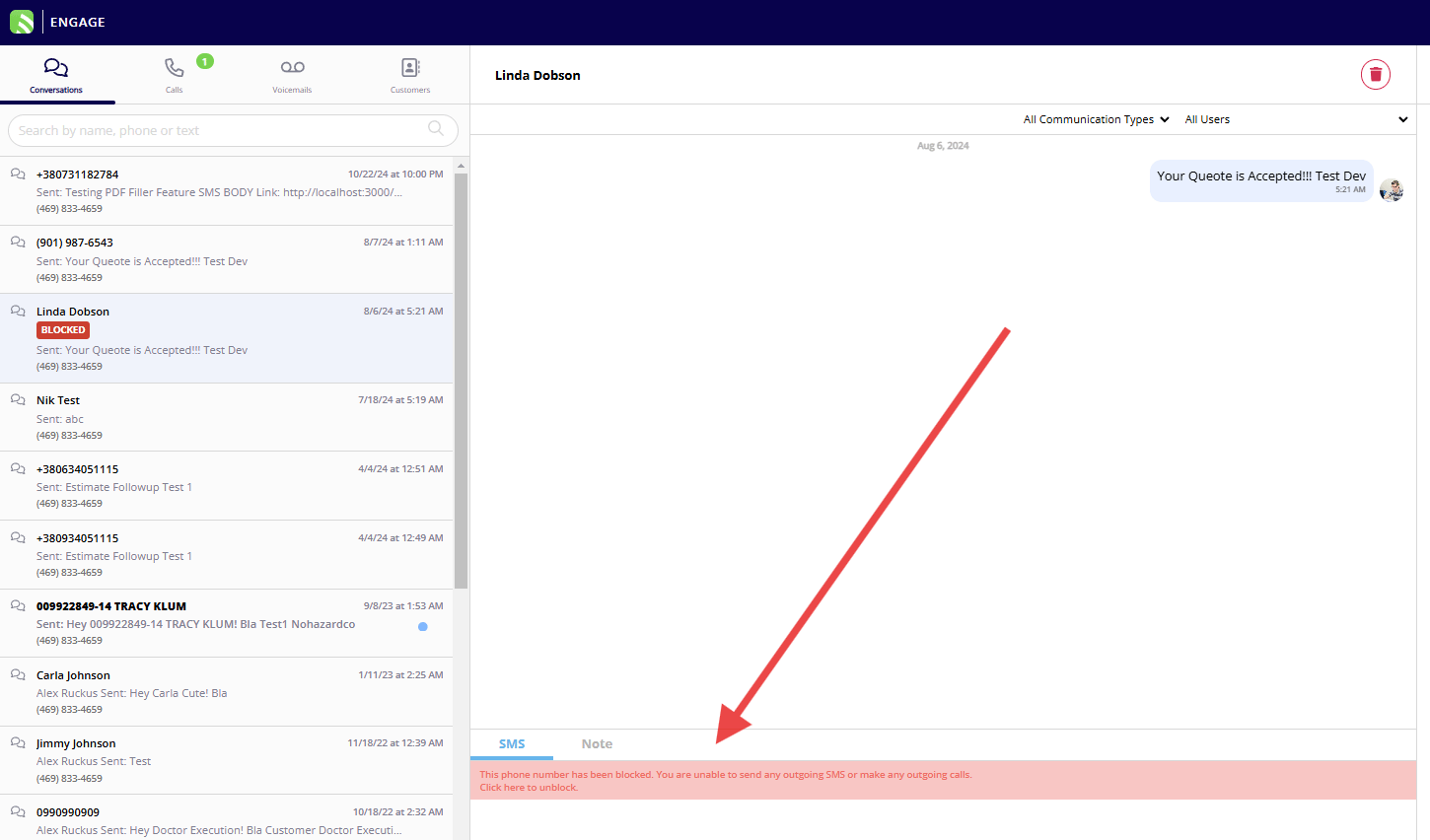
A blocked conversation shows a **Blocked** label, and its message box is replaced with a notice that the phone number has been blocked, including a **Click here to unblock** link.
## Manage and unblock numbers
1. Go to the **Blocked Contacts** section in your Engage settings. This lists every blocked number, with a search function to find a specific one.
2. To unblock, select the number and confirm to allow communication again.
A blocked conversation shows a **Blocked** label, and its message box is replaced with a notice that the phone number has been blocked, including a **Click here to unblock** link.
 ## Related articles
* [Engage Overview](/add-ons/engage/overview)
* [How to Use Additional Contacts and Alternate Phone Numbers](/add-ons/engage/additional-contacts)
* [How to Use Do Not Disturb](/add-ons/engage/do-not-disturb)
A number is blocked when it appears in your **Blocked Contacts** list and neither you nor your team can call or text it — and unblocking it from that same list restores communication in both directions.
## Related topics
- [How to Use Additional Contacts and Alternate Phone Numbers](/add-ons/engage/additional-contacts.md)
- [Engage Phone System](/add-ons/engage/index.md)
- [How to Purchase and Port Phone Numbers](/add-ons/engage/purchasing-porting-numbers.md)
- [How to Assign a Phone Number to a Lead Source](/add-ons/engage/assign-number-lead-source.md)
## Related articles
* [Engage Overview](/add-ons/engage/overview)
* [How to Use Additional Contacts and Alternate Phone Numbers](/add-ons/engage/additional-contacts)
* [How to Use Do Not Disturb](/add-ons/engage/do-not-disturb)
A number is blocked when it appears in your **Blocked Contacts** list and neither you nor your team can call or text it — and unblocking it from that same list restores communication in both directions.
## Related topics
- [How to Use Additional Contacts and Alternate Phone Numbers](/add-ons/engage/additional-contacts.md)
- [Engage Phone System](/add-ons/engage/index.md)
- [How to Purchase and Port Phone Numbers](/add-ons/engage/purchasing-porting-numbers.md)
- [How to Assign a Phone Number to a Lead Source](/add-ons/engage/assign-number-lead-source.md)