> ## Documentation Index
> Fetch the complete documentation index at: https://help.fieldpulse.com/llms.txt
> Use this file to discover all available pages before exploring further.
# Setting Up Bill to Parent
> Bill a child location's estimates and invoices to the parent account in FieldPulse, charge the parent's card on file, and show parent details on PDFs.
> **Who uses this:** Admins turn the feature on in Company Settings; anyone with customer create/edit permissions can switch it on for a customer record, and anyone with estimate/invoice create and edit permissions can change the Bill To on a document. **Availability:** All regions · Web and mobile. Not supported for recurring billing, and Bill To details cannot be set while offline.
If you work with property managers, landlords, or corporate accounts, you have done the job at a child location and needed to send the bill to the parent. Bill to Parent links a child customer's [estimates and invoices](https://www.fieldpulse.com/features/estimates-and-invoices) to the parent's billing details and lets you charge the parent's card on file, without re-entering billing details every time.
## Overview
Bill to Parent is an account-level setting that, once turned on, adds a **Bill to Parent** toggle to child customer records and a **Bill To** dropdown to their estimates and invoices. When a document is billed to the parent, FieldPulse pulls in the parent's billing address, offers the parent's saved payment method at payment time, and — for QuickBooks Online — syncs the parent's details to the invoice. Company Settings also let you choose which parent billing details print on estimate and invoice PDFs.
Bill to Parent only appears on customer records that have a parent customer linked. See [Customer Account Structures Overview](/settings/account-structures/customer-account-structures) for how to set up a parent/child relationship.
## Before you begin
* The child customer must already be linked to a parent customer — see [How to Create Related Customers](/customers/managing-customers/creating-related-customers).
* Bill to Parent is turned off for every account by default. An Admin turns it on in Company Settings before it appears on any customer record.
## Step-by-step setup
### Turn on Bill to Parent for your account
1. Go to **Company Settings**, then select **Estimates & Invoices**.
2. Select **Advanced** in the sub-header.
3. Toggle on **Enable Bill to Parent** at the top of the page.
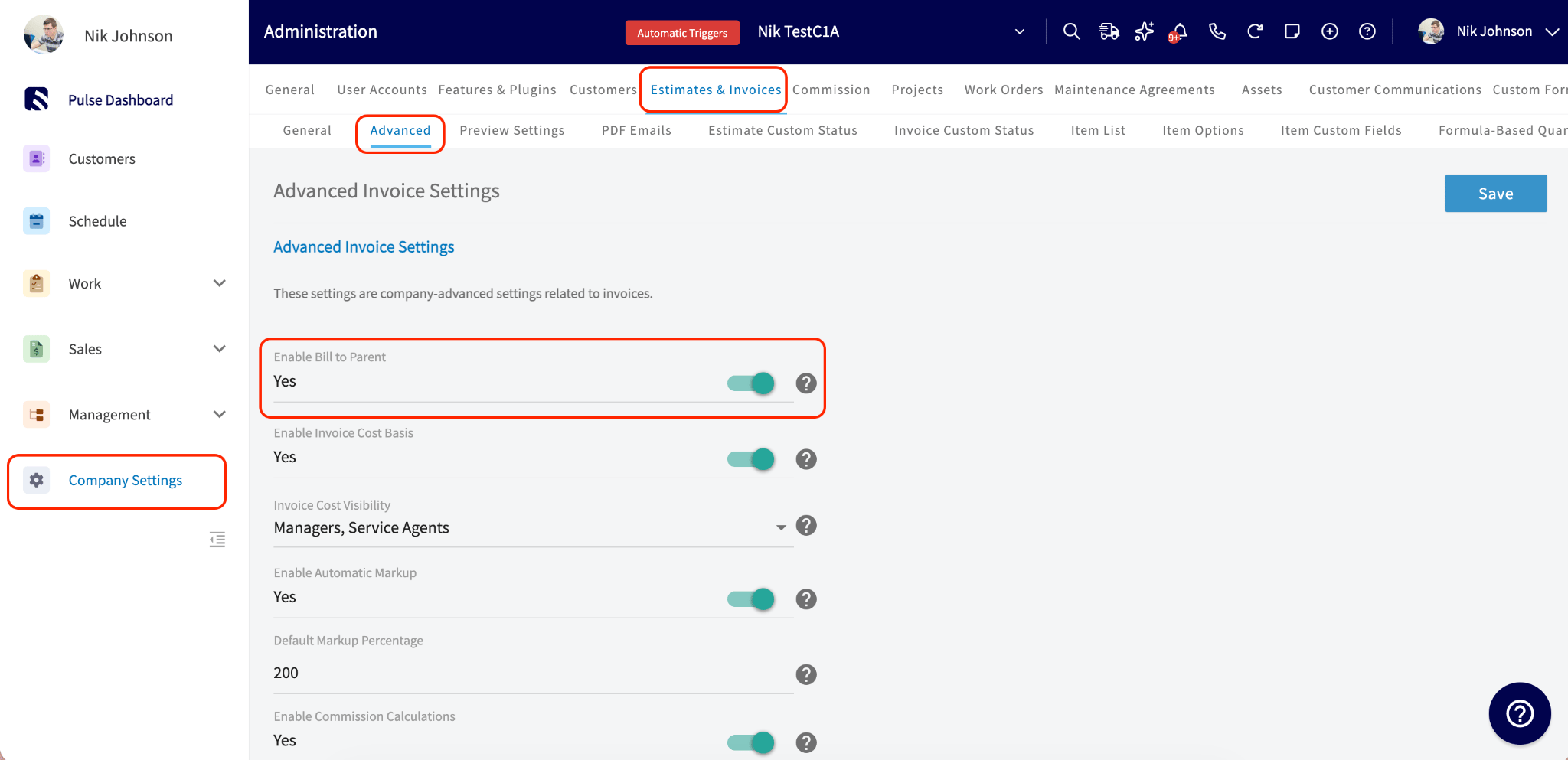 Once enabled, the **Bill to Parent** toggle appears on child customer records, and a **Bill To** dropdown appears on their estimates and invoices.
### Turn on Bill to Parent for a child customer
1. Open the child customer record and select **Edit**.
Once enabled, the **Bill to Parent** toggle appears on child customer records, and a **Bill To** dropdown appears on their estimates and invoices.
### Turn on Bill to Parent for a child customer
1. Open the child customer record and select **Edit**.
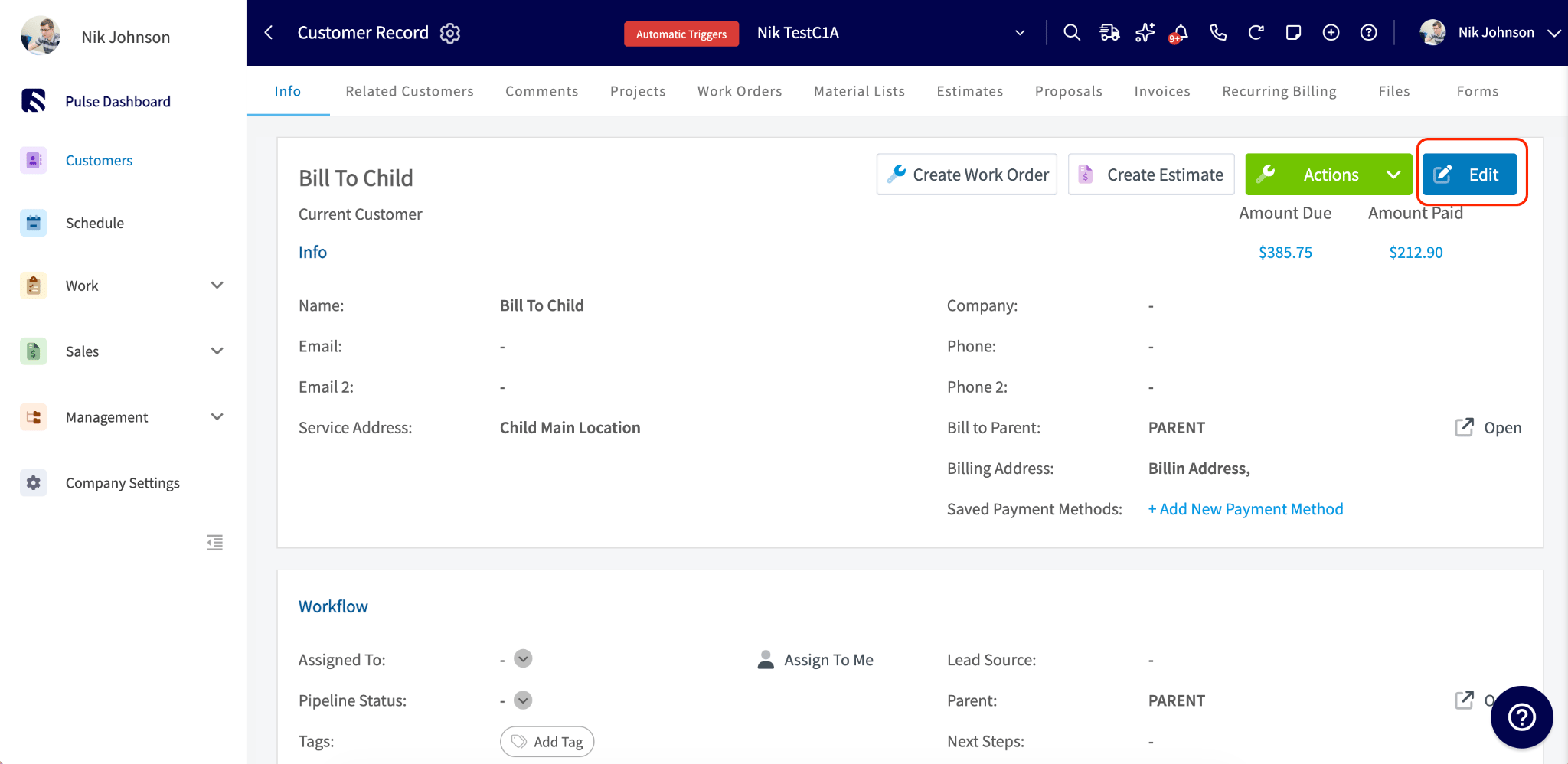 2. Toggle on **Use Separate Billing Address**, scroll to the **Billing** section, and toggle on **Bill to Parent**.
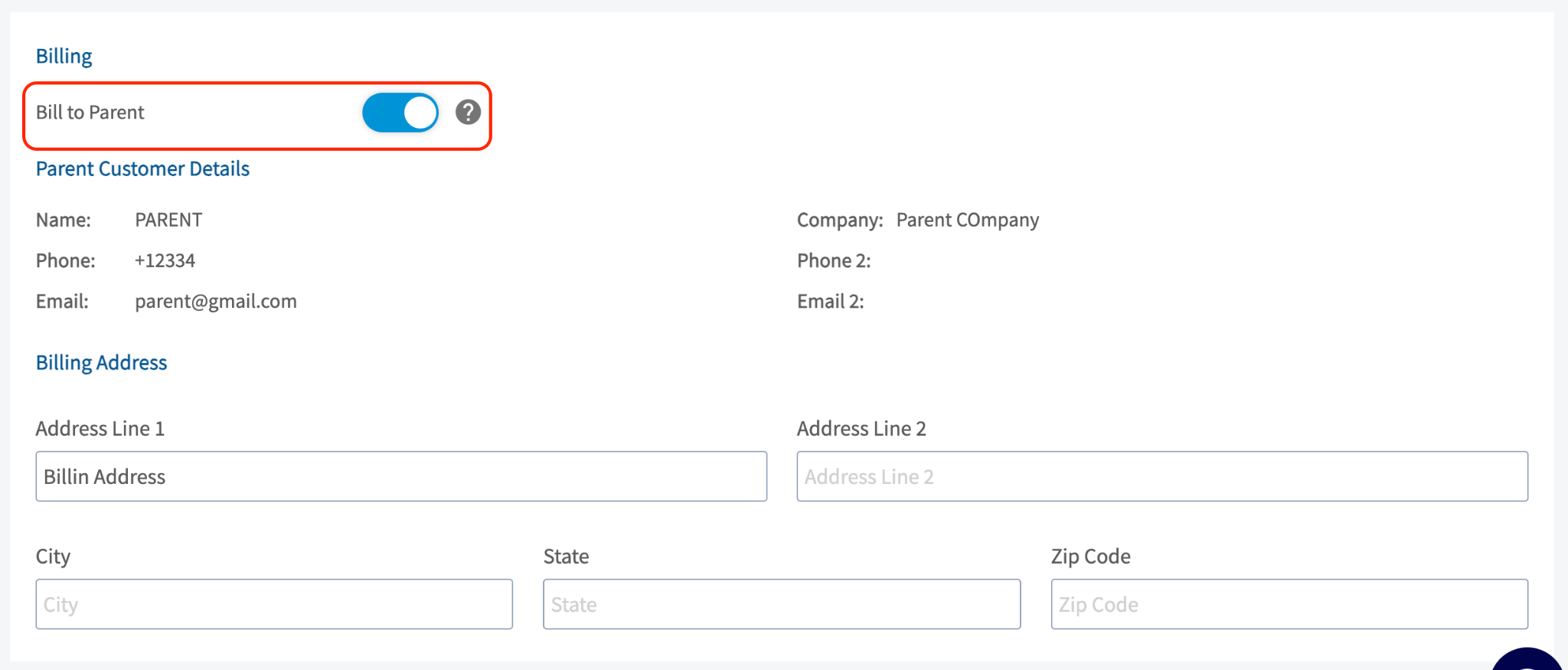 When you toggle on Bill to Parent, three things happen automatically:
* The parent's billing address is pulled into the child's billing address field. If the parent has no billing address on file, the parent's service address is used instead.
* The **Use Separate Billing Address** toggle is hidden while Bill to Parent is on, because billing details are now inherited from the parent.
* The child inherits the parent's tax exempt status and default net terms.
You can edit the billing address on the child record directly at any time, even after it is populated from the parent. If you unlink the parent from the child customer, Bill to Parent turns off automatically and the customer reverts to standard billing details.
Any historical record that was billed to the parent keeps the parent as its Bill To, even after Bill to Parent is turned off on the customer record.
## Bill To on estimates and invoices
When Bill to Parent is on for a child customer, a **Bill To** dropdown appears on their estimates and invoices with two options:
* **Parent Customer** — the default when Bill to Parent is on.
* **Customer** — the child themselves.
When you toggle on Bill to Parent, three things happen automatically:
* The parent's billing address is pulled into the child's billing address field. If the parent has no billing address on file, the parent's service address is used instead.
* The **Use Separate Billing Address** toggle is hidden while Bill to Parent is on, because billing details are now inherited from the parent.
* The child inherits the parent's tax exempt status and default net terms.
You can edit the billing address on the child record directly at any time, even after it is populated from the parent. If you unlink the parent from the child customer, Bill to Parent turns off automatically and the customer reverts to standard billing details.
Any historical record that was billed to the parent keeps the parent as its Bill To, even after Bill to Parent is turned off on the customer record.
## Bill To on estimates and invoices
When Bill to Parent is on for a child customer, a **Bill To** dropdown appears on their estimates and invoices with two options:
* **Parent Customer** — the default when Bill to Parent is on.
* **Customer** — the child themselves.
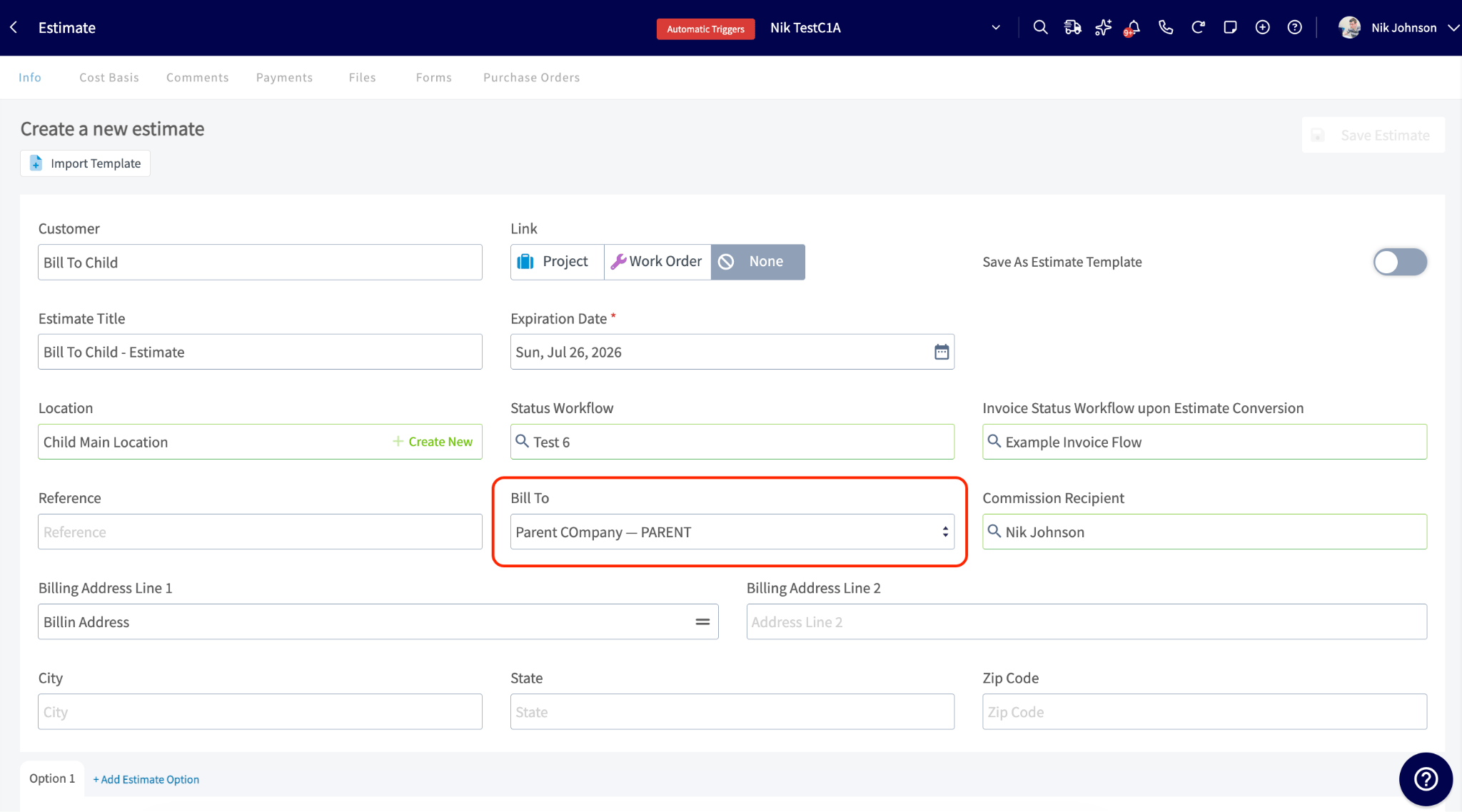 You can change the Bill To on any individual estimate or invoice without affecting the customer record setting. When **Bill To** is set to **Parent Customer**:
* The billing address is pre-populated with the parent's billing address. Edit it directly by typing a custom address, or select the address icon to insert the parent address, customer address, or service address.
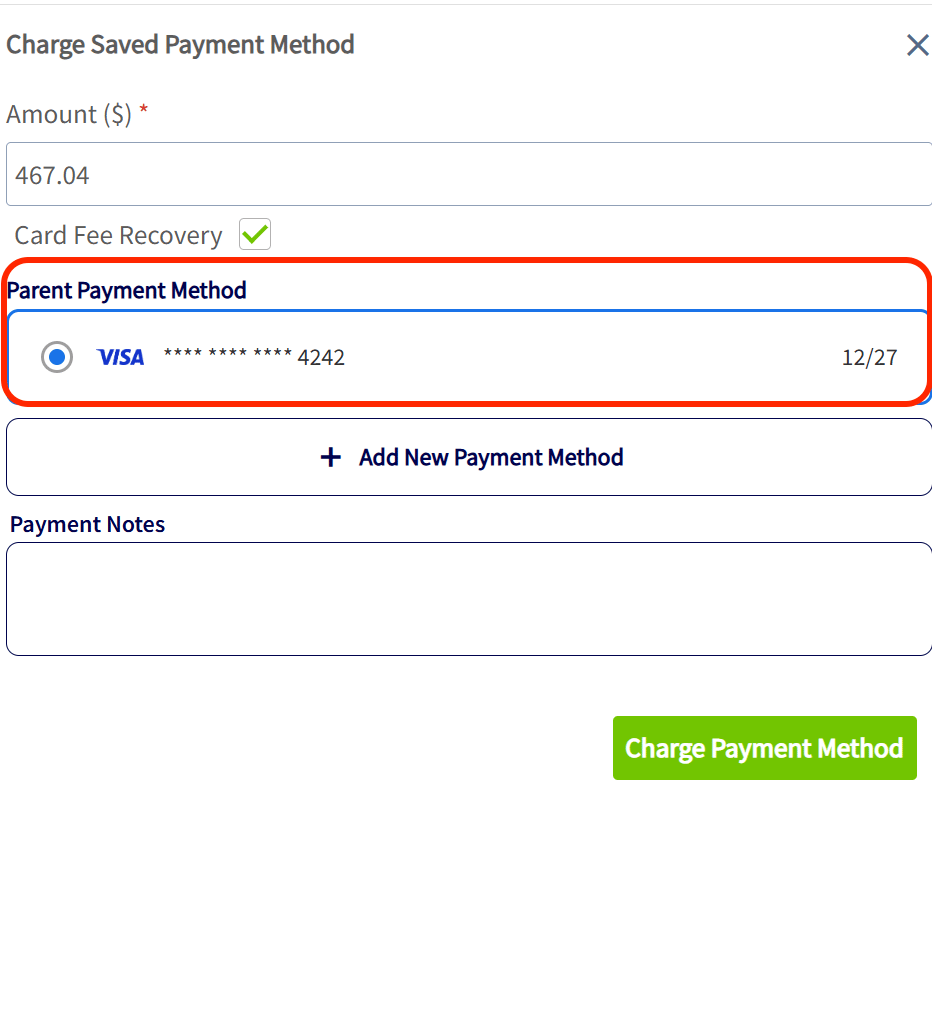
* The parent customer's saved card on file is available to charge for payment.
* The parent's email is synced to the invoice in QuickBooks Online instead of the child's email.
In view mode, the estimate or invoice shows a **Bill to Parent** field with the parent's name and a link that opens their record in a new tab.
### Save and charge the parent's payment method
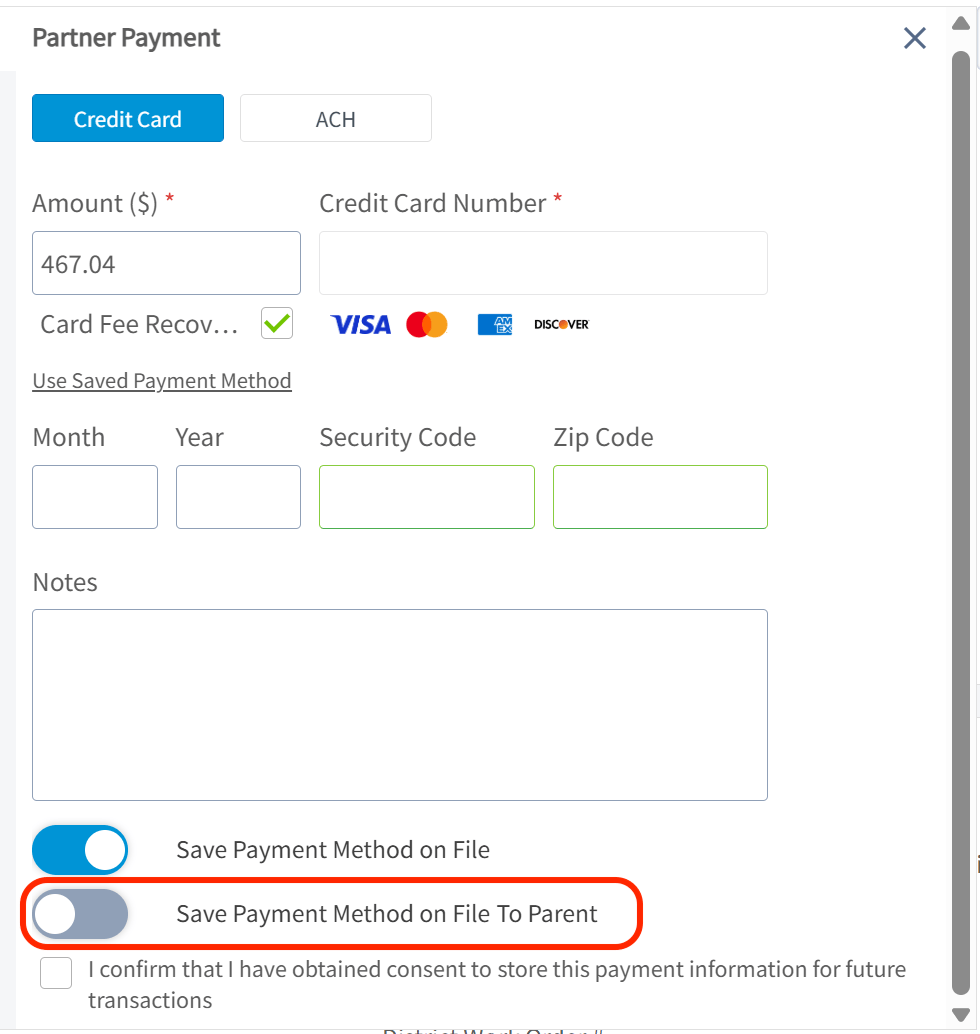
* To save a payment method on file to the parent, toggle on **Save Payment Method on File to Parent** when entering Credit Card or ACH information.
* To use a saved payment method, select **Charge Saved Payment Method** and choose the **Parent Payment Method**.
You can change the Bill To on any individual estimate or invoice without affecting the customer record setting. When **Bill To** is set to **Parent Customer**:
* The billing address is pre-populated with the parent's billing address. Edit it directly by typing a custom address, or select the address icon to insert the parent address, customer address, or service address.
* The parent customer's saved card on file is available to charge for payment.
* The parent's email is synced to the invoice in QuickBooks Online instead of the child's email.
In view mode, the estimate or invoice shows a **Bill to Parent** field with the parent's name and a link that opens their record in a new tab.
### Save and charge the parent's payment method
* To save a payment method on file to the parent, toggle on **Save Payment Method on File to Parent** when entering Credit Card or ACH information.
* To use a saved payment method, select **Charge Saved Payment Method** and choose the **Parent Payment Method**.
 ## Settings reference
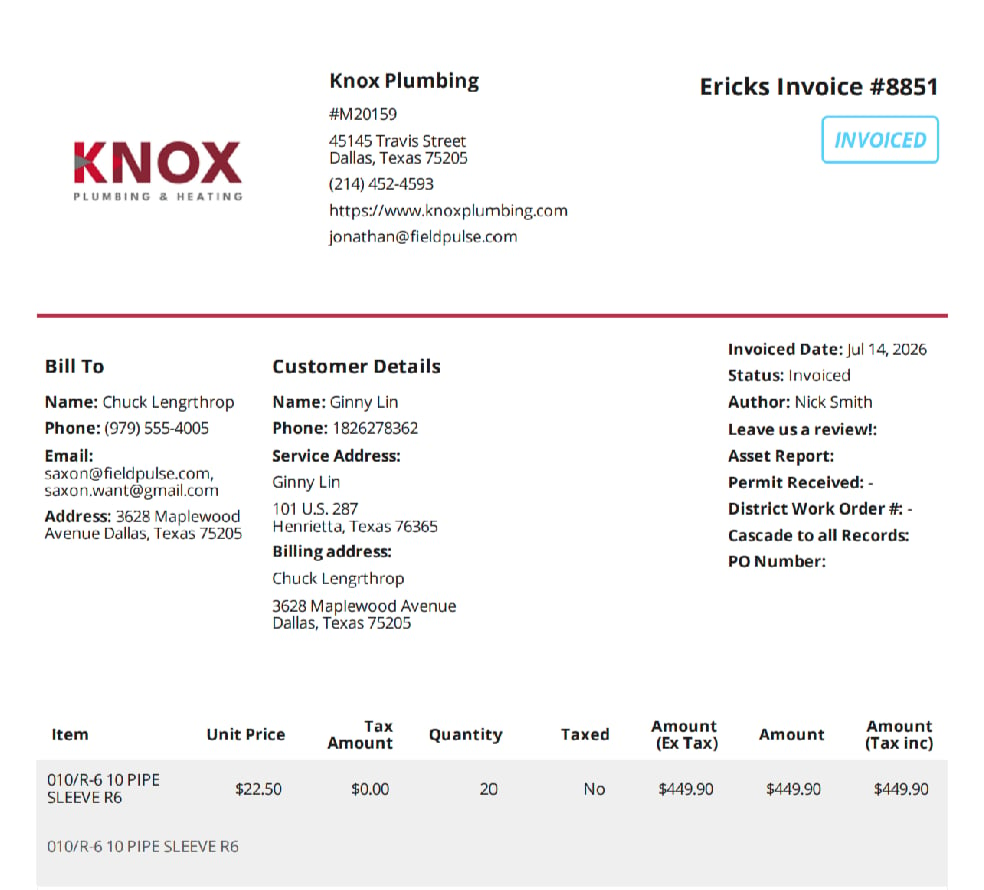
When Bill to Parent is enabled, you control which billing details appear on estimate and invoice PDFs in two layers: Company Settings defines the account-wide defaults, and the preview panel on each estimate or invoice adjusts them for that record only.
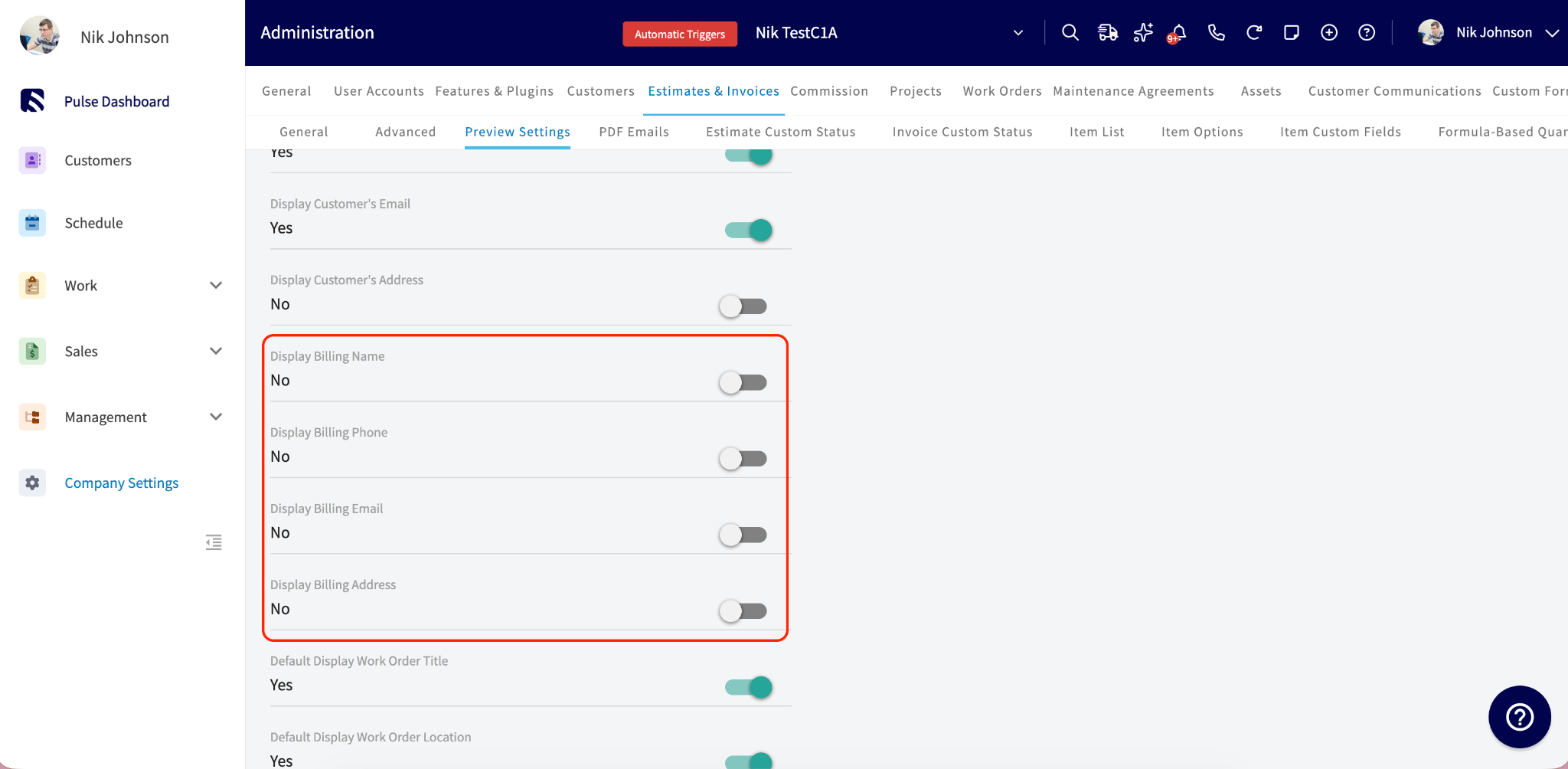
To set the account defaults, go to **Company Settings** > **Estimates & Invoices** > **Preview Settings**. The billing section sits below the existing **Display Customer's Email** toggle.
## Settings reference
When Bill to Parent is enabled, you control which billing details appear on estimate and invoice PDFs in two layers: Company Settings defines the account-wide defaults, and the preview panel on each estimate or invoice adjusts them for that record only.
To set the account defaults, go to **Company Settings** > **Estimates & Invoices** > **Preview Settings**. The billing section sits below the existing **Display Customer's Email** toggle.
 | **Setting** | **What it shows on the PDF** |
| --------------------------- | ------------------------------------------------------------------------------------------------------------------------------------------------------------------------------ |
| **Display Billing Name** | The parent customer's name in a "Bill To" section. |
| **Display Billing Phone** | The parent customer's phone number. |
| **Display Billing Email** | The parent customer's email address. |
| **Display Billing Address** | The parent customer's billing address. |
| **Modify Billing Details** | Lets you enter custom billing information on a per-record basis, overriding what is pulled from the parent customer — a custom billing name, phone number, email, and address. |
All of these options are off by default. Turn on the fields you want and select **Save**. Each estimate and invoice inherits your Company Settings defaults, and you can adjust them from the preview panel on any individual record.
| **Setting** | **What it shows on the PDF** |
| --------------------------- | ------------------------------------------------------------------------------------------------------------------------------------------------------------------------------ |
| **Display Billing Name** | The parent customer's name in a "Bill To" section. |
| **Display Billing Phone** | The parent customer's phone number. |
| **Display Billing Email** | The parent customer's email address. |
| **Display Billing Address** | The parent customer's billing address. |
| **Modify Billing Details** | Lets you enter custom billing information on a per-record basis, overriding what is pulled from the parent customer — a custom billing name, phone number, email, and address. |
All of these options are off by default. Turn on the fields you want and select **Save**. Each estimate and invoice inherits your Company Settings defaults, and you can adjust them from the preview panel on any individual record.
 ## Accounting integrations and Bill to Parent sync
How Bill to Parent information syncs depends on the accounting integration you use.
| **Accounting integration** | **Bill to Parent supported** | **What syncs** |
| -------------------------- | ---------------------------- | ---------------------------------------------------------------------------------------------------- |
| QuickBooks Online | Yes | Parent name, email, and billing address sync to the invoice. |
| QuickBooks Desktop | No | The invoice syncs with the standard customer name and address. Parent details can be added manually. |
| Xero | No | The invoice syncs to the related customer in Xero. Nothing changes when Bill to Parent is enabled. |
For parent customers with an Account Type of Commercial, QuickBooks Online stores the billing information as Line 1: Bill To Name, Line 2: Bill To Company Name, and Lines 3–5: Bill To Address, so the company name displays separately from the contact name on the invoice.
## Filter a parent's related customers by Bill To
On a parent customer's record, open the **Related Customers** tab, then the **Estimates and Invoices** subtab. The list shows every estimate and invoice tied to that parent's related (child) customers, with two filters:
* **Invoice Customer** (web app only) — filters by whose job it was: **All** (everything related to this customer), **Child Accounts Only** (child invoices), or **Customer Only** (invoices on the parent's own record).
* **Bill To** — filters by who is being billed: **Parent Customer** (only records billed to the parent) or **Customer** (only records billed to the child).
Combine both filters to answer questions like "show me every invoice where the job was done at a child location but billed to the parent."
## Notes & limitations
* **Recurring billing.** Bill to Parent is not supported for recurring billing. Recurring invoices continue to use the standard customer billing information. Support for Bill to Parent in recurring billing is planned for a future release. See [Setting Up Recurring Billing](/estimates-invoices/recurring/recurring-billing).
* **Offline mode.** Bill to Parent details cannot be configured in [Offline Mode Overview](/troubleshooting/offline-mode/offline-mode). You can still create estimates and invoices offline, but you must reconnect to the internet to set or update Bill To information before finalizing and sending the document.
## FAQs
### Who can turn Bill to Parent on and off?
The account-level setting in Company Settings requires Admin access. The Bill to Parent toggle on a customer record can be changed by anyone with customer create/edit permissions, and the Bill To dropdown on estimates and invoices by anyone with estimate/invoice edit and create permissions.
### Does Bill to Parent work on the mobile app?
Yes. Bill to Parent works the same on web and mobile, though the parent record's **Invoice Customer** filter is web app only.
### Will turning on Bill to Parent change my existing estimates and invoices?
No. Only estimates and invoices created after you enable it are affected. Existing documents keep their original billing details.
### If I update the parent's billing address later, do the child customers update too?
It depends on whether the child's address was customized. If the child's billing address still matches the parent's old address (it was inherited), it updates automatically to the new parent address. If the child's billing address was manually edited to something different, it is preserved and not overwritten.
### What happens if I turn Bill to Parent off for a single customer?
New estimates and invoices for that customer bill the child directly, and the Bill To dropdown no longer appears on new documents. Historical documents billed to the parent keep their Bill To details.
### What happens if I turn off the account-level Enable Bill to Parent setting? Will I lose data?
No data is lost. The Bill to Parent toggle remains on customer records for reference only, new records are created and billed to the customer record, and the Bill To field is no longer visible on new estimates or invoices. Existing records and historical billing information stay unchanged, so your audit trail stays accurate, and you can re-enable the setting at any time.
### When I save a new card during payment, does it save to the parent or the child?
If the customer has a parent, you see an extra toggle when saving a payment method: **Save Payment Method on File to Parent** (off by default). Turn it on to save the card to the parent's account only; leave it off to save it to the child.
### I enabled "Bill with parent" in QuickBooks Online. Does that carry over to FieldPulse?
Yes, the setting syncs both ways. When a customer syncs from QuickBooks Online with Bill with Parent enabled, FieldPulse turns on the Bill to Parent toggle and uses the billing address from QuickBooks. If QuickBooks has no billing address, the field stays blank until you add one in FieldPulse, which then pushes back to QuickBooks.
### Why is the Unlink button greyed out on my child customer?
If any of the child's invoices have been paid by the parent, unlinking is blocked. This follows a QuickBooks rule that preserves accounting history — unlinking in this state would cause unrecoverable sync errors. To change the relationship, edit the parent's information directly, recreate the customer under a new parent, or delete the linked payments in QuickBooks Online.
### How can I see all invoices billed to a parent across their child accounts?
On the parent's customer record, open the **Estimates & Invoices** subtab and use the **Invoice Customer** filter (web app only). Choose **All** (everything billed to this customer), **Child Accounts Only** (child invoices billed to this parent), or **Customer Only** (invoices on the parent's own record).
### In the invoice list, why does the Customer column show the child instead of the parent?
The Customer column always shows who the invoice belongs to (where the work was done), not who pays. The Bill To information tells you who is being billed, so you can answer both "whose job was this?" and "who is paying?"
### How many levels of parent/child customers are supported?
Up to 5 levels. The parent record's invoice filtering includes children, grandchildren, and so on, across all supported levels.
### Can I report on Bill to Parent activity?
Yes. The Estimate, Invoice, and Customer raw data reports have columns including Bill To Parent Enabled, Bill To, Parent Customer Company Name, Parent Customer Phone, Parent Customer Email, and Billing Address, and each can also be used as a filter.
### Can I move a child customer to a different parent once it has billing history?
Once a child customer has invoices that were paid using the parent's payment method, QuickBooks Online permanently links that child to the parent to preserve accounting history, and the link cannot be undone without deleting the shared transactions. If a customer needs to move to a new parent — for example, a property management company taking over a location — recreate the customer under the new parent using a slightly different name rather than re-parenting the existing record. The original customer and its billing history stay intact under the original parent.
## Related articles
* [Customer Account Structures Overview](/settings/account-structures/customer-account-structures)
* [How to Create Related Customers](/customers/managing-customers/creating-related-customers)
* [How to Save a Payment Method on File](/payments/collecting/saving-payment-method)
* [QuickBooks Online Overview](/integrations/accounting/quickbooks-online/overview)
* [How to Create Invoice Reports](/reporting/raw-data/invoice-reports)
Your setup is working when a new invoice for a child customer opens with **Bill To** set to **Parent Customer**, the parent's billing address filled in, and the parent's saved card offered at payment.
## Related topics
- [Setting Up Default Estimate & Invoice Settings](/estimates-invoices/creating/default-settings.md)
- [Creating Estimates & Invoices](/estimates-invoices/creating/index.md)
- [How to Create a Maintenance Agreement](/jobs/assets/maintenance-agreements.md)
- [How to Create an Invoice](/estimates-invoices/creating/invoice.md)
## Accounting integrations and Bill to Parent sync
How Bill to Parent information syncs depends on the accounting integration you use.
| **Accounting integration** | **Bill to Parent supported** | **What syncs** |
| -------------------------- | ---------------------------- | ---------------------------------------------------------------------------------------------------- |
| QuickBooks Online | Yes | Parent name, email, and billing address sync to the invoice. |
| QuickBooks Desktop | No | The invoice syncs with the standard customer name and address. Parent details can be added manually. |
| Xero | No | The invoice syncs to the related customer in Xero. Nothing changes when Bill to Parent is enabled. |
For parent customers with an Account Type of Commercial, QuickBooks Online stores the billing information as Line 1: Bill To Name, Line 2: Bill To Company Name, and Lines 3–5: Bill To Address, so the company name displays separately from the contact name on the invoice.
## Filter a parent's related customers by Bill To
On a parent customer's record, open the **Related Customers** tab, then the **Estimates and Invoices** subtab. The list shows every estimate and invoice tied to that parent's related (child) customers, with two filters:
* **Invoice Customer** (web app only) — filters by whose job it was: **All** (everything related to this customer), **Child Accounts Only** (child invoices), or **Customer Only** (invoices on the parent's own record).
* **Bill To** — filters by who is being billed: **Parent Customer** (only records billed to the parent) or **Customer** (only records billed to the child).
Combine both filters to answer questions like "show me every invoice where the job was done at a child location but billed to the parent."
## Notes & limitations
* **Recurring billing.** Bill to Parent is not supported for recurring billing. Recurring invoices continue to use the standard customer billing information. Support for Bill to Parent in recurring billing is planned for a future release. See [Setting Up Recurring Billing](/estimates-invoices/recurring/recurring-billing).
* **Offline mode.** Bill to Parent details cannot be configured in [Offline Mode Overview](/troubleshooting/offline-mode/offline-mode). You can still create estimates and invoices offline, but you must reconnect to the internet to set or update Bill To information before finalizing and sending the document.
## FAQs
### Who can turn Bill to Parent on and off?
The account-level setting in Company Settings requires Admin access. The Bill to Parent toggle on a customer record can be changed by anyone with customer create/edit permissions, and the Bill To dropdown on estimates and invoices by anyone with estimate/invoice edit and create permissions.
### Does Bill to Parent work on the mobile app?
Yes. Bill to Parent works the same on web and mobile, though the parent record's **Invoice Customer** filter is web app only.
### Will turning on Bill to Parent change my existing estimates and invoices?
No. Only estimates and invoices created after you enable it are affected. Existing documents keep their original billing details.
### If I update the parent's billing address later, do the child customers update too?
It depends on whether the child's address was customized. If the child's billing address still matches the parent's old address (it was inherited), it updates automatically to the new parent address. If the child's billing address was manually edited to something different, it is preserved and not overwritten.
### What happens if I turn Bill to Parent off for a single customer?
New estimates and invoices for that customer bill the child directly, and the Bill To dropdown no longer appears on new documents. Historical documents billed to the parent keep their Bill To details.
### What happens if I turn off the account-level Enable Bill to Parent setting? Will I lose data?
No data is lost. The Bill to Parent toggle remains on customer records for reference only, new records are created and billed to the customer record, and the Bill To field is no longer visible on new estimates or invoices. Existing records and historical billing information stay unchanged, so your audit trail stays accurate, and you can re-enable the setting at any time.
### When I save a new card during payment, does it save to the parent or the child?
If the customer has a parent, you see an extra toggle when saving a payment method: **Save Payment Method on File to Parent** (off by default). Turn it on to save the card to the parent's account only; leave it off to save it to the child.
### I enabled "Bill with parent" in QuickBooks Online. Does that carry over to FieldPulse?
Yes, the setting syncs both ways. When a customer syncs from QuickBooks Online with Bill with Parent enabled, FieldPulse turns on the Bill to Parent toggle and uses the billing address from QuickBooks. If QuickBooks has no billing address, the field stays blank until you add one in FieldPulse, which then pushes back to QuickBooks.
### Why is the Unlink button greyed out on my child customer?
If any of the child's invoices have been paid by the parent, unlinking is blocked. This follows a QuickBooks rule that preserves accounting history — unlinking in this state would cause unrecoverable sync errors. To change the relationship, edit the parent's information directly, recreate the customer under a new parent, or delete the linked payments in QuickBooks Online.
### How can I see all invoices billed to a parent across their child accounts?
On the parent's customer record, open the **Estimates & Invoices** subtab and use the **Invoice Customer** filter (web app only). Choose **All** (everything billed to this customer), **Child Accounts Only** (child invoices billed to this parent), or **Customer Only** (invoices on the parent's own record).
### In the invoice list, why does the Customer column show the child instead of the parent?
The Customer column always shows who the invoice belongs to (where the work was done), not who pays. The Bill To information tells you who is being billed, so you can answer both "whose job was this?" and "who is paying?"
### How many levels of parent/child customers are supported?
Up to 5 levels. The parent record's invoice filtering includes children, grandchildren, and so on, across all supported levels.
### Can I report on Bill to Parent activity?
Yes. The Estimate, Invoice, and Customer raw data reports have columns including Bill To Parent Enabled, Bill To, Parent Customer Company Name, Parent Customer Phone, Parent Customer Email, and Billing Address, and each can also be used as a filter.
### Can I move a child customer to a different parent once it has billing history?
Once a child customer has invoices that were paid using the parent's payment method, QuickBooks Online permanently links that child to the parent to preserve accounting history, and the link cannot be undone without deleting the shared transactions. If a customer needs to move to a new parent — for example, a property management company taking over a location — recreate the customer under the new parent using a slightly different name rather than re-parenting the existing record. The original customer and its billing history stay intact under the original parent.
## Related articles
* [Customer Account Structures Overview](/settings/account-structures/customer-account-structures)
* [How to Create Related Customers](/customers/managing-customers/creating-related-customers)
* [How to Save a Payment Method on File](/payments/collecting/saving-payment-method)
* [QuickBooks Online Overview](/integrations/accounting/quickbooks-online/overview)
* [How to Create Invoice Reports](/reporting/raw-data/invoice-reports)
Your setup is working when a new invoice for a child customer opens with **Bill To** set to **Parent Customer**, the parent's billing address filled in, and the parent's saved card offered at payment.
## Related topics
- [Setting Up Default Estimate & Invoice Settings](/estimates-invoices/creating/default-settings.md)
- [Creating Estimates & Invoices](/estimates-invoices/creating/index.md)
- [How to Create a Maintenance Agreement](/jobs/assets/maintenance-agreements.md)
- [How to Create an Invoice](/estimates-invoices/creating/invoice.md)