> ## Documentation Index
> Fetch the complete documentation index at: https://help.fieldpulse.com/llms.txt
> Use this file to discover all available pages before exploring further.
# Purchase Order Sync: QuickBooks Desktop
> Push new and updated purchase orders one way into QuickBooks Desktop so POs land in your books without re-entry.
# **Sync Your FieldPulse Purchase Orders with QuickBooks Desktop**
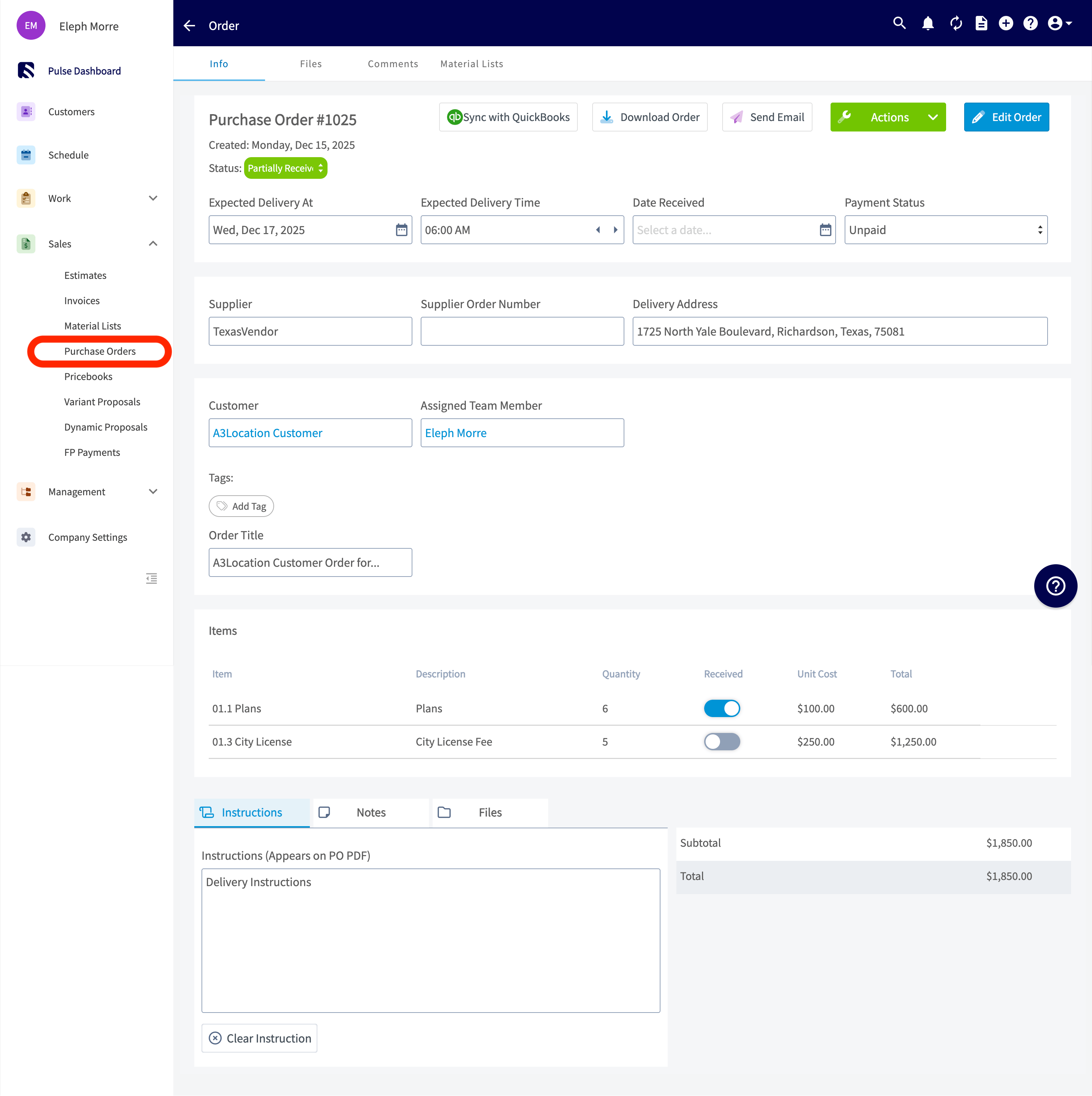
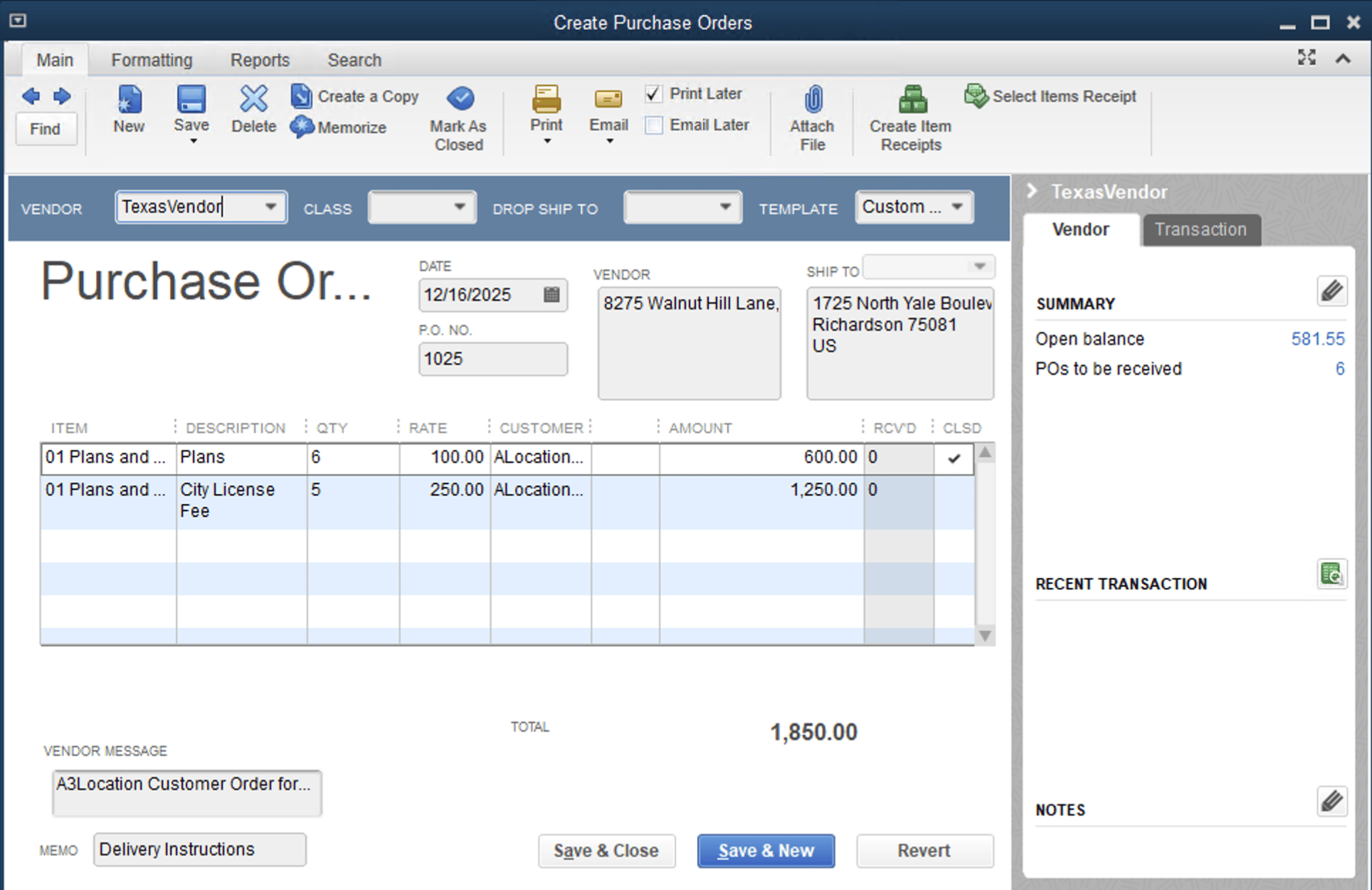
Enable one-way syncing from FieldPulse to QuickBooks for your purchase order data. Once enabled, the sync will be triggered by newly created and updated purchase orders, pushing them to QuickBooks Desktop.
## Purchase Order in FieldPulse
 ### How this syncs over to QuickBooks Desktop
 ***
# How can I get started?
Reach out to us at [support@fieldpulse.com](mailto:support@fieldpulse.com) or use the chat in the bottom right corner to initiate your purchase order sync!
## Reminder:
## FieldPulse only integrates with QuickBooks Desktop 2024 and newer
***
# Purchase Order Field Overview
Explore the table below to see which FieldPulse purchase order fields sync with QuickBooks Desktop and where they will appear. If a field is **not listed** in the table below, it does **not sync** with QuickBooks Desktop.
| **FieldPulse Field** | **QuickBooks Desktop Field** |
| ---------------------- | ------------------------------------------ |
| Purchase Order Number | Purchase Order Number |
| Supplier Name | Vendor |
| Supplier Email | Vendor Email (not shown on Purchase Order) |
| Expected Delivery Date | Date |
| Address | Shipping Address |
| Line Item Title | Product / Service |
| Description | Description |
| Quantity | Quantity |
| Unit Cost | Rate |
| Total (Per Line Item) | Amount |
| Created At Date | Created Date in Summary |
| Updated At Date | Last Edited Time |
| Order Title | Your Message to Vendor |
| Instructions | Memo |
| Total | Total |
***
# FieldPulse Purchase Order Statuses
The following FieldPulse statuses will reflect as *Open* in QuickBooks Desktop:
* *Compose*
* *Draft*
* *Ordered*
* *Pending*
* *En Route*
* *Ready for Pickup*
* *Partially Received*
* *Issue*
The following FieldPulse statuses will reflect as *Closed* in QuickBooks Desktop:
* *Received*
* *Completed*
* *Canceled*
***
**Have additional questions?**
*Contact us at [support@fieldpulse.com](mailto:support@fieldpulse.com) or use the chat feature in the bottom right corner of your screen.*
***
# How can I get started?
Reach out to us at [support@fieldpulse.com](mailto:support@fieldpulse.com) or use the chat in the bottom right corner to initiate your purchase order sync!
## Reminder:
## FieldPulse only integrates with QuickBooks Desktop 2024 and newer
***
# Purchase Order Field Overview
Explore the table below to see which FieldPulse purchase order fields sync with QuickBooks Desktop and where they will appear. If a field is **not listed** in the table below, it does **not sync** with QuickBooks Desktop.
| **FieldPulse Field** | **QuickBooks Desktop Field** |
| ---------------------- | ------------------------------------------ |
| Purchase Order Number | Purchase Order Number |
| Supplier Name | Vendor |
| Supplier Email | Vendor Email (not shown on Purchase Order) |
| Expected Delivery Date | Date |
| Address | Shipping Address |
| Line Item Title | Product / Service |
| Description | Description |
| Quantity | Quantity |
| Unit Cost | Rate |
| Total (Per Line Item) | Amount |
| Created At Date | Created Date in Summary |
| Updated At Date | Last Edited Time |
| Order Title | Your Message to Vendor |
| Instructions | Memo |
| Total | Total |
***
# FieldPulse Purchase Order Statuses
The following FieldPulse statuses will reflect as *Open* in QuickBooks Desktop:
* *Compose*
* *Draft*
* *Ordered*
* *Pending*
* *En Route*
* *Ready for Pickup*
* *Partially Received*
* *Issue*
The following FieldPulse statuses will reflect as *Closed* in QuickBooks Desktop:
* *Received*
* *Completed*
* *Canceled*
***
**Have additional questions?**
*Contact us at [support@fieldpulse.com](mailto:support@fieldpulse.com) or use the chat feature in the bottom right corner of your screen.*