> ## Documentation Index
> Fetch the complete documentation index at: https://help.fieldpulse.com/llms.txt
> Use this file to discover all available pages before exploring further.
# CHIIRP Integration
> Connect CHIIRP to automate text and email follow-up on every lead and dormant customer, keeping the calendar booked year round.
## Ready to automate your follow-up & close more deals?
Have a list of customers you haven’t communicated with for a while? Eliminate hundreds of wasted hours by using CHIIRP to automatically reach out and keep your calendar full year round!
 One of the biggest problems facing home service companies that are trying to scale is lead conversion. As the company grows, lead follow up gets harder and harder to manage. With CHIIRP you can ensure that 100% of your leads are being properly followed up with using a unique blend of automation and real human interaction.
Increasing lead conversion instantly increases the bottom line without increasing marketing spend. With CHIIRP, you can automate text message, email, and ringless voicemail campaigns to follow up with the following: new leads, open estimates, canceled jobs, referral requests, cross-selling, reviews, and so much more.
CHIIRP is more than automation software—it’s a team committed to your success. CHIIRP automates follow-ups, keeps leads engaged, and integrates seamlessly with lead sources like Facebook Lead Ads, Thumbtack, Angi, and more. From open estimates to abandoned calls, CHIIRP ensures no lead is left behind!
***
# **Integration Set Up**
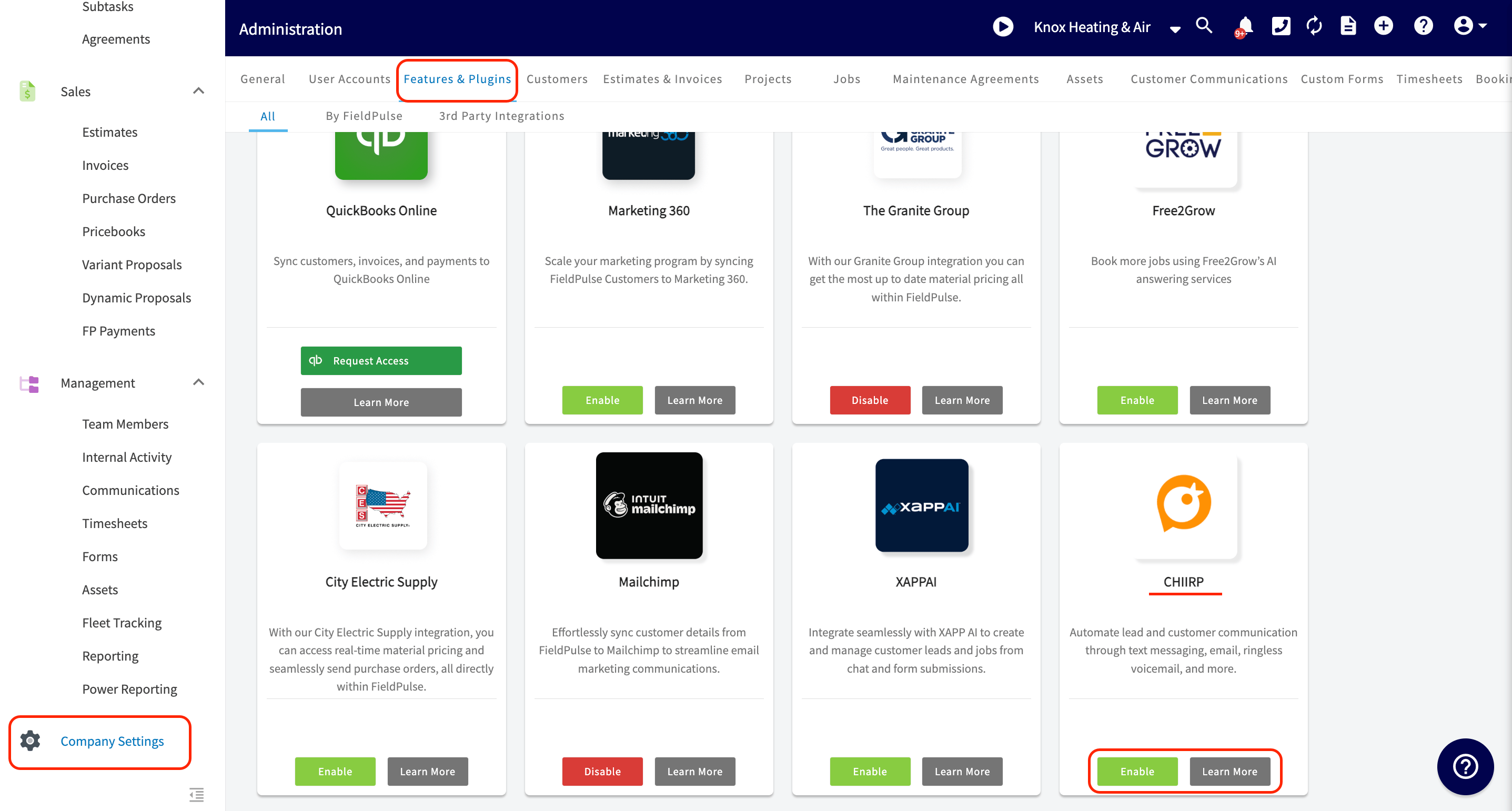
Enable the CHIIRP integration via *Company Settings*. From here, head to *Features & Plugins*. Scroll down towards the bottom to find the *Enable* or *Learn More* button under the CHIIRP tile.
One of the biggest problems facing home service companies that are trying to scale is lead conversion. As the company grows, lead follow up gets harder and harder to manage. With CHIIRP you can ensure that 100% of your leads are being properly followed up with using a unique blend of automation and real human interaction.
Increasing lead conversion instantly increases the bottom line without increasing marketing spend. With CHIIRP, you can automate text message, email, and ringless voicemail campaigns to follow up with the following: new leads, open estimates, canceled jobs, referral requests, cross-selling, reviews, and so much more.
CHIIRP is more than automation software—it’s a team committed to your success. CHIIRP automates follow-ups, keeps leads engaged, and integrates seamlessly with lead sources like Facebook Lead Ads, Thumbtack, Angi, and more. From open estimates to abandoned calls, CHIIRP ensures no lead is left behind!
***
# **Integration Set Up**
Enable the CHIIRP integration via *Company Settings*. From here, head to *Features & Plugins*. Scroll down towards the bottom to find the *Enable* or *Learn More* button under the CHIIRP tile.
 If you **do not** have an account set up with CHIIRP, you will need to connect with one of their representatives and [schedule a demo](https://23947290.hs-sites.com/book-a-demo-1).
If you have an account with CHIIRP, click here to [sign in](https://app.chiirp.com/users/sign_in). Follow the on-screen instructions and complete your integration. Once your integration is complete you will be able to send texts, emails, and ringless voicemails all in a drip sequence. Customize the sequences and send as many as you’d like! You’re in charge of the flow, volume, and length of each campaign. CHIIRP’s best-in-class support team will also be standing by to help you out if you run into any roadblocks.
## **Connect CHIIRP with your FieldPulse account today and watch your conversion rates skyrocket!**
[Schedule Demo](https://share-na2.hsforms.com/1Azh5ZNvDT9qjvXA8LzrcdAe99ui)
***
**Have additional questions?**
*Contact us at [support@fieldpulse.com](mailto:support@fieldpulse.com) or use the chat feature in the bottom right corner of your screen.*
If you **do not** have an account set up with CHIIRP, you will need to connect with one of their representatives and [schedule a demo](https://23947290.hs-sites.com/book-a-demo-1).
If you have an account with CHIIRP, click here to [sign in](https://app.chiirp.com/users/sign_in). Follow the on-screen instructions and complete your integration. Once your integration is complete you will be able to send texts, emails, and ringless voicemails all in a drip sequence. Customize the sequences and send as many as you’d like! You’re in charge of the flow, volume, and length of each campaign. CHIIRP’s best-in-class support team will also be standing by to help you out if you run into any roadblocks.
## **Connect CHIIRP with your FieldPulse account today and watch your conversion rates skyrocket!**
[Schedule Demo](https://share-na2.hsforms.com/1Azh5ZNvDT9qjvXA8LzrcdAe99ui)
***
**Have additional questions?**
*Contact us at [support@fieldpulse.com](mailto:support@fieldpulse.com) or use the chat feature in the bottom right corner of your screen.*