> ## Documentation Index
> Fetch the complete documentation index at: https://help.fieldpulse.com/llms.txt
> Use this file to discover all available pages before exploring further.
# HighLevel Integration
> Set up the HighLevel integration for a two-way sync of customers and contacts, keeping both platforms current without double entry.
The HighLevel integration with FieldPulse creates a two-way sync of customers/contacts between both platforms. Learn more about HighLevel below or if you're a current customer, check out the integration instructions below.
***
# Learn More About HighLevel
## **Do you want more customers?**
With the support of our community, you will know the best strategies the most successful digital marketers are using to make a ton of money online.
### **Do you want to keep your customers longer?**
With our all-in-one marketing and sales platform, you will be able to keep your tools in one place (while saving a fortune) and streamline your business processes so you can focus on what matters most - your business.
#### **Do you want to scale your business?**
HighLevel will help you grow by connecting you with the most successful digital marketers on the planet who will be able to help you close more deals or allow you to offer more services.
## Features
* Create full websites, funnels, & landing pages
* Drag & drop surveys and forms
* Easily customize your follow-up campaigns
* Create multi-channel campaigns
* Automated nurture conversations
* Artificial intelligence built in
To learn more about HighLevel, [the HighLevel free trialthe HighLevel free trial](https://www.gohighlevel.com/freetrial2?fp_ref=themaster\&gad_source=1\&gclid=Cj0KCQiAwP6sBhDAARIsAPfK_wZITskzhU8ogMnRWrqLFPtrMw4qbGuPqdMNJ-E0JF4OJR3jMGX_ipwaAnp1EALw_wcB).
***
# Integration Set Up
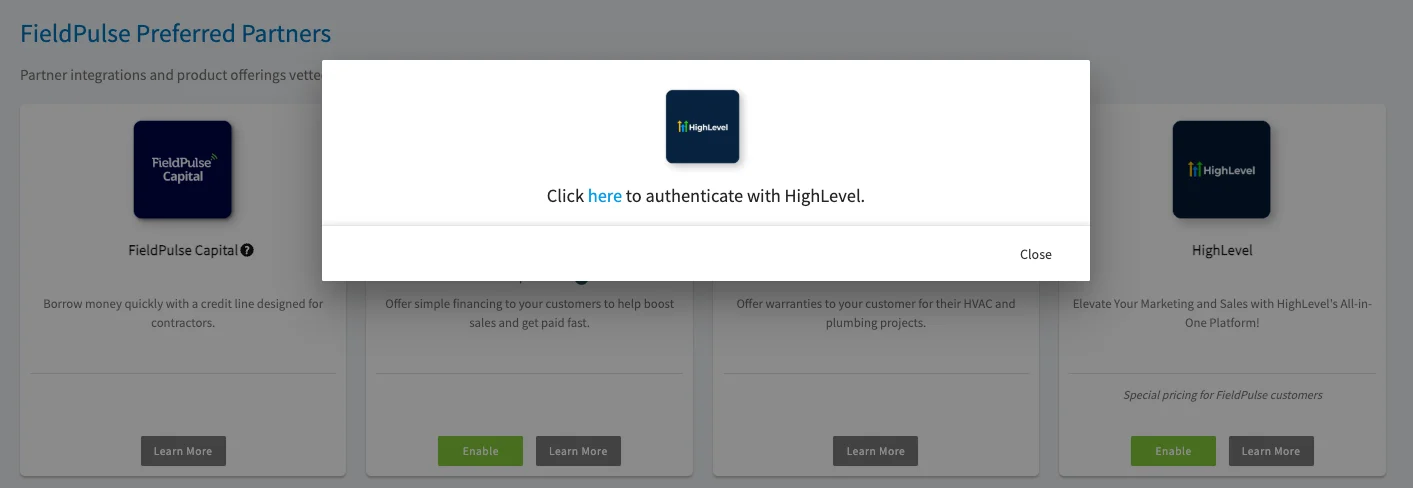
1. Enable the HighLevel Integration from Features & Plugins. Once enabled, you will be asked to login to your HighLevel account.
2. Once your accounts are connected, Customers in FieldPulse will automatically sync to High Level as Contacts and Contacts from High Level will sync to FieldPulse. as Customers. The following Customer attributes are included in the sync:
**FieldPulse Customers:**
* First Name
* Last Name
* Email
* Phone
* Address Line 1
* City
* State Postal Code
* Website
* Company Name
* Tags
**High Level Contacts:**
* First Name
* Last Name
* Company Name
* Display Name
* Account Type
* Phone
* Email address
* Address 1
* City
* Postal Code
* State
* Billing Address
* Billing City
* Billing State
* Status
* Custom Fields
* Tags
***
**Have additional questions?**
*Contact us at [support@fieldpulse.com](mailto:support@fieldpulse.com) or use the chat feature in the bottom right corner of your screen.*
 The HighLevel integration with FieldPulse creates a two-way sync of customers/contacts between both platforms. Learn more about HighLevel below or if you're a current customer, check out the integration instructions below.
***
# Learn More About HighLevel
## **Do you want more customers?**
With the support of our community, you will know the best strategies the most successful digital marketers are using to make a ton of money online.
### **Do you want to keep your customers longer?**
With our all-in-one marketing and sales platform, you will be able to keep your tools in one place (while saving a fortune) and streamline your business processes so you can focus on what matters most - your business.
#### **Do you want to scale your business?**
HighLevel will help you grow by connecting you with the most successful digital marketers on the planet who will be able to help you close more deals or allow you to offer more services.
## Features
* Create full websites, funnels, & landing pages
* Drag & drop surveys and forms
* Easily customize your follow-up campaigns
* Create multi-channel campaigns
* Automated nurture conversations
* Artificial intelligence built in
To learn more about HighLevel, [the HighLevel free trialthe HighLevel free trial](https://www.gohighlevel.com/freetrial2?fp_ref=themaster\&gad_source=1\&gclid=Cj0KCQiAwP6sBhDAARIsAPfK_wZITskzhU8ogMnRWrqLFPtrMw4qbGuPqdMNJ-E0JF4OJR3jMGX_ipwaAnp1EALw_wcB).
***
# Integration Set Up
1. Enable the HighLevel Integration from Features & Plugins. Once enabled, you will be asked to login to your HighLevel account.
The HighLevel integration with FieldPulse creates a two-way sync of customers/contacts between both platforms. Learn more about HighLevel below or if you're a current customer, check out the integration instructions below.
***
# Learn More About HighLevel
## **Do you want more customers?**
With the support of our community, you will know the best strategies the most successful digital marketers are using to make a ton of money online.
### **Do you want to keep your customers longer?**
With our all-in-one marketing and sales platform, you will be able to keep your tools in one place (while saving a fortune) and streamline your business processes so you can focus on what matters most - your business.
#### **Do you want to scale your business?**
HighLevel will help you grow by connecting you with the most successful digital marketers on the planet who will be able to help you close more deals or allow you to offer more services.
## Features
* Create full websites, funnels, & landing pages
* Drag & drop surveys and forms
* Easily customize your follow-up campaigns
* Create multi-channel campaigns
* Automated nurture conversations
* Artificial intelligence built in
To learn more about HighLevel, [the HighLevel free trialthe HighLevel free trial](https://www.gohighlevel.com/freetrial2?fp_ref=themaster\&gad_source=1\&gclid=Cj0KCQiAwP6sBhDAARIsAPfK_wZITskzhU8ogMnRWrqLFPtrMw4qbGuPqdMNJ-E0JF4OJR3jMGX_ipwaAnp1EALw_wcB).
***
# Integration Set Up
1. Enable the HighLevel Integration from Features & Plugins. Once enabled, you will be asked to login to your HighLevel account.
 2. Once your accounts are connected, Customers in FieldPulse will automatically sync to High Level as Contacts and Contacts from High Level will sync to FieldPulse. as Customers. The following Customer attributes are included in the sync:
**FieldPulse Customers:**
* First Name
* Last Name
* Email
* Phone
* Address Line 1
* City
* State Postal Code
* Website
* Company Name
* Tags
**High Level Contacts:**
* First Name
* Last Name
* Company Name
* Display Name
* Account Type
* Phone
* Email address
* Address 1
* City
* Postal Code
* State
* Billing Address
* Billing City
* Billing State
* Status
* Custom Fields
* Tags
***
**Have additional questions?**
*Contact us at [support@fieldpulse.com](mailto:support@fieldpulse.com) or use the chat feature in the bottom right corner of your screen.*
2. Once your accounts are connected, Customers in FieldPulse will automatically sync to High Level as Contacts and Contacts from High Level will sync to FieldPulse. as Customers. The following Customer attributes are included in the sync:
**FieldPulse Customers:**
* First Name
* Last Name
* Email
* Phone
* Address Line 1
* City
* State Postal Code
* Website
* Company Name
* Tags
**High Level Contacts:**
* First Name
* Last Name
* Company Name
* Display Name
* Account Type
* Phone
* Email address
* Address 1
* City
* Postal Code
* State
* Billing Address
* Billing City
* Billing State
* Status
* Custom Fields
* Tags
***
**Have additional questions?**
*Contact us at [support@fieldpulse.com](mailto:support@fieldpulse.com) or use the chat feature in the bottom right corner of your screen.*