> ## Documentation Index
> Fetch the complete documentation index at: https://help.fieldpulse.com/llms.txt
> Use this file to discover all available pages before exploring further.
# How to Manage QuickBooks Desktop After Syncing
> Check your QuickBooks Desktop sync stats in FieldPulse, find the records that failed to transfer and why, then correct and re-sync them.
> **Who uses this:** An admin reviews sync stats and clears failed records; the sync itself runs on its own. **Availability:** Requires QuickBooks Desktop + the sync connector.
After syncing with QuickBooks Desktop, you check the sync statistics in FieldPulse to see when the last sync ran and which records failed to transfer, then open each failed record, fix the cause, and let it re-sync. This is the routine that keeps a synced record from quietly sitting broken in your books.
## Overview
The workflow breakdown here is the record that never made it across — an [invoice](https://www.fieldpulse.com/features/estimates-and-invoices) that looks fine in FieldPulse but never reached QuickBooks, so the books don't match and nobody notices until reconciliation. The **Statistic** page names those records and the reason each one stalled, so you can correct and re-sync them instead of hunting. FieldPulse integrates with **QuickBooks Desktop 2024 and newer**.
## Before you begin
* The sync must be connected and running — see [How to Sync With QuickBooks Desktop](/integrations/accounting/quickbooks-desktop/sync).
* If the last sync date looks stale, confirm the computer's sleep mode is off and the Web Connector is running before troubleshooting individual records.
## Check your sync stats
1. In the left menu, go to **Company Settings**.
2. Select **Estimates & Invoices**, then **QuickBooks**.
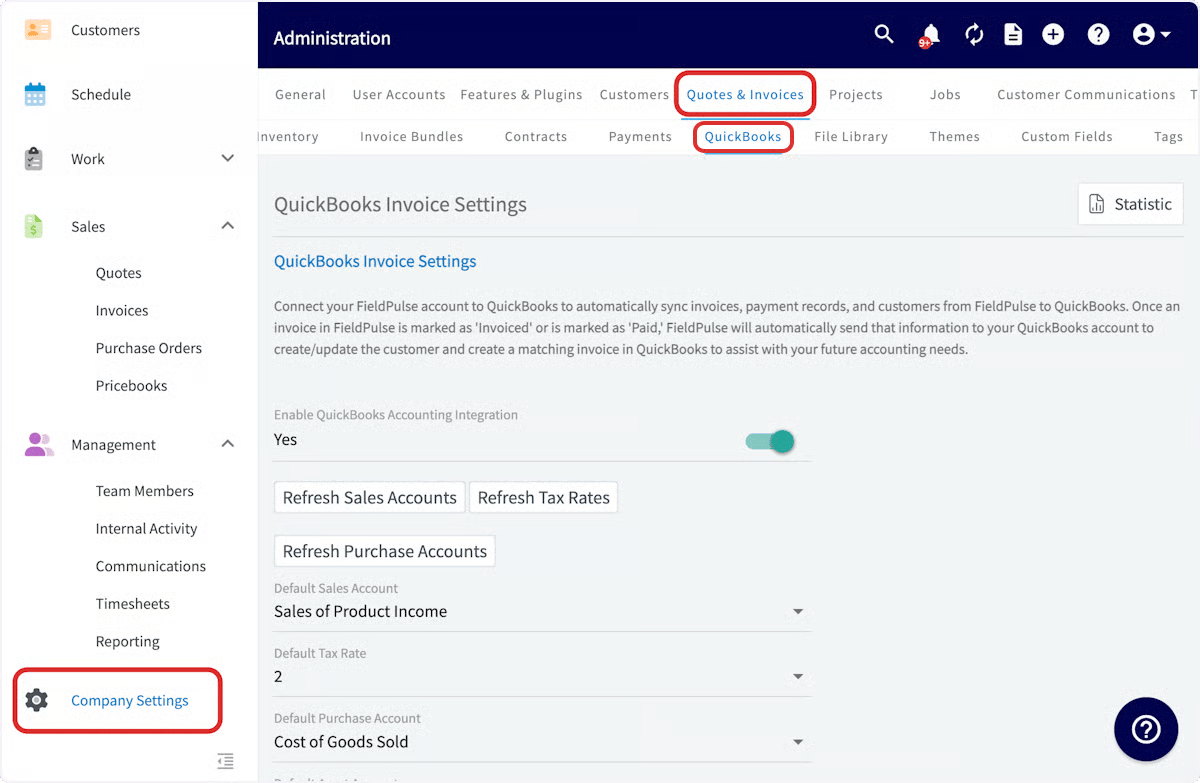 3. Select **Statistic** to see which records have and haven't synced.
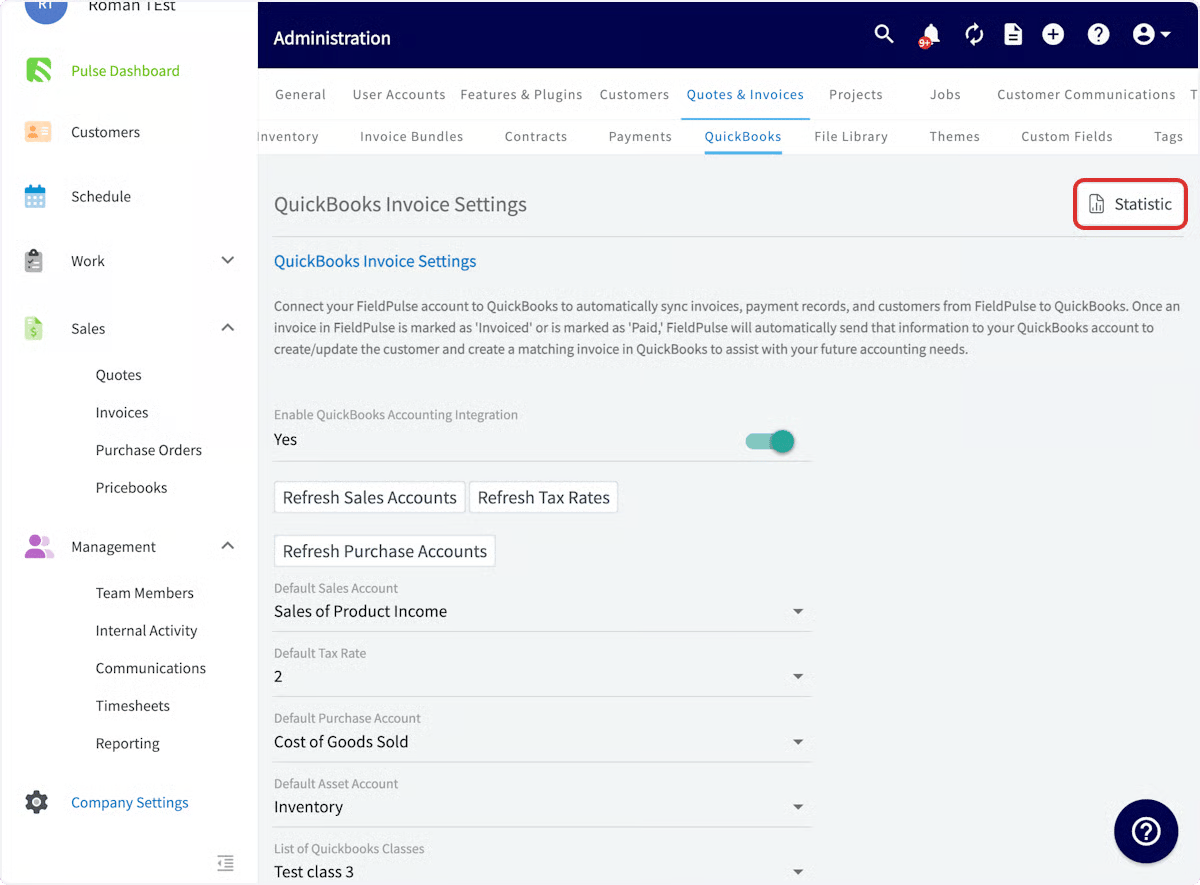 The **Statistic** page shows:
* **Date and Time** — when your most recent sync occurred (the **Last Sync Date**).
* **Unsuccessful Records** — exactly which records haven't synced, and the reason for each.
* **Search** — search among your records.
* **Review Status** — close and filter out resolved errors.
## Fix and re-sync a failed record
1. On the **Statistic** page, switch between the **FieldPulse** and **QuickBooks** views to locate where the sync issue sits.
2. Once you've found a failed record, select the record details to open that record.
The **Statistic** page shows:
* **Date and Time** — when your most recent sync occurred (the **Last Sync Date**).
* **Unsuccessful Records** — exactly which records haven't synced, and the reason for each.
* **Search** — search among your records.
* **Review Status** — close and filter out resolved errors.
## Fix and re-sync a failed record
1. On the **Statistic** page, switch between the **FieldPulse** and **QuickBooks** views to locate where the sync issue sits.
2. Once you've found a failed record, select the record details to open that record.
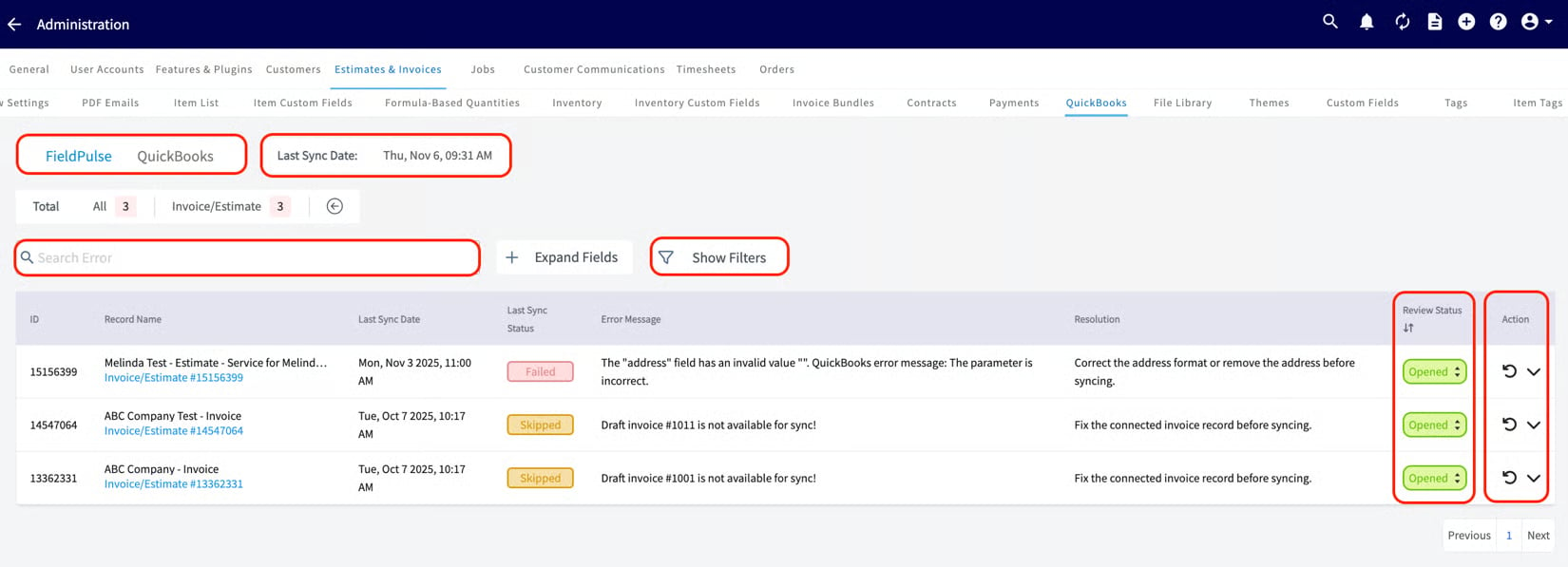 3. Correct the cause of the error (see the error messages below), then let the record re-sync.
## Common error messages
Use this table to read the **Statistic** page and QuickBooks Desktop error messages, and the action each one needs. For the complete error catalog, see [Troubleshooting QuickBooks Desktop Sync Errors](/integrations/accounting/quickbooks-desktop/sync-errors).
| **Error message** | **What to do** |
| ------------------------------------------------------------------------------------------------------------- | ------------------------------------------------------------------------------------------------------------------------------------------------------------------------------------------------------------------------------------------ |
| "Error connecting to QuickBooks - close any modal dialog in QuickBooks." | Close any open dialog boxes in [QuickBooks Desktop](/integrations/accounting/quickbooks-desktop/overview). |
| "The name 'Example Name' of the list element is already in use." | Give the customer a unique display name, or archive the customer with the identical name. |
| "BillAddress\_Addr1/ShipAddress\_Addr1 length is more than allowed (41)" | Shorten the address to 41 characters or fewer. |
| "Credit memo saved as payment can not be synced to QuickBooks Desktop" | Credit memos can't be applied in FieldPulse, so they won't sync over from QuickBooks Desktop. |
| "Line Item Name/Customer Name length is more than allowed (31)" | Shorten the field to 31 characters or fewer. |
| "Draft invoice #1234 is not available for sync" | Draft invoices don't sync. To enable draft-invoice syncing, contact FieldPulse support via chat or [support@fieldpulse.com](mailto:support@fieldpulse.com). |
| "Name value has non-ASCII characters" | Remove non-ASCII characters from the name. |
| "Related customer is archived in FieldPulse" | Restore the customer in FieldPulse to sync the related estimate/invoice. |
| "A Payment for \[Customer] could not be synced as it does not have any associated invoices." | Create an invoice to link to the payment, then sync again. |
| "There was an error when modifying a Customers list, element '...'. QuickBooks error message: Unknown Error." | This happens when you re-assign a customer's parent in FieldPulse but the customer has linked transactions. QuickBooks won't re-assign a parent when invoices or payments are linked. Revert the parent in FieldPulse to match QuickBooks. |
## Why a record may not have synced
When the reason isn't obvious, these are the usual causes by record type.
**The sync hasn't run recently:** Check the **Last Sync Date** on the **Statistic** page. If it's stale, turn off sleep mode on the device and confirm the Web Connector is running.
**A customer may not sync because:**
* The customer name duplicates another customer.
* The customer name includes non-ASCII characters.
* The email, phone number, or customer name exceeds 31 characters, or the notes exceed 4,000 characters.
* The customer is archived in QuickBooks Desktop.
* The customer is the child of a parent customer that isn't synced.
**A line item may not sync because:**
* Fields are incorrect or missing (item name, item price, SKU, etc.).
* The item name exceeds 31 characters, or the SKU exceeds 30 characters.
* The item name duplicates another line item.
* The item name includes non-ASCII characters.
* The item isn't marked as a product or service in QuickBooks Desktop.
* The related sales or purchase account isn't active in QuickBooks Desktop.
* Unit of measure is used in FieldPulse but not enabled in QuickBooks Desktop.
**An invoice may not sync because:**
* The customer is archived or not synced.
* A line item is archived or not synced.
* The notes exceed 4,000 characters.
* The estimate or invoice is in a closed accounting period in QuickBooks Desktop.
**A payment may not sync because:**
* There's an archived payment on the invoice already synced to QuickBooks Desktop.
* The related invoice isn't synced.
## Related articles
* [Troubleshooting QuickBooks Desktop Sync Errors](/integrations/accounting/quickbooks-desktop/sync-errors) — the complete error reference
* [How to Sync With QuickBooks Desktop](/integrations/accounting/quickbooks-desktop/sync)
* [QuickBooks Desktop Overview](/integrations/accounting/quickbooks-desktop/overview)
* [Setting Up QuickBooks Desktop Before Syncing](/integrations/accounting/quickbooks-desktop/pre-sync)
Your sync is healthy when the **Last Sync Date** is recent and the **Unsuccessful Records** list is empty — a quick check that keeps FieldPulse and your books matched.
## Related topics
- [QuickBooks Desktop Overview](/integrations/accounting/quickbooks-desktop/overview.md)
- [How to Sync With QuickBooks Desktop](/integrations/accounting/quickbooks-desktop/sync.md)
- [Setting Up QuickBooks Desktop Before Syncing](/integrations/accounting/quickbooks-desktop/pre-sync.md)
- [Troubleshooting QuickBooks Desktop Sync Errors](/integrations/accounting/quickbooks-desktop/sync-errors.md)
3. Correct the cause of the error (see the error messages below), then let the record re-sync.
## Common error messages
Use this table to read the **Statistic** page and QuickBooks Desktop error messages, and the action each one needs. For the complete error catalog, see [Troubleshooting QuickBooks Desktop Sync Errors](/integrations/accounting/quickbooks-desktop/sync-errors).
| **Error message** | **What to do** |
| ------------------------------------------------------------------------------------------------------------- | ------------------------------------------------------------------------------------------------------------------------------------------------------------------------------------------------------------------------------------------ |
| "Error connecting to QuickBooks - close any modal dialog in QuickBooks." | Close any open dialog boxes in [QuickBooks Desktop](/integrations/accounting/quickbooks-desktop/overview). |
| "The name 'Example Name' of the list element is already in use." | Give the customer a unique display name, or archive the customer with the identical name. |
| "BillAddress\_Addr1/ShipAddress\_Addr1 length is more than allowed (41)" | Shorten the address to 41 characters or fewer. |
| "Credit memo saved as payment can not be synced to QuickBooks Desktop" | Credit memos can't be applied in FieldPulse, so they won't sync over from QuickBooks Desktop. |
| "Line Item Name/Customer Name length is more than allowed (31)" | Shorten the field to 31 characters or fewer. |
| "Draft invoice #1234 is not available for sync" | Draft invoices don't sync. To enable draft-invoice syncing, contact FieldPulse support via chat or [support@fieldpulse.com](mailto:support@fieldpulse.com). |
| "Name value has non-ASCII characters" | Remove non-ASCII characters from the name. |
| "Related customer is archived in FieldPulse" | Restore the customer in FieldPulse to sync the related estimate/invoice. |
| "A Payment for \[Customer] could not be synced as it does not have any associated invoices." | Create an invoice to link to the payment, then sync again. |
| "There was an error when modifying a Customers list, element '...'. QuickBooks error message: Unknown Error." | This happens when you re-assign a customer's parent in FieldPulse but the customer has linked transactions. QuickBooks won't re-assign a parent when invoices or payments are linked. Revert the parent in FieldPulse to match QuickBooks. |
## Why a record may not have synced
When the reason isn't obvious, these are the usual causes by record type.
**The sync hasn't run recently:** Check the **Last Sync Date** on the **Statistic** page. If it's stale, turn off sleep mode on the device and confirm the Web Connector is running.
**A customer may not sync because:**
* The customer name duplicates another customer.
* The customer name includes non-ASCII characters.
* The email, phone number, or customer name exceeds 31 characters, or the notes exceed 4,000 characters.
* The customer is archived in QuickBooks Desktop.
* The customer is the child of a parent customer that isn't synced.
**A line item may not sync because:**
* Fields are incorrect or missing (item name, item price, SKU, etc.).
* The item name exceeds 31 characters, or the SKU exceeds 30 characters.
* The item name duplicates another line item.
* The item name includes non-ASCII characters.
* The item isn't marked as a product or service in QuickBooks Desktop.
* The related sales or purchase account isn't active in QuickBooks Desktop.
* Unit of measure is used in FieldPulse but not enabled in QuickBooks Desktop.
**An invoice may not sync because:**
* The customer is archived or not synced.
* A line item is archived or not synced.
* The notes exceed 4,000 characters.
* The estimate or invoice is in a closed accounting period in QuickBooks Desktop.
**A payment may not sync because:**
* There's an archived payment on the invoice already synced to QuickBooks Desktop.
* The related invoice isn't synced.
## Related articles
* [Troubleshooting QuickBooks Desktop Sync Errors](/integrations/accounting/quickbooks-desktop/sync-errors) — the complete error reference
* [How to Sync With QuickBooks Desktop](/integrations/accounting/quickbooks-desktop/sync)
* [QuickBooks Desktop Overview](/integrations/accounting/quickbooks-desktop/overview)
* [Setting Up QuickBooks Desktop Before Syncing](/integrations/accounting/quickbooks-desktop/pre-sync)
Your sync is healthy when the **Last Sync Date** is recent and the **Unsuccessful Records** list is empty — a quick check that keeps FieldPulse and your books matched.
## Related topics
- [QuickBooks Desktop Overview](/integrations/accounting/quickbooks-desktop/overview.md)
- [How to Sync With QuickBooks Desktop](/integrations/accounting/quickbooks-desktop/sync.md)
- [Setting Up QuickBooks Desktop Before Syncing](/integrations/accounting/quickbooks-desktop/pre-sync.md)
- [Troubleshooting QuickBooks Desktop Sync Errors](/integrations/accounting/quickbooks-desktop/sync-errors.md)