> ## Documentation Index
> Fetch the complete documentation index at: https://help.fieldpulse.com/llms.txt
> Use this file to discover all available pages before exploring further.
# Canadian Dual Tax Rate Details
> How FieldPulse displays Canadian dual tax rates (GST and PST) on records synced with QuickBooks Online, and how to enable the Tax Per Line Item mode.
> **Who uses this:** Admins enable the tax mode; it applies to the account's estimates and invoices. **Availability:** Canada only. Requires the customer's own QuickBooks Online subscription and an active QuickBooks Online integration.
Canadian dual tax rate support lets FieldPulse display two taxes — such as GST (Goods and Services Tax) and PST (Provincial Sales Tax) — correctly on [estimates and invoices](https://www.fieldpulse.com/features/estimates-and-invoices) synced with [QuickBooks Online](https://www.fieldpulse.com/company/partners/quickbooks), so Canadian businesses stay compliant without manual calculation. This page is Canada-specific.
## Overview
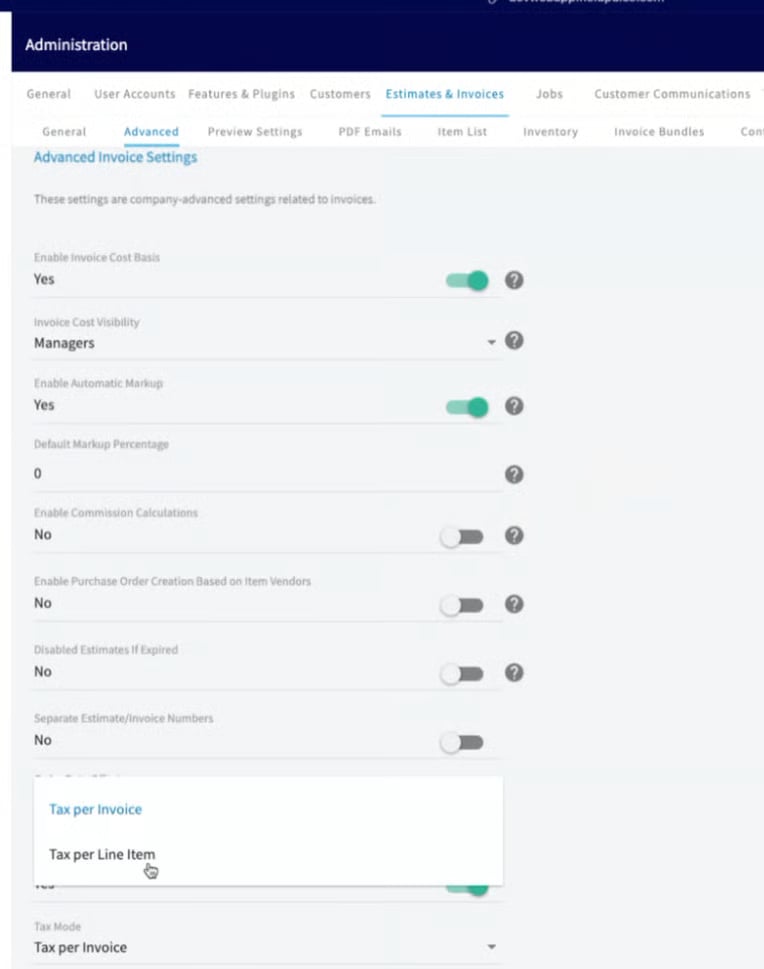
FieldPulse does not calculate tax in-house. Instead, it pulls tax data directly from QuickBooks Online. For Canadian businesses that charge two taxes, the dual tax rate feature pulls both rates from QuickBooks Online and displays the calculated result on finalized records. To use it, switch FieldPulse's tax mode to **Tax Per Line Item**.
## How to enable Canadian dual tax rates
In FieldPulse:
1. Go to **Company Settings**.
2. Open the **Estimates & Invoices** section.
3. Select **Advanced Settings**.
4. Scroll to the **Tax Mode** option.
5. Change the setting from **Tax Per Invoice** to **Tax Per Line Item**.
6. Select **Save**.
 ## How dual tax displays
Because QuickBooks Online performs the calculation, dual tax appears only after a record is finalized — not while you are still editing it.
| **Situation** | **What you see** |
| ------------------------------ | ----------------------------------------------------------------------------------------------------------------------------------------------------------------------------------------- |
| Editing an estimate or invoice | Dual tax is not displayed in edit mode. |
| Finalized record | FieldPulse pushes the record to QuickBooks Online, which calculates the tax and sends the result back. Dual tax then appears on the finalized estimate, invoice, PDF, and dynamic record. |
| Reporting | FieldPulse invoice reports include additional columns for Canadian taxes. Pull your invoice reports as usual to see them. |
## Invoice examples
Side-by-side examples of how dual tax appears across FieldPulse and QuickBooks Online:
## How dual tax displays
Because QuickBooks Online performs the calculation, dual tax appears only after a record is finalized — not while you are still editing it.
| **Situation** | **What you see** |
| ------------------------------ | ----------------------------------------------------------------------------------------------------------------------------------------------------------------------------------------- |
| Editing an estimate or invoice | Dual tax is not displayed in edit mode. |
| Finalized record | FieldPulse pushes the record to QuickBooks Online, which calculates the tax and sends the result back. Dual tax then appears on the finalized estimate, invoice, PDF, and dynamic record. |
| Reporting | FieldPulse invoice reports include additional columns for Canadian taxes. Pull your invoice reports as usual to see them. |
## Invoice examples
Side-by-side examples of how dual tax appears across FieldPulse and QuickBooks Online:
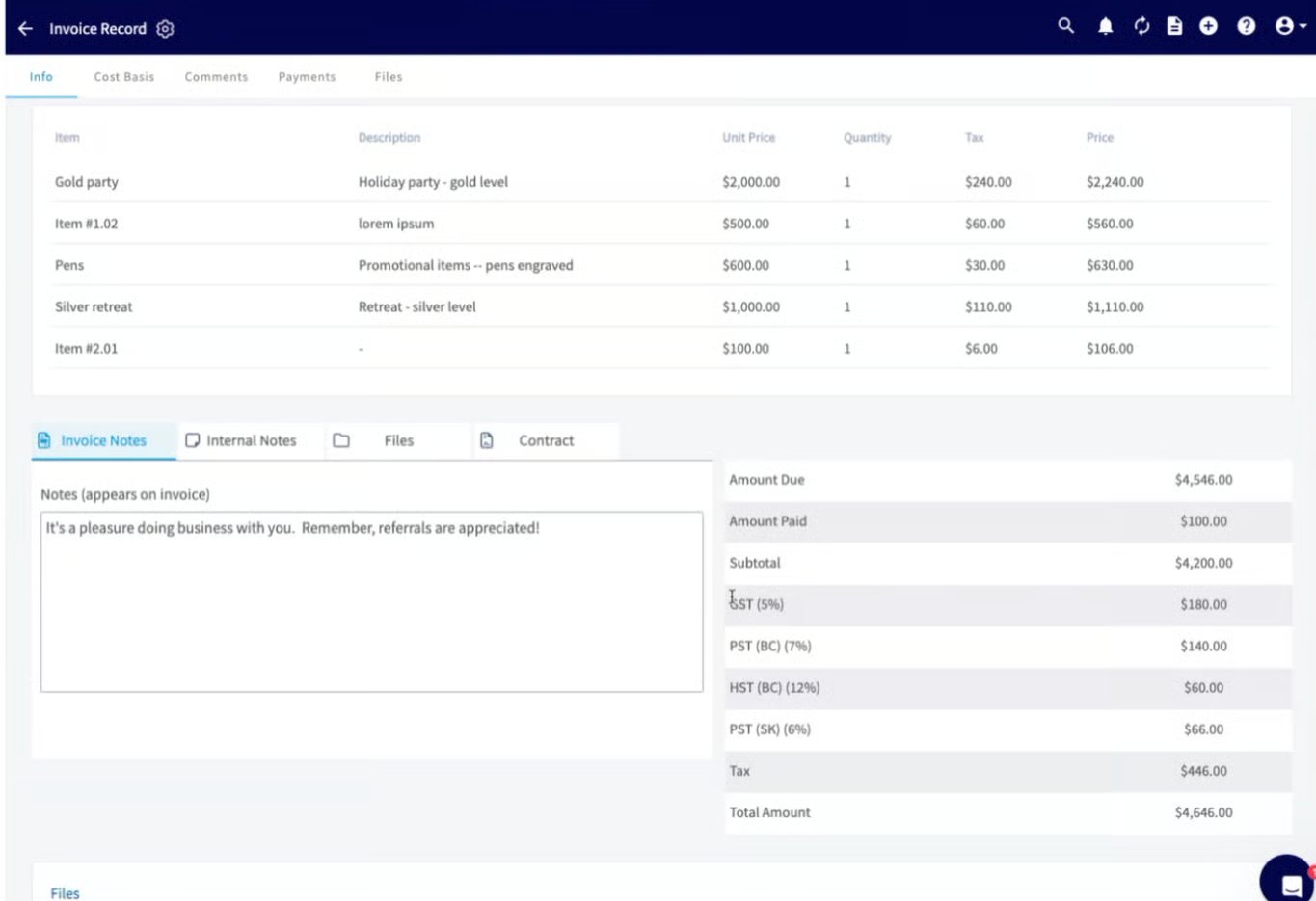 FieldPulse Invoice View Mode
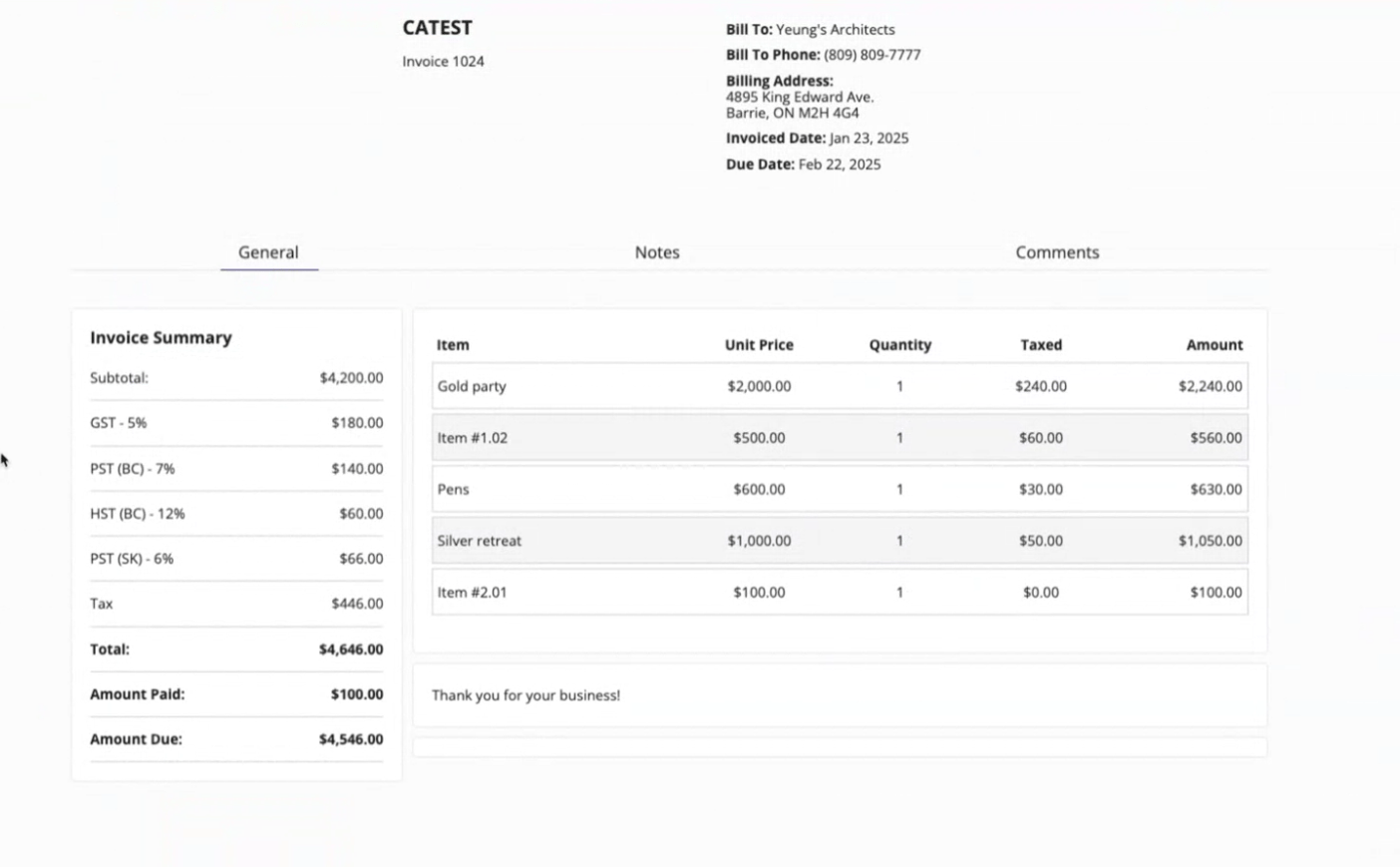 FieldPulse Dynamic Invoice
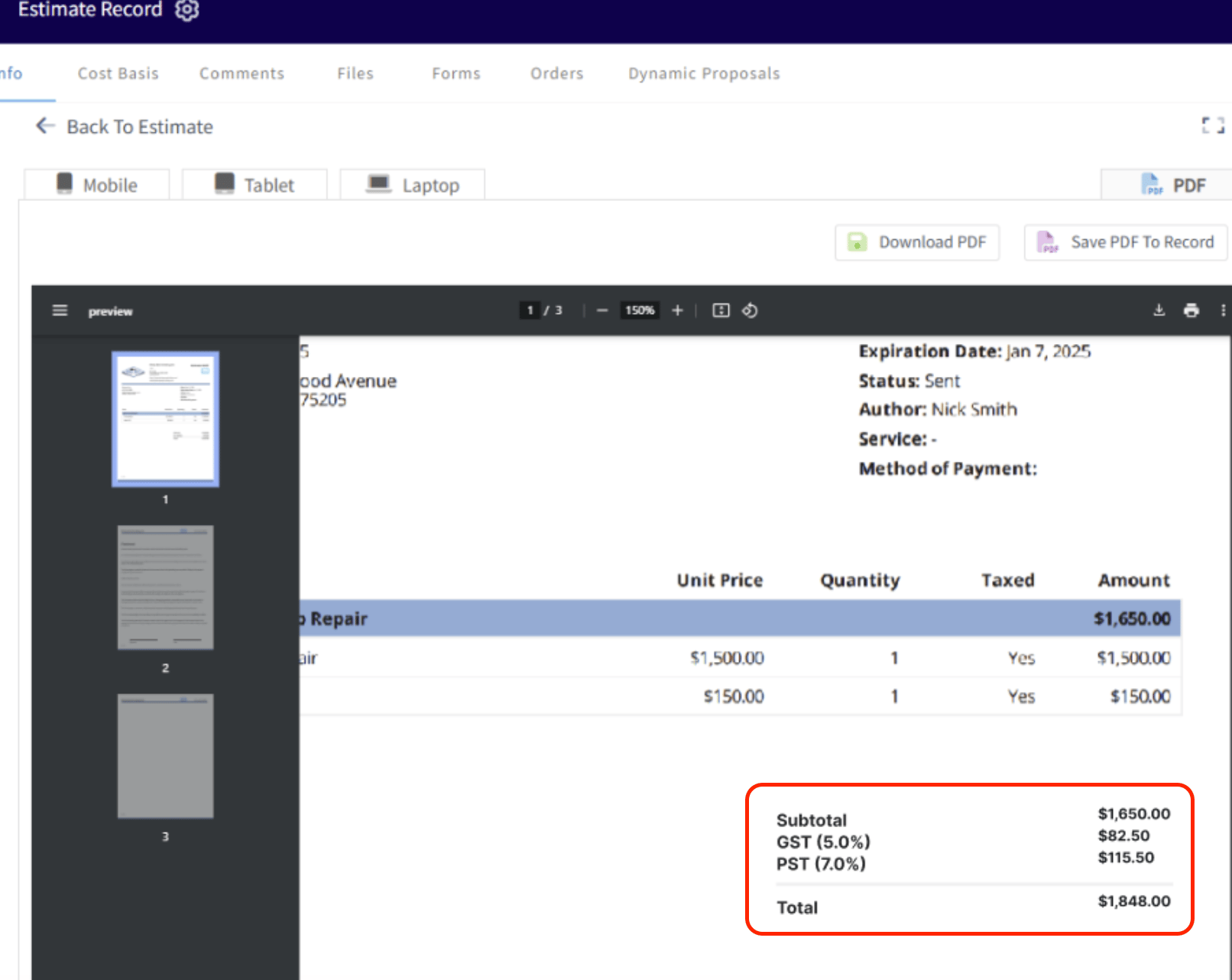 FieldPulse Invoice PDF
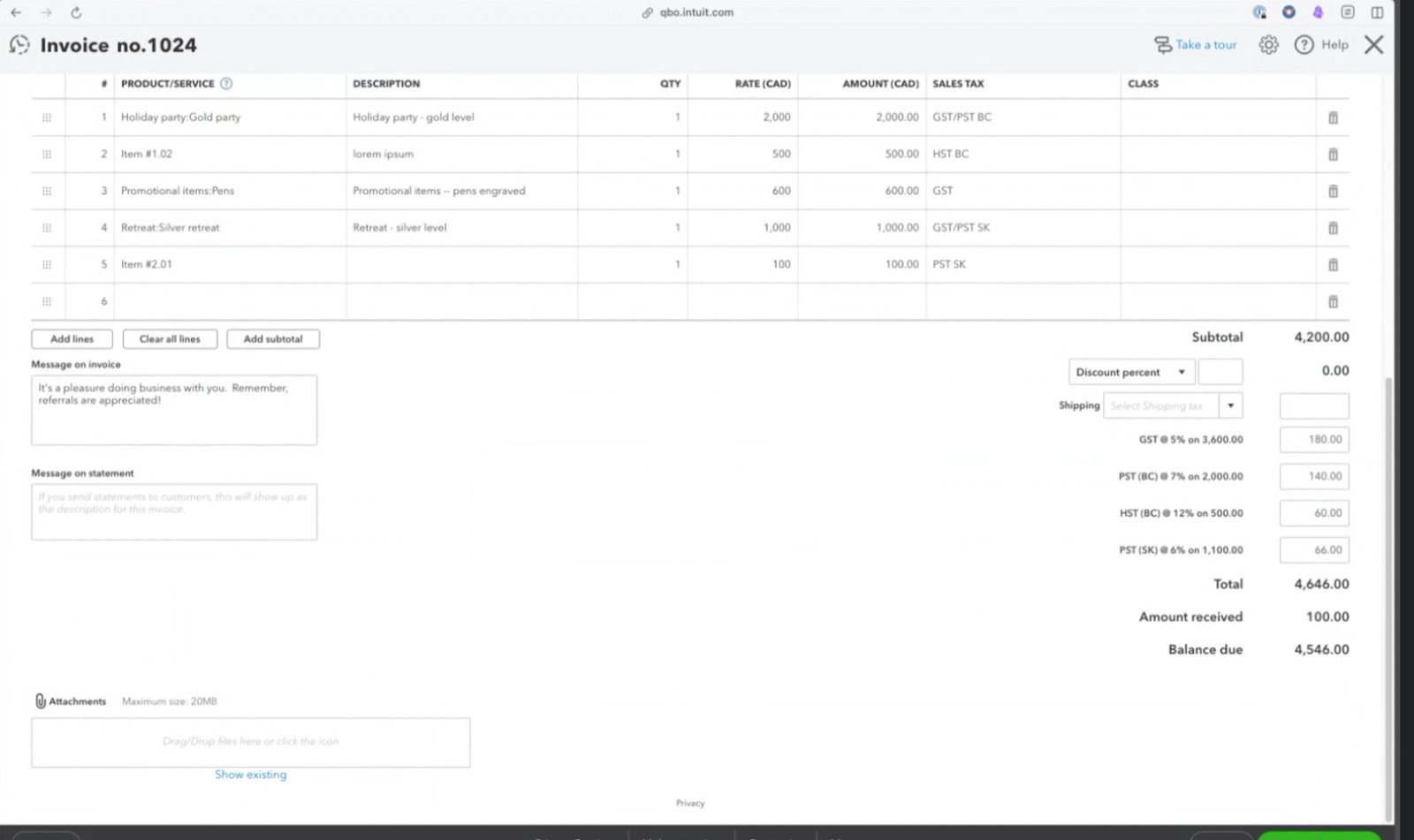 QuickBooks Online - Invoice
## Notes & limitations
* **Tax calculations do not appear in FieldPulse until you finalize the record.** FieldPulse pushes the information to QuickBooks Online, which calculates and returns the result.
* **Dual tax does not display while a record is in edit mode.** It appears only on finalized records.
* FieldPulse performs no in-house tax calculation — all Canadian dual tax figures come from QuickBooks Online.
* This feature applies to QuickBooks Online users in Canada.
## Related articles
* [QuickBooks Online Overview](/integrations/accounting/quickbooks-online/overview)
* [Setting Up QuickBooks Online Before Syncing](/integrations/accounting/quickbooks-online/pre-sync)
* [How to Manage QuickBooks Online After Syncing](/integrations/accounting/quickbooks-online/post-sync)
## Related topics
- [QuickBooks Online Overview](/integrations/accounting/quickbooks-online/overview.md)
- [Setting Up Automatic Tax Rates & Tax Override](/estimates-invoices/creating/auto-tax-rates.md)
- [QuickBooks Online](/integrations/accounting/quickbooks-online/index.md)
- [How to Create an Invoice](/estimates-invoices/creating/invoice.md)
QuickBooks Online - Invoice
## Notes & limitations
* **Tax calculations do not appear in FieldPulse until you finalize the record.** FieldPulse pushes the information to QuickBooks Online, which calculates and returns the result.
* **Dual tax does not display while a record is in edit mode.** It appears only on finalized records.
* FieldPulse performs no in-house tax calculation — all Canadian dual tax figures come from QuickBooks Online.
* This feature applies to QuickBooks Online users in Canada.
## Related articles
* [QuickBooks Online Overview](/integrations/accounting/quickbooks-online/overview)
* [Setting Up QuickBooks Online Before Syncing](/integrations/accounting/quickbooks-online/pre-sync)
* [How to Manage QuickBooks Online After Syncing](/integrations/accounting/quickbooks-online/post-sync)
## Related topics
- [QuickBooks Online Overview](/integrations/accounting/quickbooks-online/overview.md)
- [Setting Up Automatic Tax Rates & Tax Override](/estimates-invoices/creating/auto-tax-rates.md)
- [QuickBooks Online](/integrations/accounting/quickbooks-online/index.md)
- [How to Create an Invoice](/estimates-invoices/creating/invoice.md)