> ## Documentation Index
> Fetch the complete documentation index at: https://help.fieldpulse.com/llms.txt
> Use this file to discover all available pages before exploring further.
# How to Enable Automatic Deposit Invoices in QuickBooks
> Auto-generate a separate deposit invoice so collected deposits sync to QuickBooks as a liability and land correctly on your Profit & Loss reports.
> **Who uses this:** Admins enable the feature; it then applies to new estimates for the account. **Availability:** For users who integrate with QuickBooks Online **or** QuickBooks Desktop. Works on both web and mobile.
An automatic deposit invoice is a separate invoice FieldPulse generates for a collected deposit, so the deposit syncs to QuickBooks as a liability instead of revenue. That keeps the deposit off your income until the job is finished — matching accrual accounting — and keeps your cash-basis Profit & Loss reports accurate.
## Overview
Without this feature, a deposit collected on an estimate is applied to the [converted invoice](https://www.fieldpulse.com/features/estimates-and-invoices), and once that invoice syncs to [QuickBooks](https://www.fieldpulse.com/company/partners/quickbooks) the deposit shows as money already earned. Many FieldPulse users require a deposit before starting a job, with the balance due on completion. With automatic deposit invoices enabled, FieldPulse routes the deposit to a **liability account** in QuickBooks (money your business owes the customer) until the final payment is made. In short, deposits don't hit your revenue until the project is finished and the final payment is received. This feature works with both QuickBooks Online and QuickBooks Desktop.
## Video walkthrough
A video tutorial of the automatic deposit invoice flow is available\*. ([https://www.loom.com/share/bc0861983ab8412a83dc9360252dd11f](https://www.loom.com/share/bc0861983ab8412a83dc9360252dd11f))\*
## Before you begin
* Have an active [QuickBooks Online](/integrations/accounting/quickbooks-online/sync) or [QuickBooks Desktop](/integrations/accounting/quickbooks-desktop/sync) integration.
* **Create your liability account(s) in QuickBooks first.** The deposit line item must be linked to a liability account, and that account has to exist in QuickBooks before you enable this feature.
* Have a **Customer Deposit Item** ready in your Item List to represent the deposit.
## Enable automatic deposit invoices
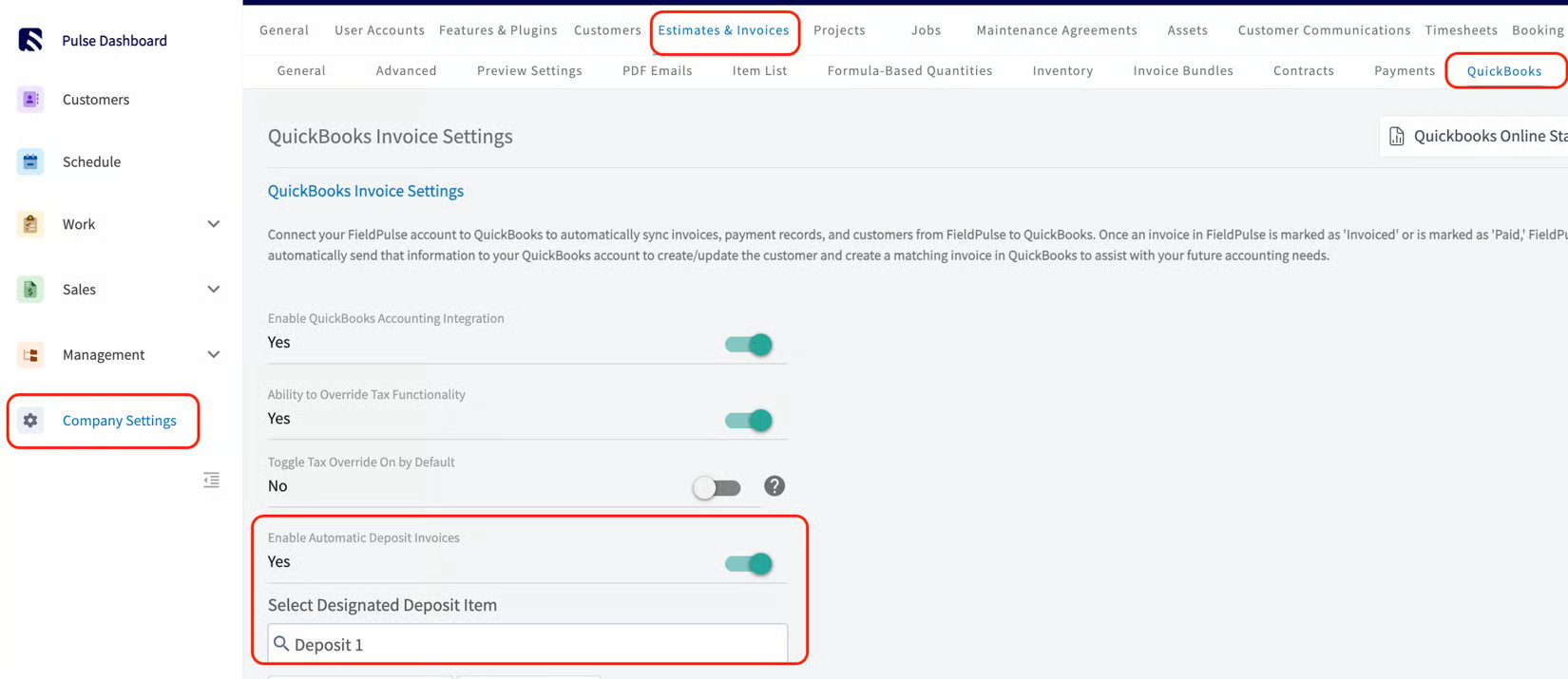
1. Go to **Company Settings > Estimates & Invoices > QuickBooks**.
2. Toggle on **Enable Automatic Deposit Invoices**.
3. Select your designated **Customer Deposit Item** from your Item List (linked to a liability account created in QuickBooks). Only one item can be selected here.
4. Select **Save** in the top-right corner.
 ## How the two invoices work
When you request a deposit on an estimate — in person or by sending a dynamic link — and the deposit is **less than 100%** of the estimate total, FieldPulse automatically generates **two invoices**:
| **Invoice** | **What it contains** | **Status** |
| ------------------- | ------------------------------------------------------------------------------------------------------------------------------------------------------------------------------------------------------------------------------------------------ | ---------------------------------------------------------------------------------- |
| **Deposit Invoice** | One line item, the Customer Deposit Line Item, priced at the deposit amount collected. The deposit payment is applied to it. | Marked **Paid** |
| **Final Invoice** | All items from the estimate, plus an automatically inserted grouping titled **Deposit Amount** containing the Customer Deposit Item at the negative value of the deposit received. Line items in this grouping are not visible to your customer. | Stays in **Draft** until the project is finished and you collect the final payment |
## Marking a deposit
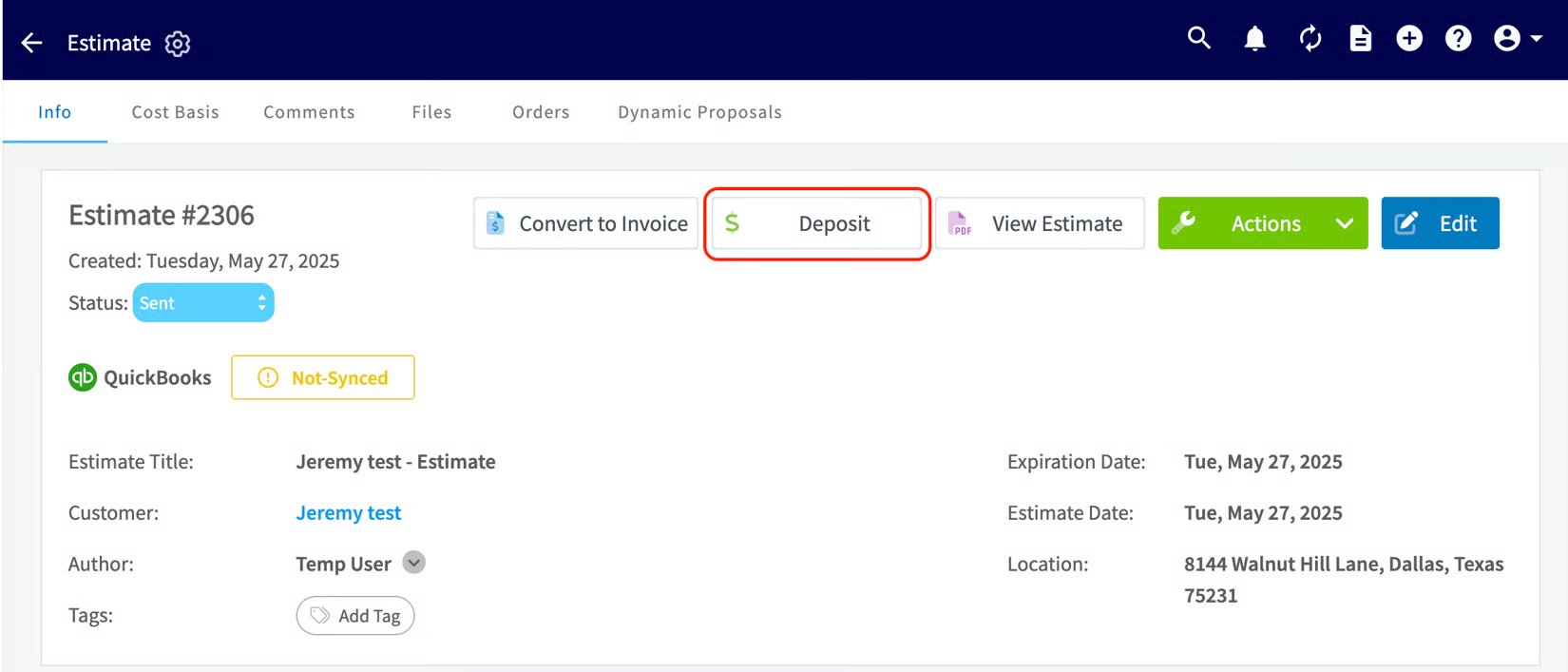
Once the feature is enabled, every new estimate shows a **Mark Deposits** button. Select it, mark a payment for less than the estimate total, and save — this triggers the automatic creation of the Deposit Invoice and Final Invoice. You can trigger this flow from the Deposit button only **once per estimate**.
## How the two invoices work
When you request a deposit on an estimate — in person or by sending a dynamic link — and the deposit is **less than 100%** of the estimate total, FieldPulse automatically generates **two invoices**:
| **Invoice** | **What it contains** | **Status** |
| ------------------- | ------------------------------------------------------------------------------------------------------------------------------------------------------------------------------------------------------------------------------------------------ | ---------------------------------------------------------------------------------- |
| **Deposit Invoice** | One line item, the Customer Deposit Line Item, priced at the deposit amount collected. The deposit payment is applied to it. | Marked **Paid** |
| **Final Invoice** | All items from the estimate, plus an automatically inserted grouping titled **Deposit Amount** containing the Customer Deposit Item at the negative value of the deposit received. Line items in this grouping are not visible to your customer. | Stays in **Draft** until the project is finished and you collect the final payment |
## Marking a deposit
Once the feature is enabled, every new estimate shows a **Mark Deposits** button. Select it, mark a payment for less than the estimate total, and save — this triggers the automatic creation of the Deposit Invoice and Final Invoice. You can trigger this flow from the Deposit button only **once per estimate**.
 ## Notes and limitations
* The deposit percentage is **always** based on the estimate **subtotal**.
* The designated deposit item should **always** be **non-taxed**.
* The deposit line item must be linked to a liability account, created in QuickBooks before enabling the feature.
* The Activity Log on the estimate records who marked a deposit and the amount.
* If the estimate is linked to a job, both the Deposit and Final invoices link to that same job — build the estimate from the job/service record so this happens automatically.
## FAQs
### Can any FieldPulse user utilize Automatic Deposit Invoices?
No. This feature is only available to users who integrate with either [QuickBooks Desktop](/integrations/accounting/quickbooks-desktop/overview) or QuickBooks Online.
### When manually marking a deposit on an estimate out in the field, will FieldPulse keep a record of who took the deposit?
Yes. The Activity Log on the Estimate record reflects the manual marking of a deposit, including the user who marked it and the amount.
### If an estimate is linked to a job, will both invoices (Deposit & Final) automatically link to that same job when they are created?
Yes. Best practice is to build your estimate from the job/service record so both invoices link automatically.
## Related articles
* [QuickBooks Online Overview](/integrations/accounting/quickbooks-online/overview)
* [Setting Up Default Customer Name Preference for QuickBooks](/integrations/accounting/quickbooks/default-customer-name)
Automatic deposit invoices are working when you mark a deposit under 100% on an estimate and FieldPulse generates a paid Deposit Invoice plus a draft Final Invoice — and the deposit lands in your QuickBooks liability account rather than revenue.
## Related topics
- [QuickBooks Desktop Overview](/integrations/accounting/quickbooks-desktop/overview.md)
- [QuickBooks Online Overview](/integrations/accounting/quickbooks-online/overview.md)
- [QuickBooks (Shared)](/integrations/accounting/quickbooks/index.md)
- [Setting Up Default Customer Name Preference for QuickBooks](/integrations/accounting/quickbooks/default-customer-name.md)
## Notes and limitations
* The deposit percentage is **always** based on the estimate **subtotal**.
* The designated deposit item should **always** be **non-taxed**.
* The deposit line item must be linked to a liability account, created in QuickBooks before enabling the feature.
* The Activity Log on the estimate records who marked a deposit and the amount.
* If the estimate is linked to a job, both the Deposit and Final invoices link to that same job — build the estimate from the job/service record so this happens automatically.
## FAQs
### Can any FieldPulse user utilize Automatic Deposit Invoices?
No. This feature is only available to users who integrate with either [QuickBooks Desktop](/integrations/accounting/quickbooks-desktop/overview) or QuickBooks Online.
### When manually marking a deposit on an estimate out in the field, will FieldPulse keep a record of who took the deposit?
Yes. The Activity Log on the Estimate record reflects the manual marking of a deposit, including the user who marked it and the amount.
### If an estimate is linked to a job, will both invoices (Deposit & Final) automatically link to that same job when they are created?
Yes. Best practice is to build your estimate from the job/service record so both invoices link automatically.
## Related articles
* [QuickBooks Online Overview](/integrations/accounting/quickbooks-online/overview)
* [Setting Up Default Customer Name Preference for QuickBooks](/integrations/accounting/quickbooks/default-customer-name)
Automatic deposit invoices are working when you mark a deposit under 100% on an estimate and FieldPulse generates a paid Deposit Invoice plus a draft Final Invoice — and the deposit lands in your QuickBooks liability account rather than revenue.
## Related topics
- [QuickBooks Desktop Overview](/integrations/accounting/quickbooks-desktop/overview.md)
- [QuickBooks Online Overview](/integrations/accounting/quickbooks-online/overview.md)
- [QuickBooks (Shared)](/integrations/accounting/quickbooks/index.md)
- [Setting Up Default Customer Name Preference for QuickBooks](/integrations/accounting/quickbooks/default-customer-name.md)