> ## Documentation Index
> Fetch the complete documentation index at: https://help.fieldpulse.com/llms.txt
> Use this file to discover all available pages before exploring further.
# Setting Up Customer and Job-Level Sales Accounts in Xero
> Set a default Xero sales account per customer or per job so residential, commercial, and service-type revenue reports cleanly in your accounting.
> **Who uses this:** An Admin enables and configures the default sales account setting. **Availability:** Requires a connected Xero account; the FieldPulse Xero integration is available for customers in **Australia and New Zealand** only.
A customer- or job-level default sales account lets you assign a specific Xero sales account to an individual [customer](https://www.fieldpulse.com/features/customer-management) or [job](https://www.fieldpulse.com/features/job-management), so revenue from different customer types or service types lands in the right account in Xero automatically. Turn it on once, set the account on the customer or job, and every new [estimate and invoice](https://www.fieldpulse.com/features/estimates-and-invoices) for that customer or job uses it — without picking the account by hand each time.
\ Always consult your accountant before changing sales account structures or your Xero sales accounts. Incorrect settings can affect your financial reporting. \
## Overview
The default sales account follows a hierarchy, from most general to most specific. The most specific setting always wins:
| **Level** | **Behavior** |
| -------------------------- | ----------------------------------------------------------- |
| **Company Default** | Used when no other override is set. |
| **Customer-Level Default** | Overrides the company-wide default. |
| **Job-Level Default** | Overrides **both** the company and customer-level defaults. |
This gives you control over how revenue is split while keeping your accounting structure organized — useful when you work across customer types ([residential](https://www.fieldpulse.com/solutions/residential) vs. [commercial](https://www.fieldpulse.com/solutions/commercial)) or service types (maintenance vs. construction) and want each stream to report separately in Xero.
## Video walkthrough
*A Loom walkthrough is embedded in the source and central to this feature. Confirm the video is migrated and embedded here: [https://www.loom.com/share/3e2d3171882143dcbb9e542c304c3237](https://www.loom.com/share/3e2d3171882143dcbb9e542c304c3237)*.
## Before you begin
* Confirm your **Xero integration is connected**. See [How to Sync With Xero](/integrations/accounting/xero/sync).
* **Talk to your accountant** about which sales accounts each customer or service type should map to before you change anything.
* Set up the **sales accounts** you plan to use in Xero first.
## Step-by-step setup
### Enable the setting
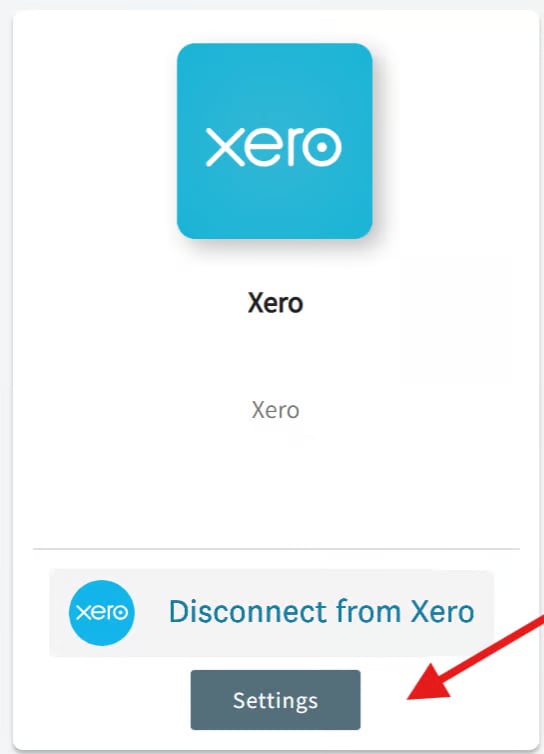
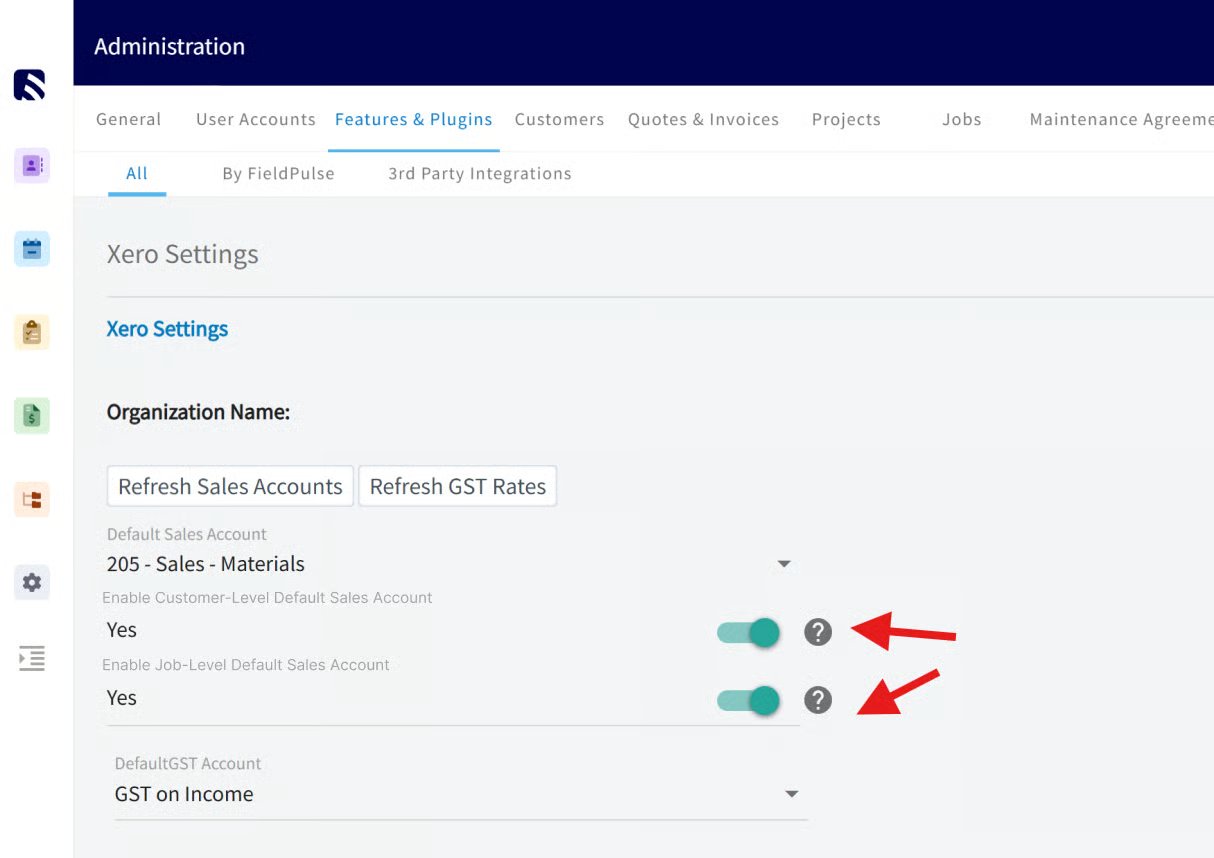
1. Go to **Company Settings**.
2. Select **Features & Plug-Ins > Xero > Settings**.
 3. Toggle **Enable Customer & Job-Level Default Sales Account** to **ON**.
 ### Set a default sales account on a customer
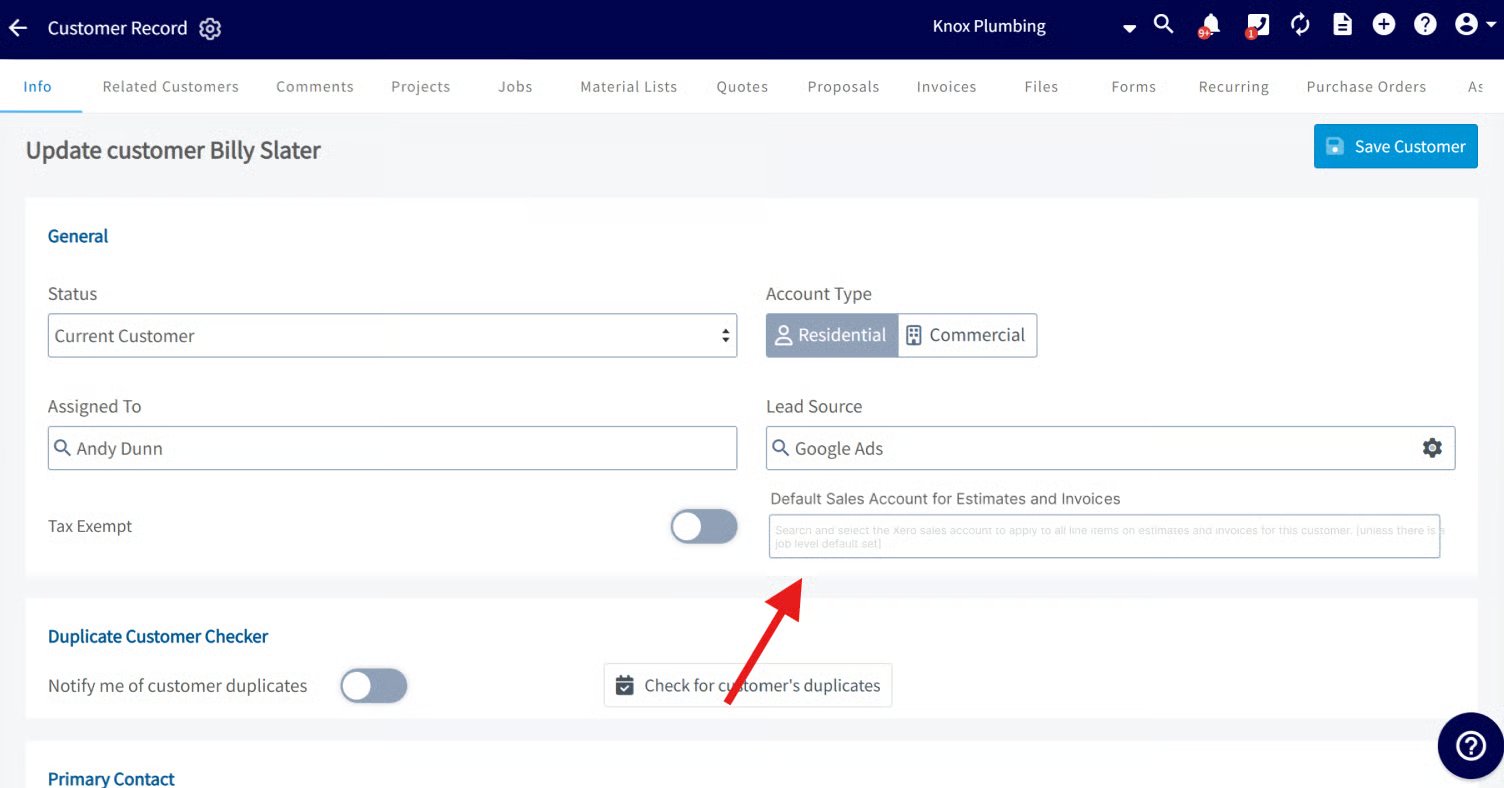
On each customer record, find the **Default Sales Account for Estimates and Invoices** field and select an account. Every estimate and invoice for that customer uses this account unless a job-level override is set.
### Set a default sales account on a customer
On each customer record, find the **Default Sales Account for Estimates and Invoices** field and select an account. Every estimate and invoice for that customer uses this account unless a job-level override is set.
 ### Set a default sales account on a job
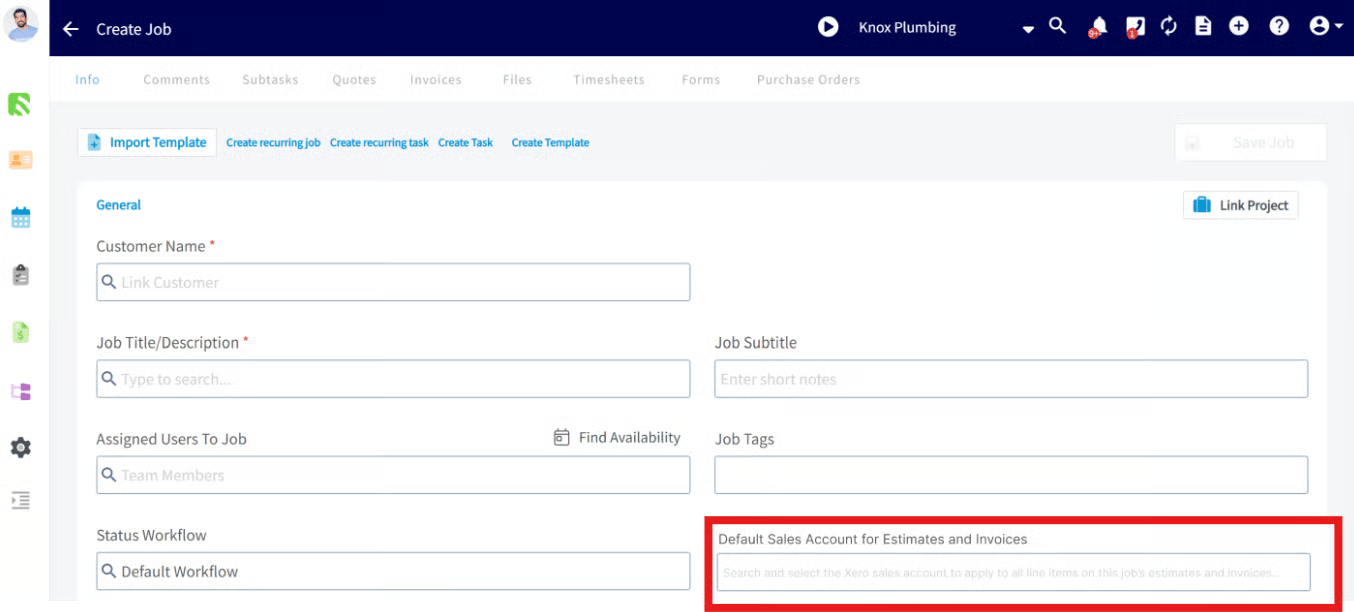
When creating a **Job** or **Job Template**, select the **Default Sales Account for Estimates and Invoices**. Every estimate and invoice created from that job uses the selected account.
\ Job-level sales accounts override **both** customer and company-level defaults. \
### Set a default sales account on a job
When creating a **Job** or **Job Template**, select the **Default Sales Account for Estimates and Invoices**. Every estimate and invoice created from that job uses the selected account.
\ Job-level sales accounts override **both** customer and company-level defaults. \
 ## Reporting
Once enabled, a **Default Sales Account for Estimates & Invoices** column appears in your Customer and Job reports, so you can track and filter customers and jobs by their associated sales account.
## Settings reference
| **Setting** | **Where** | **What it does** |
| --------------------------------------------------------------- | -------------------------------------------------------- | --------------------------------------------------------------------------------------------------- |
| **Enable Customer & Job-Level Default Sales Account** | Company Settings > Features & Plug-Ins > Xero > Settings | Turns the customer- and job-level override on. |
| **Default Sales Account for Estimates and Invoices** (customer) | Customer record | Sets the account for all of that customer's estimates and invoices. |
| **Default Sales Account for Estimates and Invoices** (job) | Job or Job Template | Sets the account for estimates and invoices from that job; overrides customer and company defaults. |
\ This feature applies only to **new estimates and invoices** created **after** the customer- or job-level defaults are enabled. FieldPulse does **not** retroactively update the sales account on existing estimates or invoices, regardless of status. The defaults apply going forward from the time you turn the feature on. \
## Related articles
* [Xero Overview](/integrations/accounting/xero/overview)
* [Setting Up Xero Before Syncing](/integrations/accounting/xero/pre-sync)
* [How to Sync With Xero](/integrations/accounting/xero/sync)
* [How to Manage Xero After Syncing](/integrations/accounting/xero/post-sync)
Your setup is working when you enable the toggle, set a sales account on a customer or job, and the next estimate or invoice you create for it posts to that account in Xero — and the new column shows the account in your Customer and Job reports.
## Related topics
- [Xero Overview](/integrations/accounting/xero/overview.md)
- [Xero](/integrations/accounting/xero/index.md)
- [Xero Sync Examples and Details](/integrations/accounting/xero/sync-examples.md)
- [How to Sync With Xero](/integrations/accounting/xero/sync.md)
## Reporting
Once enabled, a **Default Sales Account for Estimates & Invoices** column appears in your Customer and Job reports, so you can track and filter customers and jobs by their associated sales account.
## Settings reference
| **Setting** | **Where** | **What it does** |
| --------------------------------------------------------------- | -------------------------------------------------------- | --------------------------------------------------------------------------------------------------- |
| **Enable Customer & Job-Level Default Sales Account** | Company Settings > Features & Plug-Ins > Xero > Settings | Turns the customer- and job-level override on. |
| **Default Sales Account for Estimates and Invoices** (customer) | Customer record | Sets the account for all of that customer's estimates and invoices. |
| **Default Sales Account for Estimates and Invoices** (job) | Job or Job Template | Sets the account for estimates and invoices from that job; overrides customer and company defaults. |
\ This feature applies only to **new estimates and invoices** created **after** the customer- or job-level defaults are enabled. FieldPulse does **not** retroactively update the sales account on existing estimates or invoices, regardless of status. The defaults apply going forward from the time you turn the feature on. \
## Related articles
* [Xero Overview](/integrations/accounting/xero/overview)
* [Setting Up Xero Before Syncing](/integrations/accounting/xero/pre-sync)
* [How to Sync With Xero](/integrations/accounting/xero/sync)
* [How to Manage Xero After Syncing](/integrations/accounting/xero/post-sync)
Your setup is working when you enable the toggle, set a sales account on a customer or job, and the next estimate or invoice you create for it posts to that account in Xero — and the new column shows the account in your Customer and Job reports.
## Related topics
- [Xero Overview](/integrations/accounting/xero/overview.md)
- [Xero](/integrations/accounting/xero/index.md)
- [Xero Sync Examples and Details](/integrations/accounting/xero/sync-examples.md)
- [How to Sync With Xero](/integrations/accounting/xero/sync.md)