> ## Documentation Index
> Fetch the complete documentation index at: https://help.fieldpulse.com/llms.txt
> Use this file to discover all available pages before exploring further.
# Xero Sync Examples and Details
> A reference for how customers, line items, estimates, and invoices transfer between FieldPulse and Xero — the direction each moves and how key fields map.
> **Who uses this:** Anyone reviewing how records transfer between the two system*s*. **Availability:** Requires a connected Xero account; the FieldPulse Xero integration is available for customers in **Australia and New Zealand** only.
This page is a reference for how your records transfer between FieldPulse and Xero — which direction each record type moves and how its key fields map from one system to the other. Use it to preview what to expect before or after you run the sync.
## Overview
The Xero sync moves five record types between the two systems. Four of them — customers, line items, [invoices](https://www.fieldpulse.com/features/estimates-and-invoices), and [payments](https://www.fieldpulse.com/features/fieldpulse-payments) — sync both ways once connected. [Estimates](https://www.fieldpulse.com/features/estimates-and-invoices) (quotes) sync one way only, from FieldPulse to Xero. The tables below show each record type's direction and how its fields translate.
## Sync direction by record type
| **Record type** | **Direction** | **Notes** |
| ---------------------- | --------------------------- | ------------------------------------------------------------------------------ |
| **Customers** | Two-way (FieldPulse ↔ Xero) | Xero contacts, suppliers, and customers all arrive in FieldPulse as customers. |
| **Line items** | Two-way (FieldPulse ↔ Xero) | Each needs a unique SKU and a GST account. |
| **Invoices** | Two-way (FieldPulse ↔ Xero) | Syncs only once the invoice reaches Invoiced status. |
| **Payments** | Two-way (FieldPulse ↔ Xero) | — |
| **Estimates (quotes)** | One-way (FieldPulse → Xero) | Sent from FieldPulse; edits in Xero do not return. |
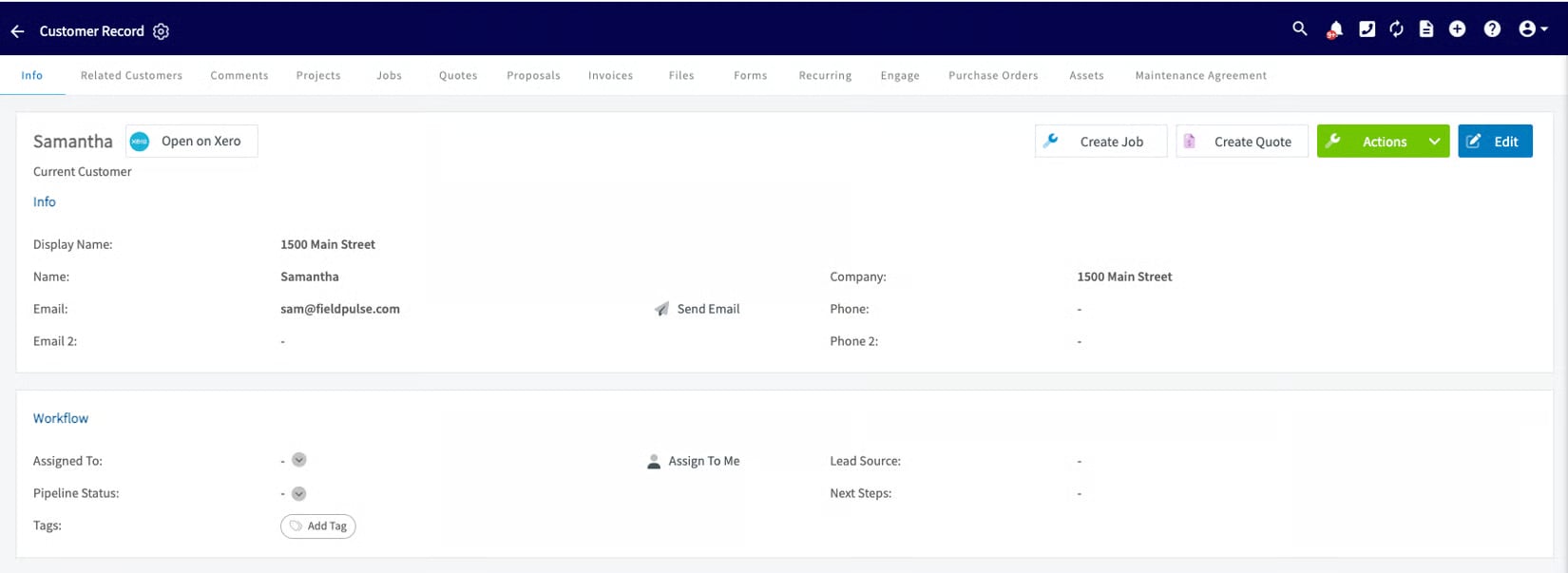
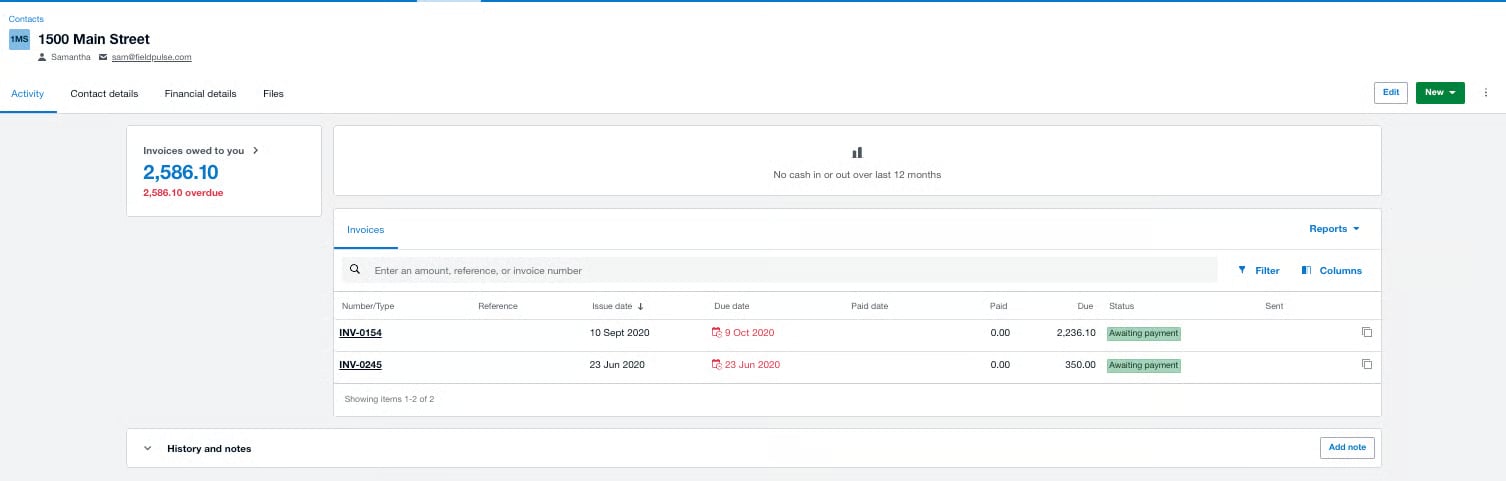
## How customer fields map
| **Field** | **How it transfers** |
| ------------------------------- | --------------------------------------------------------------------------------------------------------------------------------------------------- |
| **Name** | A customer needs a first name, last name, or company name. No first and last name in Xero → syncs to FieldPulse as a commercial (company) customer. |
| **Contact Name / Display Name** | Required in both systems after syncing. |
| **Email address** | Preferred and should be unique; not required. Missing emails in Xero cause sync issues. |
| **Phone number** | Preferred; not required. |
| **Contacts** | Unlimited in FieldPulse, but only the **first 5** sync to Xero. |
| **Contact Groups** | A Xero Contact Group arrives as a parent customer, shown as "Group: Primary Person." |
In FieldPulse:
 In Xero:
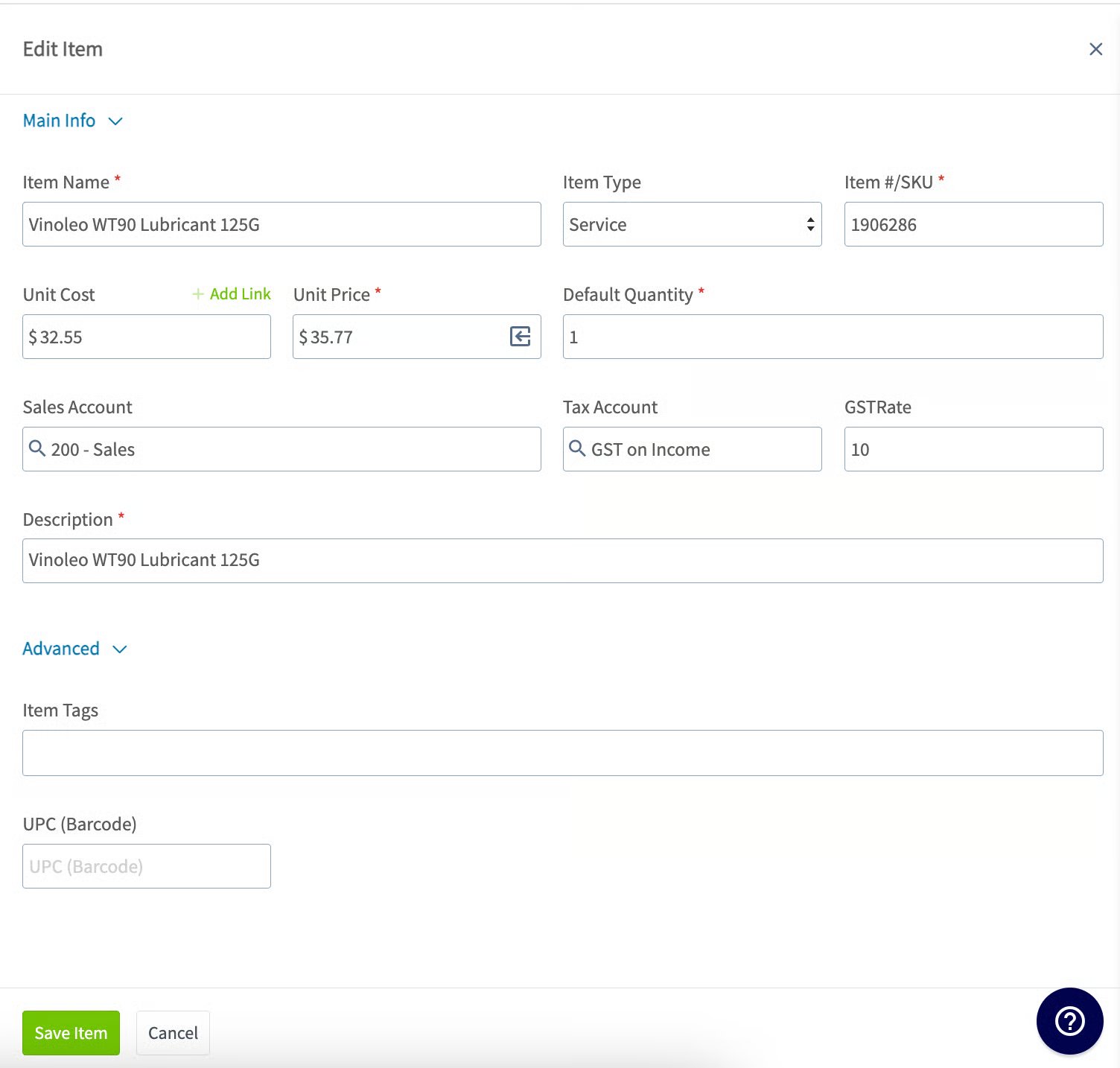
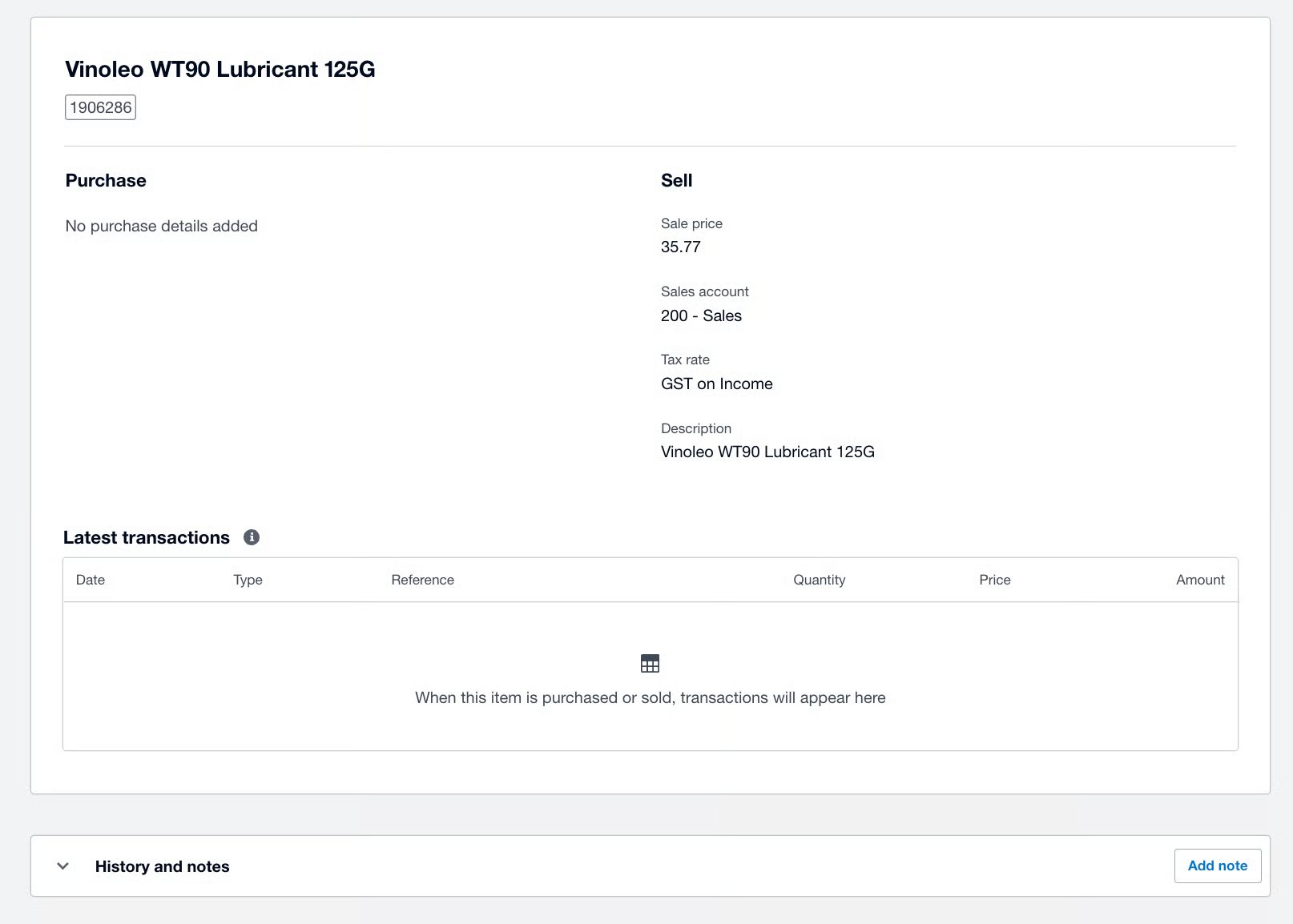
 ## How line-item fields map
| **Field** | **How it transfers** |
| --------------- | -------------------------------------------------------------------------------------------------------------------------------------------------------------------------------------- |
| **Name** | Must be unique, no special characters, not alphanumeric, and not matching a Xero Products & Services category name. |
| **SKU** | Required and unique; letters or numbers only, no symbols. |
| **Price** | Must be positive and at least \$1. Negatives and \$0 won't sync. |
| **Tax / GST** | Each Xero line item carries its own tax rate; FieldPulse uses one rate for all. GST must be checked on every item, and the account must read GST on income, BAS excluded, or GST free. |
| **Description** | Unique, meets a character minimum, normal text and punctuation only. |
In FieldPulse:
## How line-item fields map
| **Field** | **How it transfers** |
| --------------- | -------------------------------------------------------------------------------------------------------------------------------------------------------------------------------------- |
| **Name** | Must be unique, no special characters, not alphanumeric, and not matching a Xero Products & Services category name. |
| **SKU** | Required and unique; letters or numbers only, no symbols. |
| **Price** | Must be positive and at least \$1. Negatives and \$0 won't sync. |
| **Tax / GST** | Each Xero line item carries its own tax rate; FieldPulse uses one rate for all. GST must be checked on every item, and the account must read GST on income, BAS excluded, or GST free. |
| **Description** | Unique, meets a character minimum, normal text and punctuation only. |
In FieldPulse:
 In Xero:
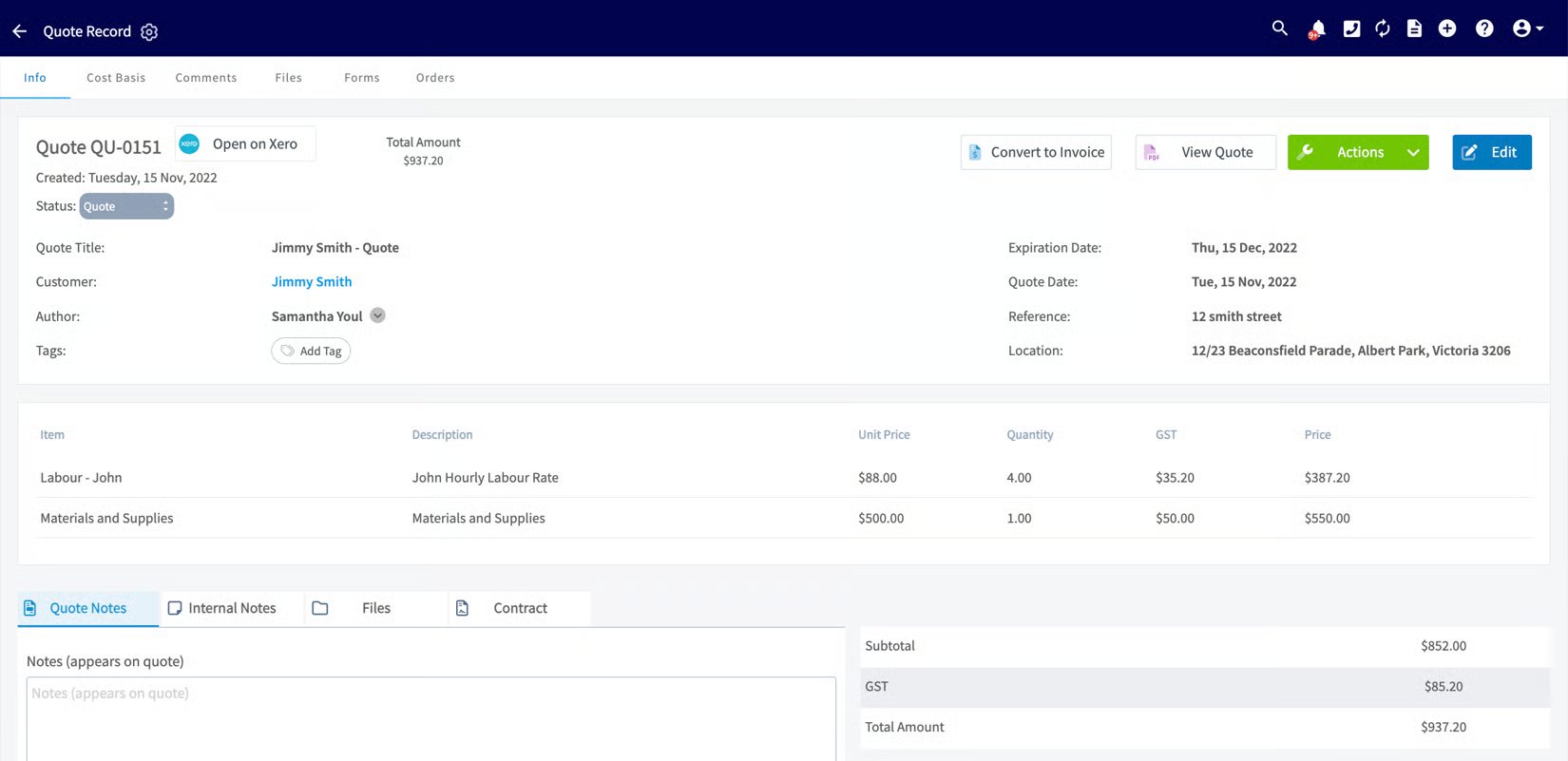
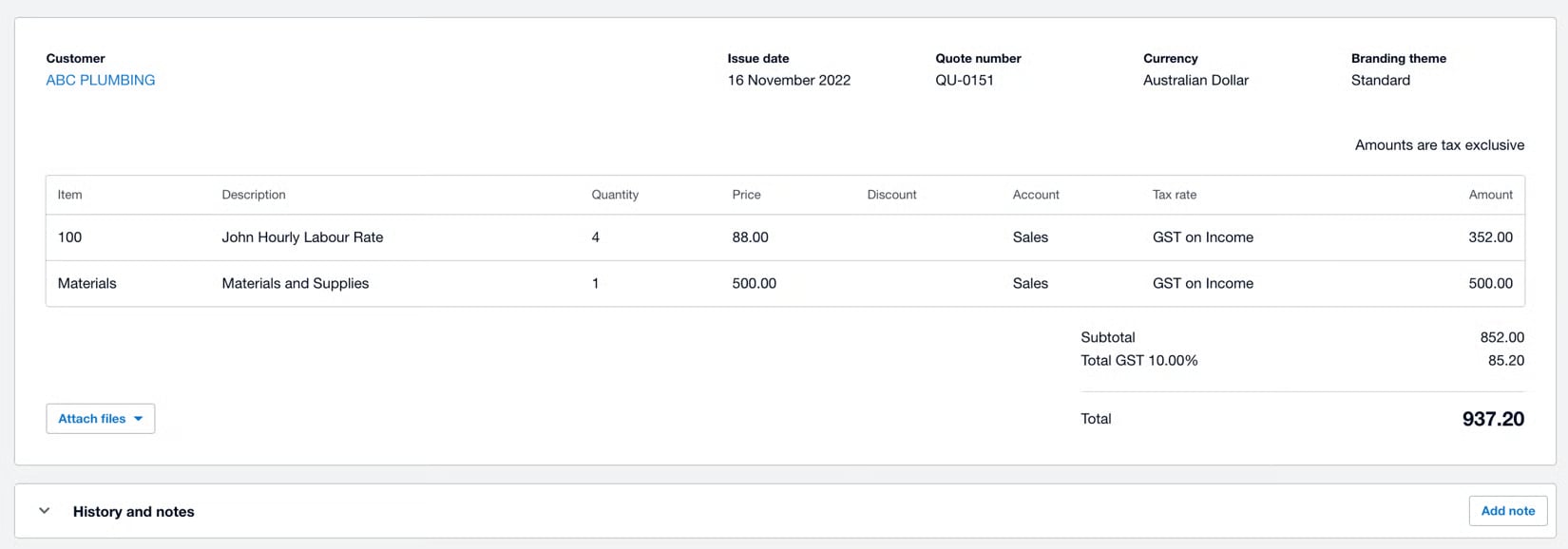
 ## How estimate fields map
| **Field** | **How it transfers** |
| ------------------------------ | ------------------------------------------------------------------------------------ |
| Direction | One-way only: FieldPulse → Xero. Edits made to an estimate in Xero do not sync back. |
| Status: Archived (FieldPulse) | Becomes VOID in Xero. |
| Status: any other (FieldPulse) | Becomes SENT in Xero. |
| Status: DRAFT (Xero) | Becomes Draft in FieldPulse (Xero → FieldPulse direction only applies to status). |
In FieldPulse:
## How estimate fields map
| **Field** | **How it transfers** |
| ------------------------------ | ------------------------------------------------------------------------------------ |
| Direction | One-way only: FieldPulse → Xero. Edits made to an estimate in Xero do not sync back. |
| Status: Archived (FieldPulse) | Becomes VOID in Xero. |
| Status: any other (FieldPulse) | Becomes SENT in Xero. |
| Status: DRAFT (Xero) | Becomes Draft in FieldPulse (Xero → FieldPulse direction only applies to status). |
In FieldPulse:
 In Xero:
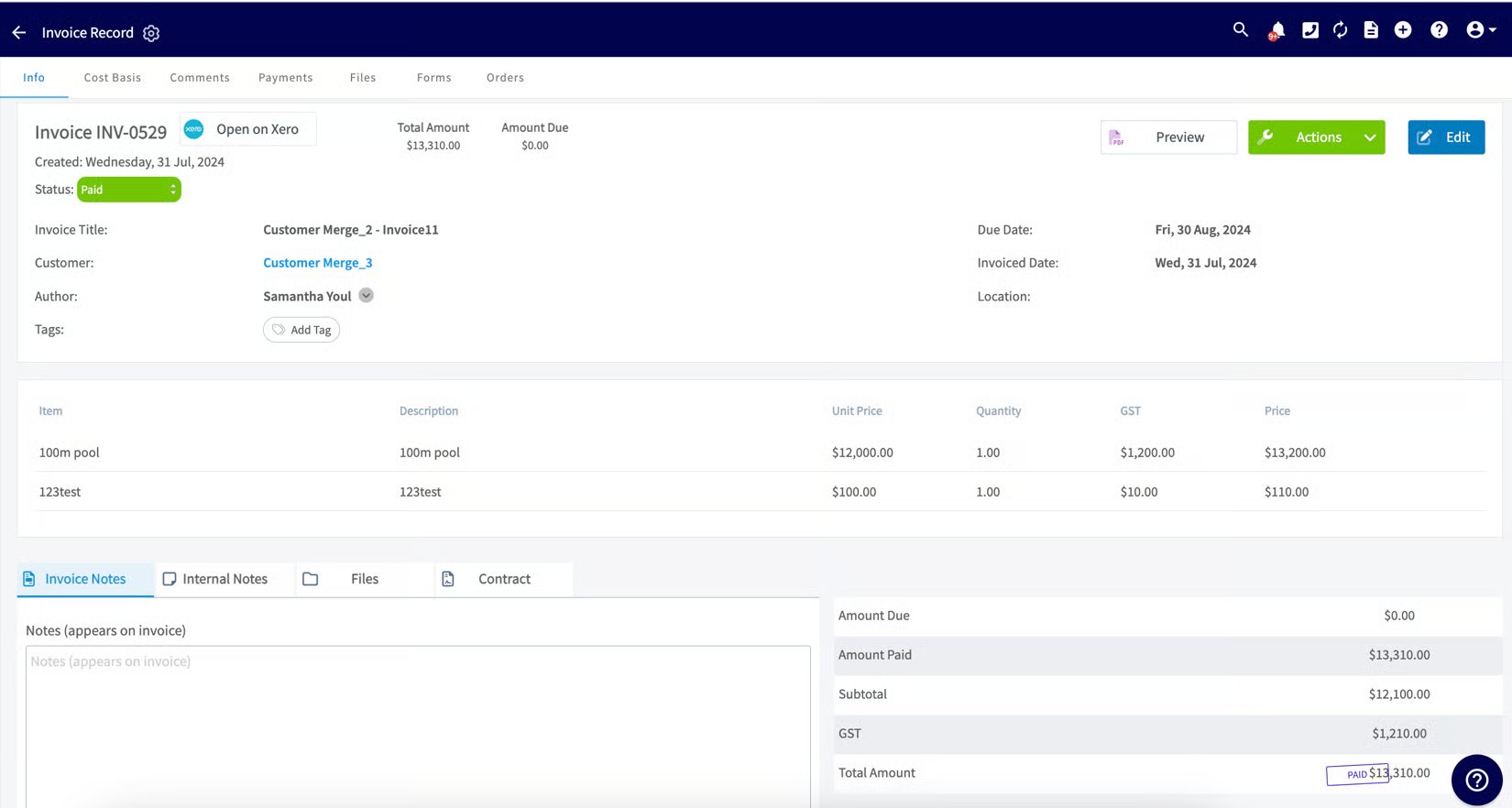
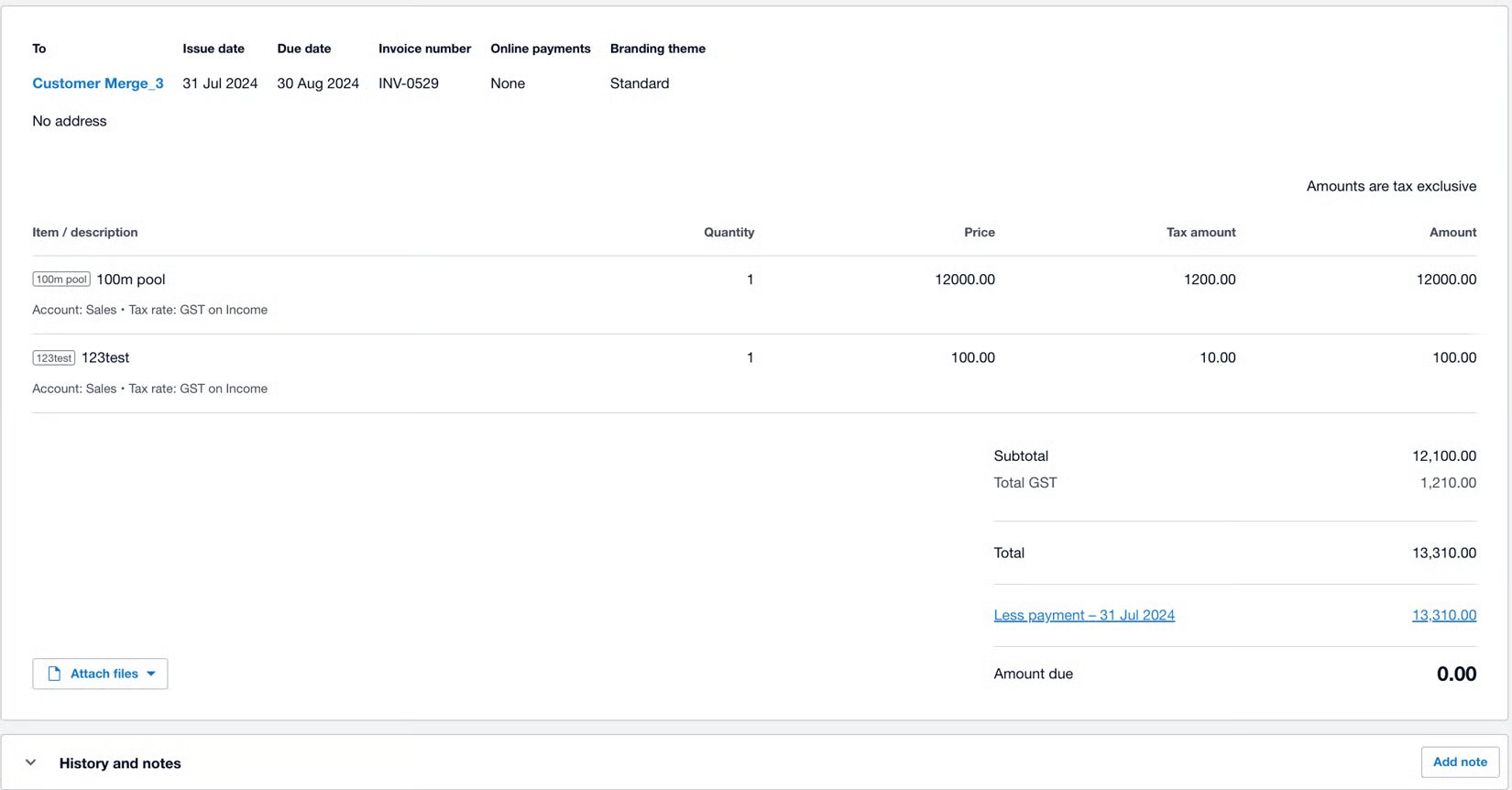
 ## How invoice fields map
| **Field** | **How it transfers** |
| -------------- | ---------------------------------------------------------------------------------------------------------------------- |
| Status | Only syncs once the invoice reaches Invoiced status in FieldPulse (after Finalize). |
| Date | Required. Xero rejects invoices without a date. |
| Price / total | Must be at least \$1; \$0 invoices won't sync. |
| Status mapping | See the full Invoice status mapping table in [Setting Up Xero Before Syncing](/integrations/accounting/xero/pre-sync). |
In FieldPulse:
## How invoice fields map
| **Field** | **How it transfers** |
| -------------- | ---------------------------------------------------------------------------------------------------------------------- |
| Status | Only syncs once the invoice reaches Invoiced status in FieldPulse (after Finalize). |
| Date | Required. Xero rejects invoices without a date. |
| Price / total | Must be at least \$1; \$0 invoices won't sync. |
| Status mapping | See the full Invoice status mapping table in [Setting Up Xero Before Syncing](/integrations/accounting/xero/pre-sync). |
In FieldPulse:
 In Xero:
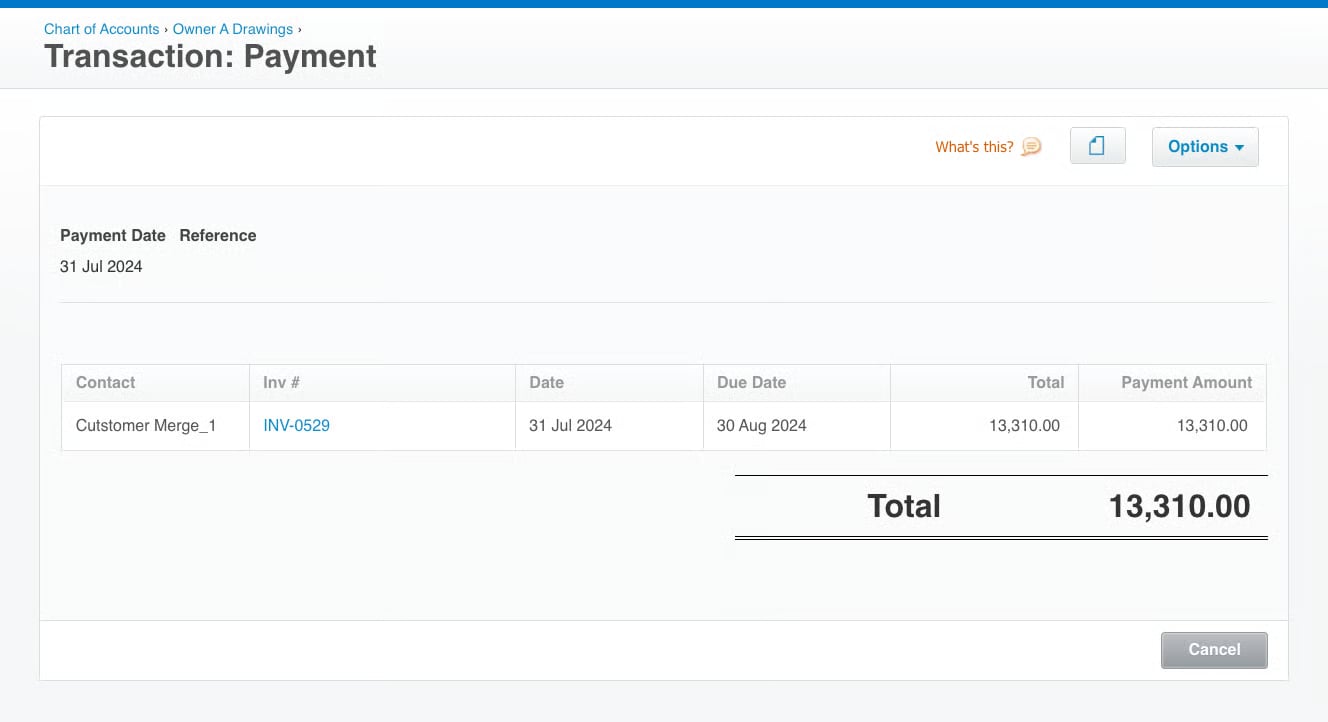
 ## How payment fields map
| **Field** | **How it transfers** |
| --------------- | ---------------------------------------------------------------------------------------------------------------------------------------------------- |
| Amount | Payment amount syncs to match the linked invoice's payment in both systems. |
| Payment date | Syncs from the originating system. |
| Payment account | Uses the default payment account selected during setup (see [How to Sync With Xero](/integrations/accounting/xero/sync)) unless otherwise specified. |
In FieldPulse:
## How payment fields map
| **Field** | **How it transfers** |
| --------------- | ---------------------------------------------------------------------------------------------------------------------------------------------------- |
| Amount | Payment amount syncs to match the linked invoice's payment in both systems. |
| Payment date | Syncs from the originating system. |
| Payment account | Uses the default payment account selected during setup (see [How to Sync With Xero](/integrations/accounting/xero/sync)) unless otherwise specified. |
In FieldPulse:
 In Xero:
 ## Notes & limitations
* **Tax rate is pulled from Xero.** Set your tax rate in Xero first; FieldPulse reads it from there.
* **Estimates are one-way.** Changes made to a quote in Xero do not sync back to FieldPulse.
* **Sync order is fixed:** customers, then line items, then invoices. A record won't appear until the records it depends on have synced.
* **Contacts cap at 5 in Xero** even though FieldPulse holds unlimited contacts per customer.
## Related articles
* [Xero Overview](/integrations/accounting/xero/overview)
* [Setting Up Xero Before Syncing](/integrations/accounting/xero/pre-sync)
* [How to Sync With Xero](/integrations/accounting/xero/sync)
* [How to Manage Xero After Syncing](/integrations/accounting/xero/post-sync)
* [Setting Up Customer and Job-Level Sales Accounts in Xero](/integrations/accounting/xero/default-sales-account)
## Related topics
- [Xero Overview](/integrations/accounting/xero/overview.md)
- [Xero](/integrations/accounting/xero/index.md)
- [How to Sync With Xero](/integrations/accounting/xero/sync.md)
- [How to Manage Xero After Syncing](/integrations/accounting/xero/post-sync.md)
## Notes & limitations
* **Tax rate is pulled from Xero.** Set your tax rate in Xero first; FieldPulse reads it from there.
* **Estimates are one-way.** Changes made to a quote in Xero do not sync back to FieldPulse.
* **Sync order is fixed:** customers, then line items, then invoices. A record won't appear until the records it depends on have synced.
* **Contacts cap at 5 in Xero** even though FieldPulse holds unlimited contacts per customer.
## Related articles
* [Xero Overview](/integrations/accounting/xero/overview)
* [Setting Up Xero Before Syncing](/integrations/accounting/xero/pre-sync)
* [How to Sync With Xero](/integrations/accounting/xero/sync)
* [How to Manage Xero After Syncing](/integrations/accounting/xero/post-sync)
* [Setting Up Customer and Job-Level Sales Accounts in Xero](/integrations/accounting/xero/default-sales-account)
## Related topics
- [Xero Overview](/integrations/accounting/xero/overview.md)
- [Xero](/integrations/accounting/xero/index.md)
- [How to Sync With Xero](/integrations/accounting/xero/sync.md)
- [How to Manage Xero After Syncing](/integrations/accounting/xero/post-sync.md)