> ## Documentation Index
> Fetch the complete documentation index at: https://help.fieldpulse.com/llms.txt
> Use this file to discover all available pages before exploring further.
# Setting Up the Signpost Integration
> Connect Signpost to automate review requests and customer follow-up, and manage customer communication inside FieldPulse web, mobile, and Engage.
> **Who uses this:** Admins can enable it. **Availability:** US. Requires a Signpost account.
The [Signpost integration](https://www.fieldpulse.com/company/partners/signpost) connects Signpost's customer-communication tools to [FieldPulse](https://www.fieldpulse.com/company/partners) so you can automate review requests and follow-up, capture leads, and handle spam calls without leaving FieldPulse. Signpost surfaces inside FieldPulse web, [mobile](https://www.fieldpulse.com/features/mobile-app), and the Engage platform, so [customer interactions](https://www.fieldpulse.com/features/customer-communication) stay in one place instead of scattered across tools.
## Overview
Signpost is a customer-communication platform for capturing leads, scheduling, and keeping in touch with customers. Connected to FieldPulse, it offers:
* **Centralized communication.** Manage customer interactions in one place across web, mobile, and Engage.
* **Lead capture and messaging** available on all devices.
* [**Engage integration**](/add-ons/engage/overview) that includes spam handling and automated engagement through FieldPulse.
Embedded video - [https://www.loom.com/share/c1264b0baeac4c56ad1823a18eeeecd6](https://www.loom.com/share/c1264b0baeac4c56ad1823a18eeeecd6)
## Before you begin
* You need a **Signpost account**. To sign up, [get started with Signpost](https://www.signpost.com/get-demo-now/) or call Signpost Sales at (844) 240-9980.
## Connect Signpost
1. Sign up for **Signpost** (see Before you begin).
2. In FieldPulse, go to **Company Settings** > **Features & Plugins**.
3. Locate the **Signpost** tile and select **Enable**.
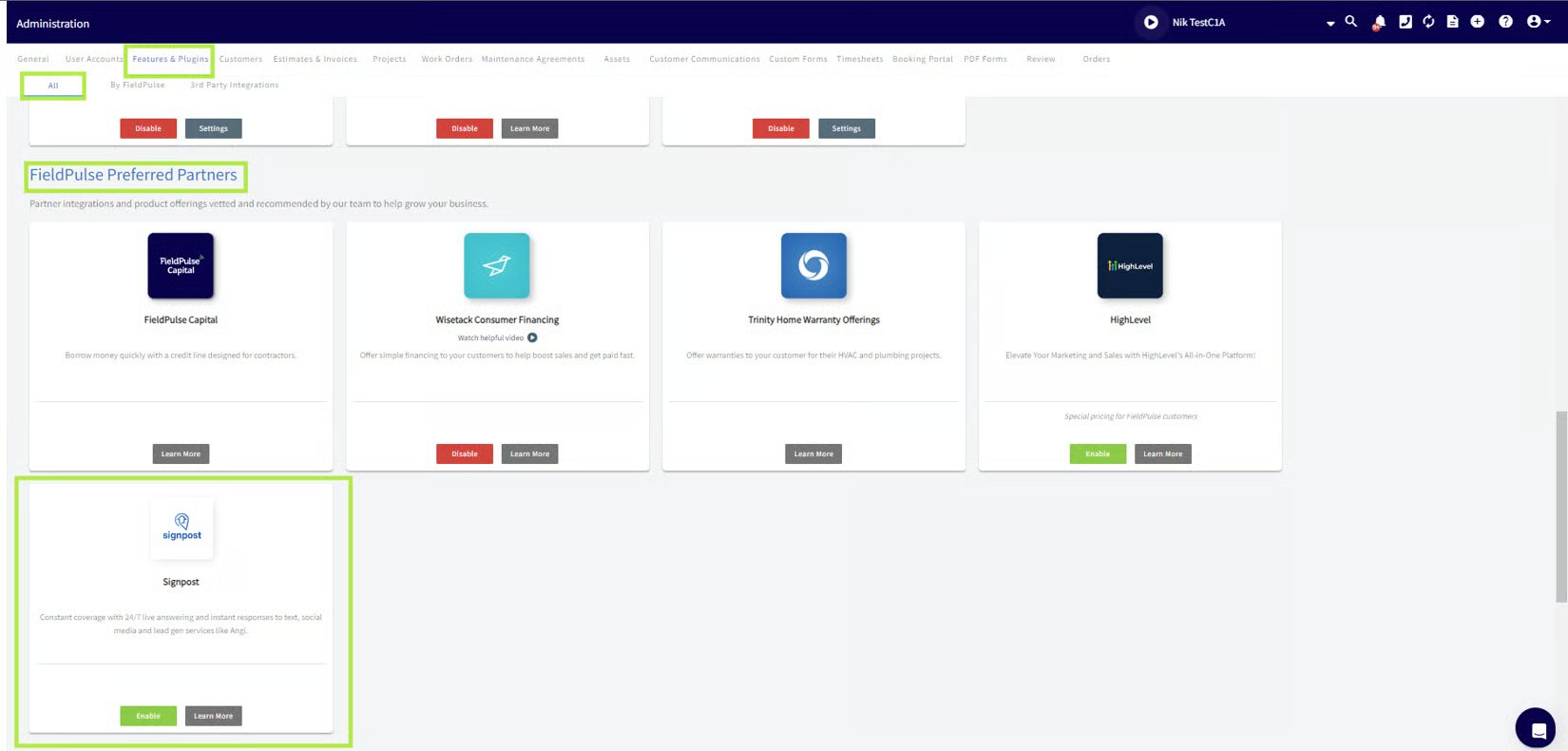 4. Open Signpost from the **Management** tab, or on the **Engage** platform select the Signpost logo in the top-right corner.
## Automate more with Zapier
You can connect FieldPulse and Signpost through Zapier to automate workflows beyond the built-in integration. A few examples:
* **New customer follow-up.** When a new contact is added in Signpost, create a Job in FieldPulse to follow up, so no new lead goes unnoticed.
* **Customer sync.** When a new customer is added in FieldPulse, create or update their details in Signpost to keep information consistent across both platforms.
* **Service reminder.** Trigger a Signpost reminder to contact a client scheduled for a recurring service or check-up in FieldPulse.
Set these up on [Signpost's integrations on Zapier](https://zapier.com/apps/signpost/integrations). See the [Zapier Overview](/integrations/developer-api/zapier-overview) page for how Zapier connects to FieldPulse.
## FAQs
### Where is Signpost available?
Signpost is available in the US.
### Who do I contact for Signpost support?
Contact Signpost Support at (844) 202-2015.
## Related articles
* [Setting Up Review Management](/customers/reviews-referrals/management)
* [Customer Communications Overview](/customers/communications/overview)
* [Zapier Overview](/integrations/developer-api/zapier-overview)
Your setup is working when the Signpost tile shows as enabled and you can open Signpost from the Management tab or the [Engage platform](https://www.fieldpulse.com/features/engage).
## Related topics
- [Marketing & Lead Gen](/integrations/marketing/index.md)
- [Setting Up the CHIIRP Integration](/integrations/marketing/chiirp.md)
- [Setting Up The Seal Integration](/integrations/partner-apps/the-seal.md)
- [Setting Up the Angi Integration](/integrations/marketing/angi.md)
4. Open Signpost from the **Management** tab, or on the **Engage** platform select the Signpost logo in the top-right corner.
## Automate more with Zapier
You can connect FieldPulse and Signpost through Zapier to automate workflows beyond the built-in integration. A few examples:
* **New customer follow-up.** When a new contact is added in Signpost, create a Job in FieldPulse to follow up, so no new lead goes unnoticed.
* **Customer sync.** When a new customer is added in FieldPulse, create or update their details in Signpost to keep information consistent across both platforms.
* **Service reminder.** Trigger a Signpost reminder to contact a client scheduled for a recurring service or check-up in FieldPulse.
Set these up on [Signpost's integrations on Zapier](https://zapier.com/apps/signpost/integrations). See the [Zapier Overview](/integrations/developer-api/zapier-overview) page for how Zapier connects to FieldPulse.
## FAQs
### Where is Signpost available?
Signpost is available in the US.
### Who do I contact for Signpost support?
Contact Signpost Support at (844) 202-2015.
## Related articles
* [Setting Up Review Management](/customers/reviews-referrals/management)
* [Customer Communications Overview](/customers/communications/overview)
* [Zapier Overview](/integrations/developer-api/zapier-overview)
Your setup is working when the Signpost tile shows as enabled and you can open Signpost from the Management tab or the [Engage platform](https://www.fieldpulse.com/features/engage).
## Related topics
- [Marketing & Lead Gen](/integrations/marketing/index.md)
- [Setting Up the CHIIRP Integration](/integrations/marketing/chiirp.md)
- [Setting Up The Seal Integration](/integrations/partner-apps/the-seal.md)
- [Setting Up the Angi Integration](/integrations/marketing/angi.md)