> ## Documentation Index
> Fetch the complete documentation index at: https://help.fieldpulse.com/llms.txt
> Use this file to discover all available pages before exploring further.
# Setting Up the HazardCo Integration
> Connect HazardCo (Australia/NZ) to complete a SWMS from templates in HazardCo and store it against the matching FieldPulse job.
> **Who uses this:** Admins can enable it. **Availability:** Australia and New Zealand; requires a HazardCo account/membership.
Connecting the HazardCo integration lets your crew complete a Safe Work Method Statement (SWMS) in HazardCo and have it stored against the matching [FieldPulse job](https://www.fieldpulse.com/features/job-management), so your WHS compliance stays attached to the work.
## Overview
The HazardCo integration brings workplace health and safety (WHS) and job management together for Australian and New Zealand service businesses. Your team completes a SWMS in the HazardCo app using its guided prompts and templates, saves it, and HazardCo stores it with the matching job in FieldPulse.
 Video tutorial - [https://www.loom.com/share/248c880820ee435f8516d19605cb8265](https://www.loom.com/share/248c880820ee435f8516d19605cb8265)
## Before you begin
* The HazardCo integration is for businesses in **Australia and New Zealand**.
* You need a **HazardCo account** to connect. You can create one during setup.
* HazardCo members get **10% off FieldPulse monthly plans or 20% off annual plans**.
## Connect HazardCo
1. In FieldPulse, go to **Company Settings**.
2. Select **Features and Plugins**.
3. Find **HazardCo** and select **Sign Up** to create your HazardCo account.
Video tutorial - [https://www.loom.com/share/248c880820ee435f8516d19605cb8265](https://www.loom.com/share/248c880820ee435f8516d19605cb8265)
## Before you begin
* The HazardCo integration is for businesses in **Australia and New Zealand**.
* You need a **HazardCo account** to connect. You can create one during setup.
* HazardCo members get **10% off FieldPulse monthly plans or 20% off annual plans**.
## Connect HazardCo
1. In FieldPulse, go to **Company Settings**.
2. Select **Features and Plugins**.
3. Find **HazardCo** and select **Sign Up** to create your HazardCo account.
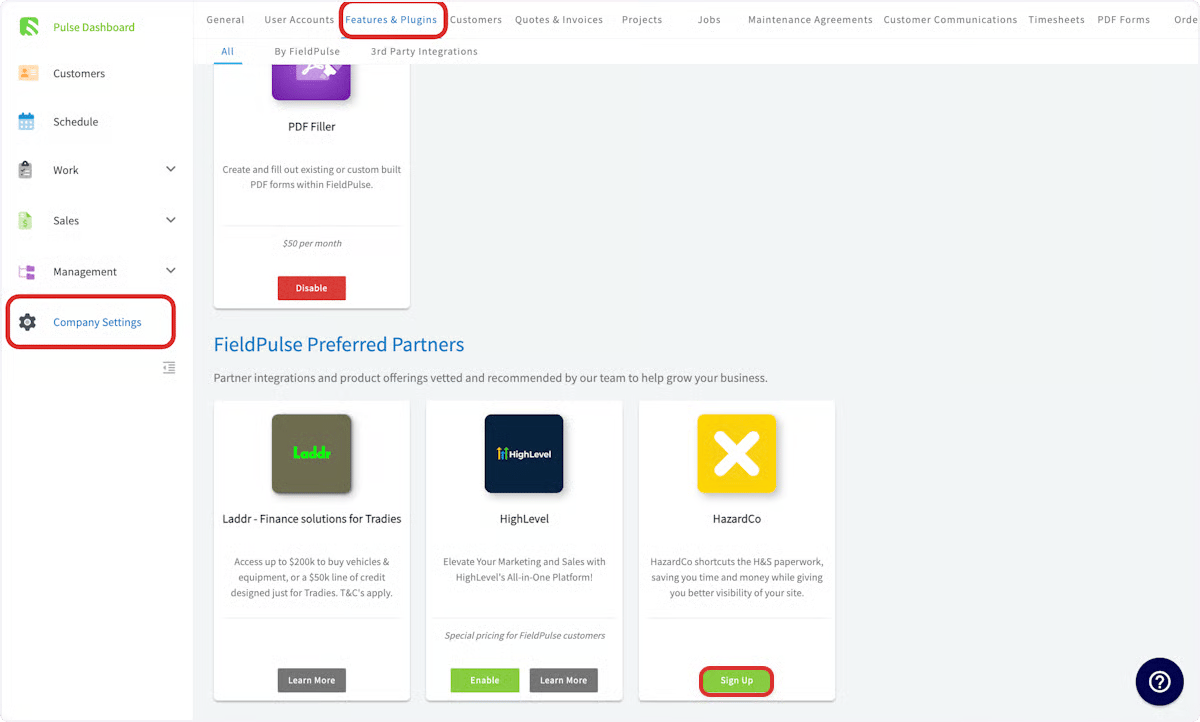 4. Log in to your **HazardCo** account and go to **Integrations**.
5. Toggle on **FieldPulse** and enter your FieldPulse login details.
## Related articles
* [Custom Forms Overview](/jobs/custom-forms/overview)
Your setup is working when you complete and save a SWMS in HazardCo and find it stored against the matching job in FieldPulse.
## Related topics
- [Partner Apps](/integrations/partner-apps/index.md)
- [Setting Up Item List & Inventory](/inventory-materials/item-list/adding-items.md)
- [Setting Up the CHIIRP Integration](/integrations/marketing/chiirp.md)
- [Setting Up the Signpost Integration](/integrations/marketing/signpost.md)
4. Log in to your **HazardCo** account and go to **Integrations**.
5. Toggle on **FieldPulse** and enter your FieldPulse login details.
## Related articles
* [Custom Forms Overview](/jobs/custom-forms/overview)
Your setup is working when you complete and save a SWMS in HazardCo and find it stored against the matching job in FieldPulse.
## Related topics
- [Partner Apps](/integrations/partner-apps/index.md)
- [Setting Up Item List & Inventory](/inventory-materials/item-list/adding-items.md)
- [Setting Up the CHIIRP Integration](/integrations/marketing/chiirp.md)
- [Setting Up the Signpost Integration](/integrations/marketing/signpost.md)