> ## Documentation Index
> Fetch the complete documentation index at: https://help.fieldpulse.com/llms.txt
> Use this file to discover all available pages before exploring further.
# Setting Up the NiceJob Integration
> Connect NiceJob to automate review and referral requests after each FieldPulse job and build your reputation on Google, Facebook, and more.
> **Who uses this:** Admins can enable it. **Availability:** Requires a paid NiceJob subscription.
Connecting the [NiceJob integration](https://www.fieldpulse.com/company/partners/nicejob) syncs your [FieldPulse customer list](https://www.fieldpulse.com/features/customer-management) into NiceJob and automatically follows up after each job with a review request, so you build reviews without sending reminders by hand.
## Overview
The NiceJob integration automates review and referral requests using events from FieldPulse. NiceJob is a reputation-management tool that runs review campaigns — an initial text plus up to three reminder emails — and shares your best reviews to Google, Facebook, BBB, HomeAdvisor, City Search, and YellowPages. The integration connects it to your FieldPulse CRM so the requests fire off the jobs you're already doing.
 Data flows between [FieldPulse and NiceJob](https://help.nicejob.com/en/articles/3104771-connect-fieldpulse-to-nicejob) two ways:
* **FieldPulse → NiceJob:** your customer list syncs in, and customer events trigger review and referral requests. Contact-info changes in FieldPulse update in NiceJob.
* **NiceJob → FieldPulse:** referral leads captured in NiceJob come into FieldPulse for follow-up.
The following FieldPulse customer events can trigger a request:
| **Event** | **Triggers on** |
| --------------------------------------------------------------------------------------------------------------------------------------------- | ----------------------------------------------------------------------------------- |
| [**Jobs**](https://www.fieldpulse.com/features/job-management) / [**Work Orders**](https://www.fieldpulse.com/features/work-order-management) | created, updated, completed |
| [**Site Visits**](https://www.fieldpulse.com/features/service-scheduling-software) | created, completed |
| [**Estimates**](https://www.fieldpulse.com/features/estimates-and-invoices) | created, updated, approved |
| **Invoices** | created, updated, paid |
| [**Payments**](https://www.fieldpulse.com/features/fieldpulse-payments) | completed |
| **Tags** | Apply the **noreview** tag to a customer to stop automatic review requests for them |
Trigger events carry employee attribution, so you can see which techs are earning the most and best reviews and referrals.
Embed video - [https://www.loom.com/share/24ed7fdb4bae454c91a034424c606876](https://www.loom.com/share/24ed7fdb4bae454c91a034424c606876)
## Before you begin
* You need an active **NiceJob** subscription. NiceJob plans start at **\$75/month** for the Grow plan; see the [NiceJob pricing page](https://get.nicejob.com/pricing) for current details.
* There is no contract required for a NiceJob subscription.
## Connect NiceJob
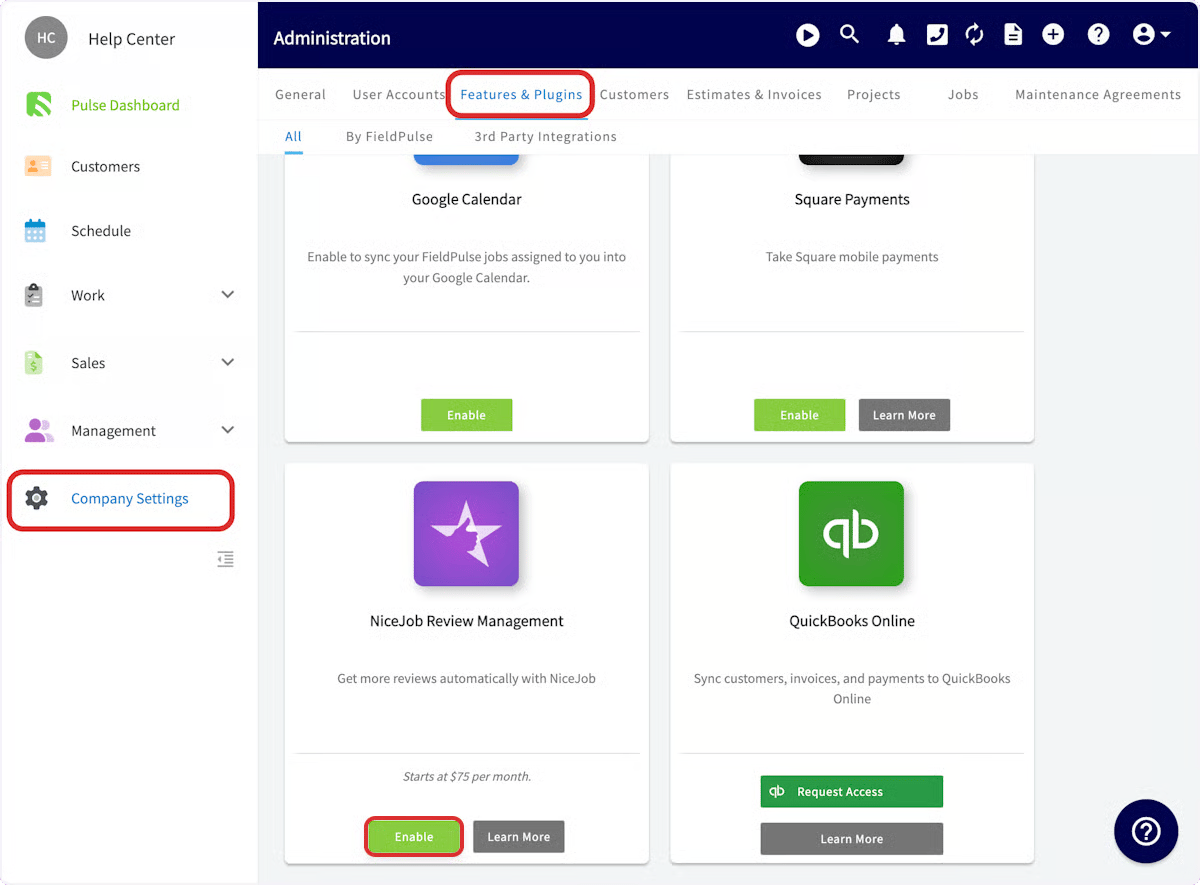
1. Go to **Company Settings**.
2. Select **Features & Plugins**.
3. Find **NiceJob** and select **Enable**.
Data flows between [FieldPulse and NiceJob](https://help.nicejob.com/en/articles/3104771-connect-fieldpulse-to-nicejob) two ways:
* **FieldPulse → NiceJob:** your customer list syncs in, and customer events trigger review and referral requests. Contact-info changes in FieldPulse update in NiceJob.
* **NiceJob → FieldPulse:** referral leads captured in NiceJob come into FieldPulse for follow-up.
The following FieldPulse customer events can trigger a request:
| **Event** | **Triggers on** |
| --------------------------------------------------------------------------------------------------------------------------------------------- | ----------------------------------------------------------------------------------- |
| [**Jobs**](https://www.fieldpulse.com/features/job-management) / [**Work Orders**](https://www.fieldpulse.com/features/work-order-management) | created, updated, completed |
| [**Site Visits**](https://www.fieldpulse.com/features/service-scheduling-software) | created, completed |
| [**Estimates**](https://www.fieldpulse.com/features/estimates-and-invoices) | created, updated, approved |
| **Invoices** | created, updated, paid |
| [**Payments**](https://www.fieldpulse.com/features/fieldpulse-payments) | completed |
| **Tags** | Apply the **noreview** tag to a customer to stop automatic review requests for them |
Trigger events carry employee attribution, so you can see which techs are earning the most and best reviews and referrals.
Embed video - [https://www.loom.com/share/24ed7fdb4bae454c91a034424c606876](https://www.loom.com/share/24ed7fdb4bae454c91a034424c606876)
## Before you begin
* You need an active **NiceJob** subscription. NiceJob plans start at **\$75/month** for the Grow plan; see the [NiceJob pricing page](https://get.nicejob.com/pricing) for current details.
* There is no contract required for a NiceJob subscription.
## Connect NiceJob
1. Go to **Company Settings**.
2. Select **Features & Plugins**.
3. Find **NiceJob** and select **Enable**.
 4. Authenticate your **NiceJob** account.
5. Select your **business name**.
Once connected, closing a job in FieldPulse automatically prompts NiceJob to follow up with a review invitation.
## Controlling which customers receive review requests
1. Go to **Company Settings.**
2. Select **Features & Plugins**.
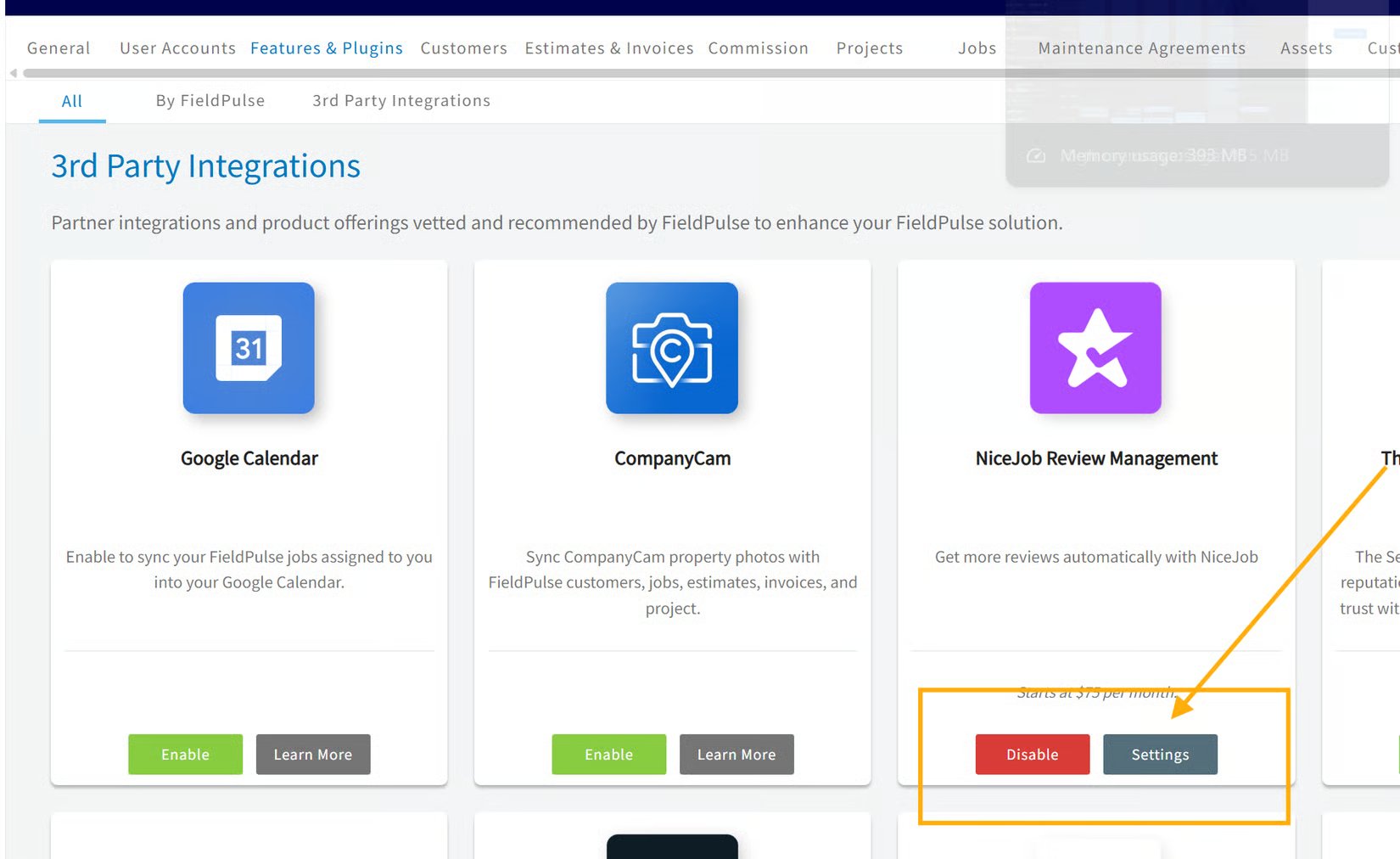
3. Find **NiceJob** and select **Settings**.
4. Authenticate your **NiceJob** account.
5. Select your **business name**.
Once connected, closing a job in FieldPulse automatically prompts NiceJob to follow up with a review invitation.
## Controlling which customers receive review requests
1. Go to **Company Settings.**
2. Select **Features & Plugins**.
3. Find **NiceJob** and select **Settings**.
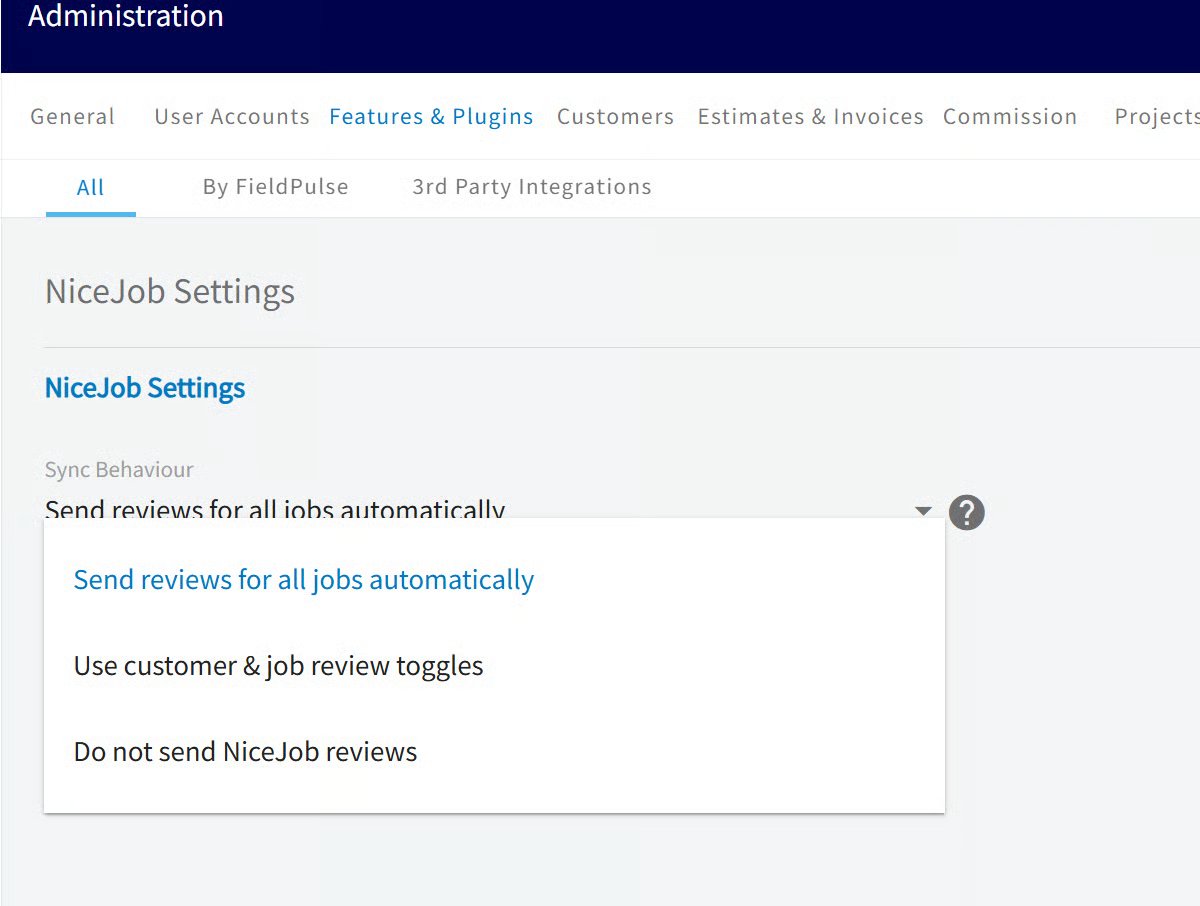
 Set the Sync Behaviour dropdown:
* **Send reviews for all jobs automatically -** sends a request on every completed job. Per-customer and per-job controls are hidden.
* **Use customer & job review toggles -** turns on the per-customer and per-job controls in steps 3 and 4 below. Also sets a default for new customers: Send reviews by default (opted in) or Do not send reviews by default (opted out).
* **Do not send NiceJob reviews -** pauses the integration. Nothing syncs and no requests go out.
Set the Sync Behaviour dropdown:
* **Send reviews for all jobs automatically -** sends a request on every completed job. Per-customer and per-job controls are hidden.
* **Use customer & job review toggles -** turns on the per-customer and per-job controls in steps 3 and 4 below. Also sets a default for new customers: Send reviews by default (opted in) or Do not send reviews by default (opted out).
* **Do not send NiceJob reviews -** pauses the integration. Nothing syncs and no requests go out.
 **Customer's default:** on the customer record, toggle Send NiceJob reviews on jobs by default.
**Override a single job:** on the job record, toggle Send NiceJob review any time before the job is marked complete.
## FAQs
### **How much does NiceJob cost?**
NiceJob plans start at \$75/month for the Grow plan. See the [NiceJob pricing page](https://get.nicejob.com/pricing) for current details.
### **Is there a contract?**
No. A NiceJob subscription does not lock you into a contract.
## Related articles
* [Setting Up Review Management](/customers/reviews-referrals/management)
Your setup is working when you close a job in FieldPulse and NiceJob [automatically sends](https://www.fieldpulse.com/features/customer-communication) that customer a review request.
## Related topics
- [Partner Apps](/integrations/partner-apps/index.md)
- [FieldPulse360: Building Your Brand](/training-resources/fieldpulse360/fieldpulse360-archives/fieldpulse360-building-your-brand.md)
- [Workflow Design Overview](/jobs/workflows/designing-your-workflow.md)
- [Setting Up the Angi Integration](/integrations/marketing/angi.md)
**Customer's default:** on the customer record, toggle Send NiceJob reviews on jobs by default.
**Override a single job:** on the job record, toggle Send NiceJob review any time before the job is marked complete.
## FAQs
### **How much does NiceJob cost?**
NiceJob plans start at \$75/month for the Grow plan. See the [NiceJob pricing page](https://get.nicejob.com/pricing) for current details.
### **Is there a contract?**
No. A NiceJob subscription does not lock you into a contract.
## Related articles
* [Setting Up Review Management](/customers/reviews-referrals/management)
Your setup is working when you close a job in FieldPulse and NiceJob [automatically sends](https://www.fieldpulse.com/features/customer-communication) that customer a review request.
## Related topics
- [Partner Apps](/integrations/partner-apps/index.md)
- [FieldPulse360: Building Your Brand](/training-resources/fieldpulse360/fieldpulse360-archives/fieldpulse360-building-your-brand.md)
- [Workflow Design Overview](/jobs/workflows/designing-your-workflow.md)
- [Setting Up the Angi Integration](/integrations/marketing/angi.md)