> ## Documentation Index
> Fetch the complete documentation index at: https://help.fieldpulse.com/llms.txt
> Use this file to discover all available pages before exploring further.
# CMP Pricing Details
> What Reece maX CMP (Competitive Market Price) does in FieldPulse and how to enable it, so Reece items you import cost jobs at your trade rate automatically.
> **Who uses this:** Admins enable CMP; it then applies for anyone importing Reece items. **Availability:** Australia and New Zealand (ANZ) — requires the Reece maX integration and a Reece maX account.
CMP stands for Competitive Market Price — an automated [Reece](https://www.fieldpulse.com/company/partners/reece-hvac) price that helps you cost jobs more effectively. When CMP pricing is enabled, FieldPulse automatically applies the Competitive Market Price to every item you import from Reece maX, so your job costing uses your trade rate without manual markup.
## Overview
CMP pricing applies Reece's Competitive Market Price to Reece maX items as they come into FieldPulse. It works across every Reece import method — from the catalogue to the API — and it does not change how non-Reece items are priced. For details or questions about how your CMP is set, speak with your [Reece](https://www.fieldpulse.com/company/partners/reece-plumbing) Branch Manager.
| **CMP pricing** | **Behavior** |
| -------------------------- | ---------------------------------------------------------------------------------------- |
| **Reece maX items** | Automatically applies the Competitive Market Price (CMP) to all items imported from maX. |
| **Import methods** | Works across all Reece import methods, from the catalogue to the API. |
| **Non-Reece items** | Does not apply. Your standard default markup settings are used instead. |
| **Customer-facing prices** | Do not display your trade rate. |
Embed video - [https://www.loom.com/share/2518d1625ce64329a571a5fea49b60f8](https://www.loom.com/share/2518d1625ce64329a571a5fea49b60f8)
## How to enable CMP pricing
1. Go to **Company Settings > Features & Plug-ins**.
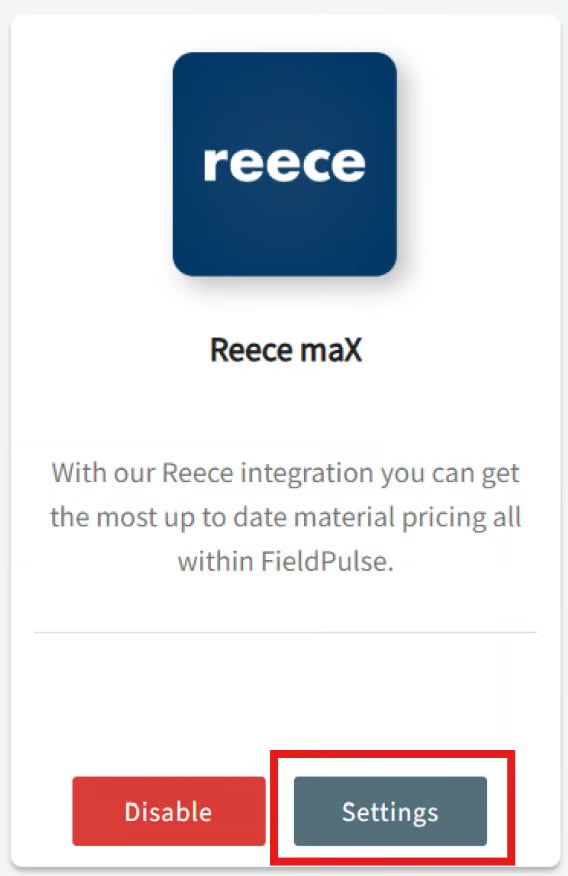
2. Scroll to **Reece maX (ANZ)** and make sure it is **enabled**.
3. Select **Settings**.
 4. Toggle **Enable CMP Pricing** to **ON**.
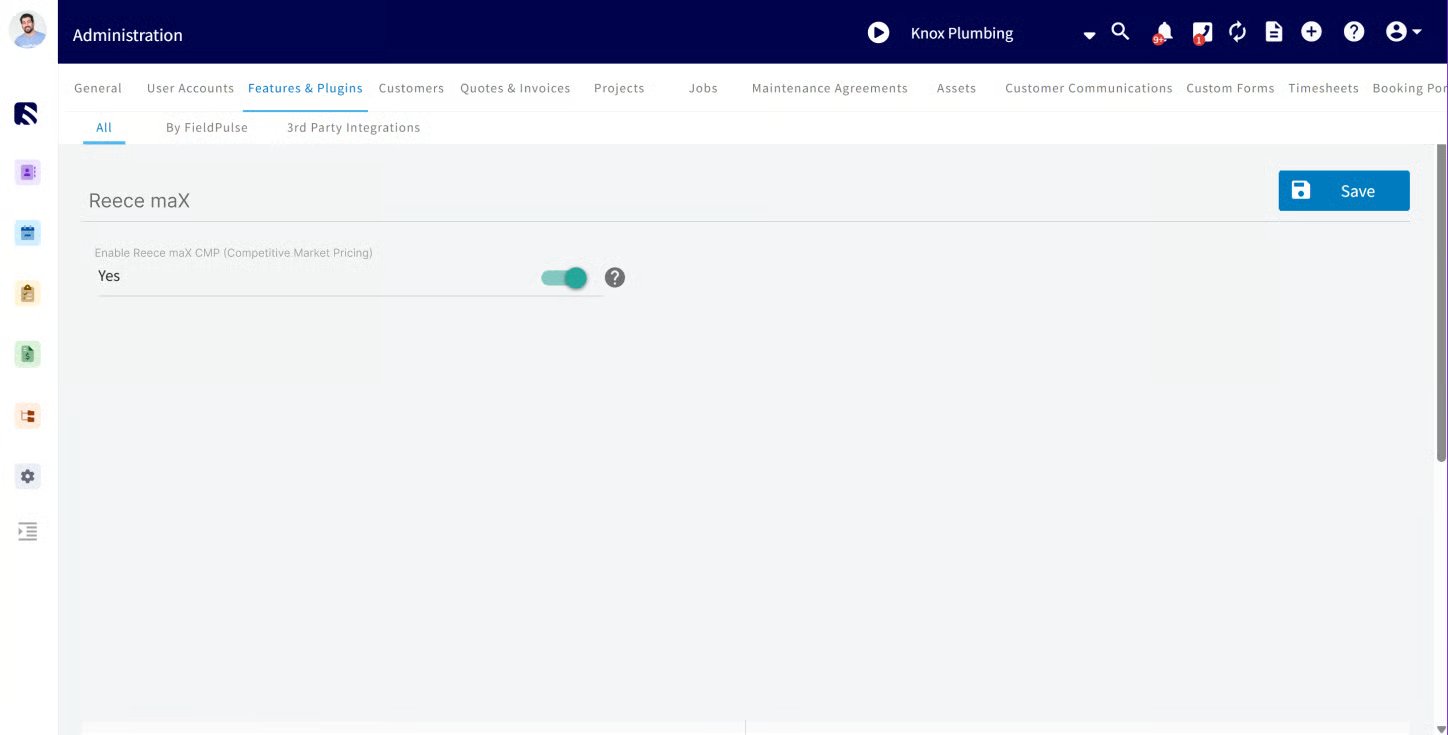 5. Select **Save** to apply your changes.
Once enabled, all Reece-sourced items reflect CMP pricing going forward.
## Notes & limitations
* CMP applies automatically to Reece (maX ANZ) items imported **after** it is enabled.
* CMP does **not** retroactively update existing quotes or invoices — it only applies to new maX items imported after CMP is enabled.
* Non-Reece items still use your existing default markup settings, set under **Company Settings > Estimates & Invoices > Advanced > Default Markup**.
* CMP is a job-costing price. Customer-facing prices do not display your trade rate.
## Related articles
* [Reece maX (ANZ) Overview](/integrations/suppliers/reece-max/overview)
* [How to Pull a Reece Branch Quote into FieldPulse](/integrations/suppliers/reece-max/branch-quotes)
* [How to Create a Reece Purchase Order](/integrations/suppliers/reece-max/purchase-orders)
## Related topics
- [Reece maX (ANZ) Overview](/integrations/suppliers/reece-max/overview.md)
- [How to Pull a Reece Branch Quote into FieldPulse](/integrations/suppliers/reece-max/branch-quotes.md)
- [Reece MAX](/integrations/suppliers/reece-max/index.md)
- [Setting Up Your Pricebook](/add-ons/sales-suite/pricebook.md)
5. Select **Save** to apply your changes.
Once enabled, all Reece-sourced items reflect CMP pricing going forward.
## Notes & limitations
* CMP applies automatically to Reece (maX ANZ) items imported **after** it is enabled.
* CMP does **not** retroactively update existing quotes or invoices — it only applies to new maX items imported after CMP is enabled.
* Non-Reece items still use your existing default markup settings, set under **Company Settings > Estimates & Invoices > Advanced > Default Markup**.
* CMP is a job-costing price. Customer-facing prices do not display your trade rate.
## Related articles
* [Reece maX (ANZ) Overview](/integrations/suppliers/reece-max/overview)
* [How to Pull a Reece Branch Quote into FieldPulse](/integrations/suppliers/reece-max/branch-quotes)
* [How to Create a Reece Purchase Order](/integrations/suppliers/reece-max/purchase-orders)
## Related topics
- [Reece maX (ANZ) Overview](/integrations/suppliers/reece-max/overview.md)
- [How to Pull a Reece Branch Quote into FieldPulse](/integrations/suppliers/reece-max/branch-quotes.md)
- [Reece MAX](/integrations/suppliers/reece-max/index.md)
- [Setting Up Your Pricebook](/add-ons/sales-suite/pricebook.md)