> ## Documentation Index
> Fetch the complete documentation index at: https://help.fieldpulse.com/llms.txt
> Use this file to discover all available pages before exploring further.
# How to Create a Reece Purchase Order
> Create a Reece purchase order in FieldPulse and submit it to your Reece branch through the Reece maX integration, with no separate login or re-keying.
> **Who uses this:** Roles with Purchase Orders permissions. **Availability:** Australia and New Zealand (ANZ) — requires the Reece maX integration and a Reece maX account.
With the Reece maX integration, you can create a Reece purchase order in FieldPulse and submit it to your Reece branch without leaving FieldPulse — no separate maX login and no re-keying. Once the items are processed, the order shows up in your maX account.
## Overview
A Reece purchase order in FieldPulse is a standard purchase order with **Reece maX** set as the supplier. You add Reece parts with the item search, choose pickup or delivery, and submit — FieldPulse sends the order to Reece for you.
## Before you begin
* The [Reece maX integration](/integrations/suppliers/reece-max/overview) must be set up and authenticated with your Reece maX account.
* [Purchase orders](/inventory-materials/purchase-orders/managing) must be enabled in FieldPulse.
## Create and submit a Reece purchase order
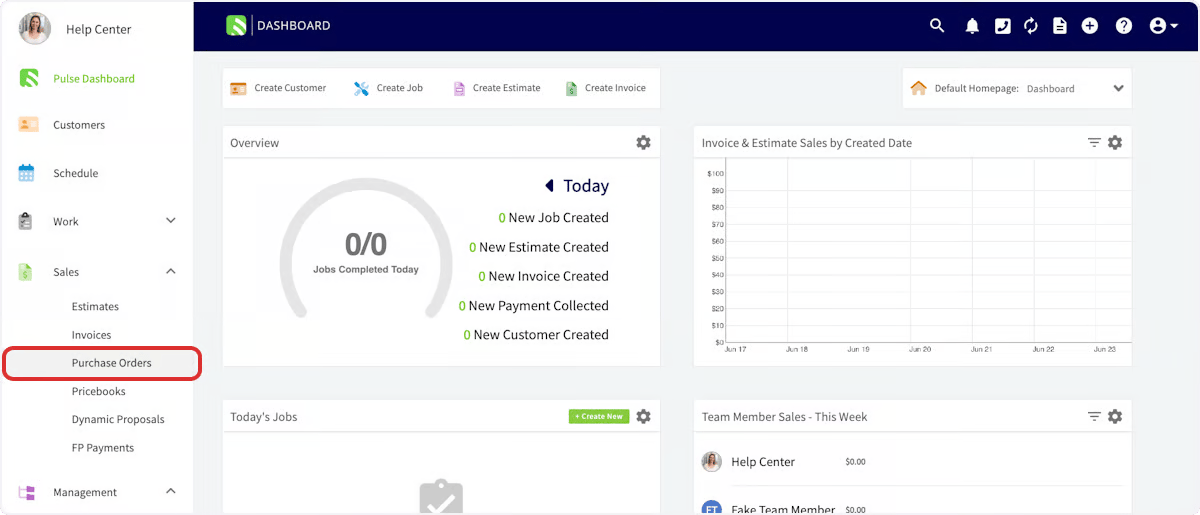
1. In the left-hand menu, select **Purchase Orders**.
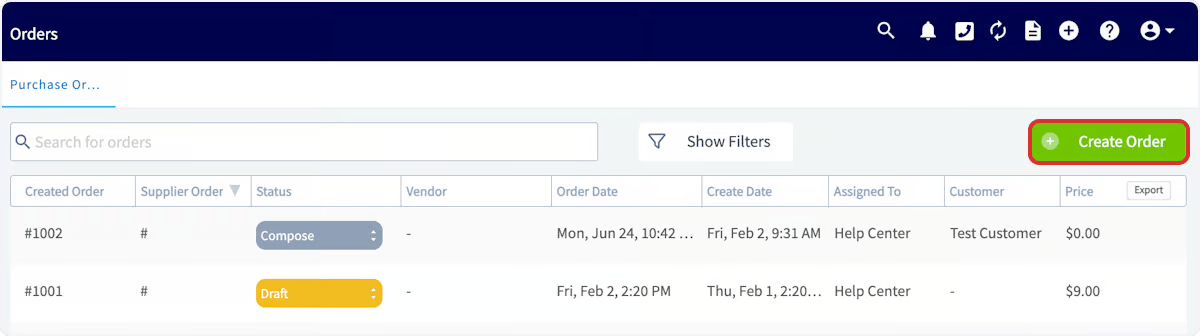
 2. On the Purchase Orders page, select **Create Order**.
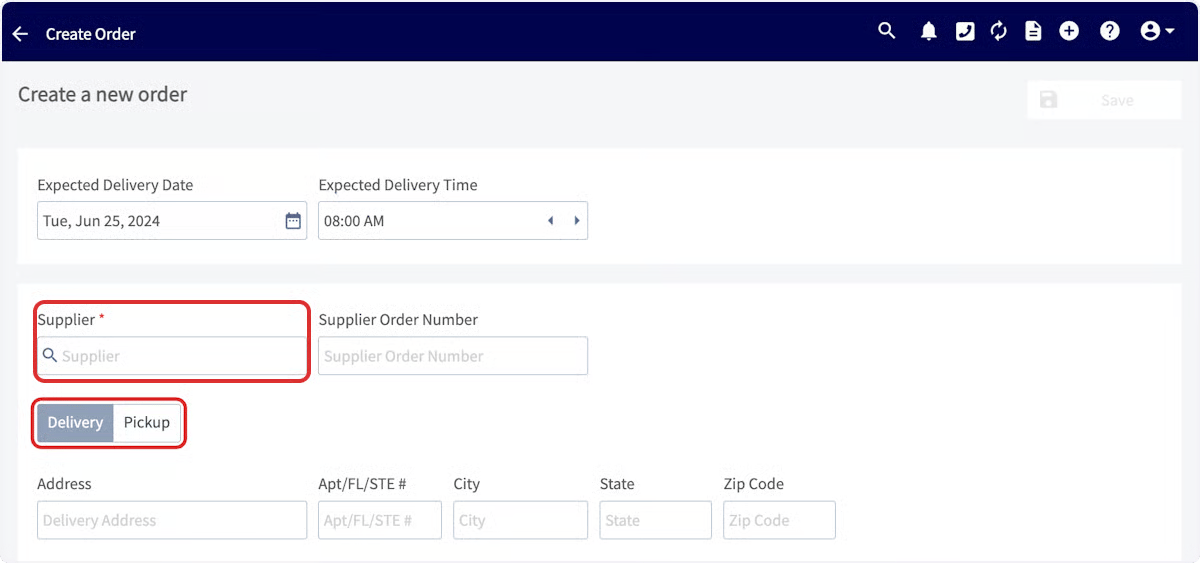
 3. In the **Supplier** search box, look for **Reece maX** in the dropdown, then select **Select Supplier**.
 4. Enter the vendor order number in the search box.
5. Select **Pickup** or **Delivery**. For delivery, enter the delivery address if required. For pickup, the address defaults to your Reece Home Branch.
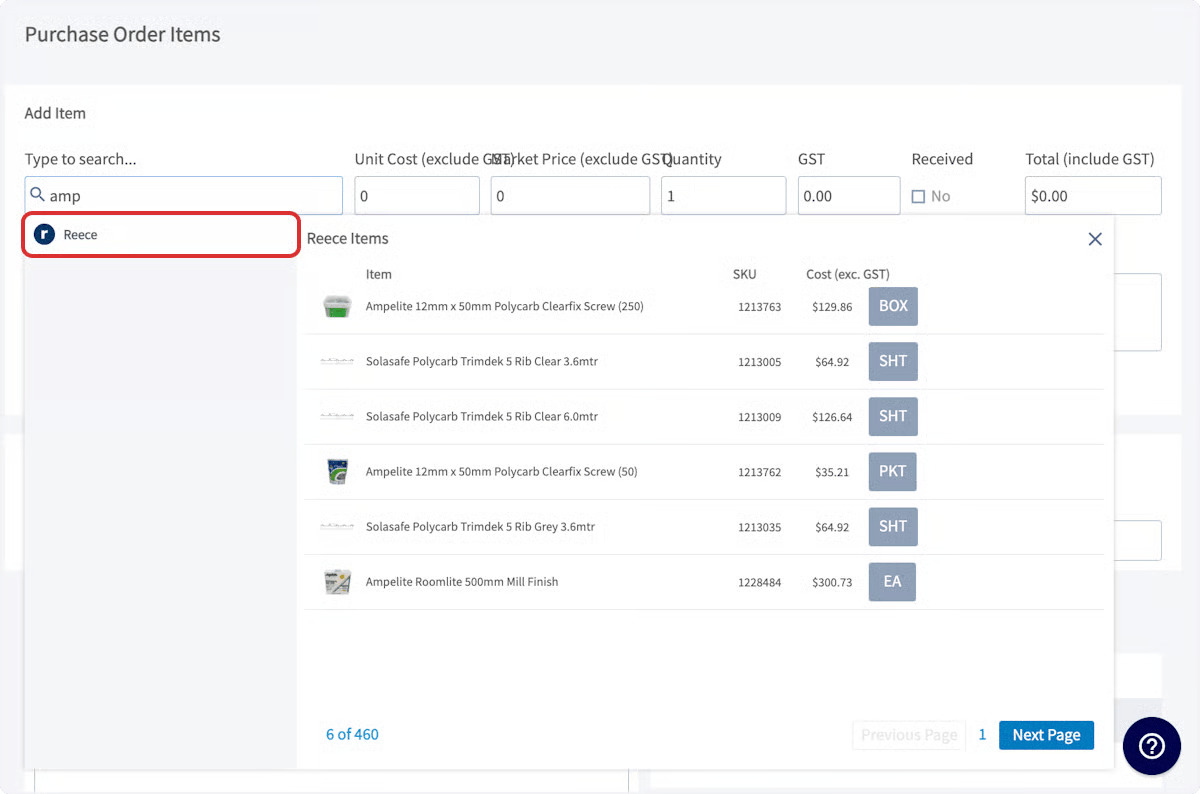
6. In the item search bar, start typing to pull up matching Reece parts. When you find the part, select **Add Item**. Repeat for any additional items, and set the quantity for each.
4. Enter the vendor order number in the search box.
5. Select **Pickup** or **Delivery**. For delivery, enter the delivery address if required. For pickup, the address defaults to your Reece Home Branch.
6. In the item search bar, start typing to pull up matching Reece parts. When you find the part, select **Add Item**. Repeat for any additional items, and set the quantity for each.
 7. Complete the rest of the purchase order and select **Save**.
8. When you are ready to order, submit the order. Once the items are processed, the order appears in your maX account.
## Related articles
* [Reece maX (ANZ) Overview](/integrations/suppliers/reece-max/overview)
* [How to Pull a Reece Branch Quote into FieldPulse](/integrations/suppliers/reece-max/branch-quotes)
* [How to Track Reece Credit Notes by Job](/integrations/suppliers/reece-max/credit-notes)
* [How to Manage Purchase Orders](/inventory-materials/purchase-orders/managing) (FieldPulse)
Your Reece purchase order is working when you submit it from FieldPulse, the items process, and the order appears in your maX account — with the parts, quantities, and branch you set, no double entry.
## Related topics
- [Reece MAX](/integrations/suppliers/reece-max/index.md)
- [Reece maX (ANZ) Overview](/integrations/suppliers/reece-max/overview.md)
- [How to Track Reece Credit Notes by Job](/integrations/suppliers/reece-max/credit-notes.md)
- [How to Pull a Reece Branch Quote into FieldPulse](/integrations/suppliers/reece-max/branch-quotes.md)
7. Complete the rest of the purchase order and select **Save**.
8. When you are ready to order, submit the order. Once the items are processed, the order appears in your maX account.
## Related articles
* [Reece maX (ANZ) Overview](/integrations/suppliers/reece-max/overview)
* [How to Pull a Reece Branch Quote into FieldPulse](/integrations/suppliers/reece-max/branch-quotes)
* [How to Track Reece Credit Notes by Job](/integrations/suppliers/reece-max/credit-notes)
* [How to Manage Purchase Orders](/inventory-materials/purchase-orders/managing) (FieldPulse)
Your Reece purchase order is working when you submit it from FieldPulse, the items process, and the order appears in your maX account — with the parts, quantities, and branch you set, no double entry.
## Related topics
- [Reece MAX](/integrations/suppliers/reece-max/index.md)
- [Reece maX (ANZ) Overview](/integrations/suppliers/reece-max/overview.md)
- [How to Track Reece Credit Notes by Job](/integrations/suppliers/reece-max/credit-notes.md)
- [How to Pull a Reece Branch Quote into FieldPulse](/integrations/suppliers/reece-max/branch-quotes.md)