> ## Documentation Index
> Fetch the complete documentation index at: https://help.fieldpulse.com/llms.txt
> Use this file to discover all available pages before exploring further.
# Setting Up Maintenance Agreement Automation
> Link a template to an item in FieldPulse so selling that item on an estimate or invoice creates a maintenance agreement at the trigger you choose.
> **Who uses this:** Admins. **Availability:** All regions · included in the FieldPulse subscription; Maintenance Agreements must be enabled in **Company Settings > Features & Plugins**.
Maintenance agreement automation creates a maintenance agreement for you when you sell a line item on an estimate or invoice. You link a maintenance agreement template to an item once, and FieldPulse generates the agreement from that template when the trigger you choose happens.
## Overview
Setup has two parts. First, you turn on automation and choose the trigger in **Company Settings > Maintenance Agreements > General**. Second, you link a template to each item in **Company Settings > Estimates & Invoices > Item List**. You cannot link a template from an estimate or invoice. The link must come from the item.
For how to build the agreement itself, see [How to Create a Maintenance Agreement](/jobs/assets/maintenance-agreements).
## Before you begin
* Enable Maintenance Agreements in **Company Settings > Features & Plugins**.
* Save at least one maintenance agreement template. See the [Use templates](/jobs/assets/maintenance-agreements#use-templates) section of [How to Create a Maintenance Agreement](/jobs/assets/maintenance-agreements).
* Sign in as an Admin, since these settings live in Company Settings.
## Step-by-step setup
### Step 1: Turn on automation and choose a trigger
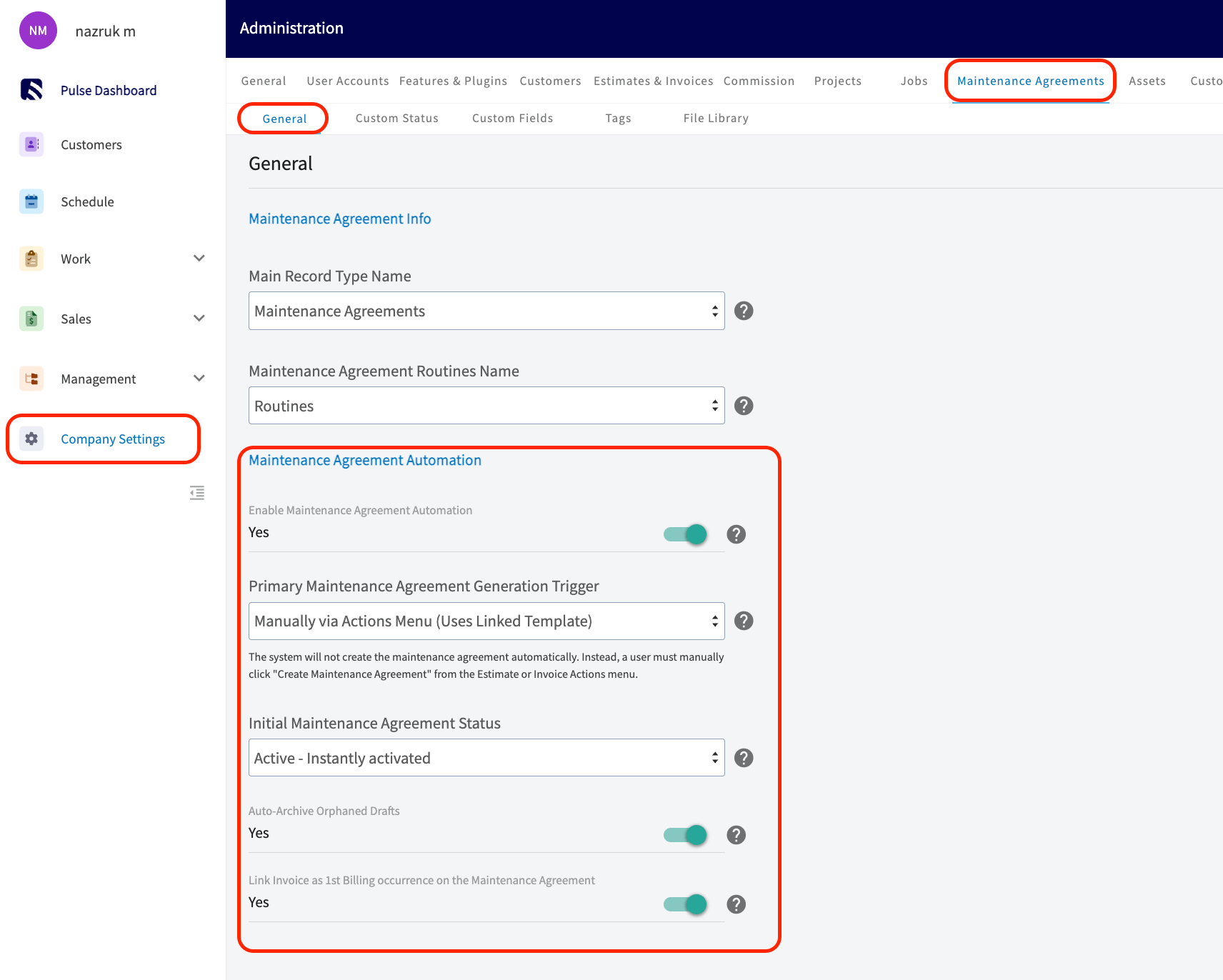
1. Go to **Company Settings > Maintenance Agreements > General**.
2. Turn on **Enable Maintenance Agreement Automation**.
3. Select a **Primary Maintenance Agreement Generation Trigger**. This field is required while automation is on. The Settings reference below describes each option.
4. Select the **Initial Maintenance Agreement Status**: **Draft** (the default) or **Active**. This field appears only when the trigger creates agreements automatically.
5. (Optional) Leave **Auto-Archive Orphaned Drafts** on to archive an automatically created Draft agreement when its estimate is rejected or its invoice is voided.
6. (Optional) Turn on **Link Invoice as 1st Billing occurrence on the Maintenance Agreement** to count the sold invoice as the agreement's first billing. This toggle is off by default, and it does not appear when the trigger is **On Estimate Acceptance**.
7. Select **Save**.
 ### Step 2: Link a template to an item
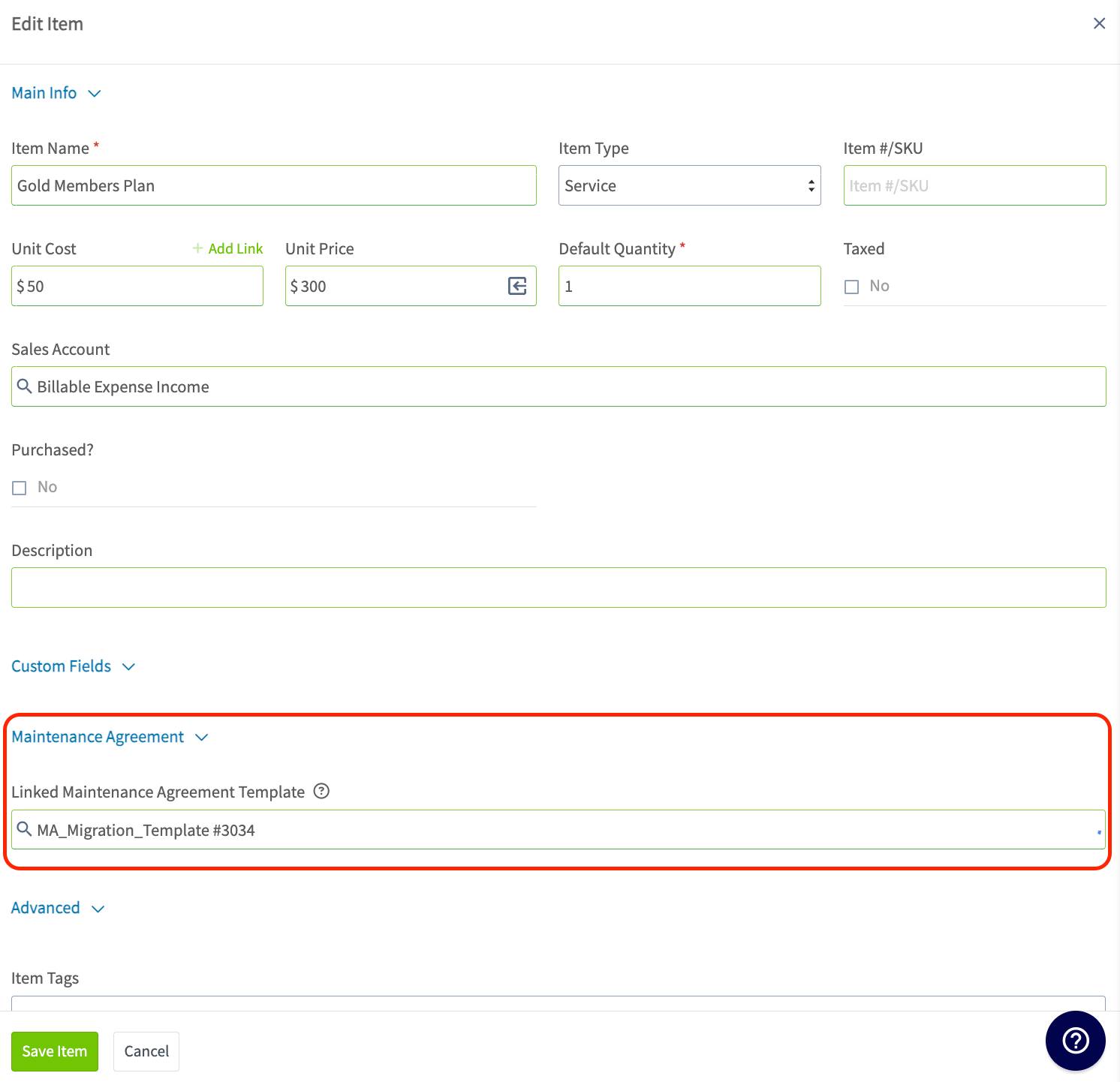
1. Go to **Company Settings > Estimates & Invoices > Item List**.
2. Open an existing item, or create a new one.
3. In the **Maintenance Agreement** section, select a **Linked Maintenance Agreement Template**. This section appears only when Maintenance Agreements are enabled and automation is on.
4. Select **Save Item**.
Every estimate or invoice line that uses the item keeps the template link, however you add the item: from the pricebook, the item list, a bundle, an estimate or invoice template, a duplicated record, a material list, a purchase order, the booking portal, or a converted estimate. A line item with a linked template shows an agreement icon. In edit mode, select the icon to open the item.
### Step 2: Link a template to an item
1. Go to **Company Settings > Estimates & Invoices > Item List**.
2. Open an existing item, or create a new one.
3. In the **Maintenance Agreement** section, select a **Linked Maintenance Agreement Template**. This section appears only when Maintenance Agreements are enabled and automation is on.
4. Select **Save Item**.
Every estimate or invoice line that uses the item keeps the template link, however you add the item: from the pricebook, the item list, a bundle, an estimate or invoice template, a duplicated record, a material list, a purchase order, the booking portal, or a converted estimate. A line item with a linked template shows an agreement icon. In edit mode, select the icon to open the item.
 ### Step 3 (optional): Link templates in bulk
1. Download the item import template from **Company Settings > Estimates & Invoices > Item List**.
2. Enter a maintenance agreement template ID in the **Maintenance Agreement Template** column for each item.
3. Upload the file.
FieldPulse rejects a row when its template ID does not exist, and it leaves the template unlinked when the column is empty. Importing an item again with a different template ID replaces the earlier link.
## Settings reference
### Generation triggers
The **Primary Maintenance Agreement Generation Trigger** decides when FieldPulse creates the agreement. Every automatic trigger first checks whether the estimate or invoice already has a linked agreement, and skips creation if it does.
| **Trigger** | **When FieldPulse creates the agreement** |
| - | - |
| **Manually via Actions Menu (Uses Linked Template)** | Never automatically. A user selects **Create Maintenance Agreement** from the estimate or invoice **Actions** menu. |
| **On Estimate Acceptance** | When the estimate is marked accepted. Only the line items in the selected option and add-ons generate agreements. |
| **On Invoice Finalization** | When the invoice is finalized. |
| **On Invoice Part Payment** | When any payment is made on the invoice, including a payment requested on an estimate that generates the invoice. |
| **On Invoice Full Payment** | When the invoice balance reaches zero. |
### Settings
| **Setting** | **What it does** | **Default** |
| - | - | - |
| **Enable Maintenance Agreement Automation** | Turns on automation and shows the settings below. | Off |
| **Primary Maintenance Agreement Generation Trigger** | Chooses the event that creates the agreement. | Blank, required when automation is on |
| **Initial Maintenance Agreement Status** | Sets the status of an automatically created agreement. | Draft |
| **Auto-Archive Orphaned Drafts** | Archives an automatically created Draft agreement when its estimate is rejected or its invoice is voided. | On |
| **Link Invoice as 1st Billing occurrence on the Maintenance Agreement** | Counts the sold invoice as the agreement's first billing, so FieldPulse does not create a duplicate invoice at the start of the contract. | Off |
### What happens when FieldPulse creates an agreement
The agreement appears in the **Maintenance Agreement** field at the top of the estimate or invoice, with a link. If several line items generate agreements, each agreement appears there, separated by commas. FieldPulse fills the agreement's **Sales Source** field with the estimate or invoice, and you can change it later in edit mode.
When you create an agreement manually from the **Actions** menu, FieldPulse always asks whether to use the linked template and set the current record as the sales source, even when the trigger is automatic. If you create the agreement manually before an automatic trigger fires, FieldPulse skips the automatic creation so the record does not get a duplicate agreement.
A line item that comes from a recurring billing invoice never creates an agreement, even when its item has a linked template. Automatic creation applies only to one-time invoices.
If you delete a maintenance agreement template, items linked to it become unlinked, and automatic creation stops for those items. If you edit a template, agreements created afterward use the updated version.
### Estimate and invoice settings
An estimate or invoice with a template-linked line item shows a **Maintenance Agreement Generation** field. The field displays the trigger and initial status from Company Settings. Select the gear icon to review them and to adjust **Link as First Payment on the Maintenance Agreement** for that one record.
### Link an invoice as the first billing
Payment is collected on an invoice, so only an invoice can serve as an agreement's first billing. FieldPulse offers this link when you save an invoice that has a template-linked line item, or when you create an agreement from an invoice. The pop-up **Does this invoice fulfill the first billing sequence?** gives two choices.
* Select **Yes, Link as Billing Sequence 1** to count the invoice as the first billing. The invoice appears first on the agreement's **Invoices** tab, and the **Sales Source** field keeps the link.
* Select **No, Keep Invoice Separate** to treat the invoice as a standalone bill. Recurring billing then creates its own invoice for the first billing sequence.
When you link the invoice, the term stays the same length and the schedule adjusts as follows.
| **Billing schedule** | **Effect of linking the invoice** |
| - | - |
| No end date | FieldPulse delays the first automatic invoice by one billing cycle and then bills normally. |
| Fixed end date | The end date does not change, and FieldPulse creates one fewer automatic invoice. |
| Fixed number of occurrences | FieldPulse reduces the count by one. A schedule of 24 occurrences becomes 23 automatic invoices. |
An estimate cannot be linked as the first billing, because an estimate has no payment. When the trigger is **On Estimate Acceptance**, the first billing link and its pop-up do not appear.
## Related articles
* [How to Create a Maintenance Agreement](/jobs/assets/maintenance-agreements)
* [Setting Up Recurring Billing](/estimates-invoices/recurring/recurring-billing)
* [Custom Status Workflows](/jobs/workflows/custom-status-workflows)
Automation is working when selling an item with a linked template, at the moment of your chosen trigger, creates an agreement that appears in the **Maintenance Agreement** field at the top of the estimate or invoice.
## Related topics
- [How to Create a Maintenance Agreement](/jobs/assets/maintenance-agreements.md)
- [Assets & Maintenance](/jobs/assets/index.md)
- [Setting Up Operator AI](/add-ons/ai/operator-ai.md)
- [Engage Overview](/add-ons/engage/overview.md)
This documentation is built and hosted on [Mintlify](https://mintlify.com), a developer documentation platform.
### Step 3 (optional): Link templates in bulk
1. Download the item import template from **Company Settings > Estimates & Invoices > Item List**.
2. Enter a maintenance agreement template ID in the **Maintenance Agreement Template** column for each item.
3. Upload the file.
FieldPulse rejects a row when its template ID does not exist, and it leaves the template unlinked when the column is empty. Importing an item again with a different template ID replaces the earlier link.
## Settings reference
### Generation triggers
The **Primary Maintenance Agreement Generation Trigger** decides when FieldPulse creates the agreement. Every automatic trigger first checks whether the estimate or invoice already has a linked agreement, and skips creation if it does.
| **Trigger** | **When FieldPulse creates the agreement** |
| - | - |
| **Manually via Actions Menu (Uses Linked Template)** | Never automatically. A user selects **Create Maintenance Agreement** from the estimate or invoice **Actions** menu. |
| **On Estimate Acceptance** | When the estimate is marked accepted. Only the line items in the selected option and add-ons generate agreements. |
| **On Invoice Finalization** | When the invoice is finalized. |
| **On Invoice Part Payment** | When any payment is made on the invoice, including a payment requested on an estimate that generates the invoice. |
| **On Invoice Full Payment** | When the invoice balance reaches zero. |
### Settings
| **Setting** | **What it does** | **Default** |
| - | - | - |
| **Enable Maintenance Agreement Automation** | Turns on automation and shows the settings below. | Off |
| **Primary Maintenance Agreement Generation Trigger** | Chooses the event that creates the agreement. | Blank, required when automation is on |
| **Initial Maintenance Agreement Status** | Sets the status of an automatically created agreement. | Draft |
| **Auto-Archive Orphaned Drafts** | Archives an automatically created Draft agreement when its estimate is rejected or its invoice is voided. | On |
| **Link Invoice as 1st Billing occurrence on the Maintenance Agreement** | Counts the sold invoice as the agreement's first billing, so FieldPulse does not create a duplicate invoice at the start of the contract. | Off |
### What happens when FieldPulse creates an agreement
The agreement appears in the **Maintenance Agreement** field at the top of the estimate or invoice, with a link. If several line items generate agreements, each agreement appears there, separated by commas. FieldPulse fills the agreement's **Sales Source** field with the estimate or invoice, and you can change it later in edit mode.
When you create an agreement manually from the **Actions** menu, FieldPulse always asks whether to use the linked template and set the current record as the sales source, even when the trigger is automatic. If you create the agreement manually before an automatic trigger fires, FieldPulse skips the automatic creation so the record does not get a duplicate agreement.
A line item that comes from a recurring billing invoice never creates an agreement, even when its item has a linked template. Automatic creation applies only to one-time invoices.
If you delete a maintenance agreement template, items linked to it become unlinked, and automatic creation stops for those items. If you edit a template, agreements created afterward use the updated version.
### Estimate and invoice settings
An estimate or invoice with a template-linked line item shows a **Maintenance Agreement Generation** field. The field displays the trigger and initial status from Company Settings. Select the gear icon to review them and to adjust **Link as First Payment on the Maintenance Agreement** for that one record.
### Link an invoice as the first billing
Payment is collected on an invoice, so only an invoice can serve as an agreement's first billing. FieldPulse offers this link when you save an invoice that has a template-linked line item, or when you create an agreement from an invoice. The pop-up **Does this invoice fulfill the first billing sequence?** gives two choices.
* Select **Yes, Link as Billing Sequence 1** to count the invoice as the first billing. The invoice appears first on the agreement's **Invoices** tab, and the **Sales Source** field keeps the link.
* Select **No, Keep Invoice Separate** to treat the invoice as a standalone bill. Recurring billing then creates its own invoice for the first billing sequence.
When you link the invoice, the term stays the same length and the schedule adjusts as follows.
| **Billing schedule** | **Effect of linking the invoice** |
| - | - |
| No end date | FieldPulse delays the first automatic invoice by one billing cycle and then bills normally. |
| Fixed end date | The end date does not change, and FieldPulse creates one fewer automatic invoice. |
| Fixed number of occurrences | FieldPulse reduces the count by one. A schedule of 24 occurrences becomes 23 automatic invoices. |
An estimate cannot be linked as the first billing, because an estimate has no payment. When the trigger is **On Estimate Acceptance**, the first billing link and its pop-up do not appear.
## Related articles
* [How to Create a Maintenance Agreement](/jobs/assets/maintenance-agreements)
* [Setting Up Recurring Billing](/estimates-invoices/recurring/recurring-billing)
* [Custom Status Workflows](/jobs/workflows/custom-status-workflows)
Automation is working when selling an item with a linked template, at the moment of your chosen trigger, creates an agreement that appears in the **Maintenance Agreement** field at the top of the estimate or invoice.
## Related topics
- [How to Create a Maintenance Agreement](/jobs/assets/maintenance-agreements.md)
- [Assets & Maintenance](/jobs/assets/index.md)
- [Setting Up Operator AI](/add-ons/ai/operator-ai.md)
- [Engage Overview](/add-ons/engage/overview.md)
This documentation is built and hosted on [Mintlify](https://mintlify.com), a developer documentation platform.