> ## Documentation Index
> Fetch the complete documentation index at: https://help.fieldpulse.com/llms.txt
> Use this file to discover all available pages before exploring further.
# How to Create Recurring Jobs
> Set weekly, monthly, or seasonal work to repeat in FieldPulse so every occurrence lands on the schedule without anyone re-entering the job by hand.
> **Who uses this:** Roles with permission to create jobs. **Availability:** All regions.
Some work comes back on a schedule — weekly maintenance, monthly service, seasonal tune-ups — and rebuilding the same [job](https://www.fieldpulse.com/features/job-management) by hand every time is the step that gets skipped. A recurring job is a job you create once and set to re-occur at an interval you choose, so the next visit is already on the calendar.
## Overview
A recurring job repeats on a regular basis at the interval you set. You link a customer, enter the job details, choose how often the job repeats, and set when the recurrence starts and whether it ever ends. FieldPulse then creates each occurrence and adds it to your schedule and your job listings.
The **Recurring** tab under **Jobs** is where recurring jobs live. From that tab you can view and edit the recurring jobs you already have, as well as create new ones.
## Video walkthrough
## Before you begin
* Have the customer ready to link. You can link an existing customer or create a new one while building the recurring job.
* Know how often the job should repeat, when the first occurrence is, and whether the recurrence should ever end.
* Decide which **Status Workflow** each occurrence should follow. [Workflow Design Overview](/jobs/workflows/designing-your-workflow) covers what a workflow needs.
* If you use ClearPath, decide which **Status Action Flow** the job should follow. See [Setting Up ClearPath Status Action Flows](/jobs/workflows/clearpath/status-action-flows).
## On web
### Open the recurring job form
Open the **Create Recurring Job** form from either of two places.
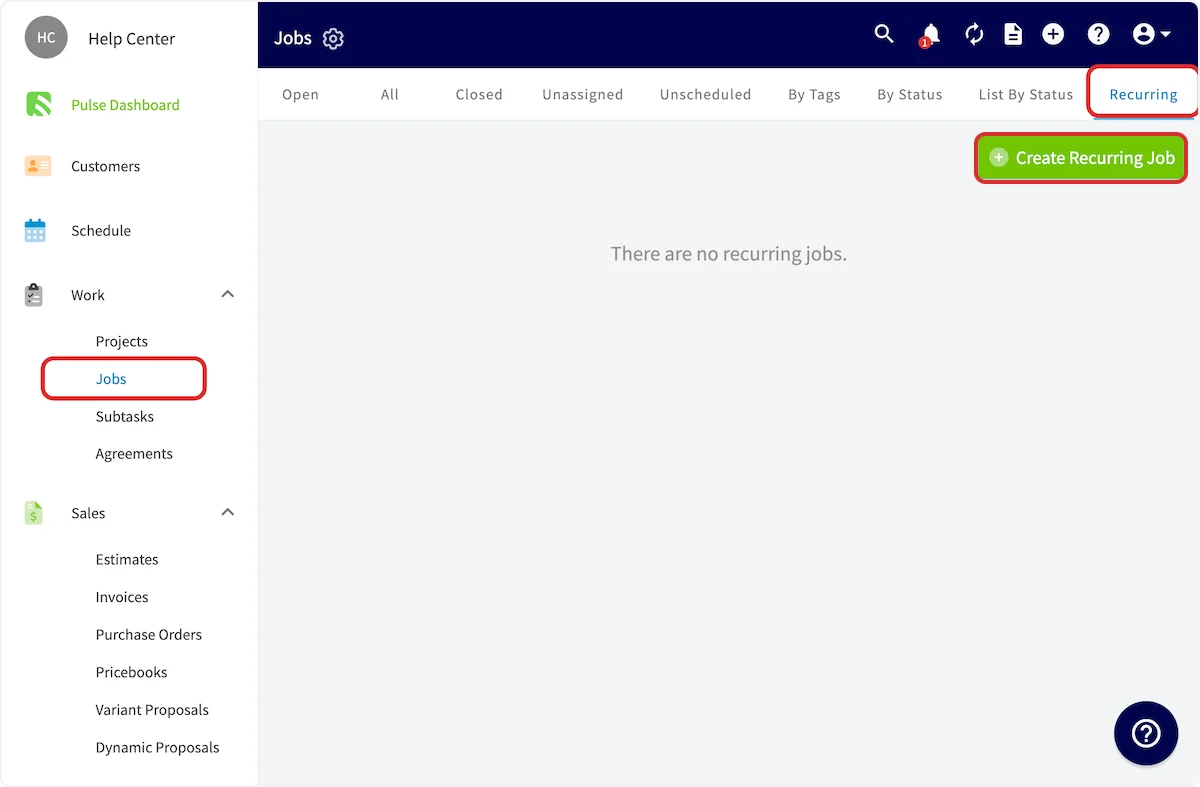
**From the Recurring tab.** Select **Jobs** in the left menu, select the **Recurring** tab, then select **Create Recurring Job**.
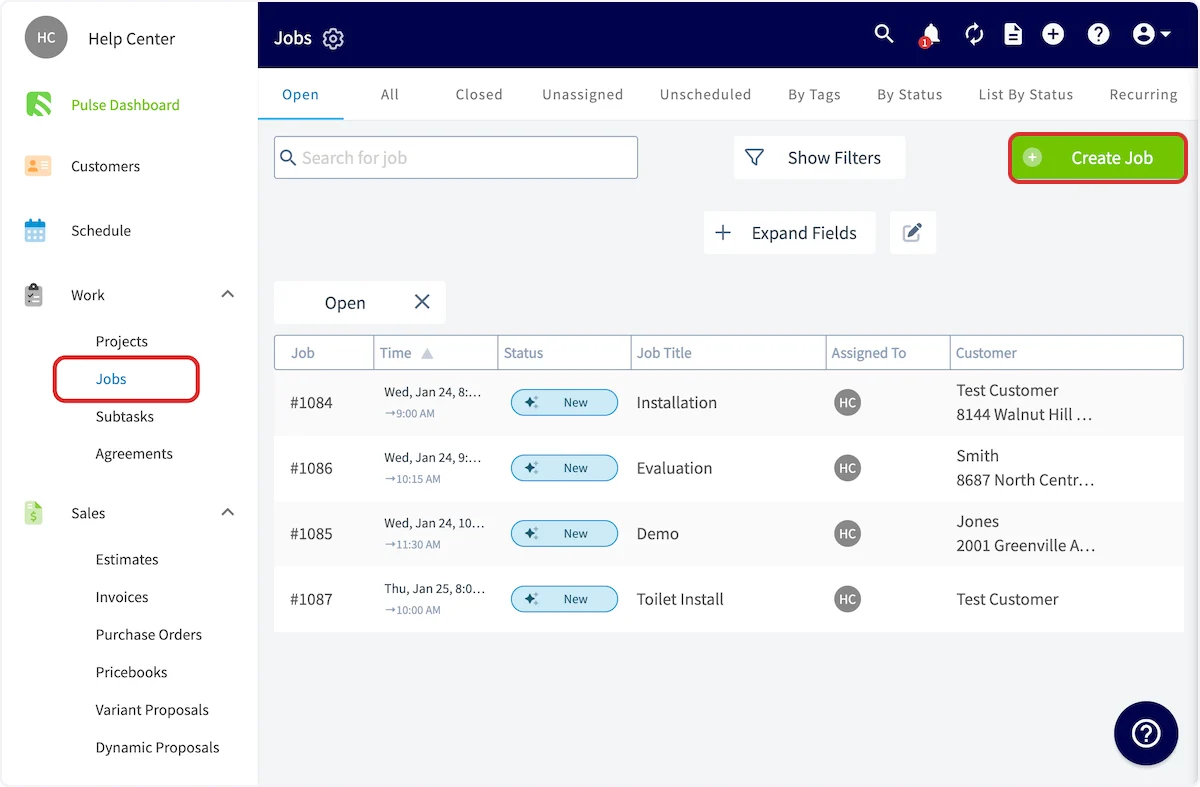
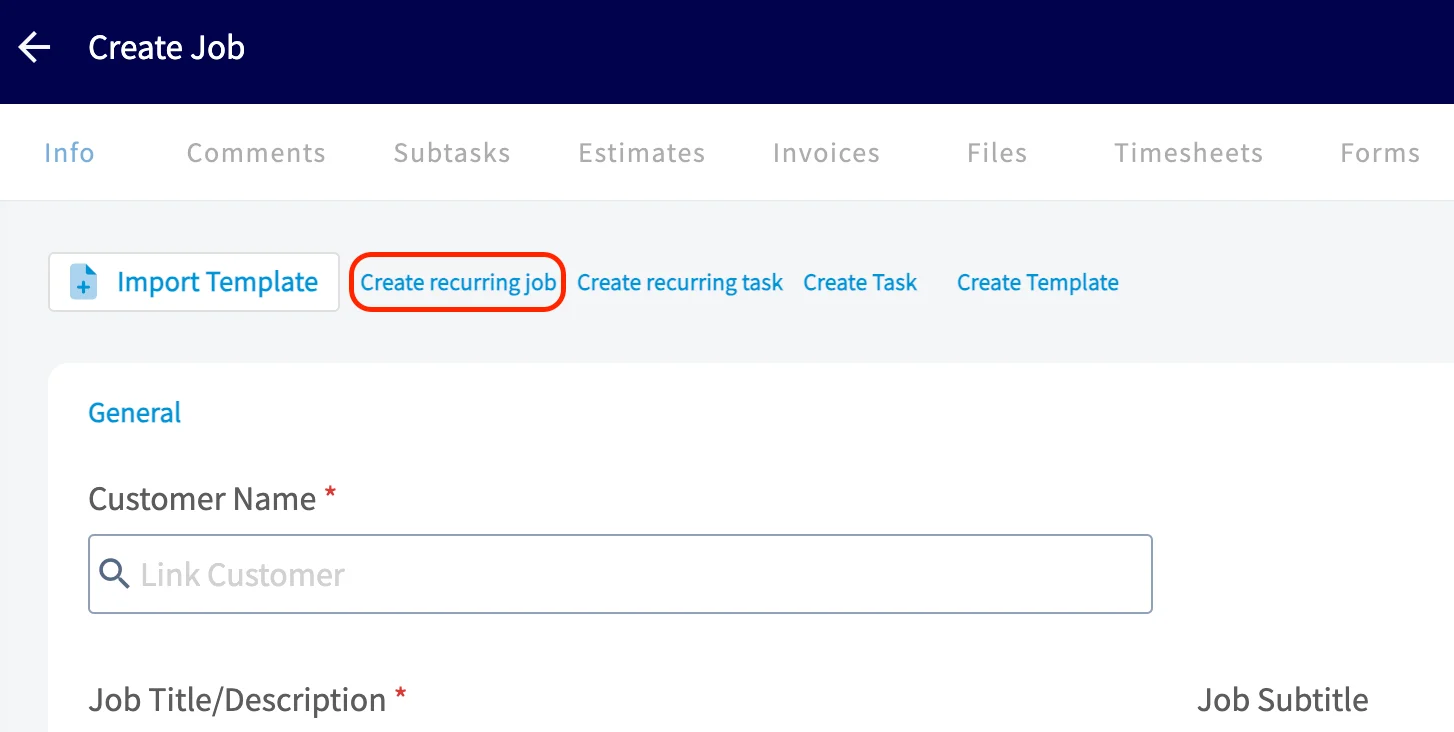
 **From a new job record.** Select **Jobs** in the left menu, then select **Create Job**. At the top of the new job record, select **Create recurring job** instead of entering the job details as usual.
 ### Enter the job details
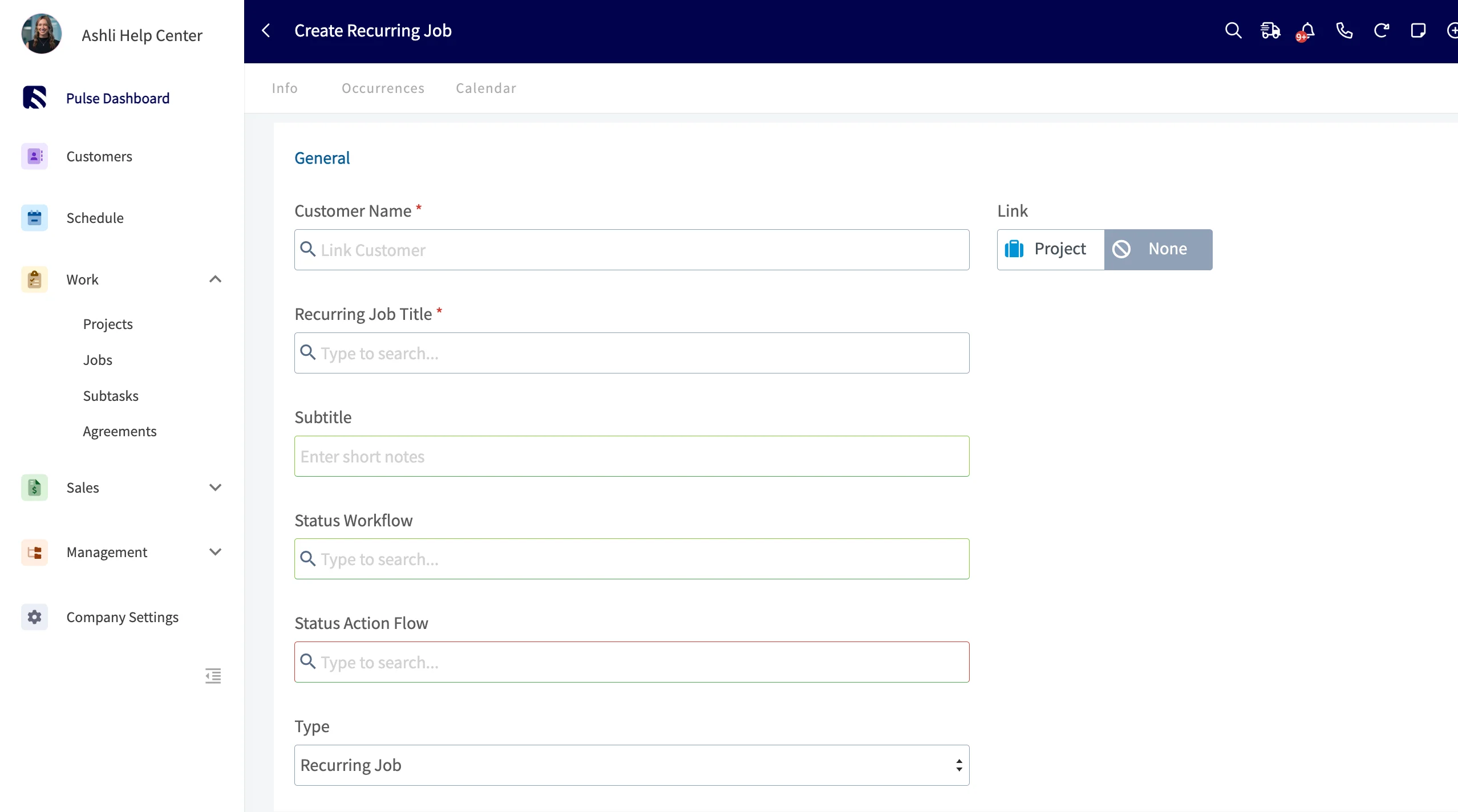
1. Link a **customer**. Select an existing customer or create a new one — the location and contact auto-populate from the customer you link.
2. Enter a **Recurring Job Title** that describes the work to be performed.
3. Select the **Status Workflow** you want each job to follow.
4. Select the **Status Action Flow** ([ClearPath](https://www.fieldpulse.com/features/clearpath)) you want each job to follow.
### Enter the job details
1. Link a **customer**. Select an existing customer or create a new one — the location and contact auto-populate from the customer you link.
2. Enter a **Recurring Job Title** that describes the work to be performed.
3. Select the **Status Workflow** you want each job to follow.
4. Select the **Status Action Flow** ([ClearPath](https://www.fieldpulse.com/features/clearpath)) you want each job to follow.
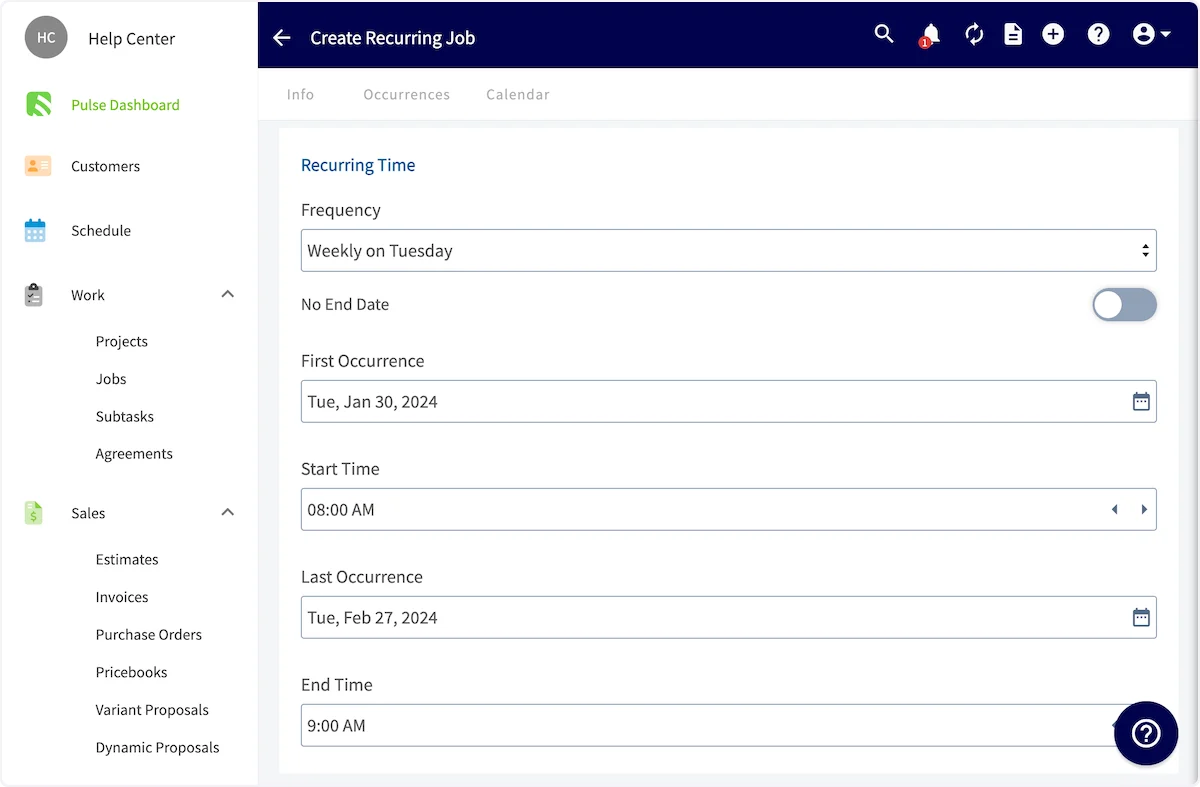
 ### Set the frequency and end point
1. Set the **Frequency** the job repeats on, such as weekly on a chosen day.
2. Set the **First Occurrence** date and the **Start Time**.
3. Choose how the recurrence ends. Turn on **No End Date** to have the job repeat with no end point, or set the **Last Occurrence** date and **End Time**.
### Set the frequency and end point
1. Set the **Frequency** the job repeats on, such as weekly on a chosen day.
2. Set the **First Occurrence** date and the **Start Time**.
3. Choose how the recurrence ends. Turn on **No End Date** to have the job repeat with no end point, or set the **Last Occurrence** date and **End Time**.
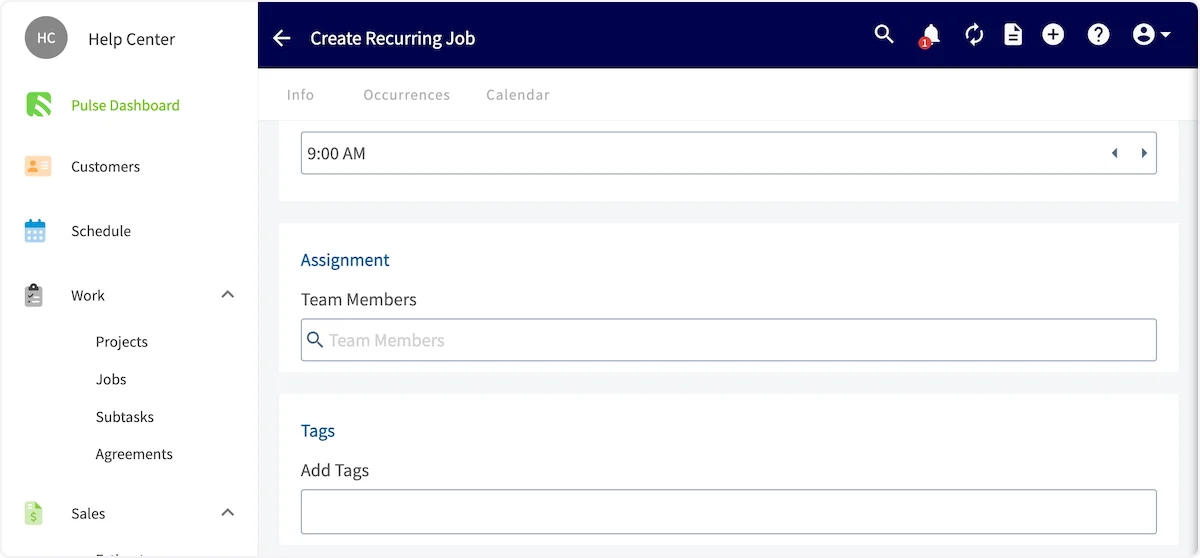
 ### Assign the team and save
1. Select the **Team Members** to assign to the job. The assignment can be changed for future occurrences.
2. Add **Tags** and **notes** as needed.
3. Select **Save**.
### Assign the team and save
1. Select the **Team Members** to assign to the job. The assignment can be changed for future occurrences.
2. Add **Tags** and **notes** as needed.
3. Select **Save**.
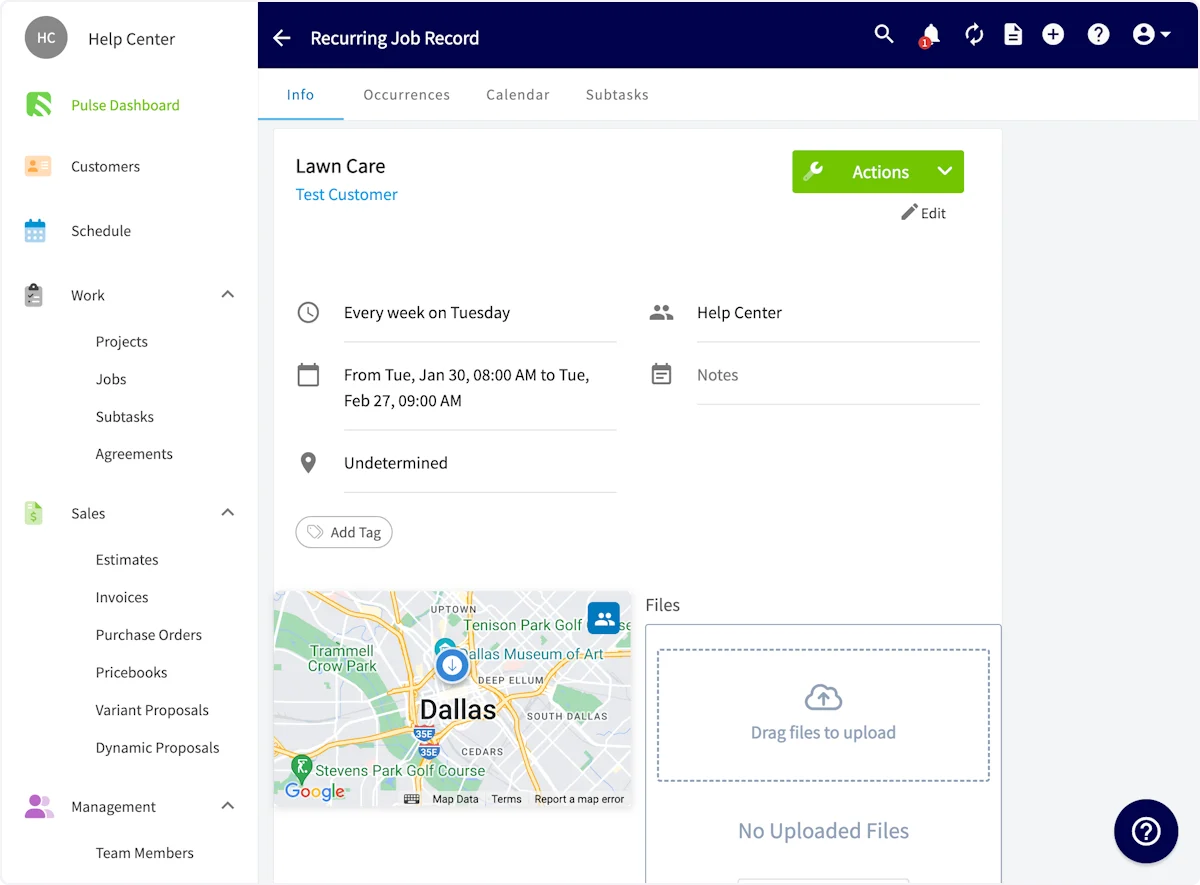
 The recurring job is added to your schedule and listed under **Jobs**.
 ## FAQs
### What happens if a month doesn't contain the occurrence a recurring job is scheduled for, such as a 5th Monday?
The job skips that occurrence entirely. There is no fallback to the nearest or last available day, and the next run resumes on the following scheduled occurrence.
### How do I bill a recurring job automatically?
Recurring billing is set up separately from the recurring job itself. See [Setting Up Recurring Billing](/estimates-invoices/recurring/recurring-billing) for how to attach it to a recurring job.
## Still need help?
Reach the [FieldPulse support team](https://www.fieldpulse.com/company/contact-us) at [support@fieldpulse.com](mailto:support@fieldpulse.com) or through the chat feature in the bottom-right corner of your screen.
## Related articles
* [How to Create a Job](/jobs/jobs-tasks/creating-a-job)
* [How to Create a Task](/jobs/jobs-tasks/creating-a-task)
* [How to Complete a Job in the Field](/jobs/jobs-tasks/completing-a-job)
* [Setting Up Recurring Billing](/estimates-invoices/recurring/recurring-billing)
Your setup is working when the recurring job shows on the schedule and under Jobs, and the next occurrence appears on its own at the frequency you set — assigned and tagged the way you built it.
## Related topics
- [How to Create a Job](/jobs/jobs-tasks/creating-a-job.md)
- [Setting Up Recurring Billing](/estimates-invoices/recurring/recurring-billing.md)
- [How to Create a Task](/jobs/jobs-tasks/creating-a-task.md)
- [How to Complete a Job in the Field](/jobs/jobs-tasks/completing-a-job.md)
## FAQs
### What happens if a month doesn't contain the occurrence a recurring job is scheduled for, such as a 5th Monday?
The job skips that occurrence entirely. There is no fallback to the nearest or last available day, and the next run resumes on the following scheduled occurrence.
### How do I bill a recurring job automatically?
Recurring billing is set up separately from the recurring job itself. See [Setting Up Recurring Billing](/estimates-invoices/recurring/recurring-billing) for how to attach it to a recurring job.
## Still need help?
Reach the [FieldPulse support team](https://www.fieldpulse.com/company/contact-us) at [support@fieldpulse.com](mailto:support@fieldpulse.com) or through the chat feature in the bottom-right corner of your screen.
## Related articles
* [How to Create a Job](/jobs/jobs-tasks/creating-a-job)
* [How to Create a Task](/jobs/jobs-tasks/creating-a-task)
* [How to Complete a Job in the Field](/jobs/jobs-tasks/completing-a-job)
* [Setting Up Recurring Billing](/estimates-invoices/recurring/recurring-billing)
Your setup is working when the recurring job shows on the schedule and under Jobs, and the next occurrence appears on its own at the frequency you set — assigned and tagged the way you built it.
## Related topics
- [How to Create a Job](/jobs/jobs-tasks/creating-a-job.md)
- [Setting Up Recurring Billing](/estimates-invoices/recurring/recurring-billing.md)
- [How to Create a Task](/jobs/jobs-tasks/creating-a-task.md)
- [How to Complete a Job in the Field](/jobs/jobs-tasks/completing-a-job.md)