> ## Documentation Index
> Fetch the complete documentation index at: https://help.fieldpulse.com/llms.txt
> Use this file to discover all available pages before exploring further.
# Offline Mode Overview
> A quick reference for what's available in the FieldPulse mobile app when you lose connection.
A quick reference for what's available in the FieldPulse mobile app when you lose connection.
# How Offline Mode Works
* FieldPulse automatically switches to Offline Mode when you're out of cell range or in Airplane Mode.
* Anything you create or edit while offline is saved locally on your device.
* When you reconnect to the internet, your changes sync automatically — no extra steps required.
* Offline Mode is available to Admins, Team Managers, and Service Agents.
***
# Offline Mode Capability Reference
## Legend:
**Yes** = fully supported
**Limited** = partial support with caveats
**No** = not available offline
| **Record Type** | **View Existing** | **Create New** | **Edit Existing** | **Cache Limits & Notes** |
| ------------------------------------------------------------------- | -------------------------------------------------------------------------------------------------------- | ----------------------------------------------------------------------------------------------------- | ---------------------------------------------------------------------------------------------------------------- | ------------------------------------------------------------------------------------------------------------------------------------------------------------------------------------------------------------------ |
| **[Customers](/offline-mode/customers-jobs-projects-offline-mode)** | **Yes**
Customers linked to your cached Jobs and Projects are available offline. | **No**
New customers must be created once you're back online. | **Limited**
Edit linked Custom Forms (up to 200 per record type). | • Customer records cache automatically when they're tied to your scheduled Jobs and Projects.
• All edits sync once you reconnect to the internet. |
| **[Jobs](/offline-mode/customers-jobs-projects-offline-mode)** | **Yes**
Jobs are cached for 1 week. | **No**
Create new Jobs once back online. | **Yes**
Add notes, upload up to 50 photos at a time, and change Custom Status Workflow. | • Edit linked Custom Forms (up to 200 per record type) and create unlimited new draft forms.
• All changes sync automatically when you reconnect. |
| **[Projects](/offline-mode/customers-jobs-projects-offline-mode)** | **Yes**
Projects are cached for 1 week. | **No**
Create new Projects once back online. | **Limited**
Edit linked Custom Forms (up to 200 per record type). | • Linked Customer and Job records cache alongside Projects.
• Updates sync automatically when you reconnect. |
| **[Custom Forms](/offline-mode/custom-forms-offline-mode)** | **Yes**
Up to 600 total — 200 each for Jobs, Projects, and Customers. | **Yes**
Create unlimited new draft Custom Forms. | **Yes**
Edit any of the 600 cached forms. | • Up to 20 Custom Form templates are available offline.
• All drafts and edits sync once you reconnect. |
| **[Estimates](/offline-mode/estimates-invoices-offline-mode)** | **Yes**
Up to 600 cached Estimates and Invoices combined. | **Limited**
New drafts can't be previewed, signed, or converted to an Invoice until back online. | **Yes**
Preview, collect signatures, and update status on cached Estimates. | • Up to 100 Estimate templates and 10,000 cached line items are available.
• Search by Title, ID, or Customer Name in List view. |
| **[Invoices](/offline-mode/estimates-invoices-offline-mode)** | **Yes**
Up to 600 cached Estimates and Invoices combined; payment records are view-only. | **Limited**
New drafts can't be previewed or signed until back online. | **Yes**
Preview, collect signatures, and update status on cached Invoices. | • Up to 100 Invoice templates and 10,000 cached line items are available.
• Payment collection is unavailable offline. Payments resume once reconnected.
• Deduct Inventory from this record. |
| **[Material Lists](/offline-mode/material-lists-offline-mode)** | **Yes**
Up to 300 cached Material List records, prioritized by recent use and your weekly schedule. | **Yes**
Create new Material Lists linked to cached Customers, Jobs, or Projects. | **Yes**
Edit cached lists, add line items, Tags, Internal/Transfer Notes, and Groupings, and update status. | • Up to 10,000 cached Line Items, 100 Bundles, and your Material List templates are available.
• Add Material List items to new or existing Estimates and Invoices.
• Deduct Inventory from this record. |
| **[Timesheets](/offline-mode/timesheets-offline-mode)** | **Limited**
Your own time entries for the current day only. | **Yes**
Clock in and out on General Timesheets and Job Timesheets. | **Yes**
Save and update your current-day time entries. | • Time entries can be linked to any Job cached for the current day.
• Other team members' timesheets and prior days are available once reconnected. |
***
# How to Manually Access Offline Mode
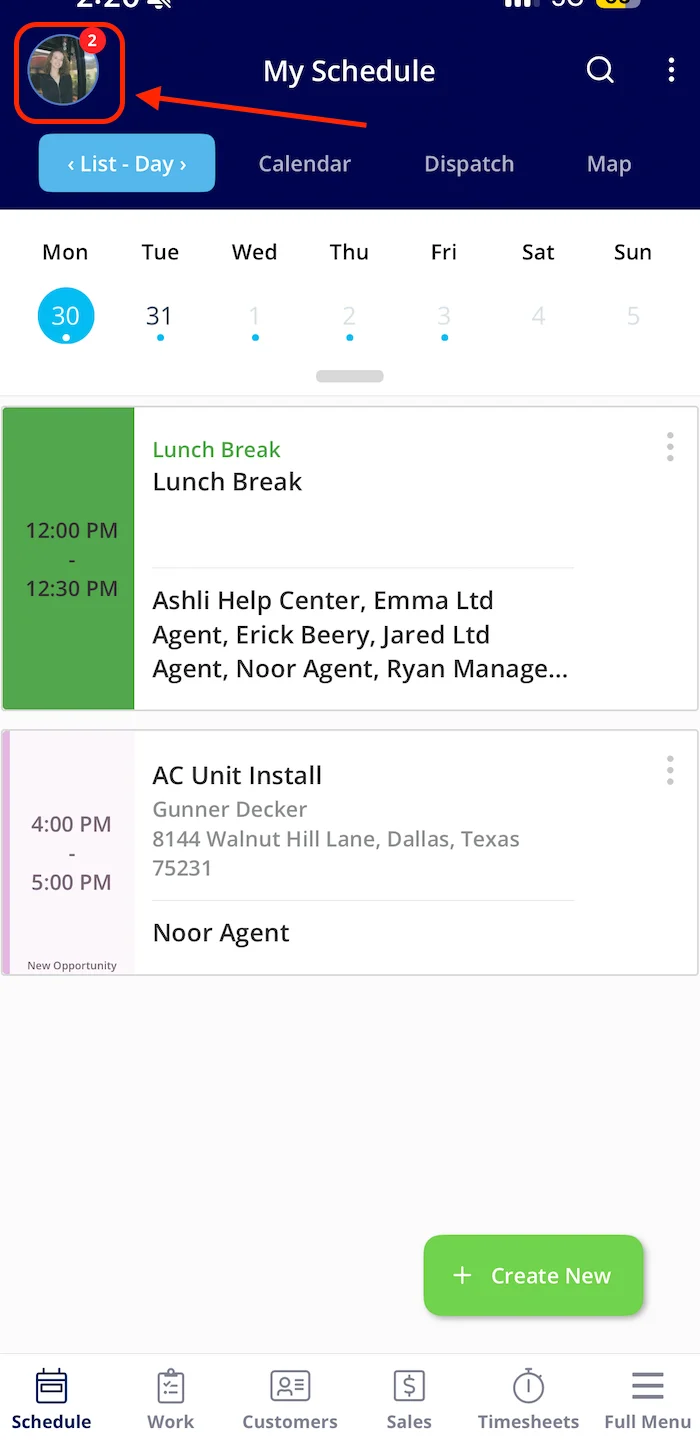
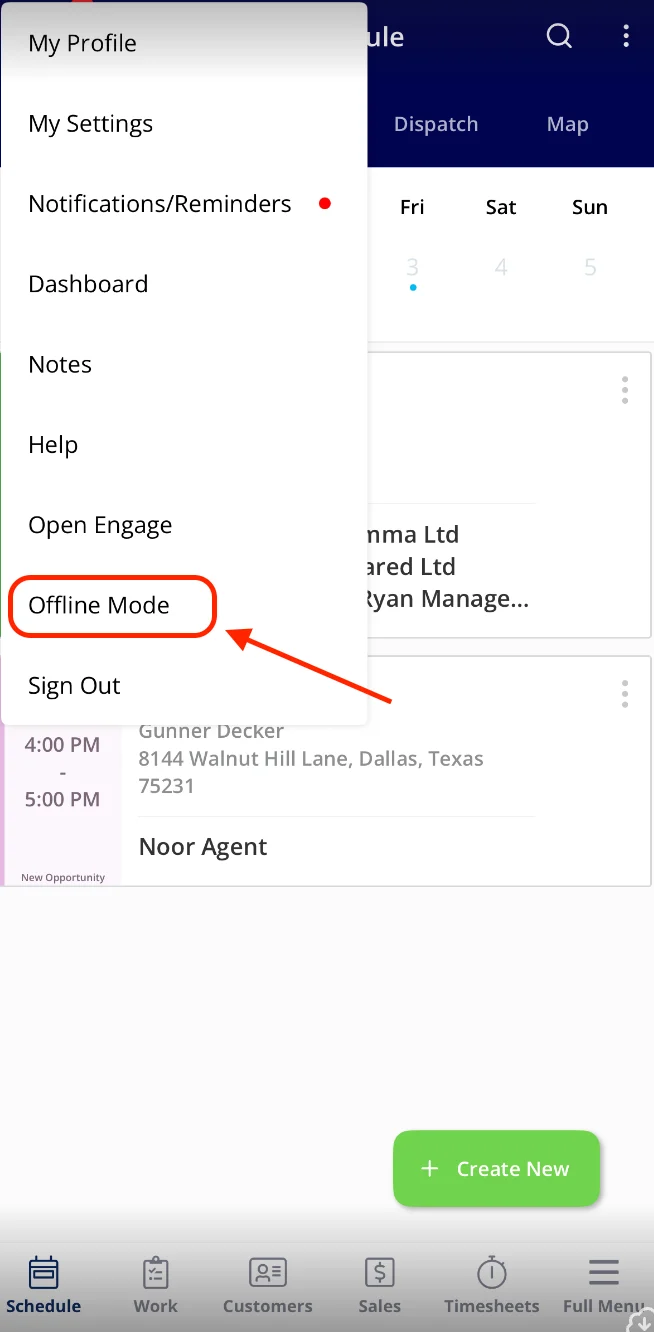
To access Offline Mode, click your *Profile Icon* and then select *Offline Mode*.
 ***
**Have additional questions?**
*Contact us at [support@fieldpulse.com](mailto:support@fieldpulse.com) or use the chat feature in the bottom right corner of your screen.*
***
**Have additional questions?**
*Contact us at [support@fieldpulse.com](mailto:support@fieldpulse.com) or use the chat feature in the bottom right corner of your screen.*