> ## Documentation Index
> Fetch the complete documentation index at: https://help.fieldpulse.com/llms.txt
> Use this file to discover all available pages before exploring further.
# How to Create Site Visit Reports
> Build a site visit report in FieldPulse to see each visit under a job with its workflow status, assigned team members, and scheduled and job durations.
> **Who uses this:** Admins have full reporting access, and Team Managers can be given it. Service Agents and Limited Agents do not have reporting access. **Availability:** All regions.
A site visit report is built from the **Jobs > Site Visits** tab in raw data reporting, and it pulls site visit records — status, schedule, durations, assigned users, and the totals on the related estimate and invoice — into one table you can filter, group, and export.
## Overview
A site visit report shows the individual visits scheduled under your jobs, so you can see where each visit sits in your workflow, who is assigned to it, and how long it was scheduled for against how long it ran. Use it when one job takes more than one trip and you need the visits themselves — not the parent job — in the table. Common site visit reports include site visits by status and site visits by assigned team member.
Building a site visit report follows the same path as every other raw data report — set a date range, choose the columns, set filters, then read the table. Site visit reporting is part of [FieldPulse's dashboards and reporting](https://www.fieldpulse.com/features/dashboards-and-reporting). For the parts of the reporting flow that are the same on every record type — saving a report, adding it to your dashboard, and exporting to CSV — see [How to Use Raw Data Reporting](/reporting/raw-data/using-raw-data-reporting).
## Video walkthrough
## Before you begin
* Add the site visits you want to report on. See [How to Add Site Visits](/jobs/jobs-tasks/site-visits).
* Check that your role has reporting access. An Admin has full reporting access; a Team Manager needs **Full Reporting access** turned on.
## Set the date range
1. Select **Reporting** under the **Management** tab in the left-side menu.
2. Select the **Jobs** tab, then the **Site Visits** tab.
3. Select **Raw Data**.
4. Select the calendar icon and choose the start date range you want to report on.
5. Select **Load Data**.
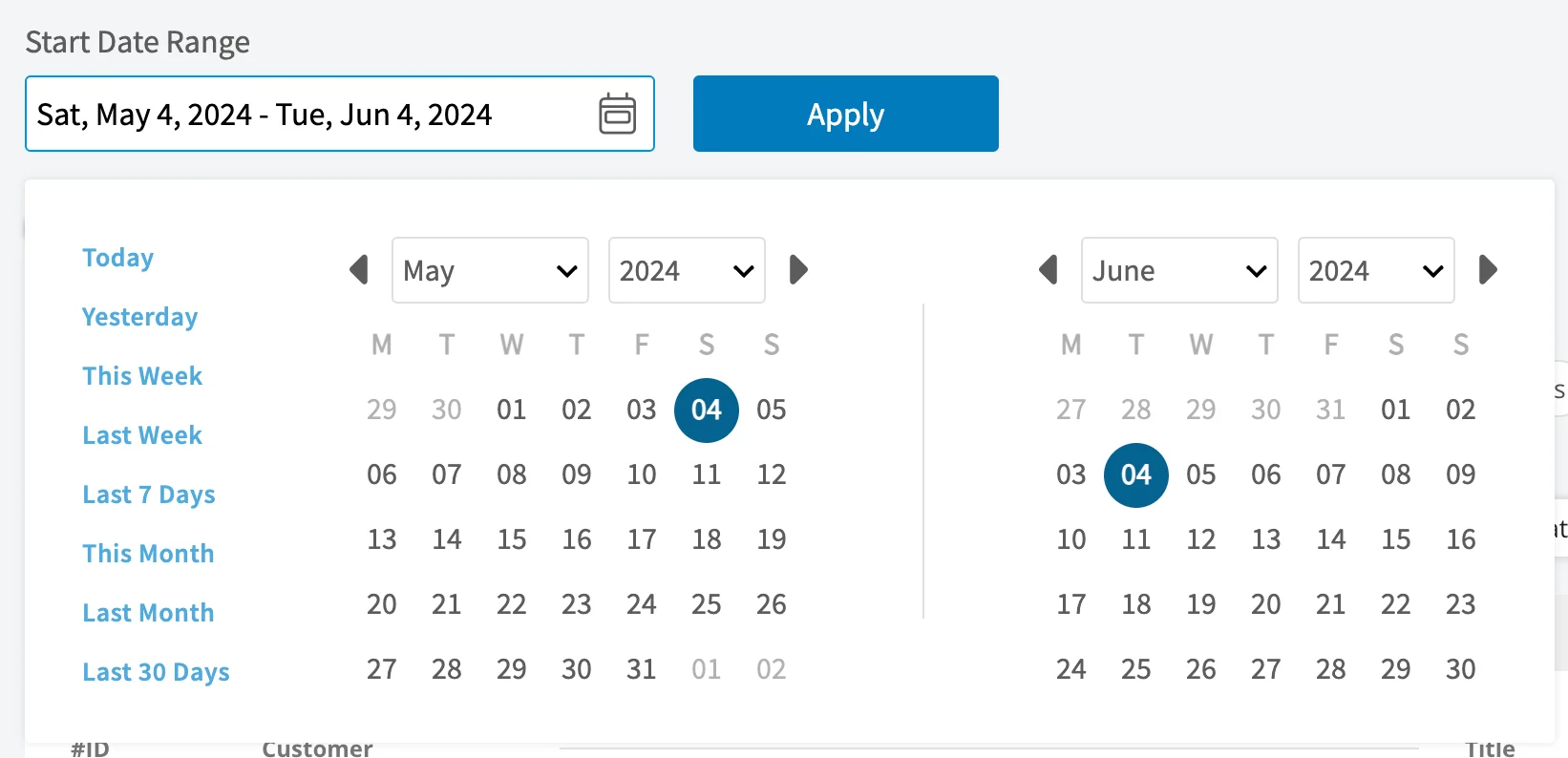 The calendar offers these presets:
| **Preset** | **Date range** |
| ---------------- | ------------------------------------------------- |
| **Today** | 12:00 AM to the current time |
| **Yesterday** | The previous day, 12:00 AM to 11:59 PM |
| **This Week** | Monday through Sunday of the current week |
| **Last Week** | The previous week |
| **Last 7 Days** | The previous seven days, including today |
| **This Month** | The first of the current month to the current day |
| **Last Month** | The entire month before the current month |
| **Last 30 Days** | The previous 30 days, including today |
| **Custom** | Start and end dates you select on the calendar |
## Choose your columns
Select **Columns** to choose which site visit fields appear in the report table and the order they appear in.
The calendar offers these presets:
| **Preset** | **Date range** |
| ---------------- | ------------------------------------------------- |
| **Today** | 12:00 AM to the current time |
| **Yesterday** | The previous day, 12:00 AM to 11:59 PM |
| **This Week** | Monday through Sunday of the current week |
| **Last Week** | The previous week |
| **Last 7 Days** | The previous seven days, including today |
| **This Month** | The first of the current month to the current day |
| **Last Month** | The entire month before the current month |
| **Last 30 Days** | The previous 30 days, including today |
| **Custom** | Start and end dates you select on the calendar |
## Choose your columns
Select **Columns** to choose which site visit fields appear in the report table and the order they appear in.
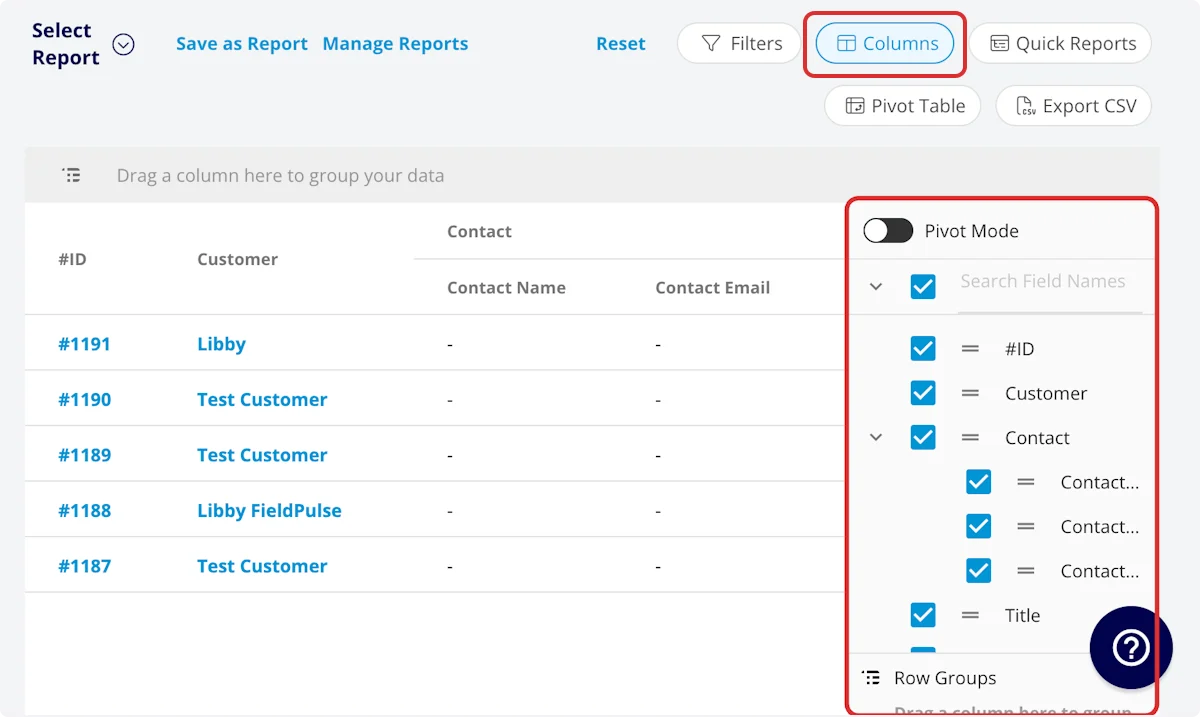 The site visit report includes these columns by default:
| **Column** | **What it holds** |
| ---------------------------------- | --------------------------------------------------------------------------------------------------------------------------------------------------------------------------------------------------------------------------------------------------------------------------------------------------------------- |
| **#ID** | The job number |
| **Customer** | The customer linked to the site visit |
| **Contact** | The customer contact selected on the job record — Contact Name, Contact Email, and Contact Phone |
| **Title** | The site visit title |
| **Subtitle** | The site visit subtitle |
| **Status** | The site visit workflow status |
| **Start Date/Time** | The date and time the site visit was scheduled to begin |
| **End Date/Time** | The date and time the site visit was scheduled to end |
| **Created At** | The date and time the site visit was created in FieldPulse |
| **Created By** | The author of the site visit |
| **Location** | The service location for the site visit |
| **Assigned Team Members** | The users assigned to the site visit |
| **Assigned Teams** | The teams assigned to the site visit |
| **Related Invoice Status** | The status of the linked invoice |
| **Total Invoice Amount** | The total amount on the related invoice |
| **Total Estimate Amount** | The total amount on the related estimate |
| **Total Invoice Amount Due** | The remaining balance on the related invoice |
| **Total Amount Paid** | The amount paid on the related invoice |
| **Assets** | The assets linked to the job record |
| **Related Estimates and Invoices** | Record numbers for estimates and invoices linked to the job record |
| **Notes** | Notes on the job and site visit records |
| **Field Notes** | Notes left by the assigned users on the job record |
| **Tags** | Tags attached to the job record |
| **Related Project** | The project linked to the job record |
| **Job Duration** | Time spent in the In Progress status type, in HH:MM:SS — **Job Duration Decimal** holds the same time in hours |
| **Scheduled Duration** | Time scheduled for the site visit, in HH:MM:SS — **Scheduled Duration Decimal** holds the same time in hours |
| **Travel Duration** | Time spent in the On The Way status type, in HH:MM:SS — **Travel Duration Decimal** holds the same time in hours |
| **Total Timesheet Duration** | The sum of all timesheets related to the job record, in HH:MM:SS — **Total Timesheet Duration Decimal** holds the same time in hours |
| **Custom Fields** | User-created fields related to the job record |
| **Estimate — Product** | Total Product Cost, Total Product Amount, and Total Product Margin on the related estimate — the sum of product line item costs, the sum of product line item prices, and the overall margin on those line items |
| **Estimate — Service** | Total Service Cost, Total Service Amount, and Total Service Margin on the related estimate — the sum of service line item costs, the sum of service line item prices, and the overall margin on those line items |
| **Invoice — Product** | Total Product Cost, Total Product Amount, and Total Product Margin on the related invoice — the sum of product line item costs, the sum of product line item prices, and the overall margin on those line items |
| **Invoice — Service** | Total Service Cost, Total Service Amount, and Total Service Margin on the related invoice — the sum of service line item costs, the sum of service line item prices, and the overall margin on those line items |
| **Customer** (record fields) | Customer-record fields carried onto the site visit — Custom Fields, Customer Phone, Customer Email, Customer Phone 2, Customer Email 2, Customer Assigned To, Customer Lead Source, Customer Pipeline Status, Customer Next Steps, Customer Notes, Customer Job Notes, Customer Created Date, and Customer Tags |
The report also includes a **Clock In Date/Time** column and a **Clock Out Date/Time** column. **Customer Job Notes** holds the job notes stored on the customer record, which are inserted onto job records automatically.
Several of these columns report on the parent job rather than the visit itself. **Assets**, **Field Notes**, **Tags**, **Related Project**, **Related Estimates and Invoices**, and **Custom Fields** all describe the job record the site visit belongs to, and **Notes** covers both the job and the site visit records.
### Job status workflow columns
The **Job Status Workflow** group adds a set of columns for each status in your custom status workflow:
| **Column** | **What it holds** |
| ---------------------------------- | -------------------- |
| **Current Total Time in Status** | Recorded in HH:MM:SS |
| **Completed Total Time in Status** | Recorded in HH:MM:SS |
## Set your filters
Before running the report, set filters to narrow the results. Select the **Filters** icon, then choose how you want to filter the report.
The site visit report includes these columns by default:
| **Column** | **What it holds** |
| ---------------------------------- | --------------------------------------------------------------------------------------------------------------------------------------------------------------------------------------------------------------------------------------------------------------------------------------------------------------- |
| **#ID** | The job number |
| **Customer** | The customer linked to the site visit |
| **Contact** | The customer contact selected on the job record — Contact Name, Contact Email, and Contact Phone |
| **Title** | The site visit title |
| **Subtitle** | The site visit subtitle |
| **Status** | The site visit workflow status |
| **Start Date/Time** | The date and time the site visit was scheduled to begin |
| **End Date/Time** | The date and time the site visit was scheduled to end |
| **Created At** | The date and time the site visit was created in FieldPulse |
| **Created By** | The author of the site visit |
| **Location** | The service location for the site visit |
| **Assigned Team Members** | The users assigned to the site visit |
| **Assigned Teams** | The teams assigned to the site visit |
| **Related Invoice Status** | The status of the linked invoice |
| **Total Invoice Amount** | The total amount on the related invoice |
| **Total Estimate Amount** | The total amount on the related estimate |
| **Total Invoice Amount Due** | The remaining balance on the related invoice |
| **Total Amount Paid** | The amount paid on the related invoice |
| **Assets** | The assets linked to the job record |
| **Related Estimates and Invoices** | Record numbers for estimates and invoices linked to the job record |
| **Notes** | Notes on the job and site visit records |
| **Field Notes** | Notes left by the assigned users on the job record |
| **Tags** | Tags attached to the job record |
| **Related Project** | The project linked to the job record |
| **Job Duration** | Time spent in the In Progress status type, in HH:MM:SS — **Job Duration Decimal** holds the same time in hours |
| **Scheduled Duration** | Time scheduled for the site visit, in HH:MM:SS — **Scheduled Duration Decimal** holds the same time in hours |
| **Travel Duration** | Time spent in the On The Way status type, in HH:MM:SS — **Travel Duration Decimal** holds the same time in hours |
| **Total Timesheet Duration** | The sum of all timesheets related to the job record, in HH:MM:SS — **Total Timesheet Duration Decimal** holds the same time in hours |
| **Custom Fields** | User-created fields related to the job record |
| **Estimate — Product** | Total Product Cost, Total Product Amount, and Total Product Margin on the related estimate — the sum of product line item costs, the sum of product line item prices, and the overall margin on those line items |
| **Estimate — Service** | Total Service Cost, Total Service Amount, and Total Service Margin on the related estimate — the sum of service line item costs, the sum of service line item prices, and the overall margin on those line items |
| **Invoice — Product** | Total Product Cost, Total Product Amount, and Total Product Margin on the related invoice — the sum of product line item costs, the sum of product line item prices, and the overall margin on those line items |
| **Invoice — Service** | Total Service Cost, Total Service Amount, and Total Service Margin on the related invoice — the sum of service line item costs, the sum of service line item prices, and the overall margin on those line items |
| **Customer** (record fields) | Customer-record fields carried onto the site visit — Custom Fields, Customer Phone, Customer Email, Customer Phone 2, Customer Email 2, Customer Assigned To, Customer Lead Source, Customer Pipeline Status, Customer Next Steps, Customer Notes, Customer Job Notes, Customer Created Date, and Customer Tags |
The report also includes a **Clock In Date/Time** column and a **Clock Out Date/Time** column. **Customer Job Notes** holds the job notes stored on the customer record, which are inserted onto job records automatically.
Several of these columns report on the parent job rather than the visit itself. **Assets**, **Field Notes**, **Tags**, **Related Project**, **Related Estimates and Invoices**, and **Custom Fields** all describe the job record the site visit belongs to, and **Notes** covers both the job and the site visit records.
### Job status workflow columns
The **Job Status Workflow** group adds a set of columns for each status in your custom status workflow:
| **Column** | **What it holds** |
| ---------------------------------- | -------------------- |
| **Current Total Time in Status** | Recorded in HH:MM:SS |
| **Completed Total Time in Status** | Recorded in HH:MM:SS |
## Set your filters
Before running the report, set filters to narrow the results. Select the **Filters** icon, then choose how you want to filter the report.
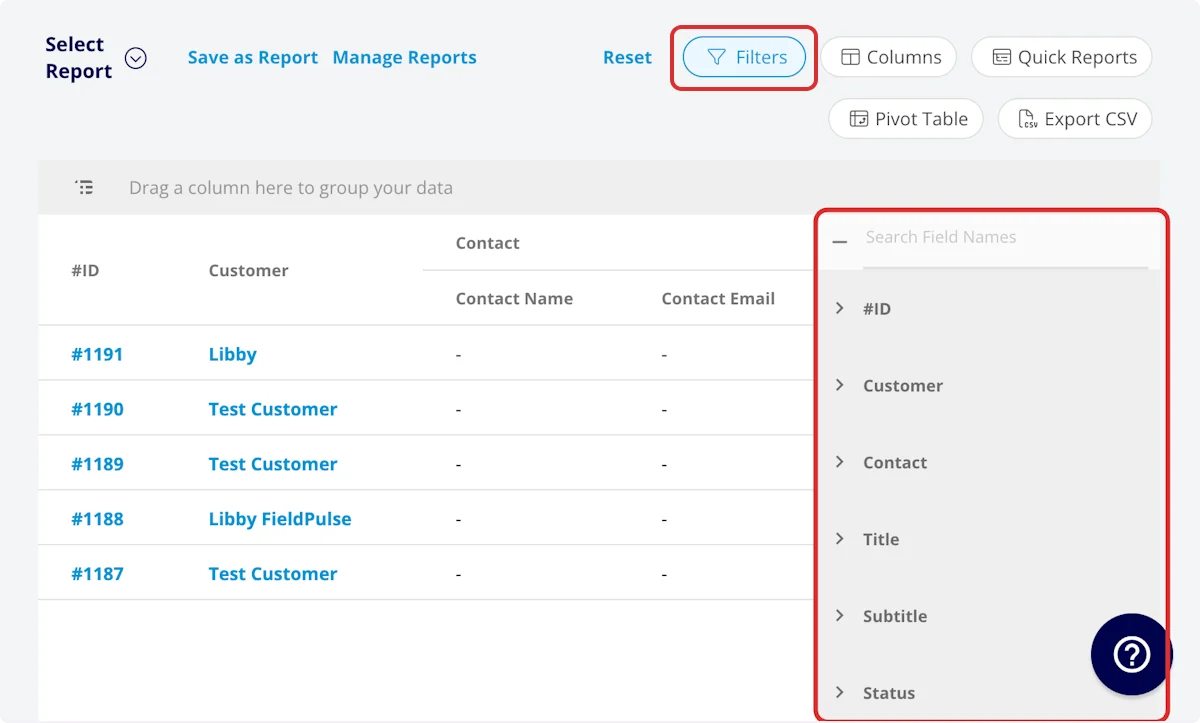 Most fields filter by contents — you choose an operator and enter a value. These fields filter differently:
| **Filter** | **How you filter** |
| ---------------------------------------------------------------------------------- | --------------------------------------------------------------------------- |
| **Contact Name**, **Contact Email**, **Contact Phone** | Select the name, email address, or phone number |
| **Status** | Select the status |
| **Start Date/Time**, **End Date/Time** | Filter by date |
| **Related Invoice Status** | Select the status |
| **Related Project** | Select the project |
| **Custom Fields** | Select the custom field |
| **Older Than**, **Within the Last**, **Within the Next** | Enter a whole number and pick a duration unit, from Minutes through Decades |
| **Customer Phone**, **Customer Email**, **Customer Phone 2**, **Customer Email 2** | Select the phone number or email address |
| **Customer Lead Source** | Select the lead source |
| **Customer Pipeline Status** | Select the status |
The remaining filters take contents — **#ID**, **Customer**, **Title**, **Subtitle**, **Created At**, **Created By**, **Location**, **Assigned Team Members**, **Assigned Teams**, **Assets**, **Related Estimates and Invoices**, **Notes**, **Field Notes**, **Tags**, the four duration filters and their decimal versions, **Customer Assigned To**, **Customer Next Steps**, **Customer Notes**, **Customer Job Notes**, **Customer Created Date**, and **Customer Tags**.
The **Older Than**, **Within the Last**, and **Within the Next** filters calculate dynamically from the current time in your timezone every time the report runs, so your saved reports never go stale.
### Filter operators
When you filter by contents, choose an operator and then enter the values to filter the data on.
| **Operator** | **Retrieves data** | **Example** | **Data retrieved** |
| ------------------------ | ------------------------------------------ | ------------------------------------------------- | ----------------------------------------------------------- |
| Equals | Equal to a specified value | Created By - Equals Tom Gause | For all records created by Tom Gause only |
| Not Equal | Different from a specified value | Tag - Not Equal to HVAC | For all records except those using the HVAC tag |
| Less Than | Lower than a specified value | #ID - Less than 1144 | For all records below #1144 |
| Less Than or Equal To | Lower than or equal to a specified value | Job Date/Time - Less than or equal to 12/13/2023 | For jobs scheduled before or on 12/13/2023 |
| Greater Than | Greater than a specified value | Job Duration - Greater than 60 minutes | For jobs in the In Progress status type for over 60 minutes |
| Greater Than or Equal To | Greater than or equal to a specified value | Job Date/Time - Greater than or equal to 1/1/2024 | For jobs scheduled on or after 1/1/2024 |
| In Range | Including and between two specified values | #ID - Between 1225 and 1236 | For all estimate records with #IDs between 1225 and 1236 |
| Starts With | Begins with a specified value | Title - Annual | For all job records beginning with Annual |
| Ends With | Ends with a specified value | Location - TX | For all job locations ending with TX |
| Blank | No values are in the field | Subtitle | For all job records with blank subtitles |
| Not Blank | Values in the field | Notes | For all job records with values in the notes field |
## Common site visit reports
Two site visit reports come up most often. Each one is the same report grouped a different way — drag the column you care about into the grouping area, and keep that column in the report.
| **Report** | **What it shows** | **Columns** | **Group by** |
| --------------------------------------- | --------------------------------------------------------------- | ------------------------------------------------------------- | ------------------------ |
| **Site visits by status** | Site visits sorted by workflow status | Customize to your needs, but include **Status** | **Status** |
| **Site visits by assigned team member** | Site visits sorted by the team member assigned to complete them | Customize to your needs, but include **Assigned Team Member** | **Assigned Team Member** |
## FAQs
### Can I save a site visit report to use again?
Yes. Select **Save as Report**, then **Save as New** to store it under **Select Report**, or **Save as Widget** to add it to your Pulse Dashboard. See [How to Use Raw Data Reporting](/reporting/raw-data/using-raw-data-reporting) for the full saving flow.
### Can I export a site visit report to a spreadsheet?
Yes. Select **Export CSV** to download the report currently on your screen as a CSV file to your device.
## Related articles
* [How to Use Raw Data Reporting](/reporting/raw-data/using-raw-data-reporting)
* [How to Add Site Visits](/jobs/jobs-tasks/site-visits)
* [Projects vs. Jobs vs. Site Visits Details](/jobs/projects/projects-vs-jobs-vs-site-visits)
* [How to Create Job Reports](/reporting/raw-data/job-reports)
* [How to Create Timesheet Reports](/reporting/raw-data/timesheet-reports)
Your site visit report is working when the table returns the visits you expected for the date range, shows the status, assignment, and duration columns you selected, and groups those visits by status or by assigned team member once you drag that column into the grouping area.
## Related topics
- [How to Use Raw Data Reporting](/reporting/raw-data/using-raw-data-reporting.md)
- [Raw Data Reporting](/reporting/raw-data/index.md)
- [How to Add Site Visits](/jobs/jobs-tasks/site-visits.md)
- [How to Create Project Reports](/reporting/raw-data/project-reports.md)
Most fields filter by contents — you choose an operator and enter a value. These fields filter differently:
| **Filter** | **How you filter** |
| ---------------------------------------------------------------------------------- | --------------------------------------------------------------------------- |
| **Contact Name**, **Contact Email**, **Contact Phone** | Select the name, email address, or phone number |
| **Status** | Select the status |
| **Start Date/Time**, **End Date/Time** | Filter by date |
| **Related Invoice Status** | Select the status |
| **Related Project** | Select the project |
| **Custom Fields** | Select the custom field |
| **Older Than**, **Within the Last**, **Within the Next** | Enter a whole number and pick a duration unit, from Minutes through Decades |
| **Customer Phone**, **Customer Email**, **Customer Phone 2**, **Customer Email 2** | Select the phone number or email address |
| **Customer Lead Source** | Select the lead source |
| **Customer Pipeline Status** | Select the status |
The remaining filters take contents — **#ID**, **Customer**, **Title**, **Subtitle**, **Created At**, **Created By**, **Location**, **Assigned Team Members**, **Assigned Teams**, **Assets**, **Related Estimates and Invoices**, **Notes**, **Field Notes**, **Tags**, the four duration filters and their decimal versions, **Customer Assigned To**, **Customer Next Steps**, **Customer Notes**, **Customer Job Notes**, **Customer Created Date**, and **Customer Tags**.
The **Older Than**, **Within the Last**, and **Within the Next** filters calculate dynamically from the current time in your timezone every time the report runs, so your saved reports never go stale.
### Filter operators
When you filter by contents, choose an operator and then enter the values to filter the data on.
| **Operator** | **Retrieves data** | **Example** | **Data retrieved** |
| ------------------------ | ------------------------------------------ | ------------------------------------------------- | ----------------------------------------------------------- |
| Equals | Equal to a specified value | Created By - Equals Tom Gause | For all records created by Tom Gause only |
| Not Equal | Different from a specified value | Tag - Not Equal to HVAC | For all records except those using the HVAC tag |
| Less Than | Lower than a specified value | #ID - Less than 1144 | For all records below #1144 |
| Less Than or Equal To | Lower than or equal to a specified value | Job Date/Time - Less than or equal to 12/13/2023 | For jobs scheduled before or on 12/13/2023 |
| Greater Than | Greater than a specified value | Job Duration - Greater than 60 minutes | For jobs in the In Progress status type for over 60 minutes |
| Greater Than or Equal To | Greater than or equal to a specified value | Job Date/Time - Greater than or equal to 1/1/2024 | For jobs scheduled on or after 1/1/2024 |
| In Range | Including and between two specified values | #ID - Between 1225 and 1236 | For all estimate records with #IDs between 1225 and 1236 |
| Starts With | Begins with a specified value | Title - Annual | For all job records beginning with Annual |
| Ends With | Ends with a specified value | Location - TX | For all job locations ending with TX |
| Blank | No values are in the field | Subtitle | For all job records with blank subtitles |
| Not Blank | Values in the field | Notes | For all job records with values in the notes field |
## Common site visit reports
Two site visit reports come up most often. Each one is the same report grouped a different way — drag the column you care about into the grouping area, and keep that column in the report.
| **Report** | **What it shows** | **Columns** | **Group by** |
| --------------------------------------- | --------------------------------------------------------------- | ------------------------------------------------------------- | ------------------------ |
| **Site visits by status** | Site visits sorted by workflow status | Customize to your needs, but include **Status** | **Status** |
| **Site visits by assigned team member** | Site visits sorted by the team member assigned to complete them | Customize to your needs, but include **Assigned Team Member** | **Assigned Team Member** |
## FAQs
### Can I save a site visit report to use again?
Yes. Select **Save as Report**, then **Save as New** to store it under **Select Report**, or **Save as Widget** to add it to your Pulse Dashboard. See [How to Use Raw Data Reporting](/reporting/raw-data/using-raw-data-reporting) for the full saving flow.
### Can I export a site visit report to a spreadsheet?
Yes. Select **Export CSV** to download the report currently on your screen as a CSV file to your device.
## Related articles
* [How to Use Raw Data Reporting](/reporting/raw-data/using-raw-data-reporting)
* [How to Add Site Visits](/jobs/jobs-tasks/site-visits)
* [Projects vs. Jobs vs. Site Visits Details](/jobs/projects/projects-vs-jobs-vs-site-visits)
* [How to Create Job Reports](/reporting/raw-data/job-reports)
* [How to Create Timesheet Reports](/reporting/raw-data/timesheet-reports)
Your site visit report is working when the table returns the visits you expected for the date range, shows the status, assignment, and duration columns you selected, and groups those visits by status or by assigned team member once you drag that column into the grouping area.
## Related topics
- [How to Use Raw Data Reporting](/reporting/raw-data/using-raw-data-reporting.md)
- [Raw Data Reporting](/reporting/raw-data/index.md)
- [How to Add Site Visits](/jobs/jobs-tasks/site-visits.md)
- [How to Create Project Reports](/reporting/raw-data/project-reports.md)