> ## Documentation Index
> Fetch the complete documentation index at: https://help.fieldpulse.com/llms.txt
> Use this file to discover all available pages before exploring further.
# Customer Account Structures: Parent/Child vs. Multi-Location
> Compare Parent/Child accounts and Multi-Location so you pick the right structure for billing control versus multiple service addresses.
In this article, we’ll explore two important account structures in FieldPulse: the Parent/Child Relationship and our Multi-Location Feature.
## Differences at a Glance
| **Feature** | **Parent/Child Relationship** | **Multi-Location** |
| -------------------------- | ------------------------------------------------------------- | ------------------------------------------------------------------------------------------------------ |
| **Primary Purpose** | To manage hierarchical billing control (who ultimately pays). | To manage multiple service addresses under one customer. |
| **QuickBooks Sync Impact** | Parent and Child sync as distinct customers. | Only the original account / Customer Record syncs. Additional locations are only housed in FieldPulse. |
| **Billing Flexibility** | Flexibility to override billing by job. | Billing is always tied to the original customer. |
| **Best for** | Property management and flexible billing needs. | Commercial customers with multiple locations. |
***
# Parent/Child Relationships
## What are they?
The Parent/Child structure is a **hierarchical system** where one main account oversees several smaller accounts.
* **Parent**: The primary account, like a corporate office or property management company. This is usually the main billing entity.
* **Child**: The individual service location, such as a specific condo unit or property site.
## When should I use them?
This structure is ideal when you need corporate oversight and tracking. This relationship also allows for both entities to operate as separate customers in QuickBooks.
## Scenario Examples
* **Property Management**: A management company (Parent) oversees multiple apartment complexes (Children).
* **Condo/Unit Billing**: The management company is the Parent, but bills individual homeowners or tenants (Children) directly.
* **Corporate Contracts**: A restaurant chain, like "Cheesecake Factory," where multiple locations are managed under one corporate umbrella.
## Key Advantages
* **Flexible Job-Specific Billing**: The system allows you to bill specific service addresses (Child) while having the option to bill the main corporate office (Parent) if needed.
## How to Set Them Up
To establish a Parent/Child relationship:
1. Go to the Parent customer's record (e.g., the management company).
2. Navigate to the *Related Customer* tab.
3. Select *Link Customer* or *Create Customer* to establish the Child account.
4. To set the default billing: Ensure the correct billing address is selected on the Child's profile. Use the *Use Separate Billing Address* toggle if you want to override the default Parent address.
 ***
# Multi-Location Feature
## What is it?
Multi-Location is a feature that allows you to add multiple service addresses to a single primary customer record.
* All service histories are tracked under the original customer account, but these additional addresses **do not** sync to QuickBooks—they stay within FieldPulse.
## When should we use this?
Use this feature when a single customer, often in a commercial setting, has multiple locations. This helps maintain a clean QuickBooks customer list by only syncing the main account name and financial transactions.
## Scenario Examples
* **Commercial Complexes**: Track jobs by specific tenant locations without cluttering your QuickBooks records.
* **Simple Location Tracking**: Keep your QuickBooks customer list clean while providing detailed service data for internal use.
## Key Advantages
* **Clean QuickBooks Sync**: Maintain one customer record in QuickBooks for all financial transactions, preventing unnecessary data clutter.
## How to Set This Up
To set up Multi-Location on a Customer Record:
1. Go to the original customer's record.
2. Navigate to the *Address* section of the Customer Record.
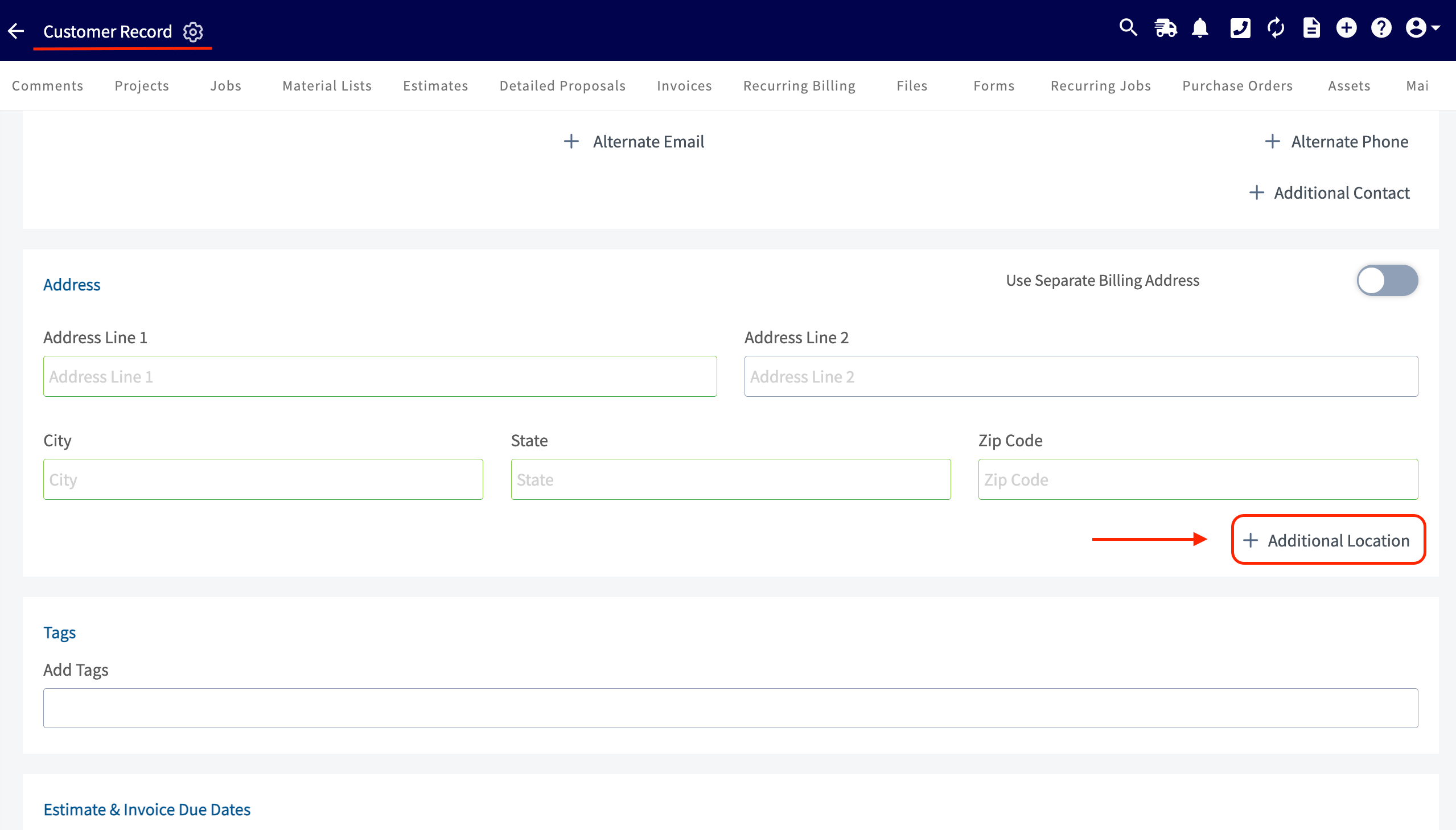
3. Add additional service addresses by clicking the add *Additional Location* button.
***
# Multi-Location Feature
## What is it?
Multi-Location is a feature that allows you to add multiple service addresses to a single primary customer record.
* All service histories are tracked under the original customer account, but these additional addresses **do not** sync to QuickBooks—they stay within FieldPulse.
## When should we use this?
Use this feature when a single customer, often in a commercial setting, has multiple locations. This helps maintain a clean QuickBooks customer list by only syncing the main account name and financial transactions.
## Scenario Examples
* **Commercial Complexes**: Track jobs by specific tenant locations without cluttering your QuickBooks records.
* **Simple Location Tracking**: Keep your QuickBooks customer list clean while providing detailed service data for internal use.
## Key Advantages
* **Clean QuickBooks Sync**: Maintain one customer record in QuickBooks for all financial transactions, preventing unnecessary data clutter.
## How to Set This Up
To set up Multi-Location on a Customer Record:
1. Go to the original customer's record.
2. Navigate to the *Address* section of the Customer Record.
3. Add additional service addresses by clicking the add *Additional Location* button.
 ***
**Have additional questions?**
*Contact us at [support@fieldpulse.com](mailto:support@fieldpulse.com) or use the chat feature in the bottom right corner of your screen.*
***
**Have additional questions?**
*Contact us at [support@fieldpulse.com](mailto:support@fieldpulse.com) or use the chat feature in the bottom right corner of your screen.*