> ## Documentation Index
> Fetch the complete documentation index at: https://help.fieldpulse.com/llms.txt
> Use this file to discover all available pages before exploring further.
# Trip Tracking: What Your Customer Sees
> See the arrival text and live tracking map clients get so they can follow the tech's location and ETA in real time.
# Overview
Nobody likes waiting around without knowing when their technician will arrive. This article covers what the trip tracking experience looks like for your customer, from the text they receive to the live map they can follow in real time.
***
# Trip Tracking Link
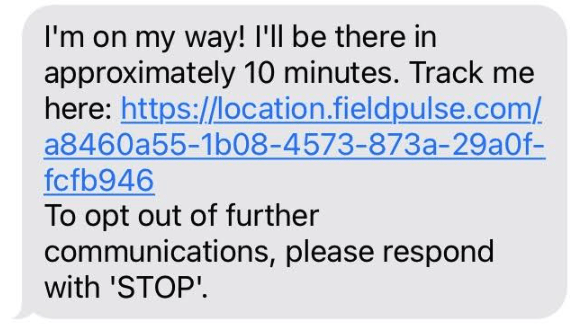
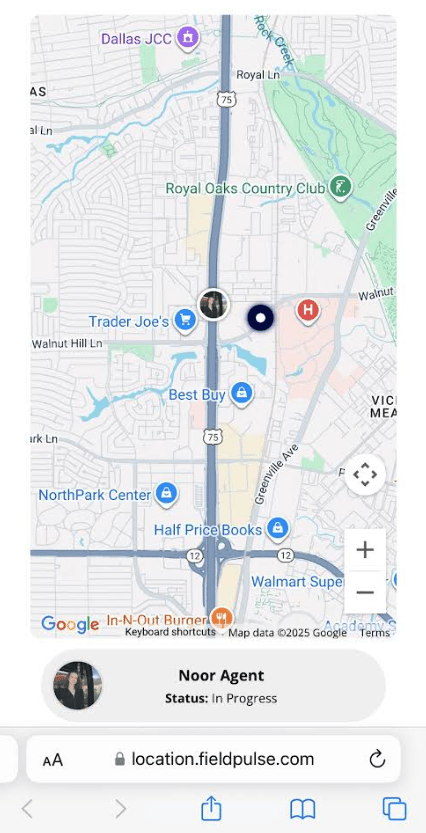
When a technician is heading to a job, they can send the customer a live trip tracking text directly from the FieldPulse mobile app. The customer gets an SMS with a link to a real-time map showing the tech's location and estimated arrival time.
The tracking link stays active for one hour after it's sent. Enough time for the customer to track the arrival without leaving their location visible all day.
**Quick tip:** The tech can also include their profile photo in the message so customers know exactly who to expect at the door.
To send this link, go to the *Job record > Actions button > Send Customer Communication > SMS > Send Trip Tracking SMS to Customer*
***
# What the Customer Receives
## The Text
 ## The Live Map
 **What's configurable:** The default trip tracking message text (set on first send, saved for future use). Tech profile photos can be included per send.
To learn more about Trip Tracking, click [the trip tracking guide](/using-fieldpulse/communications-notifications/customer-communications#h_881ce54090)
***
**Have additional questions?**
*Contact us at [support@fieldpulse.com](mailto:support@fieldpulse.com) or use the chat feature in the bottom right corner of your screen.*
**What's configurable:** The default trip tracking message text (set on first send, saved for future use). Tech profile photos can be included per send.
To learn more about Trip Tracking, click [the trip tracking guide](/using-fieldpulse/communications-notifications/customer-communications#h_881ce54090)
***
**Have additional questions?**
*Contact us at [support@fieldpulse.com](mailto:support@fieldpulse.com) or use the chat feature in the bottom right corner of your screen.*