> ## Documentation Index
> Fetch the complete documentation index at: https://help.fieldpulse.com/llms.txt
> Use this file to discover all available pages before exploring further.
# Customer Notification Preferences
> When your customer receives an SMS (text message) from your business, they’ll see the option to reply STOP to unsubscribe. Once they do, they’ll no longer…
## **Notification Settings – SMS Opt-Out for Your Customers**
When your customer receives an SMS (text message) from your business, they’ll see the option to **reply STOP to unsubscribe**. Once they do, they’ll no longer receive any SMS messages from your company. This includes automated notifications, one-off messages, and estimate or invoice links via SMS messages.
Once SMS is unchecked, that customer will be fully unsubscribed from **all** SMS communications. Even if you try to re-checks the box in Notification Settings, it **cannot** override your customer’s selection to opt-out.
Any attempt to send an SMS (including from Engage) will be blocked, and you will receive a notice stating: **"Alert: This user has opted out of SMS communication. You cannot send this message via FieldPulse."**
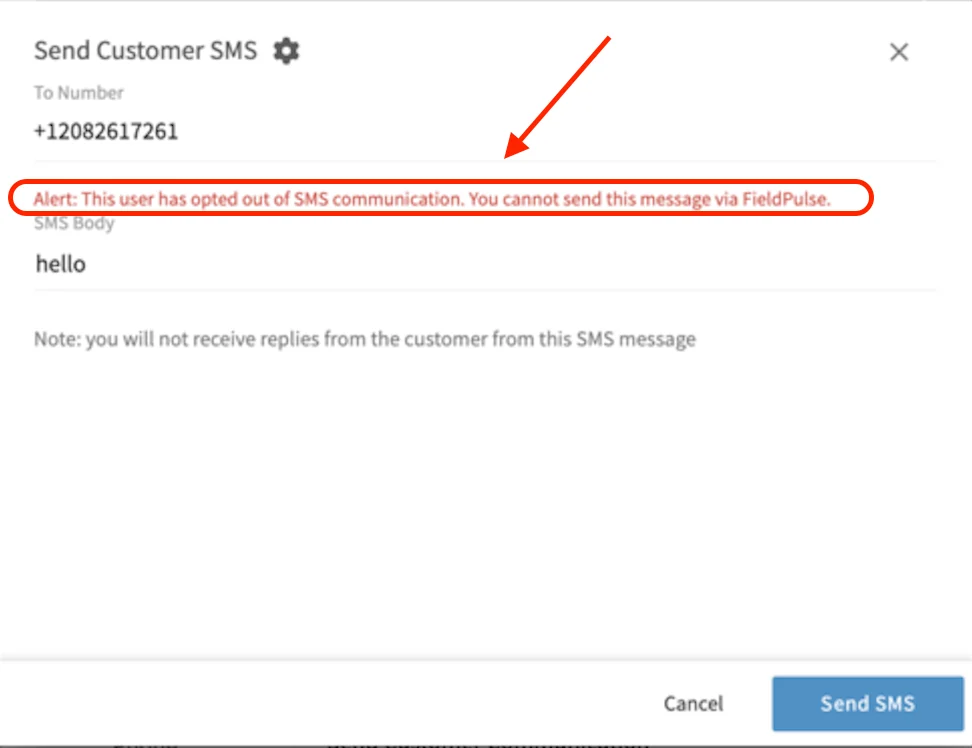 ### *SMS from FieldPulse Example*
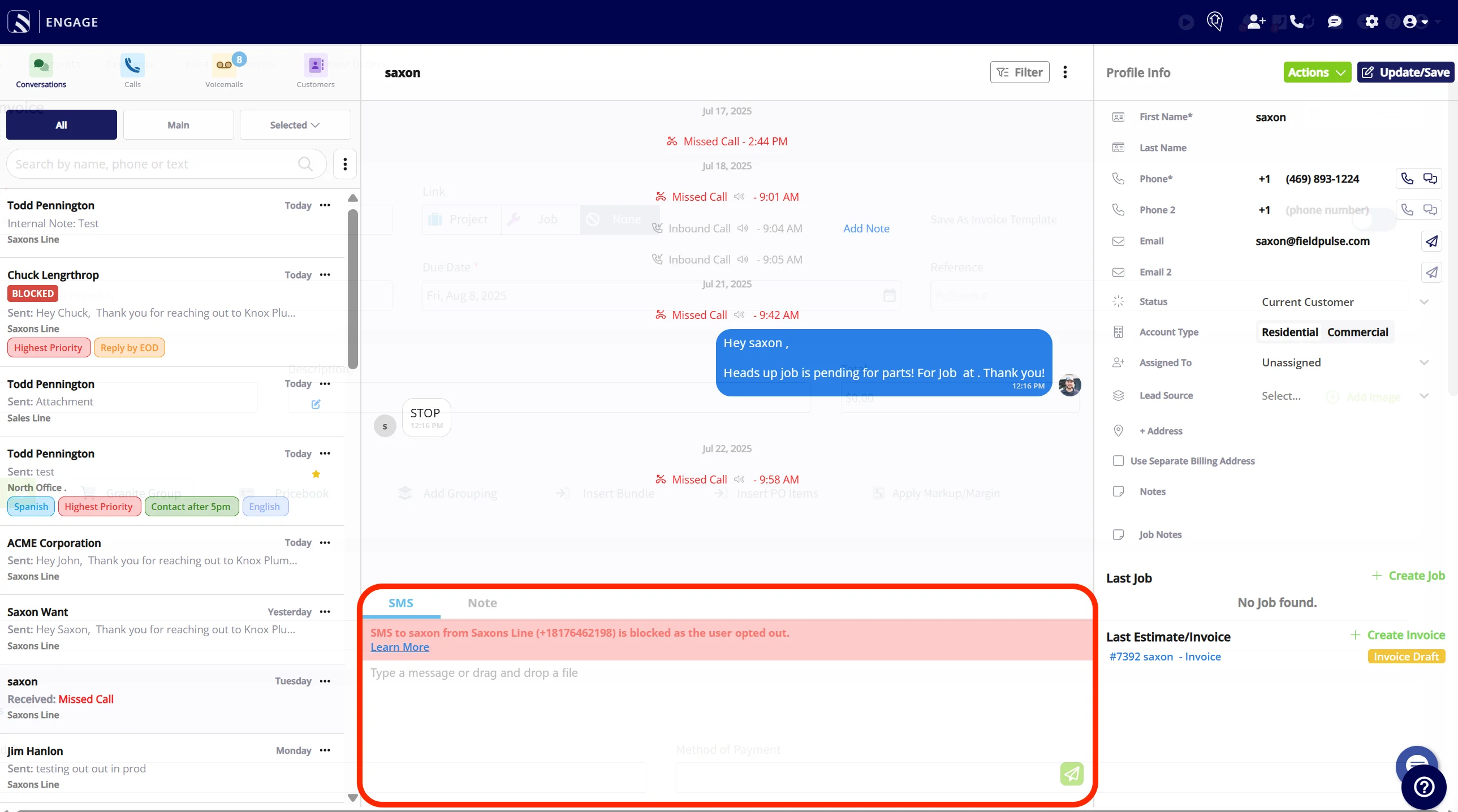 ### *SMS from Engage Example*
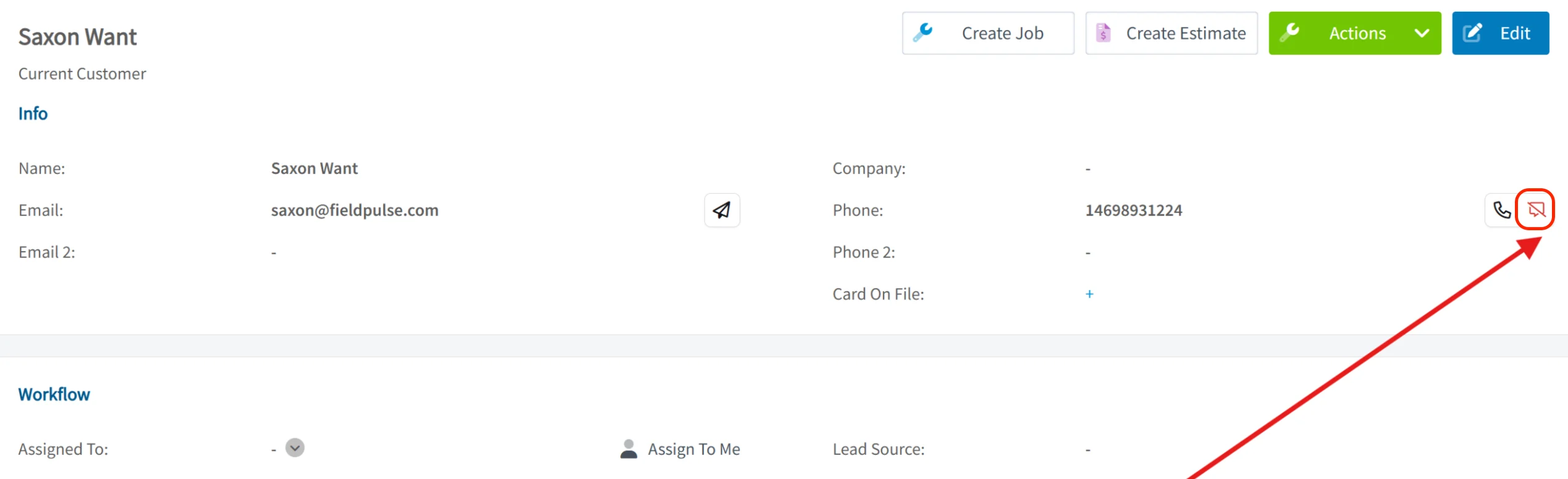
Once a customer has opted out, the SMS (text) symbol/icon on their Customer record will display in red with a dash through it. This indicates that the option is disabled, and you **will not** be able to click on this icon.
### *SMS from Engage Example*
Once a customer has opted out, the SMS (text) symbol/icon on their Customer record will display in red with a dash through it. This indicates that the option is disabled, and you **will not** be able to click on this icon.
 ## **SMS Opt-Out Behavior in FieldPulse**
**For Engage Users:** You’ll only be able to see that a customer has opted out of text messages through the *Conversation* tab in Engage. If your account has multiple Engage numbers, you can still message the customer using a different number — the opt-out applies only to the specific Engage number they opted out from.
**For Non-Engage Users:** If a contact opts out of SMS communication, you’ll see updated visuals across both web and mobile apps indicating the contact has opted out. This will block all users on the account from sending further SMS messages to that contact.
**Important:** At this time, FieldPulse only supports opt-out. Customers cannot opt back in via SMS — re-enabling communication requires manual reactivation.
## **Customer Opt-Outs: What It Means for You**
* You can still contact these customers via **email or phone calls**.
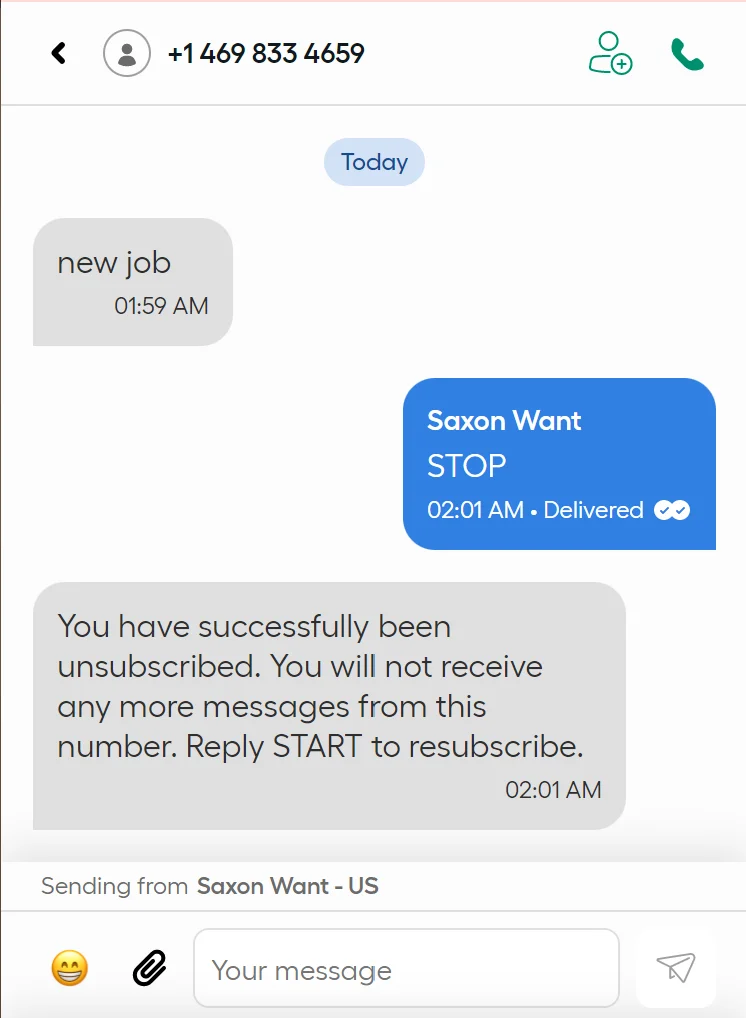
* If they opt out by replying STOP, **they must re-subscribe themselves via SMS**.
# How to Resubscribe
To resubscribe, your customer must text **START** from their own number. You **cannot** manually resubscribe a customer—this is legally prohibited.
## **SMS Opt-Out Behavior in FieldPulse**
**For Engage Users:** You’ll only be able to see that a customer has opted out of text messages through the *Conversation* tab in Engage. If your account has multiple Engage numbers, you can still message the customer using a different number — the opt-out applies only to the specific Engage number they opted out from.
**For Non-Engage Users:** If a contact opts out of SMS communication, you’ll see updated visuals across both web and mobile apps indicating the contact has opted out. This will block all users on the account from sending further SMS messages to that contact.
**Important:** At this time, FieldPulse only supports opt-out. Customers cannot opt back in via SMS — re-enabling communication requires manual reactivation.
## **Customer Opt-Outs: What It Means for You**
* You can still contact these customers via **email or phone calls**.
* If they opt out by replying STOP, **they must re-subscribe themselves via SMS**.
# How to Resubscribe
To resubscribe, your customer must text **START** from their own number. You **cannot** manually resubscribe a customer—this is legally prohibited.
 ***
Customer communication automatic triggers can be set based for various features within FieldPulse. Visit the [Customer Communications article](/using-fieldpulse/communications-notifications/customer-communications) to learn more.
***
**Have additional questions?**
*Contact us at [support@fieldpulse.com](mailto:support@fieldpulse.com) or use the chat feature in the bottom right corner of your screen.*
***
Customer communication automatic triggers can be set based for various features within FieldPulse. Visit the [Customer Communications article](/using-fieldpulse/communications-notifications/customer-communications) to learn more.
***
**Have additional questions?**
*Contact us at [support@fieldpulse.com](mailto:support@fieldpulse.com) or use the chat feature in the bottom right corner of your screen.*