> ## Documentation Index
> Fetch the complete documentation index at: https://help.fieldpulse.com/llms.txt
> Use this file to discover all available pages before exploring further.
# Timesheet Reports
> Report on logged hours by team member, job, or project, with notes, to verify time before you run payroll.
Use the *Timesheets* tab to create reports based on timesheet data including duration, parent job/project, user, and more. Some common timesheet reports include timesheets by team member, by job or project, and timesheet duration with notes.
***
# Create a Timesheet Report
## Date Range
Begin by selecting date type you'd like to use to generate the report.
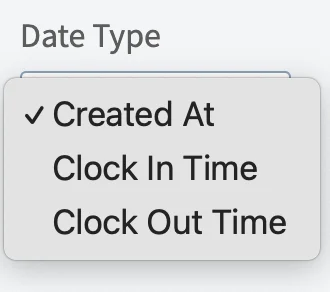 * **Created Date:** When the timesheet was created
* **Clock In Time:** When the clock in occurs
* **Clock Out Time:** When the clock out occurs
Then, select the start date range for which you’d like to report on. Click on the calendar icon to select a date range and click *Load Data*.
* **Created Date:** When the timesheet was created
* **Clock In Time:** When the clock in occurs
* **Clock Out Time:** When the clock out occurs
Then, select the start date range for which you’d like to report on. Click on the calendar icon to select a date range and click *Load Data*.
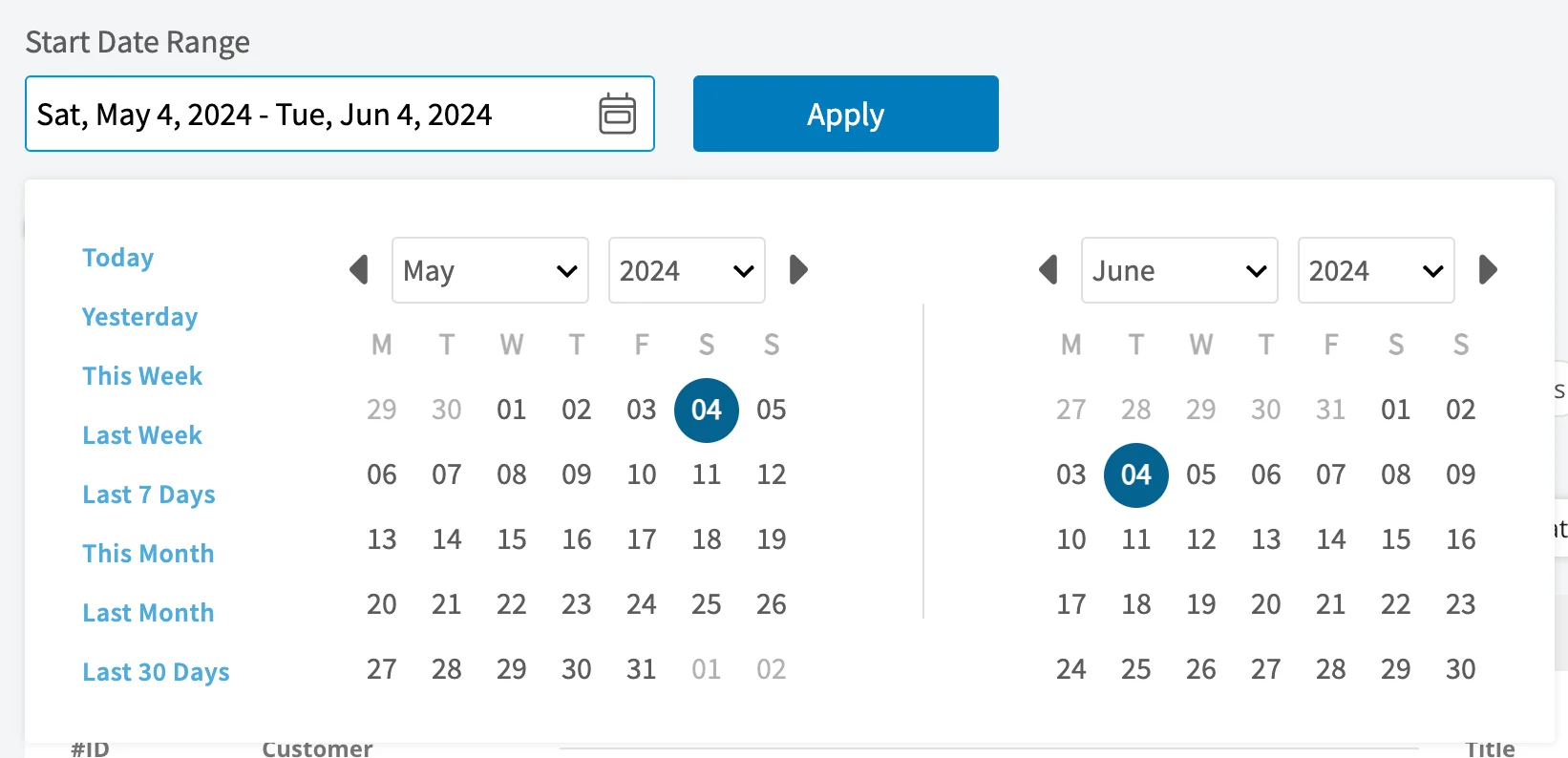 * **Today:** From 12:00 AM to the current time
* **Yesterday:** Previous day from 12:00 AM to 11:59 PM
* **This Week:** From Monday through Sunday of the current week
* **Last Week:** Previous week
* **Last 7 Days:** Previous seven days, including today
* **This Month:** From the first of the current month to the current day
* **Last Month:** Entire month before the current month
* **Last 30 Days:** Previous 30 days, including today
* **Custom:** Use the calendar to select start and end dates
## Columns
* **Today:** From 12:00 AM to the current time
* **Yesterday:** Previous day from 12:00 AM to 11:59 PM
* **This Week:** From Monday through Sunday of the current week
* **Last Week:** Previous week
* **Last 7 Days:** Previous seven days, including today
* **This Month:** From the first of the current month to the current day
* **Last Month:** Entire month before the current month
* **Last 30 Days:** Previous 30 days, including today
* **Custom:** Use the calendar to select start and end dates
## Columns
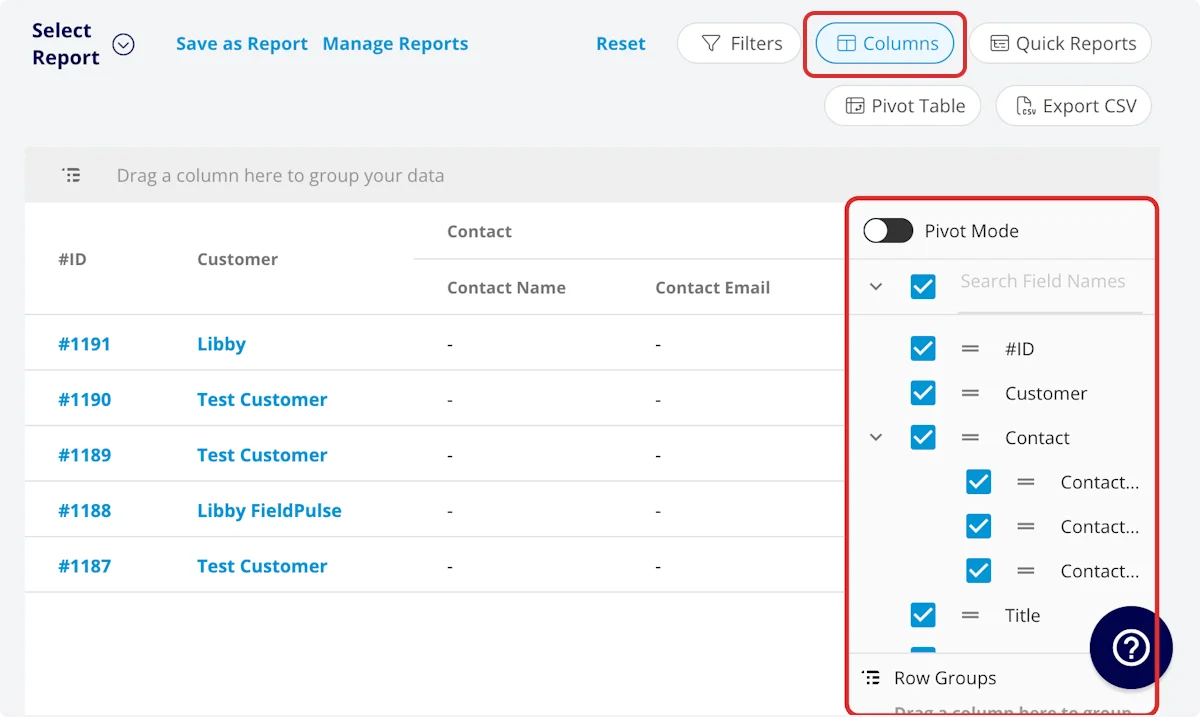 Select the columns to include in your report by clicking *Columns*. The timesheet report includes these columns by default:
* **User:** Team member who clocked in/out
* **Clock In Title:** Clock in title
* **Clock Out Title:** Clock out title
* **Clock In Date/Time:** Clock in date/time
* **Clock In Date:** Clock in date
* **Clock In Time:** Clock in time
* **Clock Out Date/Time:** Clock out date/time
* **Clock Out Date:** Clock out date
* **Clock Out Time:** Clock out time
* **Clock In Notes:** Notes left on clock-in record
* **Clock Out Notes:** Notes left on clock-out record
* **Customer:** Customer linked to the related job
* **Created At:** Date and time the timesheet was created
* **Tags:** Tags on clock-in/out record
* **Parent Project:** Linked project record
* **Parent Job:** Linked job record
* **Related Job Location Address:** Address of the related job record
* **Related Job City:** City that the related job was completed in
* **Related Job State:** State that the related job was completed in
* **Related Job Zip Code:** Zip code that the related job was completed in
* **Related Job Location Name:** Name of the location that the related job was completed in
* **Related Job Notes:** Notes on linked job record
* **Related Job Field Notes:** Field notes on linked job record
* **Duration:** Time spent clocked in, recorded in HH:MM:SS
* **Duration Decimal:** Time spent clocked in, recorded in hours
## Filters
Select the columns to include in your report by clicking *Columns*. The timesheet report includes these columns by default:
* **User:** Team member who clocked in/out
* **Clock In Title:** Clock in title
* **Clock Out Title:** Clock out title
* **Clock In Date/Time:** Clock in date/time
* **Clock In Date:** Clock in date
* **Clock In Time:** Clock in time
* **Clock Out Date/Time:** Clock out date/time
* **Clock Out Date:** Clock out date
* **Clock Out Time:** Clock out time
* **Clock In Notes:** Notes left on clock-in record
* **Clock Out Notes:** Notes left on clock-out record
* **Customer:** Customer linked to the related job
* **Created At:** Date and time the timesheet was created
* **Tags:** Tags on clock-in/out record
* **Parent Project:** Linked project record
* **Parent Job:** Linked job record
* **Related Job Location Address:** Address of the related job record
* **Related Job City:** City that the related job was completed in
* **Related Job State:** State that the related job was completed in
* **Related Job Zip Code:** Zip code that the related job was completed in
* **Related Job Location Name:** Name of the location that the related job was completed in
* **Related Job Notes:** Notes on linked job record
* **Related Job Field Notes:** Field notes on linked job record
* **Duration:** Time spent clocked in, recorded in HH:MM:SS
* **Duration Decimal:** Time spent clocked in, recorded in hours
## Filters
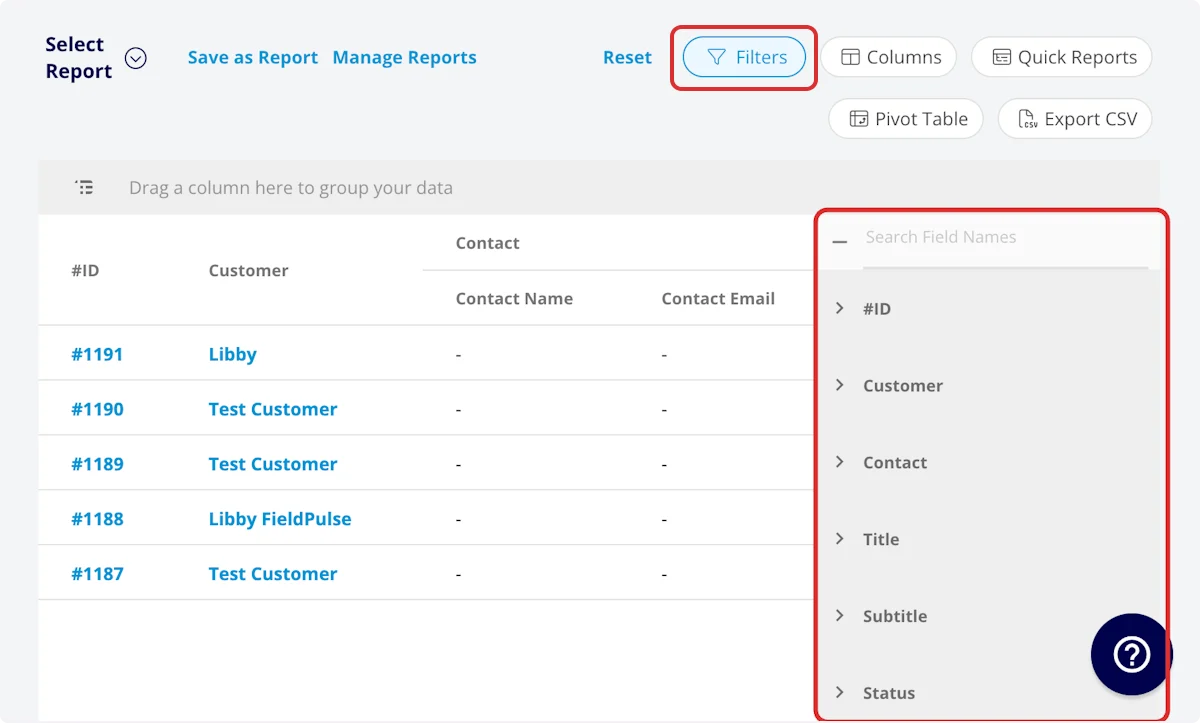 Before running the report, set filters to narrow your results. From the *Filters* icon, select how you want to filter the report:
* **User:** filter by contents
* **Clock In Title:** filter by contents
* **Clock Out Title:** filter by contents
* **Clock In Date/Time:** filter by date
* **Clock In Date:** filter by date
* **Clock In Time:** filter by date
* **Clock Out Date/Time:** filter by date
* **Clock Out Date:** filter by date
* **Clock Out Time:** filter by date
* **Clock In Notes:** filter by contents
* **Clock Out Notes:** filter by contents
* **Customer:** filter by contents
* **Created At:** filter by date
* **Tags:** filter by contents
* **Parent Project:** select project
* **Parent Job:** select job
* **Related Job Location Address:** filter by contents
* **Related Job City:** filter by contents
* **Related Job State:** filter by contents
* **Related Job Zip Code:** filter by contents
* **Related Job Location Name:** filter by contents
* **Related Job Notes:** filter by contents
* **Related Job Field Notes:** filter by contents
* **Duration:** filter by contents
* **Duration Decimal:** filter by contents
When filtering by contents, you will need to choose an operator and then enter values to filter the data. Use the table below to learn more about each operator.
| **Operator** | **Retrieves Data** | **Example** | **Data Retrieved** |
| ------------------------ | ------------------------------------------ | ------------------------------------------------- | ----------------------------------------------------------- |
| Equals | Equal to a specified value | Created By - Equals Tom Gause | For all records created by Tom Gause only |
| Not Equal | Different from a specified value | Tag - Not Equal to HVAC | For all records except those using the HVAC tag |
| Less Than | Lower than a specified value | #ID - Less than 1144 | For all records below #1144 |
| Less Than or Equal To | Lower than or equal to a specified value | Job Date/Time - Less than or equal to 12/13/2023 | For jobs scheduled before or on 12/13/2023 |
| Greater Than | Greater than a specified value | Job Duration - Greater than 60 minutes | For jobs in the In Progress status type for over 60 minutes |
| Greater Than or Equal To | Greater than or equal to a specified value | Job Date/Time - Greater than or equal to 1/1/2024 | For jobs scheduled on or after 1/1/2024 |
| In Range | Including and between two specified values | #ID - Between 1225 and 1236 | For all estimate records with #IDs between 1225 and 1236 |
| Starts With | Begins with a specified value | Title - Annual | For all job records beginning with Annual |
| Ends With | Ends with a specified value | Location - TX | For all job locations ending with TX |
| Blank | No values are in the field | Subtitle | For all job records with blank subtitles |
| Not Blank | Values in the field | Notes | For all job records with values in the notes field |
***
# Common Timesheet Reports
## Timesheets by Team Member
Use this report to view timesheets sorted by team member.
**Columns:** Customize to your needs, but must include *User*
**Group by:** *User*
## Timesheets by Job/Project
Use this report to view timesheets related to the same job or project, providing details on the total duration for a job or project.
**Columns:** Customize to your needs, but must include *Parent Job* or *Parent Project*
**Group by:** *Parent Job* or *Parent Project*
## Timesheet Duration with Notes
Use this report to view timesheets alongside the related notes, providing needed context around the timesheet durations.
**Columns:** Customize to your needs, but must include *Duration* or *Duration Decimal* and *Clock-In Notes*, *Clock-Out Notes*, or *Related Job Field Notes.*
***
**Have additional questions?**
*Contact us at [support@fieldpulse.com](mailto:support@fieldpulse.com) or use the chat feature in the bottom right corner of your screen.*
Before running the report, set filters to narrow your results. From the *Filters* icon, select how you want to filter the report:
* **User:** filter by contents
* **Clock In Title:** filter by contents
* **Clock Out Title:** filter by contents
* **Clock In Date/Time:** filter by date
* **Clock In Date:** filter by date
* **Clock In Time:** filter by date
* **Clock Out Date/Time:** filter by date
* **Clock Out Date:** filter by date
* **Clock Out Time:** filter by date
* **Clock In Notes:** filter by contents
* **Clock Out Notes:** filter by contents
* **Customer:** filter by contents
* **Created At:** filter by date
* **Tags:** filter by contents
* **Parent Project:** select project
* **Parent Job:** select job
* **Related Job Location Address:** filter by contents
* **Related Job City:** filter by contents
* **Related Job State:** filter by contents
* **Related Job Zip Code:** filter by contents
* **Related Job Location Name:** filter by contents
* **Related Job Notes:** filter by contents
* **Related Job Field Notes:** filter by contents
* **Duration:** filter by contents
* **Duration Decimal:** filter by contents
When filtering by contents, you will need to choose an operator and then enter values to filter the data. Use the table below to learn more about each operator.
| **Operator** | **Retrieves Data** | **Example** | **Data Retrieved** |
| ------------------------ | ------------------------------------------ | ------------------------------------------------- | ----------------------------------------------------------- |
| Equals | Equal to a specified value | Created By - Equals Tom Gause | For all records created by Tom Gause only |
| Not Equal | Different from a specified value | Tag - Not Equal to HVAC | For all records except those using the HVAC tag |
| Less Than | Lower than a specified value | #ID - Less than 1144 | For all records below #1144 |
| Less Than or Equal To | Lower than or equal to a specified value | Job Date/Time - Less than or equal to 12/13/2023 | For jobs scheduled before or on 12/13/2023 |
| Greater Than | Greater than a specified value | Job Duration - Greater than 60 minutes | For jobs in the In Progress status type for over 60 minutes |
| Greater Than or Equal To | Greater than or equal to a specified value | Job Date/Time - Greater than or equal to 1/1/2024 | For jobs scheduled on or after 1/1/2024 |
| In Range | Including and between two specified values | #ID - Between 1225 and 1236 | For all estimate records with #IDs between 1225 and 1236 |
| Starts With | Begins with a specified value | Title - Annual | For all job records beginning with Annual |
| Ends With | Ends with a specified value | Location - TX | For all job locations ending with TX |
| Blank | No values are in the field | Subtitle | For all job records with blank subtitles |
| Not Blank | Values in the field | Notes | For all job records with values in the notes field |
***
# Common Timesheet Reports
## Timesheets by Team Member
Use this report to view timesheets sorted by team member.
**Columns:** Customize to your needs, but must include *User*
**Group by:** *User*
## Timesheets by Job/Project
Use this report to view timesheets related to the same job or project, providing details on the total duration for a job or project.
**Columns:** Customize to your needs, but must include *Parent Job* or *Parent Project*
**Group by:** *Parent Job* or *Parent Project*
## Timesheet Duration with Notes
Use this report to view timesheets alongside the related notes, providing needed context around the timesheet durations.
**Columns:** Customize to your needs, but must include *Duration* or *Duration Decimal* and *Clock-In Notes*, *Clock-Out Notes*, or *Related Job Field Notes.*
***
**Have additional questions?**
*Contact us at [support@fieldpulse.com](mailto:support@fieldpulse.com) or use the chat feature in the bottom right corner of your screen.*