> ## Documentation Index
> Fetch the complete documentation index at: https://help.fieldpulse.com/llms.txt
> Use this file to discover all available pages before exploring further.
# Adding New Users
> Ready to expand your team? Add new users to your FieldPulse account. (Note: Only the company administrators have the ability to create new user accounts.)
Ready to expand your team? Add new users to your FieldPulse account. *(**Note:** Only the company administrators have the ability to create new user accounts.)*
User accounts use the individual’s email address as their login ID, and a password can either be created by the admin or created by the user after creation. Each user needs a unique name, email, and password. Each user also must be designated as an Administrator, Team Manager, Service Agent, Limited Agent, or Assignment User. The different roles provide different levels of access to the application and company data.
***
# **Creating User Accounts**
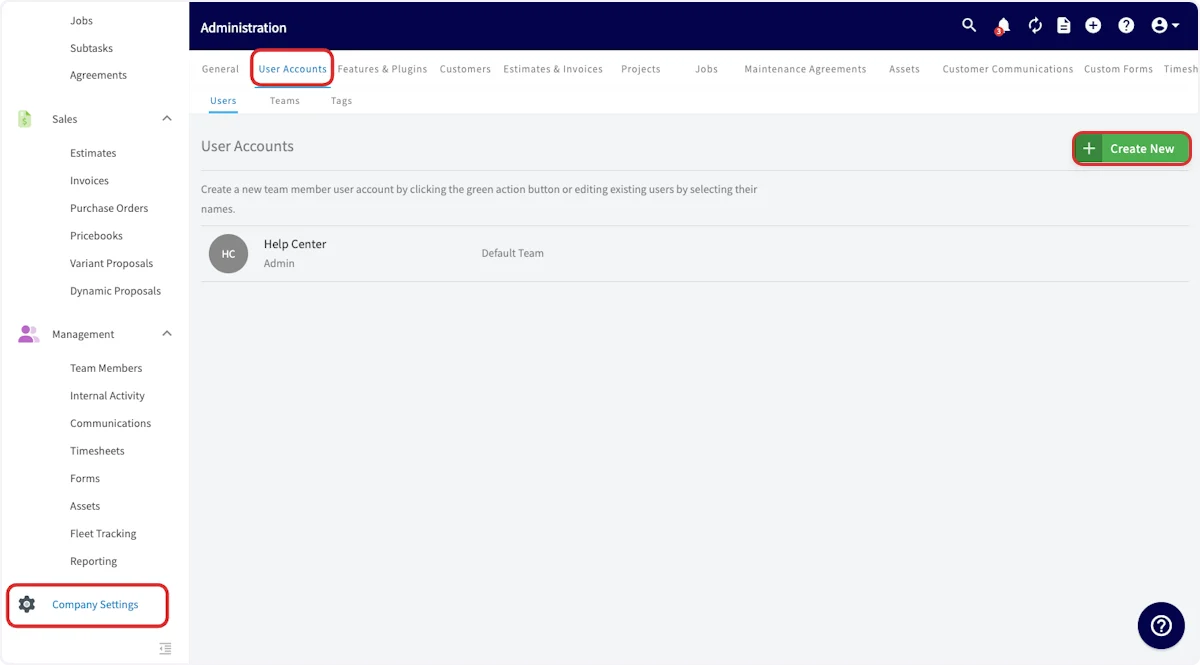
To create a new user, navigate to *Company Settings*, then *User Accounts*, and select *Create New*.
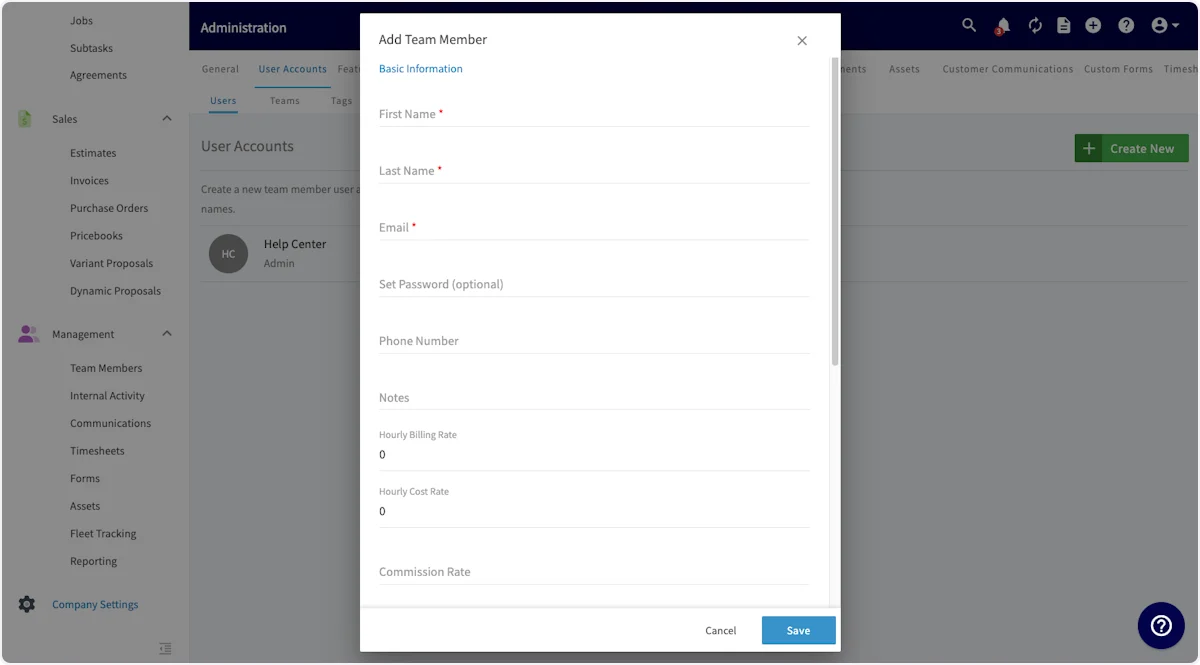
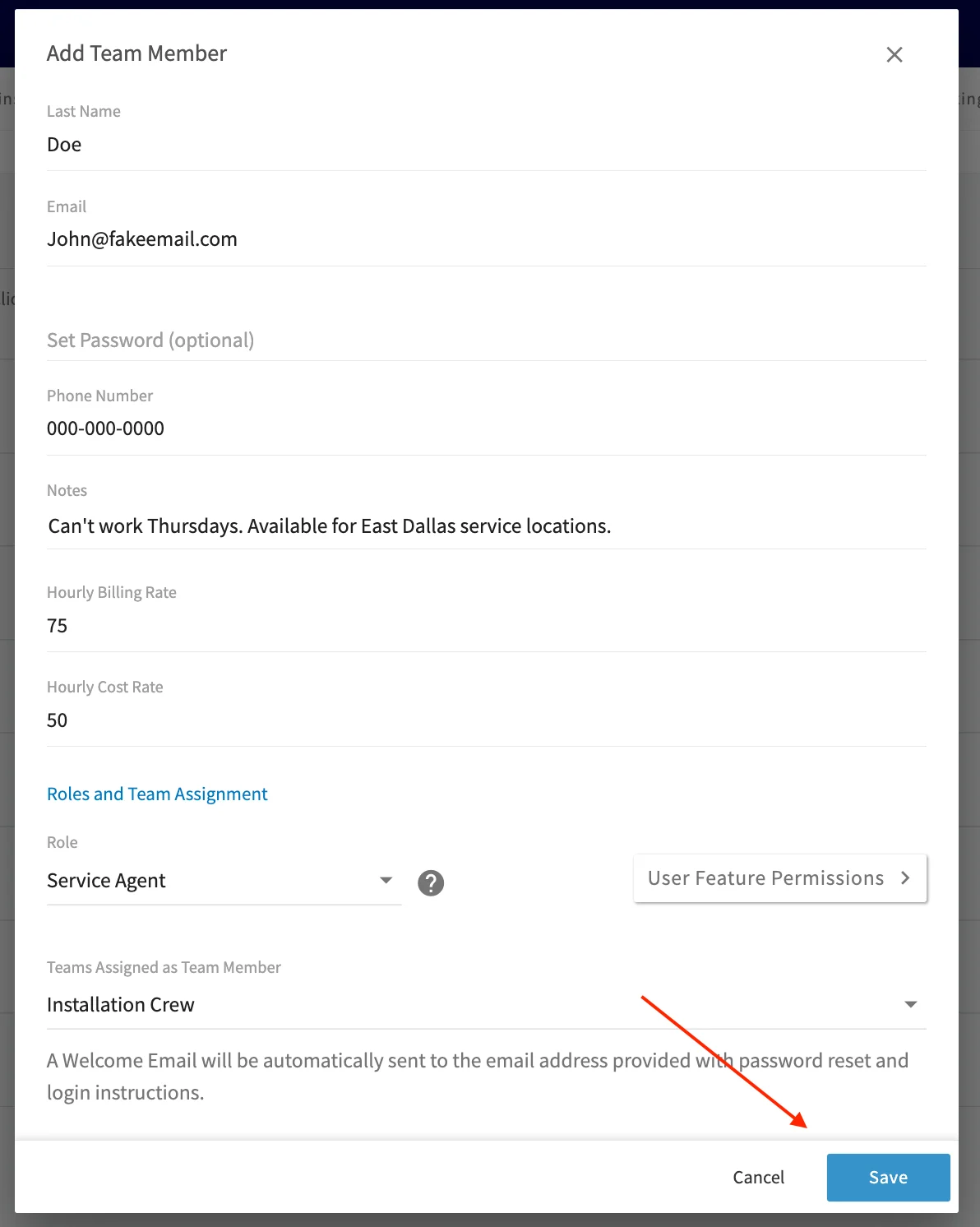
 Now you will need to fill out the basic information for the new user:
* **First Name**, **Last Name**, and **Email** are required fields.
* **Set Password** can be left blank, and will automatically send a password reset link to the new user's email address. If you prefer, you can set a standard password for the user.
* **Notes** can include any details you'd like to include on this user. This could include availability, restrictions, license numbers, expiration dates, etc.
* **Hourly Billing Rate** indicates how much your company charges the customer when this user works.
* **Hourly Cost Rate** indicates the hourly cost to your company when this user works.
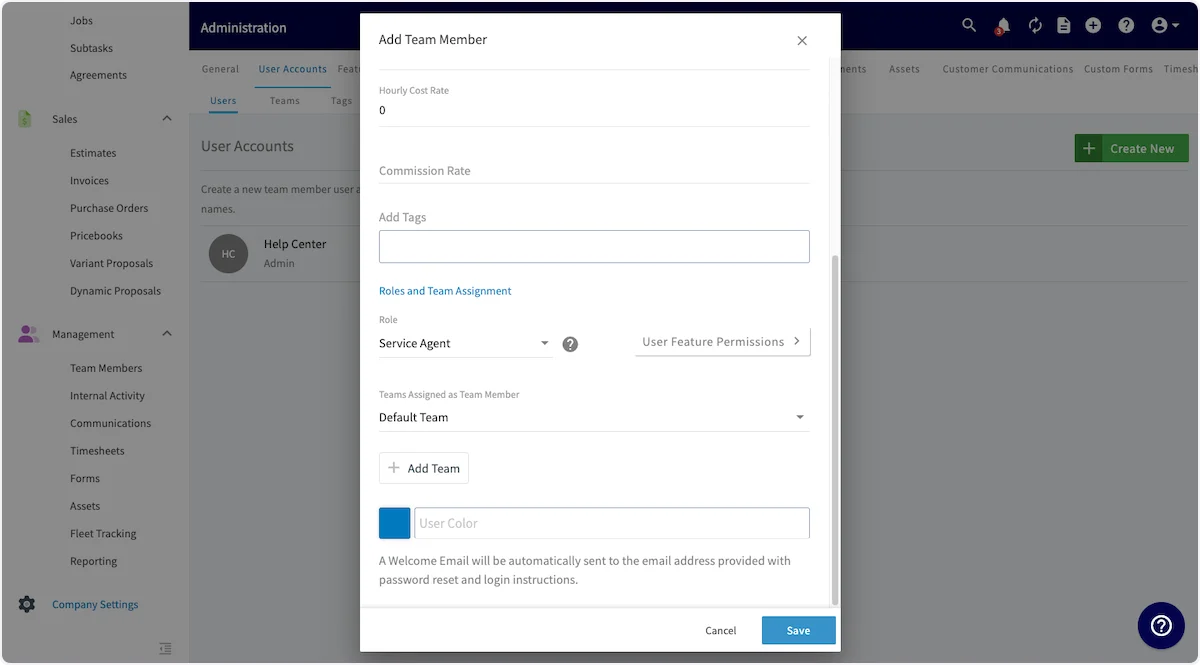
* [**User Roles**](/using-fieldpulse/users-teams/user-roles)
* Team Manager (can enable as an Admin)
* Service Agent
* Limited Agent
* Assignment User
* **Teams Assigned as Team Member** indicates which teams this user will be part of. The user will automatically be included in the default team, but can be added to other teams as well. [Click here](/using-fieldpulse/users-teams/teams-team-member-structure#h_b95be1730b) to learn more about teams.
Now you will need to fill out the basic information for the new user:
* **First Name**, **Last Name**, and **Email** are required fields.
* **Set Password** can be left blank, and will automatically send a password reset link to the new user's email address. If you prefer, you can set a standard password for the user.
* **Notes** can include any details you'd like to include on this user. This could include availability, restrictions, license numbers, expiration dates, etc.
* **Hourly Billing Rate** indicates how much your company charges the customer when this user works.
* **Hourly Cost Rate** indicates the hourly cost to your company when this user works.
* [**User Roles**](/using-fieldpulse/users-teams/user-roles)
* Team Manager (can enable as an Admin)
* Service Agent
* Limited Agent
* Assignment User
* **Teams Assigned as Team Member** indicates which teams this user will be part of. The user will automatically be included in the default team, but can be added to other teams as well. [Click here](/using-fieldpulse/users-teams/teams-team-member-structure#h_b95be1730b) to learn more about teams.
 ## User Feature Permissions
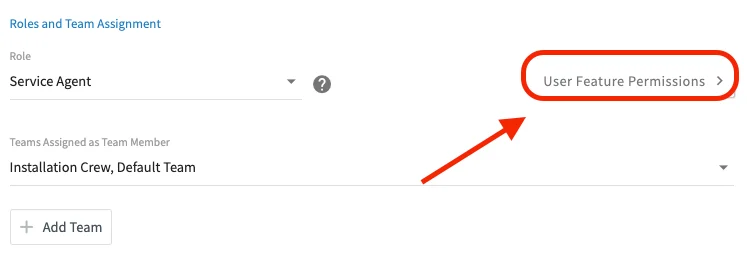
You can also use the *User Feature Permissions* button to further customize the permissions of your new or exisitng user. [Click here](/using-fieldpulse/users-teams/user-roles) to learn more about user role permissions.
## User Feature Permissions
You can also use the *User Feature Permissions* button to further customize the permissions of your new or exisitng user. [Click here](/using-fieldpulse/users-teams/user-roles) to learn more about user role permissions.
 Once the new user account is ready, click *Save* to save the new account and an automatic welcome email will be sent to the email address for this new user to log into their account.
 ***
# FAQs
**Can I search or filter team members by tag?**
Searching or filtering team members by tag is not currently available. Tags can be added to user profiles, but there is no way to look up users by tag at this time.
***
# Video Tutorial
***
**Have additional questions?**
*Contact us at [support@fieldpulse.com](mailto:support@fieldpulse.com) or use the chat feature in the bottom right corner of your screen.*
***
# FAQs
**Can I search or filter team members by tag?**
Searching or filtering team members by tag is not currently available. Tags can be added to user profiles, but there is no way to look up users by tag at this time.
***
# Video Tutorial
***
**Have additional questions?**
*Contact us at [support@fieldpulse.com](mailto:support@fieldpulse.com) or use the chat feature in the bottom right corner of your screen.*