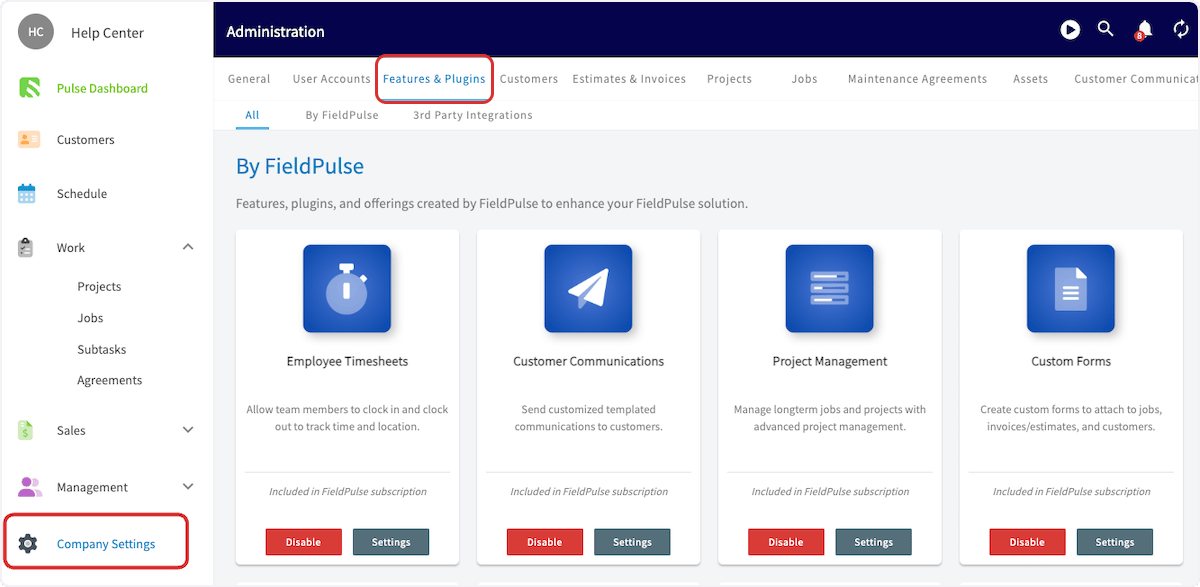
Now that you’ve set up your basic settings, it’s time to take a deep dive into the features, plugins, and partners available for your business! You can view and enable features and plugins by navigating to Company Settings, then selecting Features & Plugins from the top menu. Click on Features & Plugins

Feature & Plug-In Types

By FieldPulse

  • Blue: The blue icons are included in your base subscription package.
  • Purple: The purple icons are are add-ons to your base subscription package.
  • Our preferred partners and integrations fall below.

FieldPulse Preferred Partners

  • These are partner integrations and product offerings vetted and recommended by our team to help grow your business.

3rd Party Integrations

  • These are partner integrations and product offerings available for your business.

🛠 By FieldPulse: Included 🛠

These plugins are built into FieldPulse. Simply click Enable to turn on the features you want to add, or click Disable to turn them off.

Employee Timesheets

The Employee Timesheets feature card on the Features & Plugins page Allow your team members to clock in and out for the day, or for particular jobs. Geotag the team member’s location when they clock in or out and keep track of the hours they work on each job. Learn more about timesheets employee timesheets.

Customer Communications

The Customer Communications feature card on the Features & Plugins page Send emails and text messages to your customers using pre-written templates or one-off messages. You can personalize these messages with information from the job and customer record, such as customer name, job location and so on. Learn more about Customer Communications Customer Communications.

Project Management

The Project Management feature card on the Features & Plugins page Keep track of longer-term projects comprised of several individual jobs. Track the percentage of completion, adjust the project timeline as you go, and invoice for individual jobs or the whole project. Learn more about Projects Project Management.

Custom Forms

The Custom Forms feature card on the Features & Plugins page Create customized forms to capture important information on the job. Create inspection reports, maintenance reports, or create a checklist for your team members to follow on-site. Learn more about Custom Forms Custom Forms.

Booking Portal

The Booking Portal feature card on the Features & Plugins page Allow your customers to submit requests and book appointments through your website. Learn more about Booking Portal the Booking Portal.

Purchase Orders

The Purchase Orders feature card on the Features & Plugins page Order and track materials from your suppliers and link them to the jobs you are working on. Learn more about Purchase Orders Purchase Orders.

Customer Portal

The Customer Portal feature card on the Features & Plugins page Allow your customers to view their previous jobs, projects, estimates, invoices, and payments through the customer portal. Learn more about Customer Portal the Customer Portal.

Maintenance Agreements

The Maintenance Agreements feature card on the Features & Plugins page Create, track, and schedule your recurring maintenance agreements. Learn more about Maintenance Agreements Maintenance Agreements.

Assets

The Assets feature card on the Features & Plugins page Track and manage both internal and customer assets. Learn more about Assets Assets.

Recurring Billing

The Recurring Billing feature card on the Features & Plugins page Automatically generate and send invoices for your recurring jobs and maintenance agreements. Learn more about Recurring Billing Recurring Billing.

Custom Sales Pipeline

The Custom Sales Pipeline feature card on the Features & Plugins page Create custom sales pipeline statuses and manage your customers through the process. Learn more about Customer Sales Pipeline the custom sales pipeline.

Review Management

The Review Management feature card on the Features & Plugins page Get more reviews from customers and capture ratings and feedback on your team members. Learn more about Review Management Review Management.

Automatic Tax Rate

The Automatic Tax Rate feature card on the Features & Plugins page Automatically fill in tax rates on your estimate and invoices using your customers’ Billing Address Zip Code. Learn more about Automatic Tax Rates Automatic Tax Rates.

💥 By FieldPulse: Add-Ons 💥

These resources can be added onto your base subscription, but they do come with an additional charge. For questions on pricing, please contact support@fieldpulse.com.

FieldPulse Payments

The FieldPulse Payments feature card on the Features & Plugins page Take credit card and ACH payments from customers directly in FieldPulse. Create invoices that can be paid online, take payment on-site directly from the FieldPulse mobile app, or key in credit card information taken over the phone. Set up recurring charges, and much much more at industry-leading rates. Learn more about FieldPulse Payments FieldPulse Payments.

Pulse Fleet Tracking

The Pulse Fleet Tracking feature card on the Features & Plugins page Track your vehicles with a simple plug and play device. Includes free $100 device with each vehicle subscription. Devices start as low as $30 per month per vehicle. Learn more about Fleet Tracking, click Fleet Tracking.

Dynamic Proposal

The Dynamic Proposal feature card on the Features & Plugins page Create detailed customer proposals with information pages, image galleries, multiple proposal options, contracts, and more. Learn more about Dynamic Proposal, click Dynamic Proposals.

FieldPulse Engage

The FieldPulse Engage feature card on the Features & Plugins page FieldPulse Engage is the easiest way to separate your team’s personal and business communications with multiple phone lines for talk, text, and more. To learn more about Engage, click the Engage overview.

FieldPulse Pricebook

The FieldPulse Pricebook feature card on the Features & Plugins page Convert more customers to make higher margins with a custom pricebook tool. To learn more about Pricebook, click the Pricebook collection.

PDF Form Filler

The PDF Form Filler feature card on the Features & Plugins page Create and fill out existing or custom built forms within FieldPulse. To learn more about PDF Filler, click the PDF Form Filler.

⭐️ FieldPulse Preferred Partners ⭐️

These integrations are partners that we’ve aligned with to provide value-added services to our users. Our Preferred Partners are:

FieldPulse Capital

The FieldPulse Capital feature card on the Features & Plugins page FieldPulse Capital is a line of credit designed for contractors that will allow you to borrow money quickly. Learn more about FieldPulse Capital FieldPulse Capital. ​

Wisetack Consumer Financing

The Wisetack Consumer Financing feature card on the Features & Plugins page Wisetack is our preferred consumer financing partner. The process is entirely hands-off for your business, and you will receive payment as soon as the work is completed. The integration is built directly into FieldPulse’s payment workflow and the “as low as” monthly price appears directly on estimates and invoices. To learn more, click the Wisetack consumer financing guide.

Trinity Home Warranty

The Trinity Home Warranty feature card on the Features & Plugins page Trinity Home Warranty offers warranties to your customers for their HVAC and plumbing projects. To learn more, click the Trinity Home Warranty integration.

HighLevel

HighLevel integration tile in FieldPulse Features and Plugins Email Marketing, Reputation Management, Custom Website, and more. To learn more, click the HighLevel integration.

Signpost

Signpost integration tile in FieldPulse Features and Plugins Constant coverage with 24/7 live answering and instant responses to text, social media and lead gen services like Angi. To learn more, click the Signpost integration guide

🔌 FieldPulse Integrations 🔌

We integrate with popular software seamlessly to save you time. These are 3rd party programs that work with FieldPulse. Our integrations include:

Google Calendar

Google Calendar integration tile in FieldPulse Features and Plugins Sync your FieldPulse jobs straight to your Google Calendar. Learn more about our integration with Google Calendar the Google Calendar integration guide.

NiceJob Review Management

NiceJob Review Management integration tile in Features and Plugins NiceJob provides tools to ensure that your customers leave you with positive and plentiful reviews after you complete a job. More reviews means more credibility for your business, and more search engine visibility. Learn more about NiceJob the NiceJob integration guide.

QuickBooks Online & Desktop

QuickBooks Online and Desktop integration tile in Features and Plugins Seamlessly sync your invoices, invoice items and customers from FieldPulse into QuickBooks Online. Everything is synced in real time as you work, so your bookkeeping is put on auto-pilot. Learn more about syncing with QuickBooks the QuickBooks sync guide.

Marketing 360

Marketing 360 integration tile in FieldPulse Features and Plugins Scale your marketing program by syncing FieldPulse Customers to Marketing 360. Learn more about our integration with Marketing 360 the Marketing 360 integration guide

The Granite Group

The Granite Group integration tile in Features and Plugins With our Granite Group integration you can get the most up to date material pricing all within FieldPulse. Learn more about The Granite Group the Granite Group integration guide

Free2Grow

Free2Grow AI voice answering tile in Features and Plugins Free2Grow is a cutting-edge AI-powered voice answering solution designed to streamline and elevate your business communications. Ready to increase efficiency, enhance customer satisfaction, & see your business grow? Click the Free2Grow integration guide to learn more.

City Electric Supply

City Electric Supply integration tile in Features and Plugins With our City Electric Supply integration, you can access real-time material pricing and seamlessly send purchase orders, all directly within FieldPulse. Learn more about our integration with City Electric Supply the City Electric Supply integration guide

Mailchimp

Mailchimp integration tile in FieldPulse Features and Plugins Mailchimp is an email marketing platform tailored to a wide range of businesses (from small businesses and online stores to large enterprises). It provides you with the tools you need to create, send, and track engaging email campaigns to your customers and subscribers. Effortlessly sync customer details from FieldPulse to Mailchimp to streamline all of your email marketing communications. Learn more the Mailchimp integration guide
Have additional questions? Contact us at support@fieldpulse.com or use the chat feature in the bottom right corner of your screen.