
Who uses this: Administrators only — requesting the feature happens in Company Settings, which only Administrators can reach. Availability: All regions. Request Custom Forms under Company Settings > Features & Plugins, and FieldPulse Support helps you turn it on — contact FieldPulse for pricing.Custom Forms lets your team build the checklists, inspection sheets, and intake forms they already use, then attach them to jobs, estimates, invoices, and customers. The feature has to be turned on before anyone can build or attach a form. An Administrator requests it once for the whole account from Company Settings, and FieldPulse Support helps turn it on.
Overview
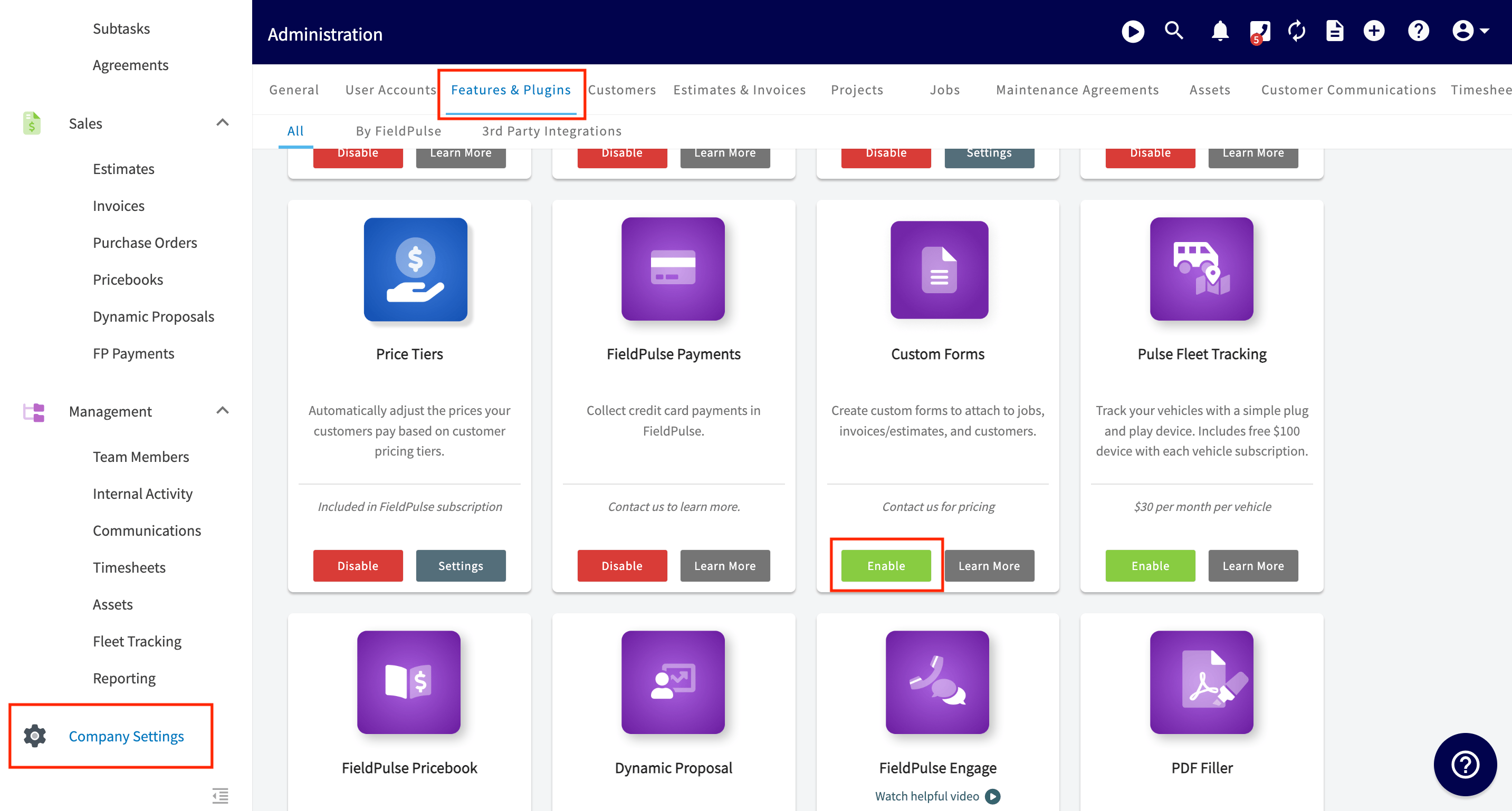
Requesting Custom Forms is a one-time step an Administrator takes in Company Settings > Features & Plugins. Find the Custom Forms tile on that page and select Enable to let the FieldPulse team know you’re interested. FieldPulse Support then helps you turn the feature on. Once the feature is on, Custom Forms appears in the top menu of Company Settings, and that is where you build and manage your form templates. The Custom Forms tile reads Contact us for pricing, so contact the FieldPulse team for pricing before you turn the feature on.Before you begin
- You need Administrator access to FieldPulse. Company Settings is Administrator-only — see User Roles and Permissions Details.
- Get pricing first. Contact the FieldPulse team at support@fieldpulse.com or through the chat feature in the bottom-right corner of your screen.
Step-by-step setup
- In the left-hand menu, select Company Settings.
- Select the Features & Plugins tab.
- Find the Custom Forms tile and select Enable. This lets the FieldPulse team know you’re interested, and FieldPulse Support helps you turn the feature on.
For a full breakdown of every setting available on a form, see Custom Form Settings Details.