
Understanding and Resolving Sync Errors In-App
For any record that fails to sync with QuickBooks Desktop—including customers, invoices, and payments—you can use the in-app troubleshooting tool to quickly identify and fix the issue. Clicking the Failed Sync button next to the record will take you to a dedicated page where all sync errors for that record are listed.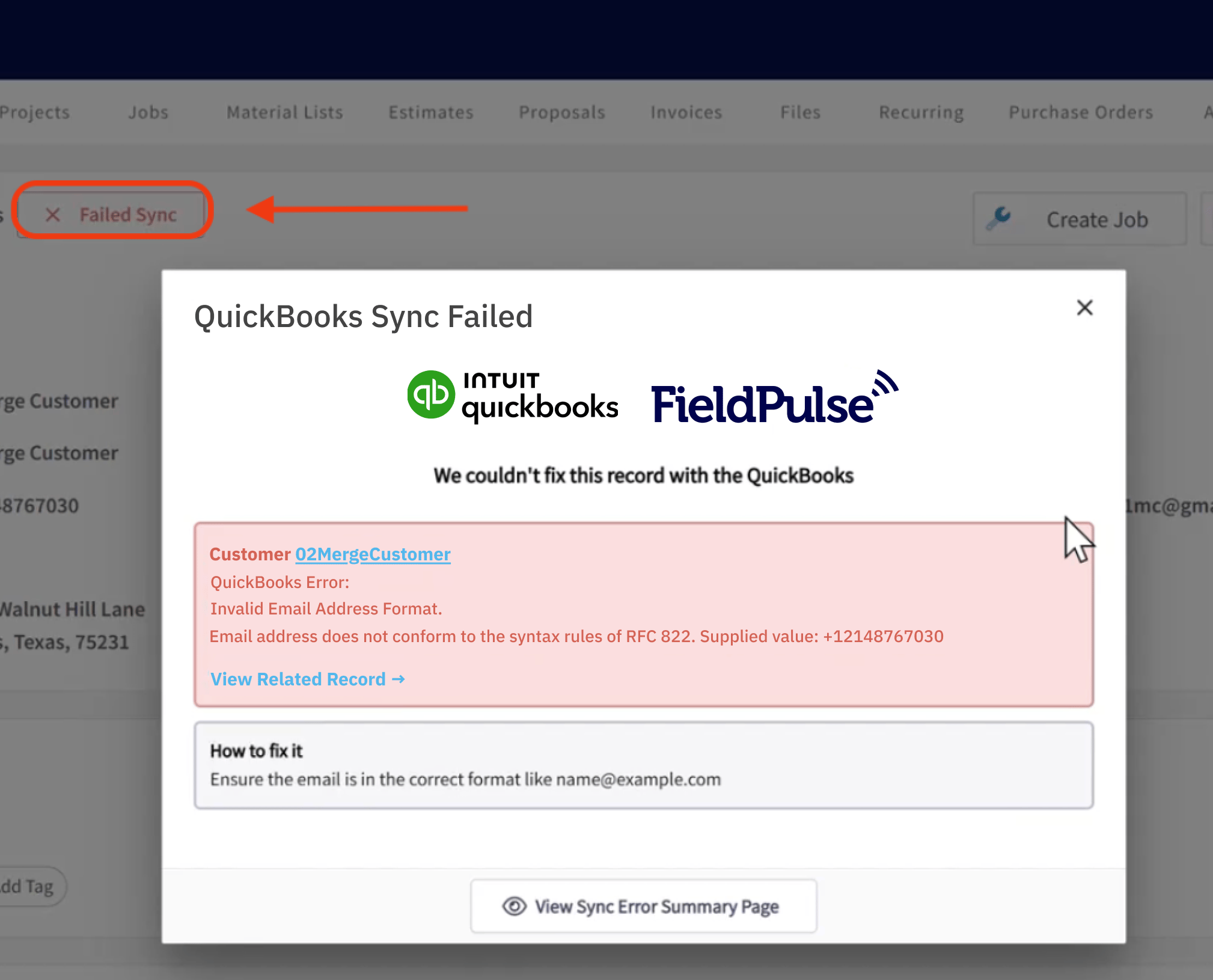
Comprehensive QuickBooks Error Reference
Here is a complete list of QuickBooks errors along with their resolutions.| Error Message from QuickBooks Desktop | Necessary Action |
|---|---|
| ”Account # sync failed!” | Check your entry or contact support if the problem continues. |
| ”Account Period Closed, Cannot Update Through Services API”, “The account period has closed and the account books cannot be updated through through the QuickBooks Online Services API. Please use the QuickBooks Online website to make these changes.” | Your books are closed for this period, so changes can’t be made through FieldPulse. To update this record, please log in to QuickBooks directly. |
| ”AltPhone length (#) more than allowed (21)“ | Shorten the alternate phone number to 21 characters or fewer. |
| ”An attempt was made to modify a Estimate with a date that is on or before the closing date of the company. If you are sure you really want to do this, please ask a user with Admin privileges to remove the password for editing transactions on or before to closing date (this setting is in the Accounting Company Preferences), then try again.” | Change the estimate date to be after your company’s closing date or ask your admin to adjust the settings in QuickBooks directly. |
| ”An attempt was made to modify a Invoice with a date that is on or before the closing date of the company. If you are sure you really want to do this, please ask a user with Admin privileges to remove the password for editing transactions on or before to closing date (this setting is in the Accounting Company Preferences), then try again.” | Change the invoice date to be after your company’s closing date or ask your admin to adjust the settings in QuickBooks directly. |
| ”An attempt was made to modify a ReceivePayment with a date that is on or before the closing date of the company. If you are sure you really want to do this, please ask a user with Admin privileges to remove the password for editing transactions on or before to closing date (this setting is in the Accounting Company Preferences), then try again.” | Change the payment date to be after your company’s closing date or ask your admin to adjust the settings in QuickBooks directly. |
| ”Assigned discount item not present!” | Ensure the discount item is active in QuickBooks or check if the discount has proper ‘value or %’. |
| ”BillAddress_Addr1 length (#) more than allowed (41)“ | Shorten billing address line 1 to 41 characters or fewer. |
| ”BillAddress_Addr2 length (#) more than allowed (41)“ | Shorten billing address line 2 to 41 characters or fewer. |
| ”BillAddress_PostalCode length (#) more than allowed (13)“ | Shorten billing postal code to 13 characters or fewer. |
| ”BillAddress_State length (#) more than allowed (21)“ | Shorten billing state to 21 characters or fewer. |
| ”CompanyName value has non-ASCII characters” | Remove special characters from the company name. |
| ”Credit memo saved as payment can not be synced to QuickBooks Desktop” | Credit memos used as payments cannot be synced to QuickBooks. |
| ”CustomerRef required but missed!” | Link this entry to a customer before saving. |
| ”Delete Customer Has Unbilled Expenses Error”, “Cannot delete Customer. : This customer cannot be deleted because there are unbilled charges for this customer.” | You must clear all unbilled transactions before deleting the customer. |
| ”Desc length (#) more than allowed (4095)“ | Shorten the description text to 4095 characters or fewer. |
| ”Discount Account # sync failed!” | Fix the discount account setup before syncing. |
| ”Discount Item # not synced yet!” | Make sure the discount item is synced before using it. |
| ”Duplicate Name Exists Error - The name supplied already exists. : Another customer, vendor or employee is already using this name. Please use a different name.” | Use a unique name that’s not already in use in QuickBooks. |
| ”Duplicate Name Exists Error”, “The name supplied already exists. : null” | Use a unique name that’s not already in use in QuickBooks. |
| ”Email length (#) more than allowed (1023)“ | Shorten the email address to 1023 characters or fewer. |
| ”Feature Not Supported Error”, “Feature Not Supported Error : We’re sorry. This feature is not included in your QuickBooks Online Simple Start subscription.” | Upgrade your QuickBooks plan or remove the unsupported feature. |
| ”FirstName length (#) more than allowed (25)“ | Shorten the first name to 25 characters or fewer. |
| ”Income Account # sync failed!” | Resolve income account issues before syncing. |
| ”Insufficient permission level to perform this action.” | Your QuickBooks user account needs higher access to complete this action. |
| ”Invalid Reference Id - Invalid Reference Id : Product/Service assigned to this transaction has been deleted. Before you can modify this transaction, you must restore #“ | Restore or replace the deleted item to continue. |
| ”Invalid Reference Id - Invalid Reference Id : Product/Service assigned to this transaction has been deleted. Before you can modify this transaction, you must restore ‘Item Name‘“ | Restore or replace the deleted item to continue. |
| ”Invalid Type”, “Invalid Type : Item of type Inventory cannot be changed to Noninventory item type” | You cannot change an inventory item into a non-inventory item. |
| ”InvoiceLine required but missed!” | Add at least one line item to this invoice to proceed. |
| ”LastName length (#) more than allowed (25)“ | Shorten the last name to 25 characters or fewer. |
| ”LastName value has non-ASCII characters” | Remove special characters from the last name. |
| ”Memo length (#) more than allowed (4095)“ | Shorten the memo field to 4095 characters or fewer. |
| ”Name length (#) more than allowed (31)“ | Shorten the name field to 31 characters or fewer. |
| ”Name value has non-ASCII characters” | Remove special characters from the name field. |
| ”Notes length (#) more than allowed (4095)“ | Shorten the notes field to 4095 characters or fewer. |
| ”Object # specified in the request cannot be found. QuickBooks error message: Invalid argument. The specified record does not exist in the list.” | The referenced record does not exist in QuickBooks. Please reach out to support if the error persists. |
| ”Object # specified in the request cannot be found. “ | The referenced record does not exist in QuickBooks. Please reach out to support if the error persists. |
| ”Parent Cannot Be Child - Parent Cannot Be Child : This item cant be a sub-item of itself.” | You cannot make an item a sub-item of itself. |
| ”Parent Customer # sync failed!” | Resolve sync issues with the parent customer before retrying. |
| ”Pending sync from FieldPulse to QuickBooks Desktop” | This record is waiting to sync. No action needed unless it stalls. |
| ”Phone length (#) more than allowed (21)“ | Shorten the phone number to 21 characters or fewer. |
| ”Related Class # sync failed!” | Fix the related class in QuickBooks before syncing. |
| ”Related Customer # sync failed!” | Fix the customer reference before syncing. |
| ”Related Invoice RefNumber:# sync failed!” | Fix the connected invoice record before syncing. |
| ”Related Item # not synced yet” | Make sure the item is synced before using it. |
| ”Related Payment Method # sync failed!” | Fix the payment method before syncing. |
| ”Related TaxRate # sync failed!” | Fix the tax rate setup before syncing. |
| ”Required param missing, need to supply the required value for the API - Required parameter ExpenseAccountRef or IncomeAccountRef is missing in the request” | Add the missing account reference to continue. |
| ”Sales Tax Code # sync failed!” | Fix the sales tax code before syncing. |
| ”SalesOrPurchase required but missed!” | Add the missing account reference to continue. |
| ”ShipAddress_Addr1 length (#) more than allowed (41)“ | Shorten shipping address line 1 to 41 characters or fewer. |
| ”ShipAddress_Addr2 length (#) more than allowed (41)“ | Shorten shipping address line 2 to 41 characters or fewer. |
| ”ShipAddress_PostalCode length (#) more than allowed (13)“ | Shorten shipping postal code to 13 characters or fewer. |
| ”ShipAddress_State length (#) more than allowed (21)“ | Shorten shipping state to 21 characters or fewer. |
| ”SOPAccount # sync failed!” | Add the missing account reference to continue. |
| ”The “address” field has an invalid value #. QuickBooks error message: The parameter is incorrect. “ | Correct the address format or remove the address before syncing. |
| ”The given object ID # in the field # is invalid. “ | The referenced record does not exist in QuickBooks. Please reach out to support if the error persists. |
| ”The name # of the list element is already in use.” | Choose a different name; a record with this name already exists. |
| ”The provided edit sequence # is out-of-date. “ | Reload the latest version of the record and try again. |
| ”The string # in the field “FirstName” is too long.” | Shorten the first name to fit the character limit. |
| ”The string # in the field “Name” is too long.” | Shorten the name to fit the character limit. |
| ”The string # in the field “Phone” is too long.” | Shorten the phone number to fit the character limit. |
| ”There is a duplicated records in FieldPulse database!”, “Matched records ids: #, #, # …” | Correct duplicates from FieldPulse before syncing. |
| ”There is already synced record present in FieldPulse database related to another instance on QuickBooks Desktop side”, “Record id: # (name = #)“ | Correct duplicates from FieldPulse before syncing. |
| ”There is an invalid reference to a parent # in the Customers list. “ | Fix the customer hierarchy setup before syncing. |
| ”There is an invalid reference to QuickBooks Account # in the Item Non-Inventory. QuickBooks error message: Invalid argument. The specified record does not exist in the list.” | Restore or replace the deleted item to continue. |
| ”There is an invalid reference to QuickBooks Item Sales Tax # in the Invoice. QuickBooks error message: Transaction Sales Tax is currently disabled by preferences.” | Turn on Sales Tax in QuickBooks before syncing. |
| ”There is an invalid reference to QuickBooks Post Account # in the ItemInventory. QuickBooks error message: To change the posting account, you must switch to single-user mode.” | Switch to single-user mode in QuickBooks to make this change. |
| ”There is no correct Tax Code available to be assigned to this item” | Assign a valid tax code to this item. |
| ”There is no OtherExpense/CostOfGoodSold account can be assigned to this item” | Assign a proper expense or Cost of Goods Sold account to this item. |
| ”There is OtherExpense account can be assigned to this item” | Please assign valid expense account. |
| ”There was an error when modifying a Estimate. QuickBooks error message: You may not create or edit a transaction dated on or before the dividing date.” | Update the estimate date or closing period settings in QuickBooks. |
| ”There was an error when modifying a Invoice. QuickBooks error message: The Transaction Sales Tax field cannot be left blank, even for non-taxable customers and sales which have no taxable items, so non-taxable sales will be correct for this district.” | Assign a sales tax code to this invoice. |
| ”There was an error when modifying a Invoice. QuickBooks error message: You may not create or edit a transaction dated on or before the dividing date.” | Update the invoice date or closing period settings in QuickBooks. |
| ”There was an error when modifying a ItemNonInventory. Cannot use SalesOrPurchaseMod aggregate when the item is reimbursable. “ | This item is reimbursable and cannot be edited this way. |
| ”There was an error when modifying a ItemService. Cannot use SalesOrPurchaseMod aggregate when the item is reimbursable. “ | This item is reimbursable and cannot be edited this way. |
| ”There was an error when saving a Estimate. QuickBooks error message: The transaction is empty.” | Add line items to this estimate before saving. |
| ”There was an error when saving a Estimate. QuickBooks error message: The Transaction Sales Tax field cannot be left blank, even for non-taxable customers and sales which have no taxable items, so non-taxable sales will be correct for this district.” | Assign a tax code to the estimate before saving. |
| ”There was an error when saving a Invoice. QuickBooks error message: The transaction is empty.” | Add line items to this invoice before saving. |
| ”There was an error when saving a Invoice. QuickBooks error message: The Transaction Sales Tax field cannot be left blank, even for non-taxable customers and sales which have no taxable items, so non-taxable sales will be correct for this district.” | Assign a tax code to the invoice before saving. |
| ”There was an error when saving a Invoice. QuickBooks error message: You may not create or edit a transaction dated on or before the dividing date.” | Update the invoice date or closing period settings in QuickBooks. |
| ”There was an error when saving a ReceivePayment. QuickBooks error message: The transaction is empty.” | Please specify a payment amount before saving. |
| ”This feature is not enabled or not available in this version of QuickBooks.” | Upgrade your QuickBooks plan or remove the unsupported feature. |
| ”There was an error when modifying a Customers list, element “[QuickBooks Desktop ID]”. QuickBooks error message: Cannot merge list elements.” | Check that there is not another customer with the same name and that all fields are filled out correctly. Then try updating again. |
Have additional questions? Contact us at support@fieldpulse.com or use the chat feature in the bottom right corner of your screen.