| Company Role | Desired Permissions | Engage Role |
|---|---|---|
| Assignment User / Limited Agent | • These roles do not have access to Engage. | • Upgrade these users to service agents to grant Engage access. |
| Service Agent | • Assigned to a specific line. • Authorized to handle incoming and outgoing calls exclusively on the designated line. • Permitted to view incoming activity only on the assigned line. • Permitted to view outgoing activity only from oneself. | • Assign this user to one phone line or none. If assigned to one phone line, the user will default to line manager too. • (Note: If you have multiple users assigned to a line, all assignees will be able to view each other’s activity on this line.) |
| Team Manager | • Linked to one specific line or none. • Empowered to oversee multiple lines. • Capable of making incoming and outgoing calls on multiple designated lines. • Granted access to view line activity on multiple specified lines. | • Assign this user to one phone line or none. If assigned to one phone line, the user will default to line manager too. • Designate this user as a manager for multiple lines. |
| Admin | • Linked to one specific line or none. • Endowed with the authority to manage all lines. • Enabled to make incoming and outgoing calls across all lines. • Given access to view line activity on all lines. | • Assign this user to one phone line or none. If assigned to one phone line, the user will default to line manager too. • Designate this user as a manager for all lines. |
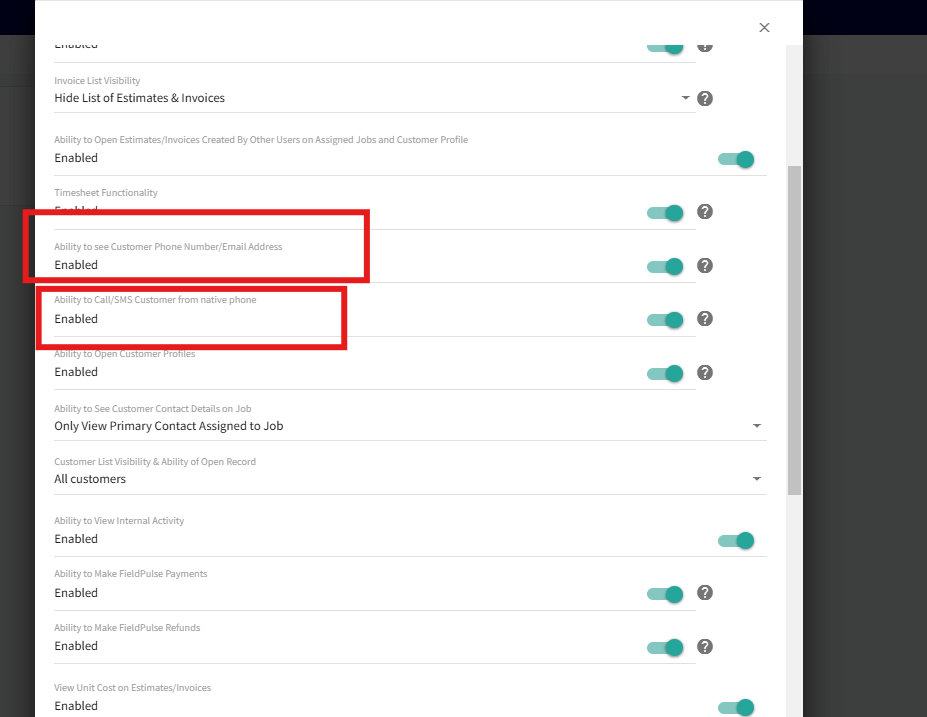
Note for Service Agents: You now have the option to enhance customer data privacy and control communication channels for users:
-
Customer Contact Visibility:
- You can hide customer phone numbers and emails from users while still allowing them full functionality within the system. This ensures customer details remain private.
-
Communication Restrictions:
-
You can restrict the ability to make calls or send SMS using the user’s native device. This ensures all customer communication is conducted through FieldPulse and Engage, allowing:
- Accurate tracking and recording of communications.
- Prevention of unauthorized external calls or SMS.
-
You can restrict the ability to make calls or send SMS using the user’s native device. This ensures all customer communication is conducted through FieldPulse and Engage, allowing:

Have additional questions? Contact us at support@fieldpulse.com or use the chat feature in the bottom right corner of your screen.