
Who uses this: Anyone who can open the Estimates or Invoices list in FieldPulse — the export runs from that list, and the report goes to that user’s FieldPulse account email address. Availability: All regions.Exporting estimates and invoices pulls your estimate or invoice records into a spreadsheet. You start the export from the Estimates list or the Invoices list, and FieldPulse emails the report to the address registered with your FieldPulse account.
Overview
The estimate and invoice export produces a spreadsheet of your records, and FieldPulse delivers it by email. Estimates and invoices export separately — you select Export on the list you want, and FieldPulse sends the finished report to the email address registered with your FieldPulse account. Open that email and open the attached report to work with the spreadsheet.Before you begin
- Make sure you can get to the email address registered with your FieldPulse account, since FieldPulse sends the finished report there.
- Decide whether you are exporting estimates or invoices. Each list has its own Export button.
On web
Export your estimates or invoices
- Select Estimates or Invoices in the left-side menu.
-
Select Export at the top right of the list.
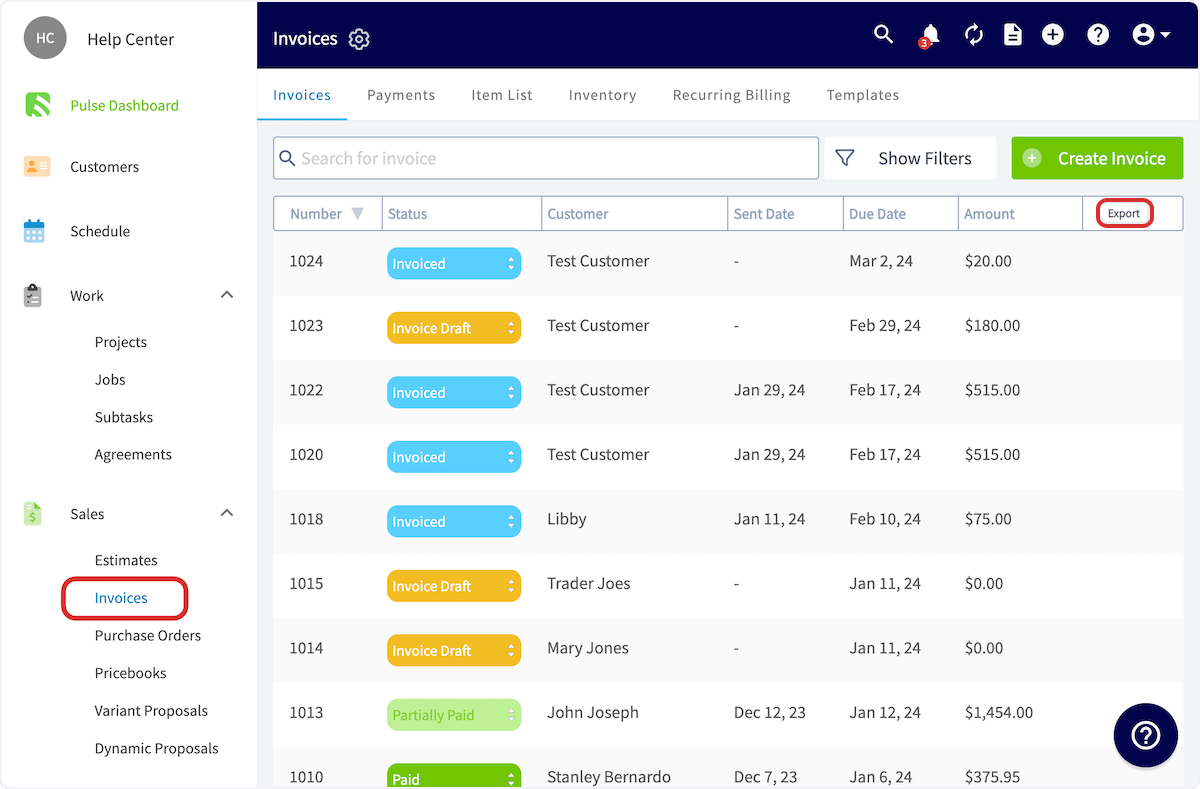
- Open the email FieldPulse sends to your registered account address, then open the attached report.
What the export contains
The spreadsheet contains the following fields:- Number
- Status
- Team Member
- Customer
- Project
- Job title
- Sent date
- Due date
- Amount