Bill a child location’s estimates and invoices to the parent account in FieldPulse, charge the parent’s card on file, and show parent details on PDFs.
Listen to this page11 min 48 sec
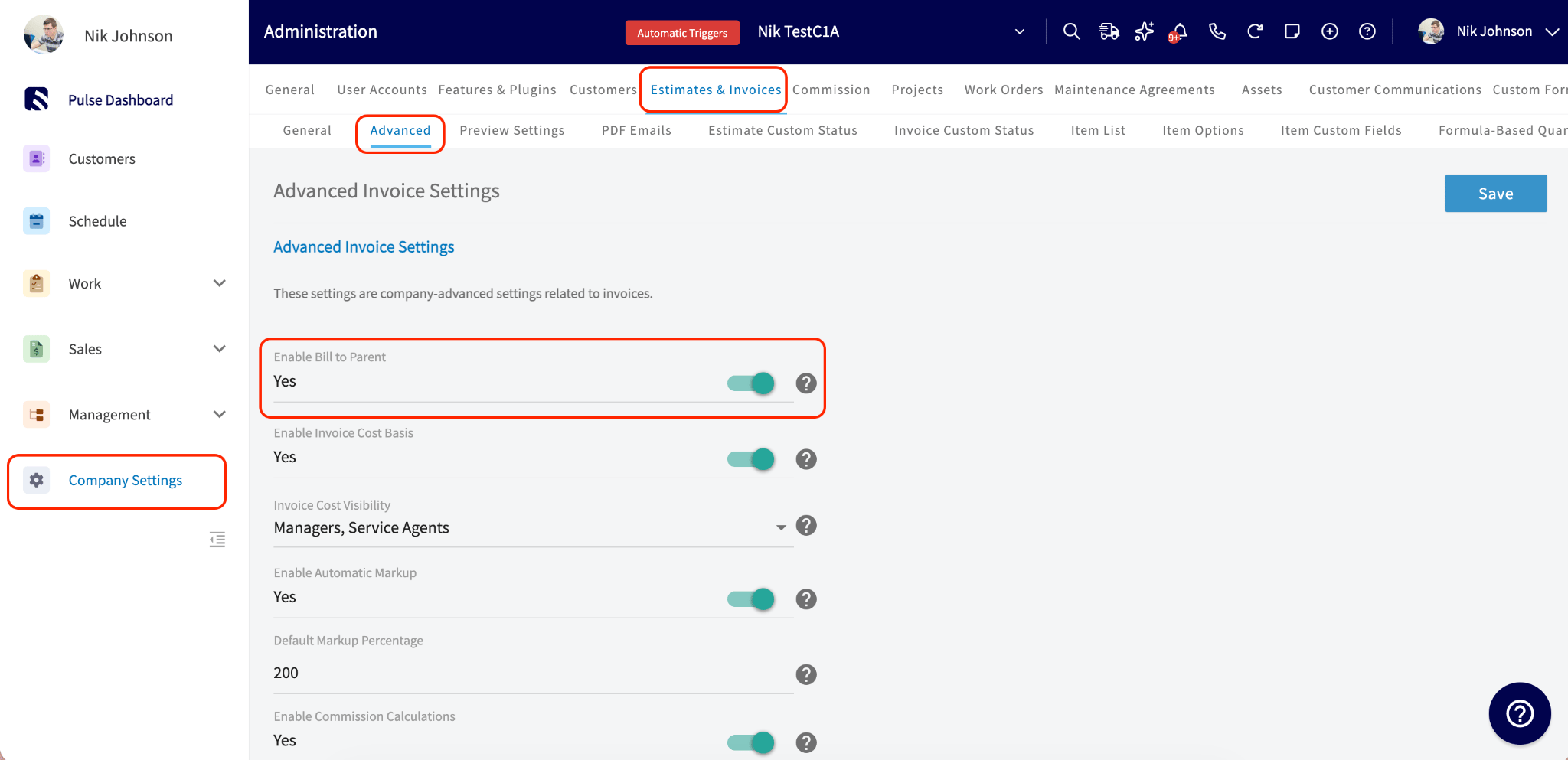
Who uses this: Admins turn the feature on in Company Settings; anyone with customer create/edit permissions can switch it on for a customer record, and anyone with estimate/invoice create and edit permissions can change the Bill To on a document. Availability: All regions · Web and mobile. Not supported for recurring billing, and Bill To details cannot be set while offline.
If you work with property managers, landlords, or corporate accounts, you have done the job at a child location and needed to send the bill to the parent. Bill to Parent links a child customer’s estimates and invoices to the parent’s billing details and lets you charge the parent’s card on file, without re-entering billing details every time.
Bill to Parent is an account-level setting that, once turned on, adds a Bill to Parent toggle to child customer records and a Bill To dropdown to their estimates and invoices. When a document is billed to the parent, FieldPulse pulls in the parent’s billing address, offers the parent’s saved payment method at payment time, and — for QuickBooks Online — syncs the parent’s details to the invoice. Company Settings also let you choose which parent billing details print on estimate and invoice PDFs.
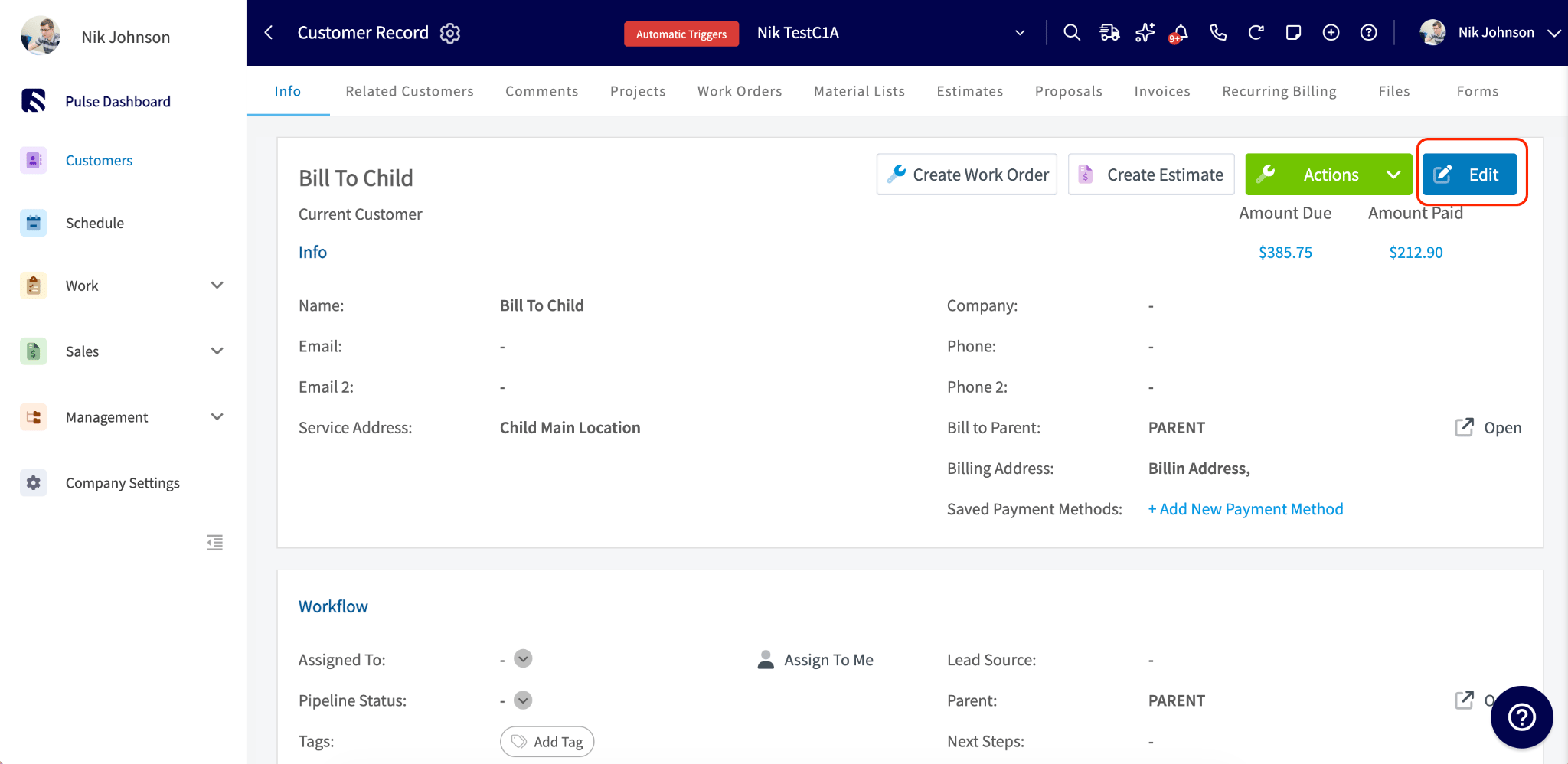
Bill to Parent only appears on customer records that have a parent customer linked. See Customer Account Structures Overview for how to set up a parent/child relationship.
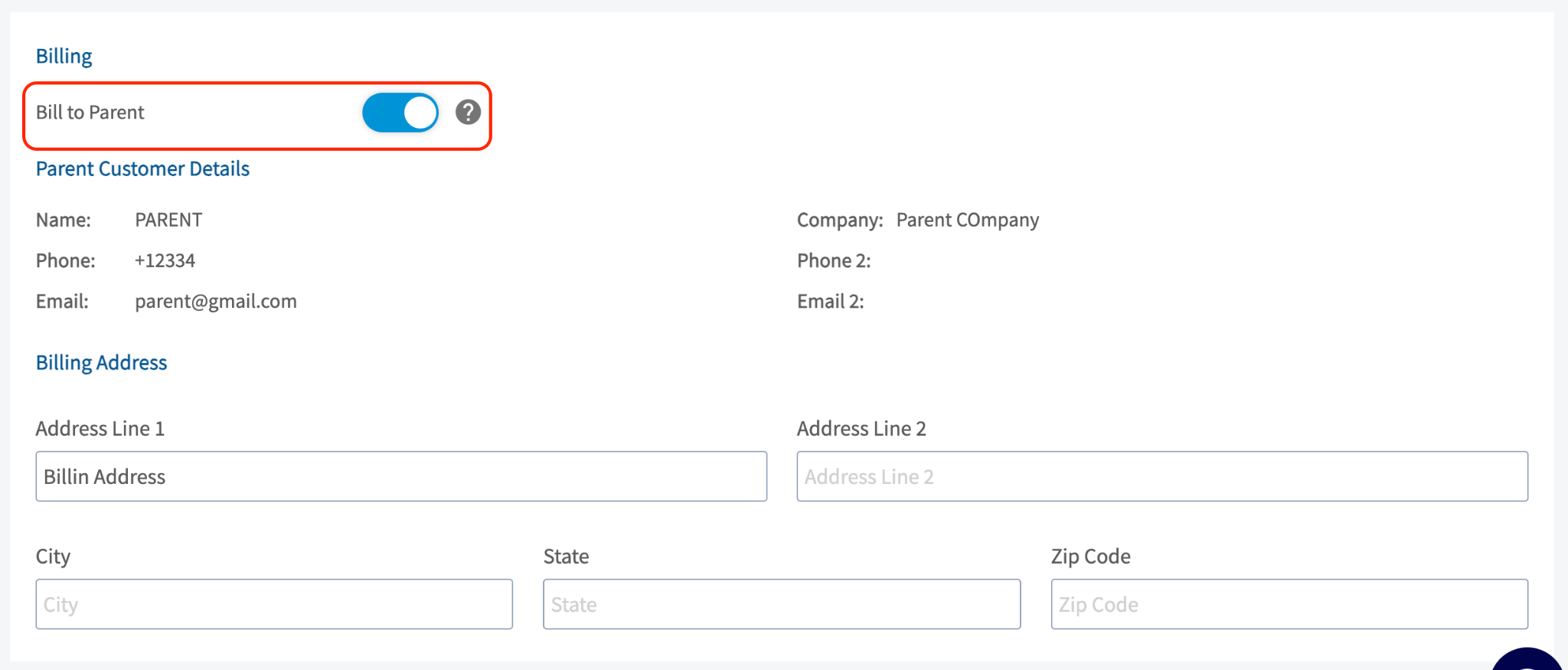
Toggle on Use Separate Billing Address, scroll to the Billing section, and toggle on Bill to Parent.
When you toggle on Bill to Parent, three things happen automatically:
The parent’s billing address is pulled into the child’s billing address field. If the parent has no billing address on file, the parent’s service address is used instead.
The Use Separate Billing Address toggle is hidden while Bill to Parent is on, because billing details are now inherited from the parent.
The child inherits the parent’s tax exempt status and default net terms.
You can edit the billing address on the child record directly at any time, even after it is populated from the parent. If you unlink the parent from the child customer, Bill to Parent turns off automatically and the customer reverts to standard billing details.
Any historical record that was billed to the parent keeps the parent as its Bill To, even after Bill to Parent is turned off on the customer record.
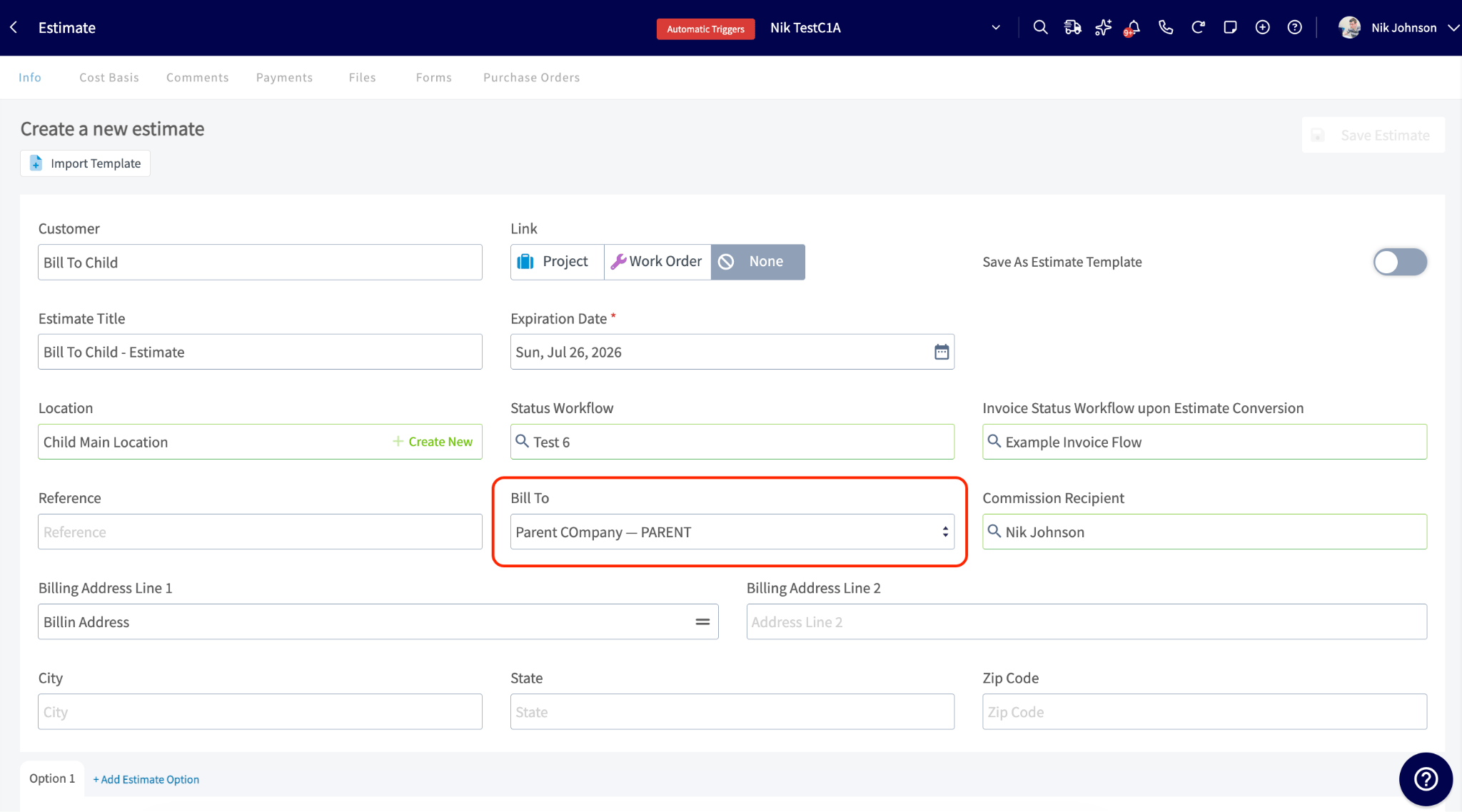
When Bill to Parent is on for a child customer, a Bill To dropdown appears on their estimates and invoices with two options:
Parent Customer — the default when Bill to Parent is on.
Customer — the child themselves.
You can change the Bill To on any individual estimate or invoice without affecting the customer record setting. When Bill To is set to Parent Customer:
The billing address is pre-populated with the parent’s billing address. Edit it directly by typing a custom address, or select the address icon to insert the parent address, customer address, or service address.
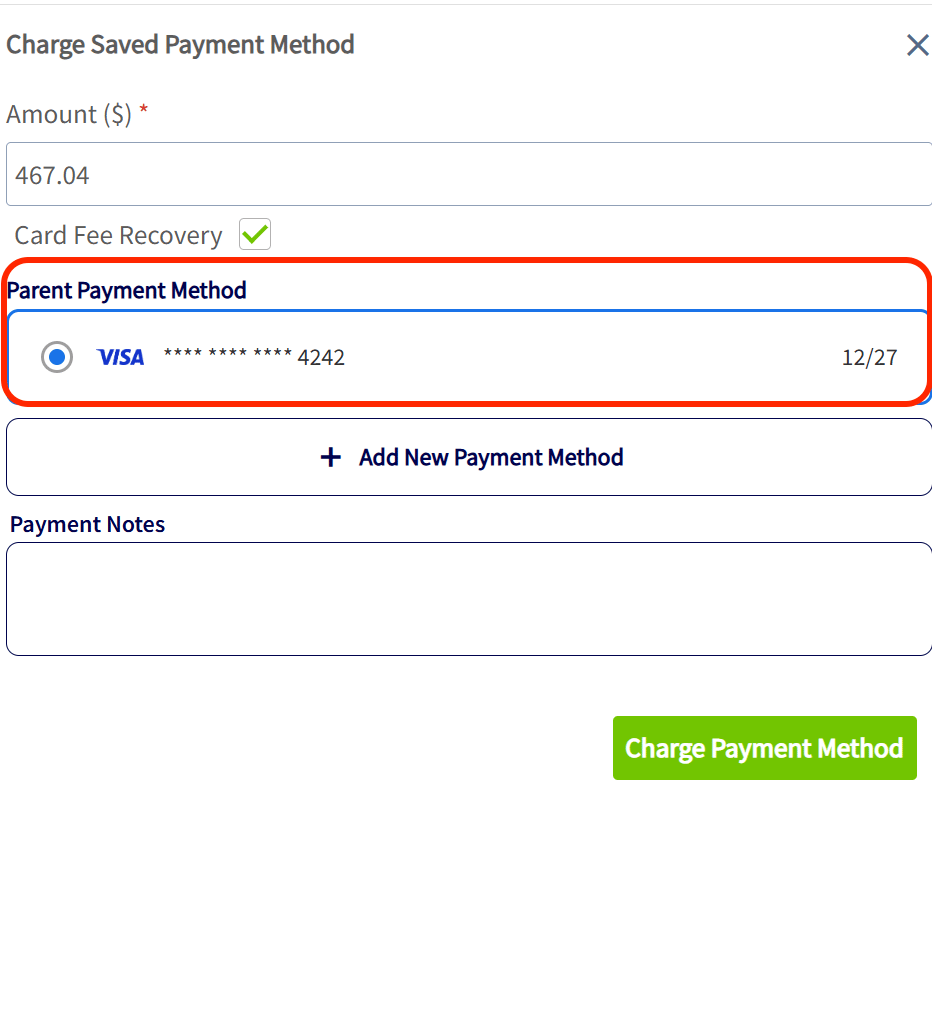
The parent customer’s saved card on file is available to charge for payment.
The parent’s email is synced to the invoice in QuickBooks Online instead of the child’s email.
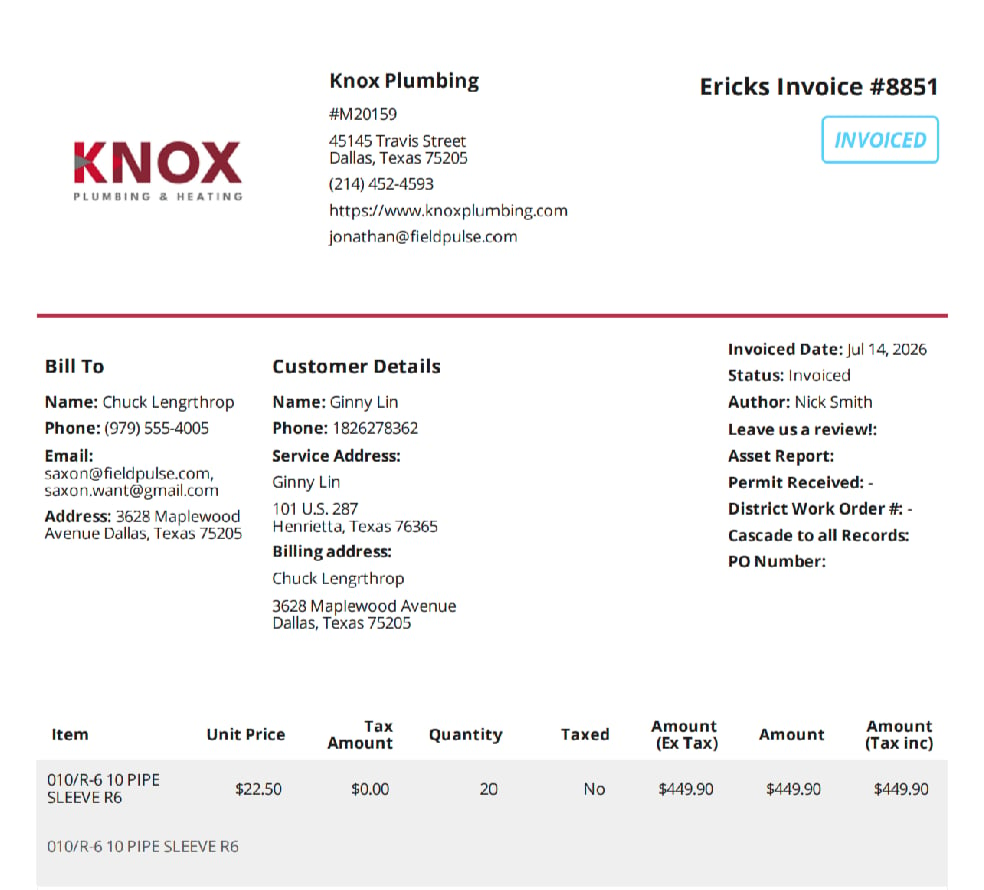
In view mode, the estimate or invoice shows a Bill to Parent field with the parent’s name and a link that opens their record in a new tab.
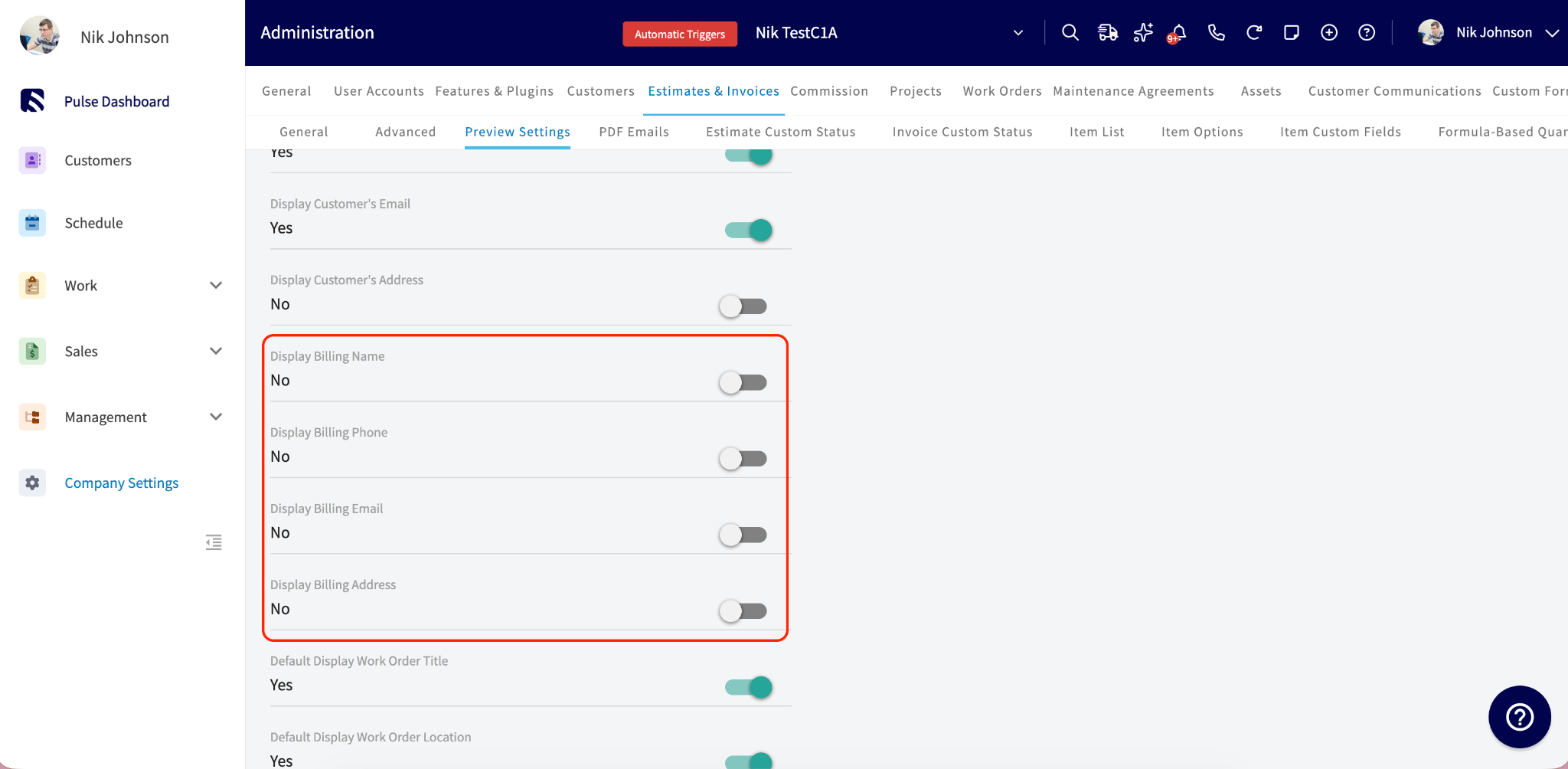
When Bill to Parent is enabled, you control which billing details appear on estimate and invoice PDFs in two layers: Company Settings defines the account-wide defaults, and the preview panel on each estimate or invoice adjusts them for that record only.To set the account defaults, go to Company Settings > Estimates & Invoices > Preview Settings. The billing section sits below the existing Display Customer’s Email toggle.
Setting
What it shows on the PDF
Display Billing Name
The parent customer’s name in a “Bill To” section.
Display Billing Phone
The parent customer’s phone number.
Display Billing Email
The parent customer’s email address.
Display Billing Address
The parent customer’s billing address.
Modify Billing Details
Lets you enter custom billing information on a per-record basis, overriding what is pulled from the parent customer — a custom billing name, phone number, email, and address.
All of these options are off by default. Turn on the fields you want and select Save. Each estimate and invoice inherits your Company Settings defaults, and you can adjust them from the preview panel on any individual record.
How Bill to Parent information syncs depends on the accounting integration you use.
Accounting integration
Bill to Parent supported
What syncs
QuickBooks Online
Yes
Parent name, email, and billing address sync to the invoice.
QuickBooks Desktop
No
The invoice syncs with the standard customer name and address. Parent details can be added manually.
Xero
No
The invoice syncs to the related customer in Xero. Nothing changes when Bill to Parent is enabled.
For parent customers with an Account Type of Commercial, QuickBooks Online stores the billing information as Line 1: Bill To Name, Line 2: Bill To Company Name, and Lines 3–5: Bill To Address, so the company name displays separately from the contact name on the invoice.
On a parent customer’s record, open the Related Customers tab, then the Estimates and Invoices subtab. The list shows every estimate and invoice tied to that parent’s related (child) customers, with two filters:
Invoice Customer (web app only) — filters by whose job it was: All (everything related to this customer), Child Accounts Only (child invoices), or Customer Only (invoices on the parent’s own record).
Bill To — filters by who is being billed: Parent Customer (only records billed to the parent) or Customer (only records billed to the child).
Combine both filters to answer questions like “show me every invoice where the job was done at a child location but billed to the parent.”
Recurring billing. Bill to Parent is not supported for recurring billing. Recurring invoices continue to use the standard customer billing information. Support for Bill to Parent in recurring billing is planned for a future release. See Setting Up Recurring Billing.
Offline mode. Bill to Parent details cannot be configured in offline mode. You can still create estimates and invoices offline, but you must reconnect to the internet to set or update Bill To information before finalizing and sending the document.
Your setup is working when a new invoice for a child customer opens with Bill To set to Parent Customer, the parent’s billing address filled in, and the parent’s saved card offered at payment.
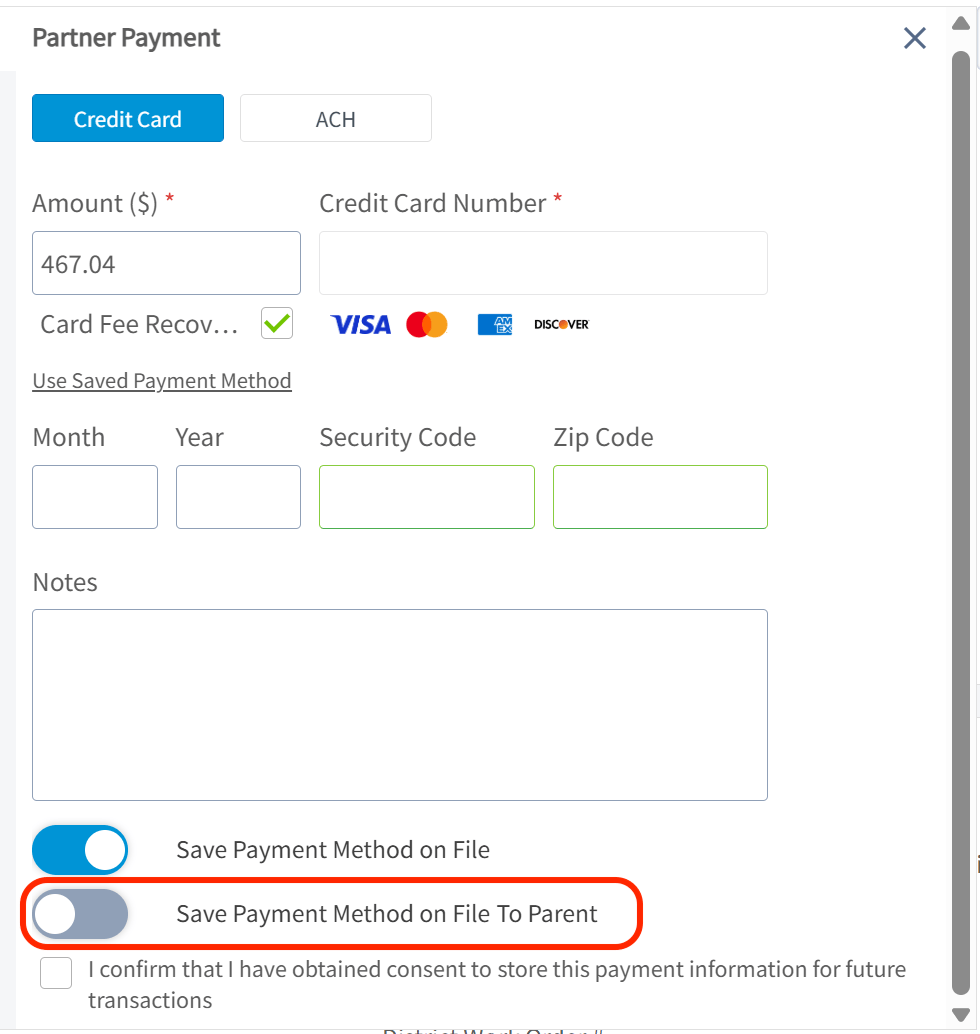
Who can turn Bill to Parent on and off?The account-level setting in Company Settings requires Admin access. The Bill to Parent toggle on a customer record can be changed by anyone with customer create/edit permissions, and the Bill To dropdown on estimates and invoices by anyone with estimate/invoice edit and create permissions.Does Bill to Parent work on the mobile app?Yes. Bill to Parent works the same on web and mobile, though the parent record’s Invoice Customer filter is web app only.Will turning on Bill to Parent change my existing estimates and invoices?No. Only estimates and invoices created after you enable it are affected. Existing documents keep their original billing details.If I update the parent’s billing address later, do the child customers update too?It depends on whether the child’s address was customized. If the child’s billing address still matches the parent’s old address (it was inherited), it updates automatically to the new parent address. If the child’s billing address was manually edited to something different, it is preserved and not overwritten.What happens if I turn Bill to Parent off for a single customer?New estimates and invoices for that customer bill the child directly, and the Bill To dropdown no longer appears on new documents. Historical documents billed to the parent keep their Bill To details.What happens if I turn off the account-level Enable Bill to Parent setting? Will I lose data?No data is lost. The Bill to Parent toggle remains on customer records for reference only, new records are created and billed to the customer record, and the Bill To field is no longer visible on new estimates or invoices. Existing records and historical billing information stay unchanged, so your audit trail stays accurate, and you can re-enable the setting at any time.When I save a new card during payment, does it save to the parent or the child?If the customer has a parent, you see an extra toggle when saving a payment method: Save Payment Method on File to Parent (off by default). Turn it on to save the card to the parent’s account only; leave it off to save it to the child.I enabled “Bill with parent” in QuickBooks Online. Does that carry over to FieldPulse?Yes, the setting syncs both ways. When a customer syncs from QuickBooks Online with Bill with Parent enabled, FieldPulse turns on the Bill to Parent toggle and uses the billing address from QuickBooks. If QuickBooks has no billing address, the field stays blank until you add one in FieldPulse, which then pushes back to QuickBooks.Why is the Unlink button greyed out on my child customer?If any of the child’s invoices have been paid by the parent, unlinking is blocked. This follows a QuickBooks rule that preserves accounting history — unlinking in this state would cause unrecoverable sync errors. To change the relationship, edit the parent’s information directly, recreate the customer under a new parent, or delete the linked payments in QuickBooks Online.How can I see all invoices billed to a parent across their child accounts?On the parent’s customer record, open the Related Customers tab, then the Estimates and Invoices subtab. Set the Bill To filter to Parent Customer to see only records billed to the parent. To narrow further by where the work was done, use the Invoice Customer filter (web app only): All (everything related to this customer), Child Accounts Only (child invoices), or Customer Only (invoices on the parent’s own record).In the invoice list, why does the Customer column show the child instead of the parent?The Customer column always shows who the invoice belongs to (where the work was done), not who pays. The Bill To information tells you who is being billed, so you can answer both “whose job was this?” and “who is paying?”How many levels of parent/child customers are supported?Up to 5 levels. The parent record’s invoice filtering includes children, grandchildren, and so on, across all supported levels.Can I report on Bill to Parent activity?Yes. The Estimate, Invoice, and Customer raw data reports have columns including Bill To Parent Enabled, Bill To, Parent Customer Company Name, Parent Customer Phone, Parent Customer Email, and Billing Address, and each can also be used as a filter.Can I move a child customer to a different parent once it has billing history?Once a child customer has invoices that were paid using the parent’s payment method, QuickBooks Online permanently links that child to the parent to preserve accounting history, and the link cannot be undone without deleting the shared transactions. If a customer needs to move to a new parent — for example, a property management company taking over a location — recreate the customer under the new parent using a slightly different name rather than re-parenting the existing record. The original customer and its billing history stay intact under the original parent.
{"docsConfig":{"theme":"mint","$schema":"https://mintlify.com/docs.json","name":"FieldPulse Help Center","description":"Product documentation for the FieldPulse field service management platform.","colors":{"primary":"#00034D","light":"#488BD6","dark":"#0007B3"},"logo":{"light":"https://mintcdn.com/fieldpulse/iDqY8C4IxwE4NJKJ/static/logo/fieldpulse-help-center-white.svg?fit=max\u0026auto=format\u0026n=iDqY8C4IxwE4NJKJ\u0026q=85\u0026s=0d5929b317daa1fc26a72a003418aca4","dark":"https://mintcdn.com/fieldpulse/iDqY8C4IxwE4NJKJ/static/logo/fieldpulse-help-center-white.svg?fit=max\u0026auto=format\u0026n=iDqY8C4IxwE4NJKJ\u0026q=85\u0026s=0d5929b317daa1fc26a72a003418aca4","href":"/"},"favicon":"https://mintcdn.com/fieldpulse/GXkiuT83YA_xAzj5/favicon.png?fit=max\u0026auto=format\u0026n=GXkiuT83YA_xAzj5\u0026q=85\u0026s=0549b7a01463208f2106bec4727194bb","api":{"params":{"expanded":"all"},"playground":{"display":"interactive","proxy":true},"examples":{"defaults":"required","languages":["curl","python","javascript"],"prefill":true}},"appearance":{"default":"light","strict":true},"background":{"color":{"light":"#F5F5F1","dark":"#0A0F1E"}},"navbar":{"links":[{"href":"https://webapp.fieldpulse.com","label":"Login"}]},"footer":{"socials":{"facebook":"https://www.facebook.com/fieldpulse","youtube":"https://www.youtube.com/@FieldPulse","linkedin":"https://www.linkedin.com/company/fieldpulse","instagram":"https://www.instagram.com/fieldpulse"},"links":[{"header":"Features","items":[{"label":"Scheduling \u0026 Dispatching","href":"https://www.fieldpulse.com/features/scheduling-and-dispatching"},{"label":"Estimates \u0026 Invoices","href":"https://www.fieldpulse.com/features/estimates-and-invoices"},{"label":"Customer Management","href":"https://www.fieldpulse.com/features/customer-management"},{"label":"Job Management","href":"https://www.fieldpulse.com/features/job-management"},{"label":"Pricebook","href":"https://www.fieldpulse.com/features/pricebook"},{"label":"Inventory Management","href":"https://www.fieldpulse.com/features/inventory-management"}]},{"header":"Product","items":[{"label":"Product Overview","href":"https://www.fieldpulse.com/features"},{"label":"Pricing","href":"https://www.fieldpulse.com/pricing"},{"label":"ClearPath","href":"https://www.fieldpulse.com/features/clearpath"},{"label":"Field Intelligence","href":"https://www.fieldpulse.com/features/field-intelligence"}]},{"header":"Company","items":[{"label":"Our Mission","href":"https://www.fieldpulse.com/company"},{"label":"Partners","href":"https://www.fieldpulse.com/company/partners"},{"label":"Careers","href":"https://www.fieldpulse.com/company/careers"},{"label":"Contact","href":"https://www.fieldpulse.com/company/contact-us"}]},{"header":"Resources","items":[{"label":"Help Center","href":"https://help.fieldpulse.com"},{"label":"Customer Stories","href":"https://www.fieldpulse.com/resources/customer-stories"},{"label":"Blog","href":"https://www.fieldpulse.com/resources/blog"},{"label":"FAQ","href":"https://www.fieldpulse.com/resources/faq"}]}]},"search":{"prompt":"Search FieldPulse docs..."},"seo":{"metatags":{"og:site_name":"FieldPulse Help Center","twitter:card":"summary_large_image","twitter:site":"@FieldPulseApp"},"paths":[{"path":"es","metatags":{"og:locale":"es_MX"}}],"organization":{"id":"https://www.fieldpulse.com/#organization","name":"FieldPulse","url":"https://www.fieldpulse.com","logo":"https://help.fieldpulse.com/static/logo/fieldpulse-organization-logo.png","sameAs":["https://www.linkedin.com/company/fieldpulse/","https://www.youtube.com/@Fieldpulse","https://www.facebook.com/fieldpulse/","https://www.instagram.com/fieldpulse/"]}},"fonts":{"heading":{"family":"Montserrat","weight":700},"body":{"family":"Montserrat","weight":500}},"integrations":{"ga4":{"measurementId":"G-CLLX0BT4J3"}},"contextual":{"options":["copy","view","assistant"],"display":"header"},"thumbnails":{"appearance":"dark","background":"https://mintcdn.com/fieldpulse/BhNcub0WV4eGdGDx/static/images/og-background.png?fit=max\u0026auto=format\u0026n=BhNcub0WV4eGdGDx\u0026q=85\u0026s=c62d13fabb1195496ae47e974fedee69","fonts":{"family":"Montserrat"}},"styling":{"latex":false},"navigation":{"languages":[{"language":"en","default":true,"href":""},{"language":"es","hidden":true,"banner":{"content":"Algunas páginas aún están solo en inglés. [Ver el centro de ayuda en inglés](/).","dismissible":true},"footer":{"socials":{"facebook":"https://www.facebook.com/fieldpulse","youtube":"https://www.youtube.com/@FieldPulse","linkedin":"https://www.linkedin.com/company/fieldpulse","instagram":"https://www.instagram.com/fieldpulse"},"links":[{"header":"Funciones","items":[{"label":"Programación y despacho","href":"https://www.fieldpulse.com/features/scheduling-and-dispatching"},{"label":"Presupuestos y facturas","href":"https://www.fieldpulse.com/features/estimates-and-invoices"},{"label":"Administración de clientes","href":"https://www.fieldpulse.com/features/customer-management"},{"label":"Administración de trabajos","href":"https://www.fieldpulse.com/features/job-management"},{"label":"Catálogo de precios","href":"https://www.fieldpulse.com/features/pricebook"},{"label":"Administración de inventario","href":"https://www.fieldpulse.com/features/inventory-management"}]},{"header":"Producto","items":[{"label":"Descripción general del producto","href":"https://www.fieldpulse.com/features"},{"label":"Precios","href":"https://www.fieldpulse.com/pricing"},{"label":"ClearPath","href":"https://www.fieldpulse.com/features/clearpath"},{"label":"Field Intelligence","href":"https://www.fieldpulse.com/features/field-intelligence"}]},{"header":"Empresa","items":[{"label":"Nuestra misión","href":"https://www.fieldpulse.com/company"},{"label":"Socios","href":"https://www.fieldpulse.com/company/partners"},{"label":"Empleos","href":"https://www.fieldpulse.com/company/careers"},{"label":"Contacto","href":"https://www.fieldpulse.com/company/contact-us"}]},{"header":"Recursos","items":[{"label":"Centro de ayuda","href":"https://help.fieldpulse.com"},{"label":"Casos de éxito","href":"https://www.fieldpulse.com/resources/customer-stories"},{"label":"Blog","href":"https://www.fieldpulse.com/resources/blog"},{"label":"Preguntas frecuentes","href":"https://www.fieldpulse.com/resources/faq"}]}]},"navbar":{"links":[{"href":"/changelog","label":"Novedades (en inglés)"},{"href":"/api-reference/overview","label":"Referencia de la API (en inglés)"},{"href":"/","label":"Ver en inglés"},{"href":"https://webapp.fieldpulse.com","label":"Iniciar sesión"}]},"href":"es"}]}},"deployment":{"deploymentMetadataValue":{"subdomain":"fieldpulse","hasAudioNarration":true,"actualSubdomain":"fieldpulse","customDomains":["help.fieldpulse.com"],"gitSource":{"type":"github","owner":"flicent","repo":"fieldpulse-help-docs","deployBranch":"main","contentDirectory":"","isPrivate":true,"mountPath":"","label":""},"chroma":{"liveDeploymentHistoryId":"6ae15e38aaa04806a4a21e6b","collectionId":"effcb9e3-fce9-4d48-9849-86cd265d3c96","schemaVersion":"v3","latestBuiltDeploymentHistoryId":"6ae15e38aaa04806a4a21e6b"},"feedback":{"thumbs":true,"agentFeedback":true},"entitlements":{"AI_CHAT":{"status":"ENABLED"},"WEB_MCP":{"status":"ENABLED"},"NARRATION":{"status":"ENABLED"}},"buildId":"6ae15e38aaa04806a4a21e6b","clientVersion":"0.0.3990","searchFilterCounts":[{"language":"en","tag":"Home","count":428},{"language":"en","tag":"API Reference","count":113},{"language":"en","tag":"Integrations","count":66},{"language":"en","tag":"Add-Ons \u0026 Premium","count":60},{"language":"en","tag":"Jobs, Projects \u0026 Field Work","count":44},{"language":"en","tag":"Training \u0026 Resources","count":40},{"language":"en","tag":"Engage Phone System","count":36},{"language":"en","tag":"FieldPulse360","count":34},{"language":"en","tag":"FieldPulse360 Archives","count":32},{"language":"en","tag":"Reporting \u0026 Analytics","count":31}],"searchSettings":{"showContentSnippets":true,"maxResults":5,"isFiltersEnabled":true}},"assistantConfig":{"enableAskAiButton":false,"enableStarterQuestions":true,"enableContextualStarterQuestions":true,"enableAskAiSearchBar":true,"deflection":{"enabled":true,"email":"support@fieldpulse.com","showHelpButton":true}},"basePath":"","hasChatPermissions":true,"hasWebMcpPermissions":true,"toggles":[{"name":"kill-isr","enabled":true,"variant":{"name":"disabled","enabled":false,"feature_enabled":true},"impressionData":false},{"name":"agent-mintlify-slack","enabled":true,"variant":{"name":"disabled","enabled":false,"feature_enabled":true},"impressionData":false},{"name":"editor-v7-file-tree","enabled":true,"variant":{"name":"disabled","enabled":false,"feature_enabled":true},"impressionData":false},{"name":"agent-integrations-settings","enabled":true,"variant":{"name":"disabled","enabled":false,"feature_enabled":true},"impressionData":false},{"name":"automations-pr-grouping","enabled":true,"variant":{"name":"disabled","enabled":false,"feature_enabled":true},"impressionData":false},{"name":"custom-prefix","enabled":true,"variant":{"name":"disabled","enabled":false,"feature_enabled":true},"impressionData":false},{"name":"analytics-v7","enabled":true,"variant":{"name":"disabled","enabled":false,"feature_enabled":true},"impressionData":false},{"name":"user-flows-analytics","enabled":true,"variant":{"name":"disabled","enabled":false,"feature_enabled":true},"impressionData":false},{"name":"no-publish-flow","enabled":true,"variant":{"name":"disabled","enabled":false,"feature_enabled":true},"impressionData":false},{"name":"workos-onboarding","enabled":true,"variant":{"name":"disabled","enabled":false,"feature_enabled":true},"impressionData":false},{"name":"llms-txt-v2","enabled":true,"variant":{"name":"disabled","enabled":false,"feature_enabled":true},"impressionData":false},{"name":"pause-universal-search-reconcile","enabled":true,"variant":{"name":"disabled","enabled":false,"feature_enabled":true},"impressionData":false},{"name":"snapshot-serving-live","enabled":true,"variant":{"name":"disabled","enabled":false,"feature_enabled":true},"impressionData":false},{"name":"stripTemperatureMiddleware","enabled":true,"variant":{"name":"disabled","enabled":false,"feature_enabled":true},"impressionData":false},{"name":"per-site-search-delta","enabled":true,"variant":{"name":"disabled","enabled":false,"feature_enabled":true},"impressionData":false},{"name":"support-platform-pylon-zendesk","enabled":true,"variant":{"name":"disabled","enabled":false,"feature_enabled":true},"impressionData":false},{"name":"snapshot-serving","enabled":true,"variant":{"name":"disabled","enabled":false,"feature_enabled":true},"impressionData":false},{"name":"instant-rollback","enabled":true,"variant":{"name":"disabled","enabled":false,"feature_enabled":true},"impressionData":false},{"name":"granular-notifications-server","enabled":true,"variant":{"name":"disabled","enabled":false,"feature_enabled":true},"impressionData":false},{"name":"granular-notifications","enabled":true,"variant":{"name":"disabled","enabled":false,"feature_enabled":true},"impressionData":false},{"name":"editor-private-page-search","enabled":true,"variant":{"name":"disabled","enabled":false,"feature_enabled":true},"impressionData":false},{"name":"automations-fable","enabled":true,"variant":{"name":"disabled","enabled":false,"feature_enabled":true},"impressionData":false},{"name":"fixed-ai-action-pricing","enabled":true,"variant":{"name":"disabled","enabled":false,"feature_enabled":true},"impressionData":false},{"name":"automation-resolve-merge-conflict","enabled":true,"variant":{"name":"disabled","enabled":false,"feature_enabled":true},"impressionData":false},{"name":"scoped-publishing","enabled":true,"variant":{"name":"disabled","enabled":false,"feature_enabled":true},"impressionData":false},{"name":"mintql","enabled":true,"variant":{"name":"disabled","enabled":false,"feature_enabled":true},"impressionData":false},{"name":"page-level-analytics","enabled":true,"variant":{"name":"disabled","enabled":false,"feature_enabled":true},"impressionData":false},{"name":"editor-version-history-v2","enabled":true,"variant":{"name":"disabled","enabled":false,"feature_enabled":true},"impressionData":false},{"name":"editor-nav-generations","enabled":true,"variant":{"name":"disabled","enabled":false,"feature_enabled":true},"impressionData":false},{"name":"billing-page-v2","enabled":true,"variant":{"name":"disabled","enabled":false,"feature_enabled":true},"impressionData":false},{"name":"workspace-projects","enabled":true,"variant":{"name":"disabled","enabled":false,"feature_enabled":true},"impressionData":false},{"name":"assistant-v5","enabled":true,"variant":{"name":"disabled","enabled":false,"feature_enabled":true},"impressionData":false},{"name":"byok-sep-25","enabled":true,"variant":{"name":"disabled","enabled":false,"feature_enabled":true},"impressionData":false},{"name":"fork-pr-previews","enabled":true,"variant":{"name":"disabled","enabled":false,"feature_enabled":true},"impressionData":false},{"name":"revalidation-jwt","enabled":true,"variant":{"name":"disabled","enabled":false,"feature_enabled":true},"impressionData":false},{"name":"vite-origin","enabled":true,"variant":{"name":"disabled","enabled":false,"feature_enabled":true},"impressionData":false},{"name":"editor-agent-model-picker","enabled":true,"variant":{"name":"disabled","enabled":false,"feature_enabled":true},"impressionData":false},{"name":"billing-updated-9-15","enabled":true,"variant":{"name":"disabled","enabled":false,"feature_enabled":true},"impressionData":false},{"name":"workos-sso-scim","enabled":true,"variant":{"name":"disabled","enabled":false,"feature_enabled":true},"impressionData":false},{"name":"hobby-abuse-scan","enabled":true,"variant":{"name":"disabled","enabled":false,"feature_enabled":true},"impressionData":false},{"name":"dashboard-inbox","enabled":true,"variant":{"name":"disabled","enabled":false,"feature_enabled":true},"impressionData":false},{"name":"workos-signup","enabled":true,"variant":{"name":"disabled","enabled":false,"feature_enabled":true},"impressionData":false},{"name":"workos-enabled","enabled":true,"variant":{"name":"disabled","enabled":false,"feature_enabled":true},"impressionData":false}],"privacy":{"consentBanner":{"enabled":true}},"isAtlas":false,"googleFontsInlined":true},"customCss":[{"filePath":"styles.css","href":"/_mintlify/custom/fieldpulse/c493638a4a3c0380/styles.css"}],"page":{"pagePath":"estimates-invoices/creating/bill-to-parent","slug":"/estimates-invoices/creating/bill-to-parent","pageMetadata":{"title":"Setting Up Bill to Parent","description":"Bill a child location's estimates and invoices to the parent account in FieldPulse, charge the parent's card on file, and show parent details on PDFs.","sidebarTitle":"Bill to Parent","source_type":"help-center","href":"/estimates-invoices/creating/bill-to-parent"},"description":{"compiledSource":"\"use strict\";\nconst {jsx: _jsx} = arguments[0];\nconst {useMDXComponents: _provideComponents} = arguments[0];\nfunction _createMdxContent(props) {\n const _components = {\n p: \"p\",\n ..._provideComponents(),\n ...props.components\n };\n return _jsx(_components.p, {\n children: \"Bill a child location’s estimates and invoices to the parent account in FieldPulse, charge the parent’s card on file, and show parent details on PDFs.\"\n });\n}\nfunction MDXContent(props = {}) {\n const {wrapper: MDXLayout} = {\n ..._provideComponents(),\n ...props.components\n };\n return MDXLayout ? _jsx(MDXLayout, {\n ...props,\n children: _jsx(_createMdxContent, {\n ...props\n })\n }) : _createMdxContent(props);\n}\nreturn {\n default: MDXContent\n};\n","frontmatter":{},"scope":{}},"pageType":"default","mdx":{"mdxSource":{"compiledSource":"\"use strict\";const{Fragment:_Fragment,jsx:_jsx,jsxs:_jsxs}=arguments[0];const{useMDXComponents:_provideComponents}=arguments[0];function _createMdxContent(props){const _components={a:`a`,blockquote:`blockquote`,li:`li`,ol:`ol`,p:`p`,strong:`strong`,tbody:`tbody`,td:`td`,th:`th`,thead:`thead`,tr:`tr`,ul:`ul`,..._provideComponents(),...props.components},{Columns,Frame,Heading,Note,OptimizedImage,Table}=_components;if(!Columns)_missingMdxReference(`Columns`,true);if(!Frame)_missingMdxReference(`Frame`,true);if(!Heading)_missingMdxReference(`Heading`,true);if(!Note)_missingMdxReference(`Note`,true);if(!OptimizedImage)_missingMdxReference(`OptimizedImage`,true);if(!Table)_missingMdxReference(`Table`,true);return _jsxs(_Fragment,{children:[_jsxs(_components.blockquote,{children:[`\n`,_jsxs(_components.p,{children:[_jsx(_components.strong,{children:`Who uses this:`}),` Admins turn the feature on in Company Settings; anyone with customer create/edit permissions can switch it on for a customer record, and anyone with estimate/invoice create and edit permissions can change the Bill To on a document. `,_jsx(_components.strong,{children:`Availability:`}),` All regions · Web and mobile. Not supported for recurring billing, and Bill To details cannot be set while offline.`]}),`\n`]}),`\n`,_jsxs(_components.p,{children:[`If you work with property managers, landlords, or corporate accounts, you have done the job at a child location and needed to send the bill to the parent. Bill to Parent links a child customer’s `,_jsx(_components.a,{href:`https://www.fieldpulse.com/features/estimates-and-invoices`,children:`estimates and invoices`}),` to the parent’s billing details and lets you charge the parent’s card on file, without re-entering billing details every time.`]}),`\n`,_jsx(Heading,{level:`2`,id:`overview`,children:`Overview`}),`\n`,_jsxs(_components.p,{children:[`Bill to Parent is an account-level setting that, once turned on, adds a `,_jsx(_components.strong,{children:`Bill to Parent`}),` toggle to child customer records and a `,_jsx(_components.strong,{children:`Bill To`}),` dropdown to their estimates and invoices. When a document is billed to the parent, FieldPulse pulls in the parent’s billing address, offers the parent’s saved payment method at payment time, and — for QuickBooks Online — syncs the parent’s details to the invoice. Company Settings also let you choose which parent billing details print on estimate and invoice PDFs.`]}),`\n`,_jsx(Note,{children:_jsxs(_components.p,{children:[`Bill to Parent only appears on customer records that have a parent customer linked. See `,_jsx(_components.a,{href:`/settings/account-structures/customer-account-structures`,children:`Customer Account Structures Overview`}),` for how to set up a parent/child relationship.`]})}),`\n`,_jsx(Heading,{level:`2`,id:`before-you-begin`,children:`Before you begin`}),`\n`,_jsxs(_components.ul,{children:[`\n`,_jsxs(_components.li,{children:[`\n`,_jsxs(_components.p,{children:[`The child customer must already be linked to a parent customer — see `,_jsx(_components.a,{href:`/customers/managing-customers/creating-related-customers`,children:`How to Create Related Customers`}),`.`]}),`\n`]}),`\n`,_jsxs(_components.li,{children:[`\n`,_jsx(_components.p,{children:`Bill to Parent is turned off for every account by default. An Admin turns it on in Company Settings before it appears on any customer record.`}),`\n`]}),`\n`]}),`\n`,_jsx(Heading,{level:`2`,id:`step-by-step-setup`,children:`Step-by-step setup`}),`\n`,_jsx(Heading,{level:`3`,id:`turn-on-bill-to-parent-for-your-account`,children:`Turn on Bill to Parent for your account`}),`\n`,_jsxs(_components.ol,{children:[`\n`,_jsxs(_components.li,{children:[`\n`,_jsxs(_components.p,{children:[`Go to `,_jsx(_components.strong,{children:`Company Settings`}),`, then select `,_jsx(_components.strong,{children:`Estimates \u0026 Invoices`}),`.`]}),`\n`]}),`\n`,_jsxs(_components.li,{children:[`\n`,_jsxs(_components.p,{children:[`Select `,_jsx(_components.strong,{children:`Advanced`}),` in the sub-header.`]}),`\n`]}),`\n`,_jsxs(_components.li,{children:[`\n`,_jsxs(_components.p,{children:[`Toggle on `,_jsx(_components.strong,{children:`Enable Bill to Parent`}),` at the top of the page.`]}),`\n`]}),`\n`]}),`\n`,_jsx(OptimizedImage,{src:`https://mintcdn.com/fieldpulse/B4PCdTYpDoc9TLyp/static/images/_api/bill-to-parent/bill-to-parent-enable-toggle.png?fit=max\u0026auto=format\u0026n=B4PCdTYpDoc9TLyp\u0026q=85\u0026s=fdecf9b3381ee06c19eb686aa8137568`,alt:`Enable Bill to Parent toggle at the top of the Advanced tab in Company Settings, Estimates \u0026 Invoices`,\"data-og-width\":`2048`,width:`2048`,\"data-og-height\":`993`,height:`993`,\"data-path\":`static/images/_api/bill-to-parent/bill-to-parent-enable-toggle.png`,\"data-optimize\":`true`,\"data-opv\":`3`,srcset:`https://mintcdn.com/fieldpulse/B4PCdTYpDoc9TLyp/static/images/_api/bill-to-parent/bill-to-parent-enable-toggle.png?w=280\u0026fit=max\u0026auto=format\u0026n=B4PCdTYpDoc9TLyp\u0026q=85\u0026s=de0070d855e9b41c504fbf269dfca076 280w, https://mintcdn.com/fieldpulse/B4PCdTYpDoc9TLyp/static/images/_api/bill-to-parent/bill-to-parent-enable-toggle.png?w=560\u0026fit=max\u0026auto=format\u0026n=B4PCdTYpDoc9TLyp\u0026q=85\u0026s=812612f730b0f5f9dec15dbd5e5a183e 560w, https://mintcdn.com/fieldpulse/B4PCdTYpDoc9TLyp/static/images/_api/bill-to-parent/bill-to-parent-enable-toggle.png?w=840\u0026fit=max\u0026auto=format\u0026n=B4PCdTYpDoc9TLyp\u0026q=85\u0026s=b99ede657832baed8d61c3efd9ec6b42 840w, https://mintcdn.com/fieldpulse/B4PCdTYpDoc9TLyp/static/images/_api/bill-to-parent/bill-to-parent-enable-toggle.png?w=1100\u0026fit=max\u0026auto=format\u0026n=B4PCdTYpDoc9TLyp\u0026q=85\u0026s=81f7434f0459bc0e60e7db2c6f3d5e32 1100w, https://mintcdn.com/fieldpulse/B4PCdTYpDoc9TLyp/static/images/_api/bill-to-parent/bill-to-parent-enable-toggle.png?w=1650\u0026fit=max\u0026auto=format\u0026n=B4PCdTYpDoc9TLyp\u0026q=85\u0026s=2362cefb8acafe85c25c5c190cc5a49b 1650w, https://mintcdn.com/fieldpulse/B4PCdTYpDoc9TLyp/static/images/_api/bill-to-parent/bill-to-parent-enable-toggle.png?w=2500\u0026fit=max\u0026auto=format\u0026n=B4PCdTYpDoc9TLyp\u0026q=85\u0026s=69e3f6d593b63d155b5ddd7e62cff5c3 2500w`}),`\n`,_jsxs(_components.p,{children:[`Once enabled, the `,_jsx(_components.strong,{children:`Bill to Parent`}),` toggle appears on child customer records, and a `,_jsx(_components.strong,{children:`Bill To`}),` dropdown appears on their estimates and invoices.`]}),`\n`,_jsx(Heading,{level:`3`,id:`turn-on-bill-to-parent-for-a-child-customer`,children:`Turn on Bill to Parent for a child customer`}),`\n`,_jsxs(_components.ol,{children:[`\n`,_jsxs(_components.li,{children:[`\n`,_jsxs(_components.p,{children:[`Open the child customer record and select `,_jsx(_components.strong,{children:`Edit`}),`.`]}),`\n`,_jsx(OptimizedImage,{src:`https://mintcdn.com/fieldpulse/B4PCdTYpDoc9TLyp/static/images/_api/bill-to-parent/bill-to-parent-edit-customer-record.png?fit=max\u0026auto=format\u0026n=B4PCdTYpDoc9TLyp\u0026q=85\u0026s=4bf02727b6dacb83490c3c39f2c2da7d`,alt:`Child customer record open in edit mode`,\"data-og-width\":`2048`,width:`2048`,\"data-og-height\":`998`,height:`998`,\"data-path\":`static/images/_api/bill-to-parent/bill-to-parent-edit-customer-record.png`,\"data-optimize\":`true`,\"data-opv\":`3`,srcset:`https://mintcdn.com/fieldpulse/B4PCdTYpDoc9TLyp/static/images/_api/bill-to-parent/bill-to-parent-edit-customer-record.png?w=280\u0026fit=max\u0026auto=format\u0026n=B4PCdTYpDoc9TLyp\u0026q=85\u0026s=e01ce1ee4d84e4099ba041c14f93d5c5 280w, https://mintcdn.com/fieldpulse/B4PCdTYpDoc9TLyp/static/images/_api/bill-to-parent/bill-to-parent-edit-customer-record.png?w=560\u0026fit=max\u0026auto=format\u0026n=B4PCdTYpDoc9TLyp\u0026q=85\u0026s=25b22ae4cac530cbdf885ee10f6f241a 560w, https://mintcdn.com/fieldpulse/B4PCdTYpDoc9TLyp/static/images/_api/bill-to-parent/bill-to-parent-edit-customer-record.png?w=840\u0026fit=max\u0026auto=format\u0026n=B4PCdTYpDoc9TLyp\u0026q=85\u0026s=535333d251b1527537eab762ef287ad7 840w, https://mintcdn.com/fieldpulse/B4PCdTYpDoc9TLyp/static/images/_api/bill-to-parent/bill-to-parent-edit-customer-record.png?w=1100\u0026fit=max\u0026auto=format\u0026n=B4PCdTYpDoc9TLyp\u0026q=85\u0026s=5c15acc7598719cfe2e5d6f6558d62b8 1100w, https://mintcdn.com/fieldpulse/B4PCdTYpDoc9TLyp/static/images/_api/bill-to-parent/bill-to-parent-edit-customer-record.png?w=1650\u0026fit=max\u0026auto=format\u0026n=B4PCdTYpDoc9TLyp\u0026q=85\u0026s=63d5bc23a43dc2e51a1e48a2e726966d 1650w, https://mintcdn.com/fieldpulse/B4PCdTYpDoc9TLyp/static/images/_api/bill-to-parent/bill-to-parent-edit-customer-record.png?w=2500\u0026fit=max\u0026auto=format\u0026n=B4PCdTYpDoc9TLyp\u0026q=85\u0026s=df1f85edbe5a47beb88e328c71ddeb50 2500w`}),`\n`]}),`\n`,_jsxs(_components.li,{children:[`\n`,_jsxs(_components.p,{children:[`Toggle on `,_jsx(_components.strong,{children:`Use Separate Billing Address`}),`, scroll to the `,_jsx(_components.strong,{children:`Billing`}),` section, and toggle on `,_jsx(_components.strong,{children:`Bill to Parent`}),`.`]}),`\n`,_jsx(OptimizedImage,{src:`https://mintcdn.com/fieldpulse/B4PCdTYpDoc9TLyp/static/images/_api/bill-to-parent/bill-to-parent-billing-toggle.png?fit=max\u0026auto=format\u0026n=B4PCdTYpDoc9TLyp\u0026q=85\u0026s=bb73c89400103816e3e4b68e14a9922e`,alt:`Bill to Parent toggle in the Billing section of a child customer record`,\"data-og-width\":`2048`,width:`2048`,\"data-og-height\":`875`,height:`875`,\"data-path\":`static/images/_api/bill-to-parent/bill-to-parent-billing-toggle.png`,\"data-optimize\":`true`,\"data-opv\":`3`,srcset:`https://mintcdn.com/fieldpulse/B4PCdTYpDoc9TLyp/static/images/_api/bill-to-parent/bill-to-parent-billing-toggle.png?w=280\u0026fit=max\u0026auto=format\u0026n=B4PCdTYpDoc9TLyp\u0026q=85\u0026s=726c7f8820cff8208d26be64ce4e7b66 280w, https://mintcdn.com/fieldpulse/B4PCdTYpDoc9TLyp/static/images/_api/bill-to-parent/bill-to-parent-billing-toggle.png?w=560\u0026fit=max\u0026auto=format\u0026n=B4PCdTYpDoc9TLyp\u0026q=85\u0026s=d0909c7704434b042817afb19f3a02da 560w, https://mintcdn.com/fieldpulse/B4PCdTYpDoc9TLyp/static/images/_api/bill-to-parent/bill-to-parent-billing-toggle.png?w=840\u0026fit=max\u0026auto=format\u0026n=B4PCdTYpDoc9TLyp\u0026q=85\u0026s=f15d348af08d605a0bec3b8310c62096 840w, https://mintcdn.com/fieldpulse/B4PCdTYpDoc9TLyp/static/images/_api/bill-to-parent/bill-to-parent-billing-toggle.png?w=1100\u0026fit=max\u0026auto=format\u0026n=B4PCdTYpDoc9TLyp\u0026q=85\u0026s=8bb4132a9f51493873565f21a3596560 1100w, https://mintcdn.com/fieldpulse/B4PCdTYpDoc9TLyp/static/images/_api/bill-to-parent/bill-to-parent-billing-toggle.png?w=1650\u0026fit=max\u0026auto=format\u0026n=B4PCdTYpDoc9TLyp\u0026q=85\u0026s=564cdfd9bb5ab800141a550a396eeb8c 1650w, https://mintcdn.com/fieldpulse/B4PCdTYpDoc9TLyp/static/images/_api/bill-to-parent/bill-to-parent-billing-toggle.png?w=2500\u0026fit=max\u0026auto=format\u0026n=B4PCdTYpDoc9TLyp\u0026q=85\u0026s=5746e6c2cb2443bfaa238a721cb71660 2500w`}),`\n`]}),`\n`]}),`\n`,_jsx(_components.p,{children:`When you toggle on Bill to Parent, three things happen automatically:`}),`\n`,_jsxs(_components.ul,{children:[`\n`,_jsxs(_components.li,{children:[`\n`,_jsx(_components.p,{children:`The parent’s billing address is pulled into the child’s billing address field. If the parent has no billing address on file, the parent’s service address is used instead.`}),`\n`]}),`\n`,_jsxs(_components.li,{children:[`\n`,_jsxs(_components.p,{children:[`The `,_jsx(_components.strong,{children:`Use Separate Billing Address`}),` toggle is hidden while Bill to Parent is on, because billing details are now inherited from the parent.`]}),`\n`]}),`\n`,_jsxs(_components.li,{children:[`\n`,_jsx(_components.p,{children:`The child inherits the parent’s tax exempt status and default net terms.`}),`\n`]}),`\n`]}),`\n`,_jsx(_components.p,{children:`You can edit the billing address on the child record directly at any time, even after it is populated from the parent. If you unlink the parent from the child customer, Bill to Parent turns off automatically and the customer reverts to standard billing details.`}),`\n`,_jsx(Note,{children:_jsx(_components.p,{children:`Any historical record that was billed to the parent keeps the parent as its Bill To, even after Bill to Parent is turned off on the customer record.`})}),`\n`,_jsx(Heading,{level:`2`,id:`bill-to-on-estimates-and-invoices`,children:`Bill To on estimates and invoices`}),`\n`,_jsxs(_components.p,{children:[`When Bill to Parent is on for a child customer, a `,_jsx(_components.strong,{children:`Bill To`}),` dropdown appears on their estimates and invoices with two options:`]}),`\n`,_jsxs(_components.ul,{children:[`\n`,_jsxs(_components.li,{children:[`\n`,_jsxs(_components.p,{children:[_jsx(_components.strong,{children:`Parent Customer`}),` — the default when Bill to Parent is on.`]}),`\n`]}),`\n`,_jsxs(_components.li,{children:[`\n`,_jsxs(_components.p,{children:[_jsx(_components.strong,{children:`Customer`}),` — the child themselves.`]}),`\n`]}),`\n`]}),`\n`,_jsx(OptimizedImage,{src:`https://mintcdn.com/fieldpulse/B4PCdTYpDoc9TLyp/static/images/_api/bill-to-parent/bill-to-parent-bill-to-dropdown.png?fit=max\u0026auto=format\u0026n=B4PCdTYpDoc9TLyp\u0026q=85\u0026s=90b4442910dd3290d9a64fd590451419`,alt:`Bill To dropdown on an estimate showing the Parent Customer and Customer options`,\"data-og-width\":`2048`,width:`2048`,\"data-og-height\":`1138`,height:`1138`,\"data-path\":`static/images/_api/bill-to-parent/bill-to-parent-bill-to-dropdown.png`,\"data-optimize\":`true`,\"data-opv\":`3`,srcset:`https://mintcdn.com/fieldpulse/B4PCdTYpDoc9TLyp/static/images/_api/bill-to-parent/bill-to-parent-bill-to-dropdown.png?w=280\u0026fit=max\u0026auto=format\u0026n=B4PCdTYpDoc9TLyp\u0026q=85\u0026s=2f93f2b199b774c3d17c7a15cd35fd71 280w, https://mintcdn.com/fieldpulse/B4PCdTYpDoc9TLyp/static/images/_api/bill-to-parent/bill-to-parent-bill-to-dropdown.png?w=560\u0026fit=max\u0026auto=format\u0026n=B4PCdTYpDoc9TLyp\u0026q=85\u0026s=8445bcef7ade390eb655372e05635a20 560w, https://mintcdn.com/fieldpulse/B4PCdTYpDoc9TLyp/static/images/_api/bill-to-parent/bill-to-parent-bill-to-dropdown.png?w=840\u0026fit=max\u0026auto=format\u0026n=B4PCdTYpDoc9TLyp\u0026q=85\u0026s=e7b0d468aa53597cf3e21828ca6756a1 840w, https://mintcdn.com/fieldpulse/B4PCdTYpDoc9TLyp/static/images/_api/bill-to-parent/bill-to-parent-bill-to-dropdown.png?w=1100\u0026fit=max\u0026auto=format\u0026n=B4PCdTYpDoc9TLyp\u0026q=85\u0026s=56b704f11b95d56b0872a6e0c2b223da 1100w, https://mintcdn.com/fieldpulse/B4PCdTYpDoc9TLyp/static/images/_api/bill-to-parent/bill-to-parent-bill-to-dropdown.png?w=1650\u0026fit=max\u0026auto=format\u0026n=B4PCdTYpDoc9TLyp\u0026q=85\u0026s=3d4a4b0c4ed74c8e4554bc022e2c81a3 1650w, https://mintcdn.com/fieldpulse/B4PCdTYpDoc9TLyp/static/images/_api/bill-to-parent/bill-to-parent-bill-to-dropdown.png?w=2500\u0026fit=max\u0026auto=format\u0026n=B4PCdTYpDoc9TLyp\u0026q=85\u0026s=dbcdfc9c355cba315808df008ed66829 2500w`}),`\n`,_jsxs(_components.p,{children:[`You can change the Bill To on any individual estimate or invoice without affecting the customer record setting. When `,_jsx(_components.strong,{children:`Bill To`}),` is set to `,_jsx(_components.strong,{children:`Parent Customer`}),`:`]}),`\n`,_jsxs(_components.ul,{children:[`\n`,_jsxs(_components.li,{children:[`\n`,_jsx(_components.p,{children:`The billing address is pre-populated with the parent’s billing address. Edit it directly by typing a custom address, or select the address icon to insert the parent address, customer address, or service address.`}),`\n`]}),`\n`,_jsxs(_components.li,{children:[`\n`,_jsx(_components.p,{children:`The parent customer’s saved card on file is available to charge for payment.`}),`\n`]}),`\n`,_jsxs(_components.li,{children:[`\n`,_jsx(_components.p,{children:`The parent’s email is synced to the invoice in QuickBooks Online instead of the child’s email.`}),`\n`]}),`\n`]}),`\n`,_jsxs(_components.p,{children:[`In view mode, the estimate or invoice shows a `,_jsx(_components.strong,{children:`Bill to Parent`}),` field with the parent’s name and a link that opens their record in a new tab.`]}),`\n`,_jsx(Heading,{level:`3`,id:`save-and-charge-the-parent’s-payment-method`,children:`Save and charge the parent’s payment method`}),`\n`,_jsxs(_components.ul,{children:[`\n`,_jsxs(_components.li,{children:[`\n`,_jsxs(_components.p,{children:[`To save a payment method on file to the parent, toggle on `,_jsx(_components.strong,{children:`Save Payment Method on File to Parent`}),` when entering Credit Card or ACH information.`]}),`\n`]}),`\n`,_jsxs(_components.li,{children:[`\n`,_jsxs(_components.p,{children:[`To use a saved payment method, select `,_jsx(_components.strong,{children:`Charge Saved Payment Method`}),` and choose the `,_jsx(_components.strong,{children:`Parent Payment Method`}),`.`]}),`\n`]}),`\n`]}),`\n`,_jsxs(Columns,{cols:2,children:[_jsx(Frame,{children:_jsx(OptimizedImage,{src:`https://mintcdn.com/fieldpulse/B4PCdTYpDoc9TLyp/static/images/_api/bill-to-parent/bill-to-parent-save-payment-to-parent.png?fit=max\u0026auto=format\u0026n=B4PCdTYpDoc9TLyp\u0026q=85\u0026s=848ac0fe9a6497548c43997ec31a8f22`,alt:`Save Payment Method on File to Parent toggle on the payment form`,\"data-og-width\":`980`,width:`980`,\"data-og-height\":`1034`,height:`1034`,\"data-path\":`static/images/_api/bill-to-parent/bill-to-parent-save-payment-to-parent.png`,\"data-optimize\":`true`,\"data-opv\":`3`,srcset:`https://mintcdn.com/fieldpulse/B4PCdTYpDoc9TLyp/static/images/_api/bill-to-parent/bill-to-parent-save-payment-to-parent.png?w=280\u0026fit=max\u0026auto=format\u0026n=B4PCdTYpDoc9TLyp\u0026q=85\u0026s=9fa74547da56098760940928c823b48a 280w, https://mintcdn.com/fieldpulse/B4PCdTYpDoc9TLyp/static/images/_api/bill-to-parent/bill-to-parent-save-payment-to-parent.png?w=560\u0026fit=max\u0026auto=format\u0026n=B4PCdTYpDoc9TLyp\u0026q=85\u0026s=f55fa5feb5f21aff3116cb0556d89727 560w, https://mintcdn.com/fieldpulse/B4PCdTYpDoc9TLyp/static/images/_api/bill-to-parent/bill-to-parent-save-payment-to-parent.png?w=840\u0026fit=max\u0026auto=format\u0026n=B4PCdTYpDoc9TLyp\u0026q=85\u0026s=52cd893996d95343587907ef4e30b73f 840w, https://mintcdn.com/fieldpulse/B4PCdTYpDoc9TLyp/static/images/_api/bill-to-parent/bill-to-parent-save-payment-to-parent.png?w=1100\u0026fit=max\u0026auto=format\u0026n=B4PCdTYpDoc9TLyp\u0026q=85\u0026s=e678a86e009d6981eb302011b87113c9 1100w, https://mintcdn.com/fieldpulse/B4PCdTYpDoc9TLyp/static/images/_api/bill-to-parent/bill-to-parent-save-payment-to-parent.png?w=1650\u0026fit=max\u0026auto=format\u0026n=B4PCdTYpDoc9TLyp\u0026q=85\u0026s=d454a9946a6bb166469a5ef39f1d5e3c 1650w, https://mintcdn.com/fieldpulse/B4PCdTYpDoc9TLyp/static/images/_api/bill-to-parent/bill-to-parent-save-payment-to-parent.png?w=2500\u0026fit=max\u0026auto=format\u0026n=B4PCdTYpDoc9TLyp\u0026q=85\u0026s=608834fb61016a59f94e28caf369afbf 2500w`})}),_jsx(Frame,{children:_jsx(OptimizedImage,{src:`https://mintcdn.com/fieldpulse/B4PCdTYpDoc9TLyp/static/images/_api/bill-to-parent/bill-to-parent-charge-saved-payment.png?fit=max\u0026auto=format\u0026n=B4PCdTYpDoc9TLyp\u0026q=85\u0026s=40652443eb9222ecc9a8f9e547e67c80`,alt:`Charge Saved Payment Method dialog with a Parent Payment Method selected`,\"data-og-width\":`932`,width:`932`,\"data-og-height\":`1026`,height:`1026`,\"data-path\":`static/images/_api/bill-to-parent/bill-to-parent-charge-saved-payment.png`,\"data-optimize\":`true`,\"data-opv\":`3`,srcset:`https://mintcdn.com/fieldpulse/B4PCdTYpDoc9TLyp/static/images/_api/bill-to-parent/bill-to-parent-charge-saved-payment.png?w=280\u0026fit=max\u0026auto=format\u0026n=B4PCdTYpDoc9TLyp\u0026q=85\u0026s=ad6996b72e4b5de69a731c13f0030abe 280w, https://mintcdn.com/fieldpulse/B4PCdTYpDoc9TLyp/static/images/_api/bill-to-parent/bill-to-parent-charge-saved-payment.png?w=560\u0026fit=max\u0026auto=format\u0026n=B4PCdTYpDoc9TLyp\u0026q=85\u0026s=2b6dcd1f08809fc56b180084c0e63da2 560w, https://mintcdn.com/fieldpulse/B4PCdTYpDoc9TLyp/static/images/_api/bill-to-parent/bill-to-parent-charge-saved-payment.png?w=840\u0026fit=max\u0026auto=format\u0026n=B4PCdTYpDoc9TLyp\u0026q=85\u0026s=ec6c5d1ca05e4fb8f4e5ccc4d92c4cab 840w, https://mintcdn.com/fieldpulse/B4PCdTYpDoc9TLyp/static/images/_api/bill-to-parent/bill-to-parent-charge-saved-payment.png?w=1100\u0026fit=max\u0026auto=format\u0026n=B4PCdTYpDoc9TLyp\u0026q=85\u0026s=13ea031333a53c83d59558427936cdd4 1100w, https://mintcdn.com/fieldpulse/B4PCdTYpDoc9TLyp/static/images/_api/bill-to-parent/bill-to-parent-charge-saved-payment.png?w=1650\u0026fit=max\u0026auto=format\u0026n=B4PCdTYpDoc9TLyp\u0026q=85\u0026s=2707b3fbf29b5b09df4ab6574b819b3d 1650w, https://mintcdn.com/fieldpulse/B4PCdTYpDoc9TLyp/static/images/_api/bill-to-parent/bill-to-parent-charge-saved-payment.png?w=2500\u0026fit=max\u0026auto=format\u0026n=B4PCdTYpDoc9TLyp\u0026q=85\u0026s=a8e49fbde19ff15e5eb95b3eb1b8acac 2500w`})})]}),`\n`,_jsx(Heading,{level:`2`,id:`settings-reference`,children:`Settings reference`}),`\n`,_jsx(_components.p,{children:`When Bill to Parent is enabled, you control which billing details appear on estimate and invoice PDFs in two layers: Company Settings defines the account-wide defaults, and the preview panel on each estimate or invoice adjusts them for that record only.`}),`\n`,_jsxs(_components.p,{children:[`To set the account defaults, go to `,_jsx(_components.strong,{children:`Company Settings`}),` > `,_jsx(_components.strong,{children:`Estimates \u0026 Invoices`}),` > `,_jsx(_components.strong,{children:`Preview Settings`}),`. The billing section sits below the existing `,_jsx(_components.strong,{children:`Display Customer’s Email`}),` toggle.`]}),`\n`,_jsx(OptimizedImage,{src:`https://mintcdn.com/fieldpulse/B4PCdTYpDoc9TLyp/static/images/_api/bill-to-parent/bill-to-parent-preview-settings.png?fit=max\u0026auto=format\u0026n=B4PCdTYpDoc9TLyp\u0026q=85\u0026s=7e93bcf88c2248dd8467d4d8717473a9`,alt:`Billing display settings in Preview Settings, below the Display Customer's Email toggle`,\"data-og-width\":`2048`,width:`2048`,\"data-og-height\":`1004`,height:`1004`,\"data-path\":`static/images/_api/bill-to-parent/bill-to-parent-preview-settings.png`,\"data-optimize\":`true`,\"data-opv\":`3`,srcset:`https://mintcdn.com/fieldpulse/B4PCdTYpDoc9TLyp/static/images/_api/bill-to-parent/bill-to-parent-preview-settings.png?w=280\u0026fit=max\u0026auto=format\u0026n=B4PCdTYpDoc9TLyp\u0026q=85\u0026s=e1377c6d79d6297efe9d7a0ae824f8e3 280w, https://mintcdn.com/fieldpulse/B4PCdTYpDoc9TLyp/static/images/_api/bill-to-parent/bill-to-parent-preview-settings.png?w=560\u0026fit=max\u0026auto=format\u0026n=B4PCdTYpDoc9TLyp\u0026q=85\u0026s=2ecdcdf384dd354a8b9de8b3900458a0 560w, https://mintcdn.com/fieldpulse/B4PCdTYpDoc9TLyp/static/images/_api/bill-to-parent/bill-to-parent-preview-settings.png?w=840\u0026fit=max\u0026auto=format\u0026n=B4PCdTYpDoc9TLyp\u0026q=85\u0026s=61bf760ac4d01b604a4c8d7771dcb05b 840w, https://mintcdn.com/fieldpulse/B4PCdTYpDoc9TLyp/static/images/_api/bill-to-parent/bill-to-parent-preview-settings.png?w=1100\u0026fit=max\u0026auto=format\u0026n=B4PCdTYpDoc9TLyp\u0026q=85\u0026s=a6008500a9823d927ffb3fcfd87a390b 1100w, https://mintcdn.com/fieldpulse/B4PCdTYpDoc9TLyp/static/images/_api/bill-to-parent/bill-to-parent-preview-settings.png?w=1650\u0026fit=max\u0026auto=format\u0026n=B4PCdTYpDoc9TLyp\u0026q=85\u0026s=dacc5367511a3a44c3ed5d427e6ee281 1650w, https://mintcdn.com/fieldpulse/B4PCdTYpDoc9TLyp/static/images/_api/bill-to-parent/bill-to-parent-preview-settings.png?w=2500\u0026fit=max\u0026auto=format\u0026n=B4PCdTYpDoc9TLyp\u0026q=85\u0026s=39cbcfb58609b2a3c7ddcb00a9b476fb 2500w`}),`\n`,_jsxs(Table,{children:[_jsx(_components.thead,{children:_jsxs(_components.tr,{children:[_jsx(_components.th,{children:_jsx(_components.strong,{children:`Setting`})}),_jsx(_components.th,{children:_jsx(_components.strong,{children:`What it shows on the PDF`})})]})}),_jsxs(_components.tbody,{children:[_jsxs(_components.tr,{children:[_jsx(_components.td,{children:_jsx(_components.strong,{children:`Display Billing Name`})}),_jsx(_components.td,{children:`The parent customer’s name in a “Bill To” section.`})]}),_jsxs(_components.tr,{children:[_jsx(_components.td,{children:_jsx(_components.strong,{children:`Display Billing Phone`})}),_jsx(_components.td,{children:`The parent customer’s phone number.`})]}),_jsxs(_components.tr,{children:[_jsx(_components.td,{children:_jsx(_components.strong,{children:`Display Billing Email`})}),_jsx(_components.td,{children:`The parent customer’s email address.`})]}),_jsxs(_components.tr,{children:[_jsx(_components.td,{children:_jsx(_components.strong,{children:`Display Billing Address`})}),_jsx(_components.td,{children:`The parent customer’s billing address.`})]}),_jsxs(_components.tr,{children:[_jsx(_components.td,{children:_jsx(_components.strong,{children:`Modify Billing Details`})}),_jsx(_components.td,{children:`Lets you enter custom billing information on a per-record basis, overriding what is pulled from the parent customer — a custom billing name, phone number, email, and address.`})]})]})]}),`\n`,_jsxs(_components.p,{children:[`All of these options are off by default. Turn on the fields you want and select `,_jsx(_components.strong,{children:`Save`}),`. Each estimate and invoice inherits your Company Settings defaults, and you can adjust them from the preview panel on any individual record.`]}),`\n`,_jsx(OptimizedImage,{src:`https://mintcdn.com/fieldpulse/B4PCdTYpDoc9TLyp/static/images/_api/bill-to-parent/bill-to-parent-display-settings.png?fit=max\u0026auto=format\u0026n=B4PCdTYpDoc9TLyp\u0026q=85\u0026s=1c9778b6f52a6176bae7d589eb1727a4`,alt:`Estimate PDF showing the parent's billing details in a Bill To section`,\"data-og-width\":`984`,width:`984`,\"data-og-height\":`890`,height:`890`,\"data-path\":`static/images/_api/bill-to-parent/bill-to-parent-display-settings.png`,\"data-optimize\":`true`,\"data-opv\":`3`,srcset:`https://mintcdn.com/fieldpulse/B4PCdTYpDoc9TLyp/static/images/_api/bill-to-parent/bill-to-parent-display-settings.png?w=280\u0026fit=max\u0026auto=format\u0026n=B4PCdTYpDoc9TLyp\u0026q=85\u0026s=899dcefa720dcdac1f753286a6a588bb 280w, https://mintcdn.com/fieldpulse/B4PCdTYpDoc9TLyp/static/images/_api/bill-to-parent/bill-to-parent-display-settings.png?w=560\u0026fit=max\u0026auto=format\u0026n=B4PCdTYpDoc9TLyp\u0026q=85\u0026s=375bef3d5b1922be19fb5f118289ee3c 560w, https://mintcdn.com/fieldpulse/B4PCdTYpDoc9TLyp/static/images/_api/bill-to-parent/bill-to-parent-display-settings.png?w=840\u0026fit=max\u0026auto=format\u0026n=B4PCdTYpDoc9TLyp\u0026q=85\u0026s=5278cf03adc506b8c7b9f559dd200123 840w, https://mintcdn.com/fieldpulse/B4PCdTYpDoc9TLyp/static/images/_api/bill-to-parent/bill-to-parent-display-settings.png?w=1100\u0026fit=max\u0026auto=format\u0026n=B4PCdTYpDoc9TLyp\u0026q=85\u0026s=c25d2b5985a1de973f3db89be90c12e4 1100w, https://mintcdn.com/fieldpulse/B4PCdTYpDoc9TLyp/static/images/_api/bill-to-parent/bill-to-parent-display-settings.png?w=1650\u0026fit=max\u0026auto=format\u0026n=B4PCdTYpDoc9TLyp\u0026q=85\u0026s=a7341a6044aea77ce43b71408ae86425 1650w, https://mintcdn.com/fieldpulse/B4PCdTYpDoc9TLyp/static/images/_api/bill-to-parent/bill-to-parent-display-settings.png?w=2500\u0026fit=max\u0026auto=format\u0026n=B4PCdTYpDoc9TLyp\u0026q=85\u0026s=e089ba5045d4164eaa6fb8dda308bb11 2500w`}),`\n`,_jsx(Heading,{level:`2`,id:`accounting-integrations-and-bill-to-parent-sync`,children:`Accounting integrations and Bill to Parent sync`}),`\n`,_jsx(_components.p,{children:`How Bill to Parent information syncs depends on the accounting integration you use.`}),`\n`,_jsxs(Table,{children:[_jsx(_components.thead,{children:_jsxs(_components.tr,{children:[_jsx(_components.th,{children:_jsx(_components.strong,{children:`Accounting integration`})}),_jsx(_components.th,{children:_jsx(_components.strong,{children:`Bill to Parent supported`})}),_jsx(_components.th,{children:_jsx(_components.strong,{children:`What syncs`})})]})}),_jsxs(_components.tbody,{children:[_jsxs(_components.tr,{children:[_jsx(_components.td,{children:`QuickBooks Online`}),_jsx(_components.td,{children:`Yes`}),_jsx(_components.td,{children:`Parent name, email, and billing address sync to the invoice.`})]}),_jsxs(_components.tr,{children:[_jsx(_components.td,{children:`QuickBooks Desktop`}),_jsx(_components.td,{children:`No`}),_jsx(_components.td,{children:`The invoice syncs with the standard customer name and address. Parent details can be added manually.`})]}),_jsxs(_components.tr,{children:[_jsx(_components.td,{children:`Xero`}),_jsx(_components.td,{children:`No`}),_jsx(_components.td,{children:`The invoice syncs to the related customer in Xero. Nothing changes when Bill to Parent is enabled.`})]})]})]}),`\n`,_jsx(Note,{children:_jsx(_components.p,{children:`For parent customers with an Account Type of Commercial, QuickBooks Online stores the billing information as Line 1: Bill To Name, Line 2: Bill To Company Name, and Lines 3–5: Bill To Address, so the company name displays separately from the contact name on the invoice.`})}),`\n`,_jsx(Heading,{level:`2`,id:`filter-a-parent’s-related-customers-by-bill-to`,children:`Filter a parent’s related customers by Bill To`}),`\n`,_jsxs(_components.p,{children:[`On a parent customer’s record, open the `,_jsx(_components.strong,{children:`Related Customers`}),` tab, then the `,_jsx(_components.strong,{children:`Estimates and Invoices`}),` subtab. The list shows every estimate and invoice tied to that parent’s related (child) customers, with two filters:`]}),`\n`,_jsxs(_components.ul,{children:[`\n`,_jsxs(_components.li,{children:[`\n`,_jsxs(_components.p,{children:[_jsx(_components.strong,{children:`Invoice Customer`}),` (web app only) — filters by whose job it was: `,_jsx(_components.strong,{children:`All`}),` (everything related to this customer), `,_jsx(_components.strong,{children:`Child Accounts Only`}),` (child invoices), or `,_jsx(_components.strong,{children:`Customer Only`}),` (invoices on the parent’s own record).`]}),`\n`]}),`\n`,_jsxs(_components.li,{children:[`\n`,_jsxs(_components.p,{children:[_jsx(_components.strong,{children:`Bill To`}),` — filters by who is being billed: `,_jsx(_components.strong,{children:`Parent Customer`}),` (only records billed to the parent) or `,_jsx(_components.strong,{children:`Customer`}),` (only records billed to the child).`]}),`\n`]}),`\n`]}),`\n`,_jsx(_components.p,{children:`Combine both filters to answer questions like “show me every invoice where the job was done at a child location but billed to the parent.”`}),`\n`,_jsx(Heading,{level:`2`,id:`notes-\u0026-limitations`,children:`Notes \u0026 limitations`}),`\n`,_jsxs(_components.ul,{children:[`\n`,_jsxs(_components.li,{children:[`\n`,_jsxs(_components.p,{children:[_jsx(_components.strong,{children:`Recurring billing.`}),` Bill to Parent is not supported for recurring billing. Recurring invoices continue to use the standard customer billing information. Support for Bill to Parent in recurring billing is planned for a future release. See `,_jsx(_components.a,{href:`/estimates-invoices/recurring/recurring-billing`,children:`Setting Up Recurring Billing`}),`.`]}),`\n`]}),`\n`,_jsxs(_components.li,{children:[`\n`,_jsxs(_components.p,{children:[_jsx(_components.strong,{children:`Offline mode.`}),` Bill to Parent details cannot be configured in `,_jsx(_components.a,{href:`/troubleshooting/offline-mode/offline-mode`,children:`offline mode`}),`. You can still create estimates and invoices offline, but you must reconnect to the internet to set or update Bill To information before finalizing and sending the document.`]}),`\n`]}),`\n`]}),`\n`,_jsxs(_components.p,{children:[`Your setup is working when a new invoice for a child customer opens with `,_jsx(_components.strong,{children:`Bill To`}),` set to `,_jsx(_components.strong,{children:`Parent Customer`}),`, the parent’s billing address filled in, and the parent’s saved card offered at payment.`]}),`\n`,_jsx(Heading,{level:`2`,id:`faqs`,children:`FAQs`}),`\n`,_jsx(_components.p,{children:_jsx(_components.strong,{children:`Who can turn Bill to Parent on and off?`})}),`\n`,_jsx(_components.p,{children:`The account-level setting in Company Settings requires Admin access. The Bill to Parent toggle on a customer record can be changed by anyone with customer create/edit permissions, and the Bill To dropdown on estimates and invoices by anyone with estimate/invoice edit and create permissions.`}),`\n`,_jsx(_components.p,{children:_jsx(_components.strong,{children:`Does Bill to Parent work on the mobile app?`})}),`\n`,_jsxs(_components.p,{children:[`Yes. Bill to Parent works the same on web and mobile, though the parent record’s `,_jsx(_components.strong,{children:`Invoice Customer`}),` filter is web app only.`]}),`\n`,_jsx(_components.p,{children:_jsx(_components.strong,{children:`Will turning on Bill to Parent change my existing estimates and invoices?`})}),`\n`,_jsx(_components.p,{children:`No. Only estimates and invoices created after you enable it are affected. Existing documents keep their original billing details.`}),`\n`,_jsx(_components.p,{children:_jsx(_components.strong,{children:`If I update the parent’s billing address later, do the child customers update too?`})}),`\n`,_jsx(_components.p,{children:`It depends on whether the child’s address was customized. If the child’s billing address still matches the parent’s old address (it was inherited), it updates automatically to the new parent address. If the child’s billing address was manually edited to something different, it is preserved and not overwritten.`}),`\n`,_jsx(_components.p,{children:_jsx(_components.strong,{children:`What happens if I turn Bill to Parent off for a single customer?`})}),`\n`,_jsx(_components.p,{children:`New estimates and invoices for that customer bill the child directly, and the Bill To dropdown no longer appears on new documents. Historical documents billed to the parent keep their Bill To details.`}),`\n`,_jsx(_components.p,{children:_jsx(_components.strong,{children:`What happens if I turn off the account-level Enable Bill to Parent setting? Will I lose data?`})}),`\n`,_jsx(_components.p,{children:`No data is lost. The Bill to Parent toggle remains on customer records for reference only, new records are created and billed to the customer record, and the Bill To field is no longer visible on new estimates or invoices. Existing records and historical billing information stay unchanged, so your audit trail stays accurate, and you can re-enable the setting at any time.`}),`\n`,_jsx(_components.p,{children:_jsx(_components.strong,{children:`When I save a new card during payment, does it save to the parent or the child?`})}),`\n`,_jsxs(_components.p,{children:[`If the customer has a parent, you see an extra toggle when saving a payment method: `,_jsx(_components.strong,{children:`Save Payment Method on File to Parent`}),` (off by default). Turn it on to save the card to the parent’s account only; leave it off to save it to the child.`]}),`\n`,_jsx(_components.p,{children:_jsx(_components.strong,{children:`I enabled “Bill with parent” in QuickBooks Online. Does that carry over to FieldPulse?`})}),`\n`,_jsx(_components.p,{children:`Yes, the setting syncs both ways. When a customer syncs from QuickBooks Online with Bill with Parent enabled, FieldPulse turns on the Bill to Parent toggle and uses the billing address from QuickBooks. If QuickBooks has no billing address, the field stays blank until you add one in FieldPulse, which then pushes back to QuickBooks.`}),`\n`,_jsx(_components.p,{children:_jsx(_components.strong,{children:`Why is the Unlink button greyed out on my child customer?`})}),`\n`,_jsx(_components.p,{children:`If any of the child’s invoices have been paid by the parent, unlinking is blocked. This follows a QuickBooks rule that preserves accounting history — unlinking in this state would cause unrecoverable sync errors. To change the relationship, edit the parent’s information directly, recreate the customer under a new parent, or delete the linked payments in QuickBooks Online.`}),`\n`,_jsx(_components.p,{children:_jsx(_components.strong,{children:`How can I see all invoices billed to a parent across their child accounts?`})}),`\n`,_jsxs(_components.p,{children:[`On the parent’s customer record, open the `,_jsx(_components.strong,{children:`Related Customers`}),` tab, then the `,_jsx(_components.strong,{children:`Estimates and Invoices`}),` subtab. Set the `,_jsx(_components.strong,{children:`Bill To`}),` filter to `,_jsx(_components.strong,{children:`Parent Customer`}),` to see only records billed to the parent. To narrow further by where the work was done, use the `,_jsx(_components.strong,{children:`Invoice Customer`}),` filter (web app only): `,_jsx(_components.strong,{children:`All`}),` (everything related to this customer), `,_jsx(_components.strong,{children:`Child Accounts Only`}),` (child invoices), or `,_jsx(_components.strong,{children:`Customer Only`}),` (invoices on the parent’s own record).`]}),`\n`,_jsx(_components.p,{children:_jsx(_components.strong,{children:`In the invoice list, why does the Customer column show the child instead of the parent?`})}),`\n`,_jsx(_components.p,{children:`The Customer column always shows who the invoice belongs to (where the work was done), not who pays. The Bill To information tells you who is being billed, so you can answer both “whose job was this?” and “who is paying?”`}),`\n`,_jsx(_components.p,{children:_jsx(_components.strong,{children:`How many levels of parent/child customers are supported?`})}),`\n`,_jsx(_components.p,{children:`Up to 5 levels. The parent record’s invoice filtering includes children, grandchildren, and so on, across all supported levels.`}),`\n`,_jsx(_components.p,{children:_jsx(_components.strong,{children:`Can I report on Bill to Parent activity?`})}),`\n`,_jsx(_components.p,{children:`Yes. The Estimate, Invoice, and Customer raw data reports have columns including Bill To Parent Enabled, Bill To, Parent Customer Company Name, Parent Customer Phone, Parent Customer Email, and Billing Address, and each can also be used as a filter.`}),`\n`,_jsx(_components.p,{children:_jsx(_components.strong,{children:`Can I move a child customer to a different parent once it has billing history?`})}),`\n`,_jsx(_components.p,{children:`Once a child customer has invoices that were paid using the parent’s payment method, QuickBooks Online permanently links that child to the parent to preserve accounting history, and the link cannot be undone without deleting the shared transactions. If a customer needs to move to a new parent — for example, a property management company taking over a location — recreate the customer under the new parent using a slightly different name rather than re-parenting the existing record. The original customer and its billing history stay intact under the original parent.`}),`\n`,_jsx(Heading,{level:`2`,id:`related-articles`,children:`Related articles`}),`\n`,_jsxs(_components.ul,{children:[`\n`,_jsx(_components.li,{children:_jsx(_components.a,{href:`/settings/account-structures/customer-account-structures`,children:`Customer Account Structures Overview`})}),`\n`,_jsx(_components.li,{children:_jsx(_components.a,{href:`/customers/managing-customers/creating-related-customers`,children:`How to Create Related Customers`})}),`\n`,_jsx(_components.li,{children:_jsx(_components.a,{href:`/payments/collecting/saving-payment-method`,children:`How to Save a Payment Method on File`})}),`\n`,_jsx(_components.li,{children:_jsx(_components.a,{href:`/integrations/accounting/quickbooks-online/overview`,children:`QuickBooks Online Overview`})}),`\n`,_jsx(_components.li,{children:_jsx(_components.a,{href:`/reporting/raw-data/invoice-reports`,children:`How to Create Invoice Reports`})}),`\n`]})]})}function MDXContent(props={}){const{wrapper:MDXLayout}={..._provideComponents(),...props.components};return MDXLayout?_jsx(MDXLayout,{...props,children:_jsx(_createMdxContent,{...props})}):_createMdxContent(props)}return{default:MDXContent};function _missingMdxReference(id,component){throw new Error(`Expected `+(component?`component`:`object`)+\" `\"+id+\"` to be defined: you likely forgot to import, pass, or provide it.\")}","frontmatter":{},"scope":{"config":{},"pageMetadata":{"title":"Setting Up Bill to Parent","description":"Bill a child location's estimates and invoices to the parent account in FieldPulse, charge the parent's card on file, and show parent details on PDFs.","sidebarTitle":"Bill to Parent","source_type":"help-center","href":"/estimates-invoices/creating/bill-to-parent"}}},"mdxSourceWithNoJs":null},"mdxExtracts":{"tableOfContents":[{"title":"Overview","slug":"overview","depth":2,"children":[]},{"title":"Before you begin","slug":"before-you-begin","depth":2,"children":[]},{"title":"Step-by-step setup","slug":"step-by-step-setup","depth":2,"children":[{"title":"Turn on Bill to Parent for your account","slug":"turn-on-bill-to-parent-for-your-account","depth":3,"children":[]},{"title":"Turn on Bill to Parent for a child customer","slug":"turn-on-bill-to-parent-for-a-child-customer","depth":3,"children":[]}]},{"title":"Bill To on estimates and invoices","slug":"bill-to-on-estimates-and-invoices","depth":2,"children":[{"title":"Save and charge the parent’s payment method","slug":"save-and-charge-the-parent’s-payment-method","depth":3,"children":[]}]},{"title":"Settings reference","slug":"settings-reference","depth":2,"children":[]},{"title":"Accounting integrations and Bill to Parent sync","slug":"accounting-integrations-and-bill-to-parent-sync","depth":2,"children":[]},{"title":"Filter a parent’s related customers by Bill To","slug":"filter-a-parent’s-related-customers-by-bill-to","depth":2,"children":[]},{"title":"Notes \u0026 limitations","slug":"notes-\u0026-limitations","depth":2,"children":[]},{"title":"FAQs","slug":"faqs","depth":2,"children":[]},{"title":"Related articles","slug":"related-articles","depth":2,"children":[]}],"codeExamples":{}},"jsLinks":["/_mintlify/custom/fieldpulse/18c25a0209d16476/footer-nav.js","/_mintlify/custom/fieldpulse/e48aee707fc9fd8e/navbar-scroll.js","/_mintlify/custom/fieldpulse/f932709279178dcc/landing-nav.js","/_mintlify/custom/fieldpulse/07ef69c75cfb7d67/article-data.js","/_mintlify/custom/fieldpulse/b1ff9594d3bed9e4/category-cards.js","/_mintlify/custom/fieldpulse/af31e68fdd949a89/docs-sidebar.js","/_mintlify/custom/fieldpulse/b165c344fc190c8e/article-breadcrumb.js","/_mintlify/custom/fieldpulse/572069c1f34ac807/sidebar-nav-data.js","/_mintlify/custom/fieldpulse/b33729ec9687c66f/mobile-toc.js","/_mintlify/custom/fieldpulse/c85eba28fb81eb80/landing-mobile-nav.js","/_mintlify/custom/fieldpulse/dce687a2c0afcee8/ask-assistant-fab.js","/_mintlify/custom/fieldpulse/f85a10123737312b/article-index-es.js","/_mintlify/custom/fieldpulse/dc594876e2b5f5a1/fp-i18n.js"],"narration":{"path":"estimates-invoices/creating/bill-to-parent","locale":"en","estimatedDurationSec":801,"durationSec":708},"subdomain":"fieldpulse","siteName":"FieldPulse Help Center","title":"Setting Up Bill to Parent - FieldPulse Help Center","relatedPagesConfig":{"enabled":true,"limit":5,"mode":"automatic"},"contextualStarterQuestions":[{"_id":"6abc31d524f17637e0b20aab","deploymentId":"69a099be6ec314fbab662e4e","questionText":"What details show on parent PDFs?","status":"active","generatedBy":"contextual","path":"estimates-invoices/creating/bill-to-parent","createdAt":"2026-09-29T21:47:01.210Z","updatedAt":"2026-09-29T21:47:01.210Z","__v":0},{"_id":"6abc31d524f17637e0b20aaa","deploymentId":"69a099be6ec314fbab662e4e","questionText":"How do I enable Bill to Parent?","status":"active","generatedBy":"contextual","path":"estimates-invoices/creating/bill-to-parent","createdAt":"2026-09-29T21:47:01.210Z","updatedAt":"2026-09-29T21:47:01.210Z","__v":0},{"_id":"6abc31d524f17637e0b20aac","deploymentId":"69a099be6ec314fbab662e4e","questionText":"How do I bill to a parent account?","status":"active","generatedBy":"contextual","path":"estimates-invoices/creating/bill-to-parent","createdAt":"2026-09-29T21:47:01.210Z","updatedAt":"2026-09-29T21:47:01.210Z","__v":0}],"navMaps":{"firstHrefInVersion":{},"firstHrefInLanguage":{"en":{"href":"/estimates-invoices/creating/bill-to-parent","matchLevel":0},"es":{"href":"/es/estimates-invoices/creating/bill-to-parent","matchLevel":1,"hidden":true}}},"lastModified":"2026-09-29T21:46:14.602Z","originalFileLocation":"estimates-invoices/creating/bill-to-parent.mdx","locale":"en"},"headHtml":"\u003cscript data-mint-head>(function(){var d=document.documentElement,p=\"light\";if(!p){try{p=localStorage.getItem(\"isDarkMode\")}catch(e){}if(p==='true')p='dark';else if(p==='false')p='light';if(p!=='light'\u0026\u0026p!=='dark'\u0026\u0026p!=='system')p=\"light\"}var r=p==='system'?(matchMedia(\"(prefers-color-scheme: dark)\").matches?'dark':'light'):p;d.classList.remove(r==='dark'?'light':'dark');d.classList.add(r);d.setAttribute(\"data-theme-preference\",p)})();\u003c/script>\u003cmeta data-mint-head name=\"description\" content=\"Bill a child location\u0026#x27;s estimates and invoices to the parent account in FieldPulse, charge the parent\u0026#x27;s card on file, and show parent details on PDFs.\">\u003cmeta data-mint-head name=\"application-name\" content=\"FieldPulse Help Center\">\u003cmeta data-mint-head name=\"generator\" content=\"Mintlify\">\u003clink data-mint-head rel=\"icon\" type=\"image/png\" sizes=\"192x192\" href=\"/mintlify-assets/_mintlify/favicons/fieldpulse/E8g1gXYMW9mIy6FP/_generated/favicon/android-chrome-192x192.png\" media=\"(prefers-color-scheme: light)\">\u003clink data-mint-head rel=\"apple-touch-icon\" type=\"image/png\" sizes=\"180x180\" href=\"/mintlify-assets/_mintlify/favicons/fieldpulse/E8g1gXYMW9mIy6FP/_generated/favicon/apple-touch-icon.png\">\u003clink data-mint-head rel=\"icon\" type=\"image/png\" sizes=\"16x16\" href=\"/mintlify-assets/_mintlify/favicons/fieldpulse/E8g1gXYMW9mIy6FP/_generated/favicon/favicon-16x16.png\" media=\"(prefers-color-scheme: light)\">\u003clink data-mint-head rel=\"icon\" type=\"image/png\" sizes=\"32x32\" href=\"/mintlify-assets/_mintlify/favicons/fieldpulse/E8g1gXYMW9mIy6FP/_generated/favicon/favicon-32x32.png\" media=\"(prefers-color-scheme: light)\">\u003clink data-mint-head rel=\"shortcut icon\" type=\"image/x-icon\" href=\"/mintlify-assets/_mintlify/favicons/fieldpulse/E8g1gXYMW9mIy6FP/_generated/favicon/favicon.ico\" media=\"(prefers-color-scheme: light)\">\u003clink data-mint-head rel=\"icon\" type=\"image/png\" sizes=\"192x192\" href=\"/mintlify-assets/_mintlify/favicons/fieldpulse/E8g1gXYMW9mIy6FP/_generated/favicon-dark/android-chrome-192x192.png\" media=\"(prefers-color-scheme: dark)\">\u003clink data-mint-head rel=\"icon\" type=\"image/png\" sizes=\"16x16\" href=\"/mintlify-assets/_mintlify/favicons/fieldpulse/E8g1gXYMW9mIy6FP/_generated/favicon-dark/favicon-16x16.png\" media=\"(prefers-color-scheme: dark)\">\u003clink data-mint-head rel=\"icon\" type=\"image/png\" sizes=\"32x32\" href=\"/mintlify-assets/_mintlify/favicons/fieldpulse/E8g1gXYMW9mIy6FP/_generated/favicon-dark/favicon-32x32.png\" media=\"(prefers-color-scheme: dark)\">\u003clink data-mint-head rel=\"shortcut icon\" type=\"image/x-icon\" href=\"/mintlify-assets/_mintlify/favicons/fieldpulse/E8g1gXYMW9mIy6FP/_generated/favicon-dark/favicon.ico\" media=\"(prefers-color-scheme: dark)\">\u003cmeta data-mint-head property=\"og:title\" content=\"Setting Up Bill to Parent - FieldPulse Help Center\">\u003cmeta data-mint-head property=\"og:description\" content=\"Bill a child location\u0026#x27;s estimates and invoices to the parent account in FieldPulse, charge the parent\u0026#x27;s card on file, and show parent details on PDFs.\">\u003cmeta data-mint-head property=\"og:site_name\" content=\"FieldPulse Help Center\">\u003cmeta data-mint-head property=\"og:url\" content=\"https://help.fieldpulse.com/estimates-invoices/creating/bill-to-parent\">\u003cmeta data-mint-head property=\"og:type\" content=\"website\">\u003cmeta data-mint-head property=\"og:image\" content=\"https://fieldpulse.mintlify.app/_mintlify/api/og/v2?division=Creating+Estimates+%26+Invoices\u0026amp;title=Setting+Up+Bill+to+Parent\u0026amp;description=Bill+a+child+location%27s+estimates+and+invoices+to+the+parent+account+in+FieldPulse%2C+charge+the+parent%27s+card+on+file%2C+and+show+parent+details+on+PDFs.\u0026amp;theme=769a91abf862ee53a531a16e\u0026amp;signature=32f2e2d5d3be74a318c2c64a9439dba0e9bcb1971b4099152466fb24a88178d0\">\u003cmeta data-mint-head property=\"og:image:width\" content=\"1200\">\u003cmeta data-mint-head property=\"og:image:height\" content=\"630\">\u003cmeta data-mint-head name=\"twitter:card\" content=\"summary_large_image\">\u003cmeta data-mint-head name=\"twitter:title\" content=\"Setting Up Bill to Parent - FieldPulse Help Center\">\u003cmeta data-mint-head name=\"twitter:description\" content=\"Bill a child location\u0026#x27;s estimates and invoices to the parent account in FieldPulse, charge the parent\u0026#x27;s card on file, and show parent details on PDFs.\">\u003cmeta data-mint-head name=\"twitter:image\" content=\"https://fieldpulse.mintlify.app/_mintlify/api/og/v2?division=Creating+Estimates+%26+Invoices\u0026amp;title=Setting+Up+Bill+to+Parent\u0026amp;description=Bill+a+child+location%27s+estimates+and+invoices+to+the+parent+account+in+FieldPulse%2C+charge+the+parent%27s+card+on+file%2C+and+show+parent+details+on+PDFs.\u0026amp;theme=769a91abf862ee53a531a16e\u0026amp;signature=32f2e2d5d3be74a318c2c64a9439dba0e9bcb1971b4099152466fb24a88178d0\">\u003cmeta data-mint-head name=\"twitter:image:width\" content=\"1200\">\u003cmeta data-mint-head name=\"twitter:image:height\" content=\"630\">\u003cmeta data-mint-head name=\"msapplication-config\" content=\"/mintlify-assets/_mintlify/favicons/fieldpulse/E8g1gXYMW9mIy6FP/_generated/favicon/browserconfig.xml\">\u003cmeta data-mint-head name=\"apple-mobile-web-app-title\" content=\"FieldPulse Help Center\">\u003cmeta data-mint-head name=\"msapplication-TileColor\" content=\"#00034D\">\u003clink data-mint-head rel=\"canonical\" href=\"https://help.fieldpulse.com/estimates-invoices/creating/bill-to-parent\">\u003clink data-mint-head rel=\"alternate\" type=\"application/xml\" href=\"/sitemap.xml\">\u003clink data-mint-head rel=\"alternate\" type=\"text/markdown\" href=\"/estimates-invoices/creating/bill-to-parent.md\">\u003cscript data-mint-head type=\"application/ld+json\">{\"@context\":\"https://schema.org\",\"@graph\":[{\"@type\":\"Organization\",\"@id\":\"https://www.fieldpulse.com/#organization\",\"name\":\"FieldPulse\",\"url\":\"https://www.fieldpulse.com\",\"logo\":{\"@type\":\"ImageObject\",\"url\":\"https://help.fieldpulse.com/static/logo/fieldpulse-organization-logo.png\"},\"sameAs\":[\"https://www.linkedin.com/company/fieldpulse/\",\"https://www.youtube.com/@Fieldpulse\",\"https://www.facebook.com/fieldpulse/\",\"https://www.instagram.com/fieldpulse/\"]},{\"@type\":\"WebSite\",\"@id\":\"https://help.fieldpulse.com#website\",\"name\":\"FieldPulse Help Center\",\"url\":\"https://help.fieldpulse.com\",\"publisher\":{\"@id\":\"https://www.fieldpulse.com/#organization\"}},{\"@type\":\"WebPage\",\"@id\":\"https://help.fieldpulse.com/estimates-invoices/creating/bill-to-parent#webpage\",\"url\":\"https://help.fieldpulse.com/estimates-invoices/creating/bill-to-parent\",\"name\":\"Setting Up Bill to Parent\",\"description\":\"Bill a child location's estimates and invoices to the parent account in FieldPulse, charge the parent's card on file, and show parent details on PDFs.\",\"dateModified\":\"2026-09-29T21:46:14.602Z\",\"isPartOf\":{\"@id\":\"https://help.fieldpulse.com#website\"},\"breadcrumb\":{\"@id\":\"https://help.fieldpulse.com/estimates-invoices/creating/bill-to-parent#breadcrumb\"}},{\"@type\":\"BreadcrumbList\",\"@id\":\"https://help.fieldpulse.com/estimates-invoices/creating/bill-to-parent#breadcrumb\",\"itemListElement\":[{\"@type\":\"ListItem\",\"position\":1,\"name\":\"Estimates \u0026 Invoices\",\"item\":\"https://help.fieldpulse.com/estimates-invoices/index\"},{\"@type\":\"ListItem\",\"position\":2,\"name\":\"Creating Estimates \u0026 Invoices\",\"item\":\"https://help.fieldpulse.com/estimates-invoices/creating/index\"},{\"@type\":\"ListItem\",\"position\":3,\"name\":\"Setting Up Bill to Parent\",\"item\":\"https://help.fieldpulse.com/estimates-invoices/creating/bill-to-parent\"}]},{\"@type\":[\"Article\",\"TechArticle\"],\"@id\":\"https://help.fieldpulse.com/estimates-invoices/creating/bill-to-parent#article\",\"headline\":\"Setting Up Bill to Parent\",\"name\":\"Setting Up Bill to Parent\",\"description\":\"Bill a child location's estimates and invoices to the parent account in FieldPulse, charge the parent's card on file, and show parent details on PDFs.\",\"url\":\"https://help.fieldpulse.com/estimates-invoices/creating/bill-to-parent\",\"mainEntityOfPage\":{\"@id\":\"https://help.fieldpulse.com/estimates-invoices/creating/bill-to-parent#webpage\"},\"dateModified\":\"2026-09-29T21:46:14.602Z\",\"publisher\":{\"@id\":\"https://www.fieldpulse.com/#organization\"},\"isPartOf\":{\"@id\":\"https://help.fieldpulse.com#website\"}}]}\u003c/script>\u003cscript data-mint-head type=\"application/ld+json\">{\"@context\":\"https://schema.org\",\"@type\":\"WebSite\",\"name\":\"FieldPulse Help Center\",\"creator\":{\"@type\":\"Organization\",\"name\":\"Mintlify\",\"url\":\"https://mintlify.com\"}}\u003c/script>","siteName":"FieldPulse Help Center","nav":{"global":null,"languages":[{"language":"en","default":true,"tabs":[{"tab":"Home","icon":"house","pages":[{"title":"FieldPulse Help Center","mode":"custom","href":""},{"group":"Getting Started","pages":[{"title":"Getting Started","href":"/getting-started/index"},{"group":"Migrating to FieldPulse","pages":[{"title":"Migrating to FieldPulse","href":"/getting-started/migrating/index"},{"title":"How to Migrate from FieldEdge to FieldPulse","href":"/getting-started/migrating/fieldedge"},{"title":"How to Migrate from Housecall Pro to FieldPulse","href":"/getting-started/migrating/housecall-pro"},{"title":"How to Migrate From Jobber to FieldPulse","href":"/getting-started/migrating/jobber"},{"title":"How to Migrate from Service Fusion to FieldPulse","href":"/getting-started/migrating/service-fusion"},{"title":"How to Migrate from ServiceTitan to FieldPulse","href":"/getting-started/migrating/servicetitan"}]},{"group":"Mobile App Basics","pages":[{"title":"Mobile App Basics","href":"/getting-started/mobile-app/index"},{"title":"Mobile App Overview: Admins and Team Managers","href":"/getting-started/mobile-app/admins-team-managers"},{"title":"Limited Agent Mobile App Overview","href":"/getting-started/mobile-app/limited-agents"},{"title":"Service Agent Mobile App Overview","href":"/getting-started/mobile-app/service-agents"}]},{"group":"Next Steps \u0026 Support","pages":[{"title":"Next Steps \u0026 Support","href":"/getting-started/next-steps/index"},{"title":"Features \u0026 Plugins Overview","href":"/getting-started/next-steps/features-plugins-overview"},{"title":"After Setup Overview","href":"/getting-started/next-steps/after-setup"}]},{"group":"Quick-Start Guides","pages":[{"title":"Quick-Start Guides","href":"/getting-started/quick-start/index"},{"title":"How to Create Your First Estimate or Invoice","href":"/getting-started/quick-start/estimates-invoices"},{"title":"Customers \u0026 Scheduling Quick Start","href":"/getting-started/quick-start/customers-scheduling"}]},{"group":"Welcome \u0026 Account Setup","pages":[{"title":"Welcome \u0026 Account Setup","href":"/getting-started/welcome/index"},{"title":"Welcome to FieldPulse","href":"/getting-started/welcome/overview"},{"title":"Setting Up Your Account","href":"/getting-started/welcome/account-setup"},{"title":"Setting Up Google Single Sign-On","href":"/getting-started/welcome/google-sso"},{"title":"Setting Up Two-Factor Authentication (2FA)","href":"/getting-started/welcome/two-factor-auth"}]},{"group":"Get Started by Role","pages":[{"title":"Get Started by Role","href":"/getting-started/role/index"},{"title":"Get Started as an Owner","href":"/getting-started/role/owner"},{"title":"Get Started as a Dispatcher","href":"/getting-started/role/dispatcher"},{"title":"Get Started as a Field Technician","href":"/getting-started/role/field-technician"}]}]},{"group":"Customers \u0026 CRM","pages":[{"title":"Customers \u0026 CRM","href":"/customers/index"},{"group":"Communications","pages":[{"title":"Communications","href":"/customers/communications/index"},{"title":"Customer Communications Overview","href":"/customers/communications/overview"},{"title":"Job Confirmations Overview","href":"/customers/communications/job-confirmations"},{"title":"Setting Up Automatic Communication Triggers","href":"/customers/communications/automatic-triggers"},{"title":"Setting Up Email \u0026 SMS Templates","href":"/customers/communications/message-templates"},{"title":"How to Send Communications to Customers","href":"/customers/communications/sending"},{"title":"Customer Notification Preferences and SMS Opt-Out Details","href":"/customers/communications/notification-preferences"}]},{"group":"Customer Portal","pages":[{"title":"Customer Portal","href":"/customers/customer-portal/index"},{"title":"Customer Portal Overview","href":"/customers/customer-portal/customer-portal"},{"title":"Customer Portal Experience Overview","href":"/customers/customer-portal/portal-customer-view"}]},{"group":"Leads \u0026 Pipeline","pages":[{"title":"Leads \u0026 Pipeline","href":"/customers/leads-pipeline/index"},{"title":"Setting Up a Custom Sales Pipeline","href":"/customers/leads-pipeline/sales"},{"title":"How to Track Lead Sources","href":"/customers/leads-pipeline/sources"}]},{"group":"Managing Customers","pages":[{"title":"Managing Customers","href":"/customers/managing-customers/index"},{"title":"Setting Up Customer Custom Fields","href":"/customers/managing-customers/custom-fields"},{"title":"Setting Up Customer Statuses","href":"/customers/managing-customers/statuses"},{"title":"Setting Up Price Tiers","href":"/customers/managing-customers/price-tiers"},{"title":"How to Create a Customer","href":"/customers/managing-customers/creating-a-customer"},{"title":"How to Create Related Customers","href":"/customers/managing-customers/creating-related-customers"},{"title":"How to Merge Duplicate Customers","href":"/customers/managing-customers/merging-duplicates"},{"title":"How to Manage Multi-Location \u0026 Multi-Contact Customers","href":"/customers/managing-customers/multi-location-multi-contact"},{"title":"How to Tag and Sort Customers","href":"/customers/managing-customers/tagging-sorting"},{"title":"Customer Record Field Details","href":"/customers/managing-customers/record-fields"}]},{"group":"Reviews \u0026 Referrals","pages":[{"title":"Reviews \u0026 Referrals","href":"/customers/reviews-referrals/index"},{"title":"Review Management Emails Overview","href":"/customers/reviews-referrals/customer-view"},{"title":"Setting Up Review Management","href":"/customers/reviews-referrals/management"}]}]},{"group":"Jobs, Projects \u0026 Field Work","pages":[{"title":"Jobs, Projects \u0026 Field Work","href":"/jobs/index"},{"group":"Assets \u0026 Maintenance","pages":[{"title":"Assets \u0026 Maintenance","href":"/jobs/assets/index"},{"title":"Company Equipment \u0026 Asset Tracking Overview","href":"/jobs/assets/tracking-equipment-assets"},{"title":"Setting Up Maintenance Agreement Automation","href":"/jobs/assets/maintenance-agreement-automation"},{"title":"How to Create a Maintenance Agreement","href":"/jobs/assets/maintenance-agreements"},{"title":"How to Manage Assets","href":"/jobs/assets/managing-assets"},{"title":"Maintenance Agreement Migration Details","href":"/jobs/assets/maintenance-agreement-migration"}]},{"group":"Workflows","pages":[{"title":"Workflows","href":"/jobs/workflows/index"},{"title":"Workflow Design Overview","href":"/jobs/workflows/designing-your-workflow"},{"title":"Custom Status Workflows","href":"/jobs/workflows/custom-status-workflows"},{"title":"Workflow Blueprint Details","href":"/jobs/workflows/blueprints"},{"group":"ClearPath","pages":[{"title":"ClearPath","href":"/jobs/workflows/clearpath/index"},{"title":"ClearPath Overview","href":"/jobs/workflows/clearpath/overview"},{"title":"Setting Up ClearPath Status Action Flows","href":"/jobs/workflows/clearpath/status-action-flows"},{"title":"How to Use ClearPath in the Field (Focus View)","href":"/jobs/workflows/clearpath/focus-view"},{"title":"ClearPath Widget Details","href":"/jobs/workflows/clearpath/widget-catalog"}]}]},{"group":"Booking Portal","pages":[{"title":"Booking Portal","href":"/jobs/booking-portal/index"},{"title":"Booking Portal Overview","href":"/jobs/booking-portal/booking-customer-view"},{"title":"Setting Up the Booking Portal","href":"/jobs/booking-portal/booking-portal-setup"}]},{"group":"Jobs \u0026 Tasks","pages":[{"title":"Jobs \u0026 Tasks","href":"/jobs/jobs-tasks/index"},{"title":"Setting Up Job Templates","href":"/jobs/jobs-tasks/creating-job-templates"},{"title":"Setting Up Custom Fields on Job Records","href":"/jobs/jobs-tasks/custom-fields"},{"title":"Setting Up Customer Arrival Windows","href":"/jobs/jobs-tasks/customer-arrival-window"},{"title":"Setting Up Job Costing","href":"/jobs/jobs-tasks/job-costing"},{"title":"How to Create a Job","href":"/jobs/jobs-tasks/creating-a-job"},{"title":"How to Use a Job Template","href":"/jobs/jobs-tasks/using-job-templates"},{"title":"How to Create Recurring Jobs","href":"/jobs/jobs-tasks/recurring-jobs"},{"title":"How to Create Custom Tags for Jobs","href":"/jobs/jobs-tasks/custom-tags"},{"title":"How to Create a Task","href":"/jobs/jobs-tasks/creating-a-task"},{"title":"How to Manage Unassigned \u0026 Unscheduled Jobs","href":"/jobs/jobs-tasks/unassigned-unscheduled-jobs"},{"title":"How to Add Site Visits","href":"/jobs/jobs-tasks/site-visits"},{"title":"How to Use Subtasks","href":"/jobs/jobs-tasks/subtasks"},{"title":"How to Use Comments","href":"/jobs/jobs-tasks/comments"},{"title":"How to Manage Files","href":"/jobs/jobs-tasks/file-management"},{"title":"How to Complete a Job in the Field","href":"/jobs/jobs-tasks/completing-a-job"},{"title":"How to Create Dynamic Job Reports","href":"/jobs/jobs-tasks/dynamic-job-reports"},{"title":"Jobs \u0026 Projects Offline Mode Details","href":"/jobs/jobs-tasks/offline-behavior"}]},{"group":"Projects","pages":[{"title":"Projects","href":"/jobs/projects/index"},{"title":"Project Management Overview","href":"/jobs/projects/overview"},{"title":"Setting Up Custom Fields on Project Records","href":"/jobs/projects/custom-fields"},{"title":"Projects vs. Jobs vs. Site Visits Details","href":"/jobs/projects/projects-vs-jobs-vs-site-visits"}]},{"group":"Timesheets","pages":[{"title":"Timesheets","href":"/jobs/timesheets/index"},{"title":"How to Use Employee Timesheets","href":"/jobs/timesheets/employee-timesheets"},{"title":"Timesheets Offline Mode Details","href":"/jobs/timesheets/offline-behavior"}]}]},{"group":"Estimates \u0026 Invoices","pages":[{"title":"Estimates \u0026 Invoices","href":"/estimates-invoices/index"},{"group":"Creating Estimates \u0026 Invoices","pages":[{"title":"Creating Estimates \u0026 Invoices","href":"/estimates-invoices/creating/index"},{"title":"Estimate \u0026 Invoice Customer Experience Overview","href":"/estimates-invoices/creating/customer-view"},{"title":"Setting Up Automatic Tax Rates \u0026 Tax Override","href":"/estimates-invoices/creating/auto-tax-rates"},{"title":"Setting Up Default Estimate \u0026 Invoice Settings","href":"/estimates-invoices/creating/default-settings"},{"title":"Setting Up Formula-Based Quantities","href":"/estimates-invoices/creating/formula-quantities"},{"title":"Setting Up Record Locking on Estimates \u0026 Invoices","href":"/estimates-invoices/creating/locking-edits"},{"title":"Setting Up Custom Estimate \u0026 Invoice Status Workflows","description":"Create your own estimate and invoice statuses in FieldPulse Company Settings, set a default workflow, and keep your statuses mapped to QuickBooks.","href":"/estimates-invoices/creating/status-workflows"},{"title":"Setting Up Bill to Parent","sidebarTitle":"Bill to Parent","href":"/estimates-invoices/creating/bill-to-parent"},{"title":"How to Add Labor to Estimates \u0026 Invoices","description":"Bill technician time on a FieldPulse estimate or invoice using each team member's hourly billing rate and the hours clocked on the job record.","href":"/estimates-invoices/creating/adding-labor"},{"title":"How to Attach Photos \u0026 Files to Estimates \u0026 Invoices","href":"/estimates-invoices/creating/attaching-photos-files"},{"title":"How to Create an Estimate","href":"/estimates-invoices/creating/estimate"},{"title":"How to Create an Invoice","href":"/estimates-invoices/creating/invoice"},{"title":"How to Use Line Item Bundles \u0026 Groupings","href":"/estimates-invoices/creating/line-item-bundles"},{"title":"How to Send Estimates \u0026 Invoices to Customers","href":"/estimates-invoices/creating/sending"},{"title":"How to Capture Line Item Images on Mobile","sidebarTitle":"Line Item Images (Mobile)","href":"/estimates-invoices/creating/line-item-images"},{"title":"Estimates \u0026 Invoices Offline Mode Details","href":"/estimates-invoices/creating/offline-behavior"}]},{"group":"Options, Add-Ons \u0026 Signatures","pages":[{"title":"Options, Add-Ons \u0026 Signatures","href":"/estimates-invoices/options/index"},{"title":"Collecting Signatures Overview","sidebarTitle":"Collecting Signatures","href":"/estimates-invoices/options/collecting-signatures-overview"},{"title":"Setting Up Contracts","sidebarTitle":"Contracts","href":"/estimates-invoices/options/contracts"},{"title":"How to Request a Customer Signature","href":"/estimates-invoices/options/customer-signature"},{"title":"How to Use Estimate Options \u0026 Add-Ons","href":"/estimates-invoices/options/options-add-ons"},{"title":"How to Send a Variant Proposal","sidebarTitle":"Send a Variant Proposal","href":"/estimates-invoices/options/variant-proposal"}]},{"group":"Recurring Billing","pages":[{"title":"Setting Up Recurring Billing","href":"/estimates-invoices/recurring/recurring-billing"}]},{"group":"Templates \u0026 Themes","pages":[{"title":"Templates \u0026 Themes","href":"/estimates-invoices/templates/index"},{"title":"Setting Up Alternative Company Profiles","href":"/estimates-invoices/templates/company-profiles"},{"title":"Setting Up Estimate \u0026 Invoice Templates","href":"/estimates-invoices/templates/creating-templates"},{"title":"Setting Up Custom Estimate \u0026 Invoice Themes","href":"/estimates-invoices/templates/themes"},{"title":"How to Use Estimate \u0026 Invoice Templates","href":"/estimates-invoices/templates/using-templates"}]}]},{"group":"Payments \u0026 Financing","pages":[{"title":"Payments \u0026 Financing","href":"/payments/index"},{"group":"Getting Started with Payments","pages":[{"title":"Getting Started with Payments","href":"/payments/getting-started/index"},{"title":"Payment Provider Options Overview","href":"/payments/getting-started/payment-provider-options"},{"title":"FieldPulse Payments Overview","href":"/payments/getting-started/fieldpulse-payments"},{"title":"Setting Up FieldPulse Payments","href":"/payments/getting-started/applying"},{"title":"Setting Up Card Fee Recovery","href":"/payments/getting-started/card-fee-recovery"},{"title":"FieldPulse Deposit and Payment Status Details","href":"/payments/getting-started/deposits-payment-statuses"}]},{"group":"Commissions \u0026 Profitability","pages":[{"title":"Commissions \u0026 Profitability","href":"/payments/commissions/index"},{"title":"Commission Structures Overview","href":"/payments/commissions/commission-structures"},{"title":"Setting Up Cost Basis and Invoice Profitability","href":"/payments/commissions/cost-basis-invoice-profitability"},{"title":"Setting Up Flat Rate Job Commissions","href":"/payments/commissions/flat-rate-job-commissions"},{"title":"Setting Up Invoice-Level Commission","href":"/payments/commissions/invoice-level-commission"},{"title":"How to Create and Use Commission Templates","href":"/payments/commissions/commission-templates"},{"title":"How to Use Markups \u0026 Margins","href":"/payments/commissions/markups-margins"},{"title":"How to Split Commissions Among Team Members","sidebarTitle":"Splitting Commissions","href":"/payments/commissions/splitting-commissions"}]},{"group":"Consumer Financing","pages":[{"title":"Consumer Financing","href":"/payments/financing/index"},{"title":"FieldPulse Capital Overview","href":"/payments/financing/fieldpulse-capital"},{"title":"Setting Up Acorn Finance","href":"/payments/financing/acorn-finance"},{"title":"Setting Up Wisetack Financing","href":"/payments/financing/wisetack"}]},{"group":"Collecting \u0026 Managing Payments","pages":[{"title":"Collecting \u0026 Managing Payments","href":"/payments/collecting/index"},{"title":"FieldPulse Payments Chargebacks Overview","href":"/payments/collecting/chargebacks"},{"title":"Payment Receipts Overview","href":"/payments/collecting/payment-receipts-customer-view"},{"title":"How to Collect Payments: 3 Methods","href":"/payments/collecting/collecting-payments-3-methods"},{"title":"How to Mark a Payment","href":"/payments/collecting/marking-payments"},{"title":"How to Take Partial and Progress Payments","href":"/payments/collecting/partial-progress-payments"},{"title":"How to Process a Refund","href":"/payments/collecting/refunds"},{"title":"How to Save a Payment Method on File","href":"/payments/collecting/saving-payment-method"},{"title":"How to Collect Payments With Tap to Pay on iPhone","href":"/payments/collecting/tap-to-pay-iphone"}]}]},{"group":"Scheduling \u0026 Dispatch","pages":[{"title":"Scheduling \u0026 Dispatch","href":"/scheduling-dispatch/index"},{"group":"Availability \u0026 Scheduling","pages":[{"title":"Availability \u0026 Scheduling","href":"/scheduling-dispatch/availability/index"},{"title":"Availability \u0026 Scheduling Overview","href":"/scheduling-dispatch/availability/overview"},{"title":"Setting Up Schedule Visibility","href":"/scheduling-dispatch/availability/schedule-visibility-settings"},{"title":"How to Find Availability","href":"/scheduling-dispatch/availability/finding-availability"}]},{"group":"Dispatch \u0026 Map View","pages":[{"title":"Dispatch \u0026 Map View","href":"/scheduling-dispatch/dispatch/index"},{"title":"Route Optimization Overview","href":"/scheduling-dispatch/dispatch/route-optimization"},{"title":"Trip Tracking Overview","href":"/scheduling-dispatch/dispatch/trip-tracking-customer-view"},{"title":"How to Use the Schedule Map View","href":"/scheduling-dispatch/dispatch/using-schedule-map-view"}]},{"group":"Working Hours \u0026 Calendar","pages":[{"title":"Working Hours \u0026 Calendar","href":"/scheduling-dispatch/working-hours/index"},{"title":"Setting Up the Default Calendar Start Date","href":"/scheduling-dispatch/working-hours/default-calendar-start-date"},{"title":"Setting Up Working Hours for Multi-Day Jobs","href":"/scheduling-dispatch/working-hours/multi-day-jobs"},{"title":"How to Track Lunch Breaks","href":"/scheduling-dispatch/working-hours/tracking-lunch-breaks"}]}]},{"group":"Inventory \u0026 Materials","pages":[{"title":"Inventory \u0026 Materials","href":"/inventory-materials/index"},{"group":"Supplier Chat","pages":[{"title":"Setting Up Supplier Chat","href":"/inventory-materials/supplier-chat/supplier-chat"}]},{"group":"Inventory \u0026 Item List","pages":[{"title":"Inventory \u0026 Item List","href":"/inventory-materials/item-list/index"},{"title":"Inventory Hubs Overview","href":"/inventory-materials/item-list/inventory-hubs"},{"title":"Serialized Inventory Overview","href":"/inventory-materials/item-list/serialized-inventory"},{"title":"Setting Up Inventory Item Custom Fields","href":"/inventory-materials/item-list/inventory-item-custom-fields"},{"title":"Setting Up Item Custom Fields","href":"/inventory-materials/item-list/item-custom-fields"},{"title":"Setting Up Inventory Permissions","href":"/inventory-materials/item-list/permissions"},{"title":"Setting Up Item List \u0026 Inventory","href":"/inventory-materials/item-list/adding-items"},{"title":"How to Bulk Transfer Serialized Inventory","href":"/inventory-materials/item-list/bulk-transfer-serialized"},{"title":"How to Deduct and Count Inventory","href":"/inventory-materials/item-list/deducting-counting"}]},{"group":"Material Lists","pages":[{"title":"Material Lists","href":"/inventory-materials/material-lists/index"},{"title":"Material Lists Overview","href":"/inventory-materials/material-lists/material-lists"},{"title":"Setting Up Custom Fields on Material Lists","href":"/inventory-materials/material-lists/custom-fields"},{"title":"How to Use Material Lists on the Mobile App","href":"/inventory-materials/material-lists/mobile-app"},{"title":"Material Lists Offline Mode Details","href":"/inventory-materials/material-lists/offline-behavior"}]},{"group":"Purchase Orders","pages":[{"title":"Purchase Orders","href":"/inventory-materials/purchase-orders/index"},{"title":"Setting Up Custom Fields on Purchase Orders","href":"/inventory-materials/purchase-orders/custom-fields"},{"title":"How to Manage Purchase Orders","href":"/inventory-materials/purchase-orders/managing"}]}]},{"group":"Reporting \u0026 Analytics","pages":[{"title":"Reporting \u0026 Analytics","href":"/reporting/index"},{"group":"Custom Reporting","pages":[{"title":"Custom Reporting","href":"/reporting/custom/index"},{"title":"How to Build and Configure the Custom Reporting Dashboard","href":"/reporting/custom/custom-reporting-dashboard"},{"title":"How to Import Reporting Templates","sidebarTitle":"Reporting Templates","href":"/reporting/custom/reporting-templates"}]},{"group":"Pulse Dashboard","pages":[{"title":"Pulse Dashboard Overview","href":"/reporting/pulse/pulse-dashboard"}]},{"group":"Raw Data Reporting","pages":[{"title":"Raw Data Reporting","href":"/reporting/raw-data/index"},{"title":"How to Create Asset Reports","href":"/reporting/raw-data/asset-reports"},{"title":"How to Create Commission Reports","href":"/reporting/raw-data/commission-reports"},{"title":"How to Create Custom Forms Reports","href":"/reporting/raw-data/custom-forms-reports"},{"title":"How to Create Customer Reports","href":"/reporting/raw-data/customer-reports"},{"title":"How to Create Estimate Reports","href":"/reporting/raw-data/estimate-reports"},{"title":"How to Create Inventory Audit Reports","href":"/reporting/raw-data/inventory-audit-reports"},{"title":"How to Create Inventory Count Reports","href":"/reporting/raw-data/inventory-count-reports"},{"title":"How to Create Inventory Reports","href":"/reporting/raw-data/inventory-reports"},{"title":"How to Create Invoice Item Reports","href":"/reporting/raw-data/invoice-item-reports"},{"title":"How to Create Invoice Reports","href":"/reporting/raw-data/invoice-reports"},{"title":"How to Create Item Usage Reports","href":"/reporting/raw-data/item-usage-reports"},{"title":"How to Create Job Reports","href":"/reporting/raw-data/job-reports"},{"title":"How to Create Maintenance Agreement Reports","href":"/reporting/raw-data/maintenance-agreement-reports"},{"title":"How to Create Payment Reports","href":"/reporting/raw-data/payment-reports"},{"title":"How to Create Project Reports","href":"/reporting/raw-data/project-reports"},{"title":"How to Create Purchase Order Reports","href":"/reporting/raw-data/purchase-order-reports"},{"title":"How to Create Reminder Reports","href":"/reporting/raw-data/reminder-reports"},{"title":"How to Create Review Management Reports","href":"/reporting/raw-data/review-management-reports"},{"title":"How to Create Serialized Inventory Reports","href":"/reporting/raw-data/serialized-inventory-reports"},{"title":"How to Create Site Visit Reports","href":"/reporting/raw-data/site-visit-reports"},{"title":"How to Create Subtask Reports","href":"/reporting/raw-data/subtask-reports"},{"title":"How to Create Task Reports","href":"/reporting/raw-data/task-reports"},{"title":"How to Create Timesheet Reports","href":"/reporting/raw-data/timesheet-reports"},{"title":"How to Create User Reports","href":"/reporting/raw-data/user-reports"},{"title":"How to Use Raw Data Reporting","href":"/reporting/raw-data/using-raw-data-reporting"}]}]},{"group":"Maverick","pages":[{"title":"Maverick","href":"/maverick/index"},{"group":"Maverick Basics","pages":[{"title":"Maverick Basics","href":"/maverick/basics/index"},{"title":"Maverick Overview","href":"/maverick/basics/overview"}]}]},{"group":"Team, Account \u0026 Settings","pages":[{"title":"Team, Account \u0026 Settings","href":"/settings/index"},{"group":"Account Structures \u0026 Franchises","pages":[{"title":"Account Structures \u0026 Franchises","href":"/settings/account-structures/index"},{"title":"Franchise Overview","href":"/settings/account-structures/franchise-overview"},{"title":"Customer Account Structures Overview","href":"/settings/account-structures/customer-account-structures"},{"title":"Franchise Royalty Reporting Overview","href":"/settings/account-structures/franchise-royalty-reporting"},{"title":"Master Account Overview","href":"/settings/account-structures/master-account"},{"title":"How to Use Franchise Roll-Up Reporting","href":"/settings/account-structures/franchise-roll-up-reporting"}]},{"group":"App Preferences","pages":[{"title":"App Preferences","href":"/settings/app-preferences/index"},{"title":"Internal Activity Overview","href":"/settings/app-preferences/internal-activity"},{"title":"Reminders Overview","href":"/settings/app-preferences/reminders"},{"title":"How to Adjust Screen Contrast and Display Themes","href":"/settings/app-preferences/display-themes"},{"title":"How to Use Notes","href":"/settings/app-preferences/notes"},{"title":"How to Search and Filter Records","href":"/settings/app-preferences/search-filter"}]},{"group":"Data Import \u0026 Export","pages":[{"title":"Data Import \u0026 Export","href":"/settings/data/index"},{"title":"How to Export Customers","href":"/settings/data/exporting-customers"},{"title":"How to Export Estimates and Invoices","href":"/settings/data/exporting-estimates-invoices"},{"title":"How to Import Customers","href":"/settings/data/importing-customers"},{"title":"How to Import Data into FieldPulse","href":"/settings/data/importing-data"},{"title":"How to Import Your Item List","href":"/settings/data/importing-item-list"},{"title":"How to Import Jobs","href":"/settings/data/importing-jobs"},{"title":"How to Import Serialized Inventory","href":"/settings/data/importing-serialized-inventory"},{"title":"How to Use Mass Import for Custom Fields","href":"/settings/data/mass-import-custom-fields"},{"title":"How to Self-Import Data With Google Sheets","href":"/settings/data/self-import-google-sheets"}]},{"group":"Notifications","pages":[{"title":"Notifications Overview","href":"/settings/notifications/notifications-master-guide"}]},{"group":"Users, Roles \u0026 Teams","pages":[{"title":"Users, Roles \u0026 Teams","href":"/settings/users-teams/index"},{"title":"How to Add New Users","href":"/settings/users-teams/adding-users"},{"title":"How to Check Team Member Locations","href":"/settings/users-teams/checking-team-locations"},{"title":"How to Create a Team","href":"/settings/users-teams/creating-a-team"},{"title":"User Roles and Permissions Details","href":"/settings/users-teams/user-roles"}]}]},{"group":"Add-Ons \u0026 Premium","pages":[{"title":"Add-Ons \u0026 Premium","href":"/add-ons/index"},{"group":"AI","pages":[{"title":"AI Add-ons","href":"/add-ons/ai/index"},{"title":"Chat AI Overview","href":"/add-ons/ai/chat-ai-overview"},{"title":"Setting Up Operator AI","href":"/add-ons/ai/operator-ai"}]},{"group":"Custom Forms","pages":[{"title":"Custom Forms","href":"/add-ons/custom-forms/index"},{"title":"Custom Forms Overview","href":"/add-ons/custom-forms/overview"},{"title":"Setting Up Custom Forms","href":"/add-ons/custom-forms/enabling"},{"title":"How to Create a Custom Form","href":"/add-ons/custom-forms/create-a-form"},{"title":"How to Import and Export Custom Form Templates","href":"/add-ons/custom-forms/import-export"},{"title":"How to Link Custom Forms to Jobs","href":"/add-ons/custom-forms/link-to-jobs"},{"title":"How to Use the PDF Form Filler","href":"/add-ons/custom-forms/pdf-form-filler"},{"title":"How to View Photos and Files on Form PDFs","href":"/add-ons/custom-forms/viewing-photos-files"},{"title":"Custom Form Field Types and Formulas Details","href":"/add-ons/custom-forms/field-types"},{"title":"Custom Forms Offline Mode Details","href":"/add-ons/custom-forms/offline-behavior"},{"title":"Custom Form Settings Details","href":"/add-ons/custom-forms/settings"}]},{"group":"Engage Phone System","pages":[{"title":"Engage Phone System","href":"/add-ons/engage/index"},{"title":"Engage Overview","href":"/add-ons/engage/overview"},{"title":"Engage Mobile App Overview","href":"/add-ons/engage/mobile-app"},{"title":"Setting Up 10DLC Compliance Registration","href":"/add-ons/engage/10dlc-compliance"},{"title":"Setting Up Audio Samples","href":"/add-ons/engage/audio-samples"},{"title":"Setting Up Engage Audio Devices","href":"/add-ons/engage/audio-devices"},{"title":"Setting Up Call Routing","href":"/add-ons/engage/call-routing"},{"title":"Setting Up Caller ID","href":"/add-ons/engage/caller-id"},{"title":"Setting Up Email in Engage","href":"/add-ons/engage/connecting-email"},{"title":"Setting Up Engage Notifications","href":"/add-ons/engage/notifications"},{"title":"Setting Up Ring Duration","href":"/add-ons/engage/ring-duration"},{"title":"Setting Up Engage via SIP (DID)","href":"/add-ons/engage/sip-did"},{"title":"Setting Up Voicemail","href":"/add-ons/engage/voicemail"},{"title":"Setting Up Working Hours","href":"/add-ons/engage/working-hours"},{"title":"Setting Up a Yealink VoIP Phone","href":"/add-ons/engage/yealink-voip"},{"title":"Setting Up Call Transcripts and Summaries","sidebarTitle":"Call Transcripts \u0026 Summaries","href":"/add-ons/engage/call-transcripts-summaries"},{"title":"Setting Up Engage Filters","sidebarTitle":"Engage Filters","href":"/add-ons/engage/engage-filters"},{"title":"Setting Up Call Attribution","href":"/add-ons/engage/call-attribution"},{"title":"How to Use Additional Contacts and Alternate Phone Numbers","href":"/add-ons/engage/additional-contacts"},{"title":"How to Assign a Phone Number to a Lead Source","href":"/add-ons/engage/assign-number-lead-source"},{"title":"How to Block a Phone Number","href":"/add-ons/engage/blocking-a-number"},{"title":"How to Put a Caller on Hold","href":"/add-ons/engage/caller-on-hold"},{"title":"How to Create Custom Tags in Engage","href":"/add-ons/engage/custom-tags"},{"title":"How to Use Do Not Disturb","href":"/add-ons/engage/do-not-disturb"},{"title":"How to Create an Engage Report","href":"/add-ons/engage/report"},{"title":"How to Mark Engage Conversations and Notifications as Read","href":"/add-ons/engage/marking-notifications-read"},{"title":"How to Purchase and Port Phone Numbers","href":"/add-ons/engage/purchasing-porting-numbers"},{"title":"How to Use Transfers in Engage (non-SIP)","href":"/add-ons/engage/transfers-non-sip"},{"title":"How to Filter and Sort Conversations, Calls, and Voicemails","sidebarTitle":"Filters \u0026 Sorting","href":"/add-ons/engage/filters-sorting"},{"title":"How to Link Calls to Records in Engage","href":"/add-ons/engage/link-calls-to-records"},{"title":"Phone Line Settings Details","href":"/add-ons/engage/phone-line-settings"},{"title":"Phone Number Format (E.164) Details","href":"/add-ons/engage/phone-number-format"},{"title":"Engage User Roles Details","href":"/add-ons/engage/user-roles"},{"title":"Yealink Phone Models Details","href":"/add-ons/engage/yealink-phone-models"},{"title":"Troubleshooting Dropped or Rough Engage Calls","href":"/add-ons/engage/network-diagnosis"},{"title":"Troubleshooting Engage Network Warning Messages","sidebarTitle":"Network Warnings","href":"/add-ons/engage/network-warning-messages"}]},{"group":"Fleet Tracking","pages":[{"title":"Fleet Tracking","href":"/add-ons/fleet/index"},{"title":"Setting Up Pulse Fleet Tracking","href":"/add-ons/fleet/pulse-fleet-tracking"},{"title":"How to Create Geofences in Pulse Fleet Tracking","href":"/add-ons/fleet/geofences"}]},{"group":"Sales Suite","pages":[{"title":"Sales Suite","href":"/add-ons/sales-suite/index"},{"title":"Sales Suite Overview","href":"/add-ons/sales-suite/overview"},{"title":"Dynamic Proposals Overview","href":"/add-ons/sales-suite/dynamic-proposals"},{"title":"Setting Up Dimensional Pricebook","href":"/add-ons/sales-suite/dimensional-pricebook"},{"title":"Setting Up Your Pricebook","href":"/add-ons/sales-suite/pricebook"},{"title":"How to Import a Pricebook","href":"/add-ons/sales-suite/importing-pricebook"}]}]},{"group":"Integrations","pages":[{"title":"Integrations","href":"/integrations/index"},{"group":"Accounting","pages":[{"title":"Accounting","href":"/integrations/accounting/index"},{"group":"QuickBooks Desktop","pages":[{"title":"QuickBooks Desktop","href":"/integrations/accounting/quickbooks-desktop/index"},{"title":"QuickBooks Desktop Overview","href":"/integrations/accounting/quickbooks-desktop/overview"},{"title":"Setting Up QuickBooks Desktop Before Syncing","href":"/integrations/accounting/quickbooks-desktop/pre-sync"},{"title":"How to Manage QuickBooks Desktop After Syncing","href":"/integrations/accounting/quickbooks-desktop/post-sync"},{"title":"How to Sync Purchase Orders With QuickBooks Desktop","href":"/integrations/accounting/quickbooks-desktop/purchase-orders"},{"title":"How to Sync With QuickBooks Desktop","href":"/integrations/accounting/quickbooks-desktop/sync"},{"title":"QuickBooks Desktop Sync Examples and Details","href":"/integrations/accounting/quickbooks-desktop/sync-examples"},{"title":"Troubleshooting QuickBooks Desktop Sync Errors","href":"/integrations/accounting/quickbooks-desktop/sync-errors"}]},{"group":"QuickBooks Online","pages":[{"title":"QuickBooks Online","href":"/integrations/accounting/quickbooks-online/index"},{"title":"QuickBooks Online Overview","href":"/integrations/accounting/quickbooks-online/overview"},{"title":"Setting Up QuickBooks Online Before Syncing","href":"/integrations/accounting/quickbooks-online/pre-sync"},{"title":"How to Manage QuickBooks Online After Syncing","href":"/integrations/accounting/quickbooks-online/post-sync"},{"title":"How to Sync Purchase Orders With QuickBooks Online","href":"/integrations/accounting/quickbooks-online/purchase-orders"},{"title":"How to Sync With QuickBooks Online","href":"/integrations/accounting/quickbooks-online/sync"},{"title":"How to Sync Timesheets With QuickBooks Online","href":"/integrations/accounting/quickbooks-online/timesheets"},{"title":"Canadian Dual Tax Rate Details","href":"/integrations/accounting/quickbooks-online/canadian-dual-tax"},{"title":"QuickBooks Online Sync Examples and Details","href":"/integrations/accounting/quickbooks-online/sync-examples"},{"title":"Troubleshooting QuickBooks Online Sync Errors","href":"/integrations/accounting/quickbooks-online/sync-errors"}]},{"group":"QuickBooks (Shared)","pages":[{"title":"QuickBooks (Shared)","href":"/integrations/accounting/quickbooks/index"},{"title":"Setting Up Default Customer Name Preference for QuickBooks","href":"/integrations/accounting/quickbooks/default-customer-name"},{"title":"How to Enable Automatic Deposit Invoices in QuickBooks","href":"/integrations/accounting/quickbooks/automatic-deposit-invoices"}]},{"group":"Xero","pages":[{"title":"Xero","href":"/integrations/accounting/xero/index"},{"title":"Xero Overview","href":"/integrations/accounting/xero/overview"},{"title":"Setting Up Customer and Job-Level Sales Accounts in Xero","href":"/integrations/accounting/xero/default-sales-account"},{"title":"Setting Up Xero Before Syncing","href":"/integrations/accounting/xero/pre-sync"},{"title":"How to Manage Xero After Syncing","href":"/integrations/accounting/xero/post-sync"},{"title":"How to Sync With Xero","href":"/integrations/accounting/xero/sync"},{"title":"Xero Sync Examples and Details","href":"/integrations/accounting/xero/sync-examples"}]}]},{"group":"Developer API \u0026 Zapier","pages":[{"title":"Developer API \u0026 Zapier","href":"/integrations/developer-api/index"},{"title":"FieldPulse API Overview","href":"/integrations/developer-api/fieldpulse-api-overview"},{"title":"Zapier Overview","href":"/integrations/developer-api/zapier-overview"},{"title":"How to Use Zapier With FieldPulse","href":"/integrations/developer-api/zapier-walkthrough"},{"title":"Zapier Triggers and Actions Details","href":"/integrations/developer-api/zapier-triggers-actions"}]},{"group":"Marketing \u0026 Lead Gen","pages":[{"title":"Marketing \u0026 Lead Gen","href":"/integrations/marketing/index"},{"title":"Setting Up the Angi Integration","sidebarTitle":"Angi","href":"/integrations/marketing/angi"},{"title":"Setting Up the CHIIRP Integration","sidebarTitle":"CHIIRP","href":"/integrations/marketing/chiirp"},{"title":"Setting Up the HighLevel Integration","sidebarTitle":"HighLevel","href":"/integrations/marketing/highlevel"},{"title":"Setting Up the Mailchimp Integration","sidebarTitle":"Mailchimp","href":"/integrations/marketing/mailchimp"},{"title":"Setting Up the Marketing 360 Integration","sidebarTitle":"Marketing 360","href":"/integrations/marketing/marketing-360"},{"title":"Setting Up the Signpost Integration","sidebarTitle":"Signpost","href":"/integrations/marketing/signpost"},{"title":"Setting Up the Thumbtack Integration","sidebarTitle":"Thumbtack","href":"/integrations/marketing/thumbtack"},{"title":"Setting Up the XAPPAI Integration","sidebarTitle":"XAPPAI","href":"/integrations/marketing/xappai"}]},{"group":"Partner Apps","pages":[{"title":"Partner Apps","href":"/integrations/partner-apps/index"},{"title":"Ruby Receptionist Overview","sidebarTitle":"Ruby Receptionist","href":"/integrations/partner-apps/ruby-receptionist"},{"title":"Setting Up the CompanyCam Integration","sidebarTitle":"CompanyCam","href":"/integrations/partner-apps/companycam"},{"title":"Setting Up the Google Calendar Integration","sidebarTitle":"Google Calendar","href":"/integrations/partner-apps/google-calendar"},{"title":"Setting Up the HazardCo Integration","sidebarTitle":"HazardCo","href":"/integrations/partner-apps/hazardco"},{"title":"Setting Up the NiceJob Integration","sidebarTitle":"NiceJob","href":"/integrations/partner-apps/nicejob"},{"title":"Setting Up the QuickBooks Time Integration","sidebarTitle":"QuickBooks Time","href":"/integrations/partner-apps/quickbooks-time"},{"title":"Setting Up The Seal Integration","sidebarTitle":"The Seal","href":"/integrations/partner-apps/the-seal"},{"title":"Setting Up the Trinity Warranty Integration","sidebarTitle":"Trinity Warranty","href":"/integrations/partner-apps/trinity-warranty"}]},{"group":"Suppliers \u0026 Distributors","pages":[{"title":"Suppliers \u0026 Distributors","href":"/integrations/suppliers/index"},{"title":"Setting Up the City Electric Supply Integration","sidebarTitle":"City Electric Supply","href":"/integrations/suppliers/city-electric-supply"},{"title":"Setting Up The Granite Group Integration","sidebarTitle":"The Granite Group","href":"/integrations/suppliers/the-granite-group"},{"title":"Setting Up the Winsupply Costbook Integration","sidebarTitle":"Winsupply Costbook","href":"/integrations/suppliers/winsupply-costbook"},{"group":"Reece MAX","pages":[{"title":"Reece MAX","href":"/integrations/suppliers/reece-max/index"},{"title":"Reece maX (ANZ) Overview","href":"/integrations/suppliers/reece-max/overview"},{"title":"How to Pull a Reece Branch Quote into FieldPulse","href":"/integrations/suppliers/reece-max/branch-quotes"},{"title":"How to Track Reece Credit Notes by Job","href":"/integrations/suppliers/reece-max/credit-notes"},{"title":"How to Create a Reece Purchase Order","href":"/integrations/suppliers/reece-max/purchase-orders"},{"title":"CMP Pricing Details","href":"/integrations/suppliers/reece-max/cmp-pricing"}]},{"group":"Reece US","pages":[{"title":"Reece US","href":"/integrations/suppliers/reece-us/index"},{"title":"Reece (US) Overview","href":"/integrations/suppliers/reece-us/overview"},{"title":"Reece (US) Product Categories and Details","href":"/integrations/suppliers/reece-us/product-categories"}]}]}]},{"group":"Troubleshooting \u0026 Reference","pages":[{"title":"Troubleshooting \u0026 Reference","href":"/troubleshooting/index"},{"group":"Help","pages":[{"title":"Getting Help","href":"/troubleshooting/getting-help/index"},{"title":"Getting Help, Reporting Issues \u0026 Requesting Features Overview","href":"/troubleshooting/getting-help/getting-help"},{"title":"How to Reach FieldPulse Support","href":"/troubleshooting/getting-help/reach-support"}]},{"group":"Connectivity","pages":[{"title":"Connectivity","href":"/troubleshooting/connectivity/index"},{"title":"Troubleshooting Connectivity \u0026 Slow Loading","href":"/troubleshooting/connectivity/connectivity-slow-loading"},{"title":"Troubleshooting Push Notifications","href":"/troubleshooting/connectivity/push-notifications"}]},{"group":"Offline","pages":[{"title":"Offline Mode Overview","href":"/troubleshooting/offline-mode/offline-mode"}]},{"group":"Specs","pages":[{"title":"Technical Specs","href":"/troubleshooting/technical-specs/index"},{"title":"How to Create Custom Barcodes for Mobile Scanning","href":"/troubleshooting/technical-specs/custom-barcodes"},{"title":"Character Limits and Validation Details","href":"/troubleshooting/technical-specs/character-limits"},{"title":"Supported Devices and Browsers Details","sidebarTitle":"Supported Devices \u0026 Browsers","href":"/troubleshooting/technical-specs/supported-devices-browsers"}]}]},{"group":"Training \u0026 Resources","pages":[{"title":"Training \u0026 Resources","href":"/training-resources/index"},{"group":"FieldPulse360","pages":[{"title":"FieldPulse360","href":"/training-resources/fieldpulse360/index"},{"title":"Upcoming FieldPulse360 Sessions","href":"/training-resources/fieldpulse360/upcoming-fieldpulse360-sessions"},{"group":"FieldPulse360 Archives","pages":[{"title":"FieldPulse360 Archives","href":"/training-resources/fieldpulse360/fieldpulse360-archives/index"},{"title":"FieldPulse360: Maintenance Agreements Revamp","href":"/training-resources/fieldpulse360/fieldpulse360-archives/fieldpulse360-maintenance-agreements-revamp"},{"title":"FieldPulse360: Purchase Orders \u0026 Supplier Chat","href":"/training-resources/fieldpulse360/fieldpulse360-archives/fieldpulse360-purchase-orders-supplier-chat"},{"title":"FieldPulse360: Reporting","href":"/training-resources/fieldpulse360/fieldpulse360-archives/fieldpulse360-reporting"},{"title":"FieldPulse360: ClearPath Deep Dive","href":"/training-resources/fieldpulse360/fieldpulse360-archives/fieldpulse360-clearpath-deep-dive"},{"title":"FieldPulse360: Fintech for Future Growth","href":"/training-resources/fieldpulse360/fieldpulse360-archives/fieldpulse360-fintech-for-future-growth"},{"title":"FieldPulse360: ClearPath Best Practices","href":"/training-resources/fieldpulse360/fieldpulse360-archives/fieldpulse360-clearpath-best-practices"},{"title":"FieldPulse360: Introducing ClearPath","href":"/training-resources/fieldpulse360/fieldpulse360-archives/fieldpulse360-introducing-clearpath"},{"title":"FieldPulse360: How to get FieldPulse to do the most for your workflows - Part 2: Automatic Customer Communications \u0026 Notification Settings","href":"/training-resources/fieldpulse360/fieldpulse360-archives/fieldpulse360-how-to-get-fieldpulse-to-do-the-most-for-your-workflows-part-2-automatic-customer-communications-notification-settings"},{"title":"FieldPulse360: How to get FieldPulse to do the most for your workflows - Part 1: Subtasks \u0026 Record Templates","href":"/training-resources/fieldpulse360/fieldpulse360-archives/fieldpulse360-how-to-get-fieldpulse-to-do-the-most-for-your-workflows-part-1-subtasks-record-templates"},{"title":"FieldPulse360: Setting Up Workflow Foundations in FieldPulse","href":"/training-resources/fieldpulse360/fieldpulse360-archives/fieldpulse360-setting-up-workflow-foundations-in-fieldpulse"},{"title":"FieldPulse360: What is a Workflow?","href":"/training-resources/fieldpulse360/fieldpulse360-archives/fieldpulse360-what-is-a-workflow"},{"title":"FieldPulse360: From Request to Reality - Showcasing Features Built for You","href":"/training-resources/fieldpulse360/fieldpulse360-archives/fieldpulse360-from-request-to-reality-showcasing-features-built-for-you"},{"title":"FieldPulse360: Mastering Extended Timeline Work","href":"/training-resources/fieldpulse360/fieldpulse360-archives/fieldpulse360-mastering-extended-timeline-work"},{"title":"FieldPulse360: Make Your Data Make Sense","href":"/training-resources/fieldpulse360/fieldpulse360-archives/fieldpulse360-make-your-data-make-sense"},{"title":"FieldPulse360: Building Your Brand","href":"/training-resources/fieldpulse360/fieldpulse360-archives/fieldpulse360-building-your-brand"},{"title":"FieldPulse360: Workflow Walkthroughs","href":"/training-resources/fieldpulse360/fieldpulse360-archives/fieldpulse360-workflow-walkthroughs"},{"title":"FieldPulse360: Feature Updates","href":"/training-resources/fieldpulse360/fieldpulse360-archives/fieldpulse360-feature-updates"},{"title":"FieldPulse360: Organize Your Workflow","href":"/training-resources/fieldpulse360/fieldpulse360-archives/fieldpulse360-organize-your-workflow"},{"title":"FieldPulse360: Money Matters","href":"/training-resources/fieldpulse360/fieldpulse360-archives/fieldpulse360-money-matters"},{"title":"FieldPulse360: Reporting Upgrades","href":"/training-resources/fieldpulse360/fieldpulse360-archives/fieldpulse360-reporting-upgrades"},{"title":"FieldPulse360: Inventory 101","href":"/training-resources/fieldpulse360/fieldpulse360-archives/fieldpulse360-inventory-101"},{"title":"FieldPulse360: Feature Enhancements","href":"/training-resources/fieldpulse360/fieldpulse360-archives/fieldpulse360-feature-enhancements"},{"title":"FieldPulse360: Employee Management","href":"/training-resources/fieldpulse360/fieldpulse360-archives/fieldpulse360-employee-management"},{"title":"FieldPulse360: Customer Communications","href":"/training-resources/fieldpulse360/fieldpulse360-archives/fieldpulse360-customer-communications"},{"title":"FieldPulse360: Estimates \u0026 Invoices","href":"/training-resources/fieldpulse360/fieldpulse360-archives/fieldpulse360-estimates-invoices"},{"title":"FieldPulse360: Job Management","href":"/training-resources/fieldpulse360/fieldpulse360-archives/fieldpulse360-job-management"},{"title":"FieldPulse360: Pricebook","href":"/training-resources/fieldpulse360/fieldpulse360-archives/fieldpulse360-pricebook"},{"title":"FieldPulse360: Raw Data Reporting","href":"/training-resources/fieldpulse360/fieldpulse360-archives/fieldpulse360-raw-data-reporting"},{"title":"FieldPulse360: Mobile App 101","href":"/training-resources/fieldpulse360/fieldpulse360-archives/fieldpulse360-mobile-app-101"},{"title":"FieldPulse360: Customers \u0026 Scheduling","href":"/training-resources/fieldpulse360/fieldpulse360-archives/fieldpulse360-customers-scheduling"},{"title":"FieldPulse360: Advanced Inventory","href":"/training-resources/fieldpulse360/fieldpulse360-archives/fieldpulse360-advanced-inventory"}]}]},{"group":"Weekly Q\u0026A Session","pages":[{"title":"FieldPulse Live: Ask Us Anything!","href":"/training-resources/weekly-q-a-session/fieldpulse-live-ask-us-anything"}]},{"group":"Foundations in the Field","pages":[{"title":"Foundations in the Field","href":"/training-resources/foundations-in-the-field"}]},{"group":"Review \u0026 Referral Rewards","pages":[{"title":"How to Get a $100 Gift Card for a Capterra Review","href":"/training-resources/review-referral-rewards/capterra-gift-card"}]},{"title":"FieldPulse Core Features Roadmap","href":"/what-s-new/fieldpulse-feature-roadmap"},{"title":"FieldPulse Add-On Features Roadmap","href":"/what-s-new/fieldpulse-addon-features-roadmap"}]}]},{"tab":"What's New","pages":[{"title":"What's New","href":"/changelog"}]},{"tab":"API Reference","pages":[{"title":"API Reference","href":"/api-reference/overview"}]}]},{"language":"es","banner":{"content":"Algunas páginas aún están solo en inglés. [Ver el centro de ayuda en inglés](/).","dismissible":true},"footer":{"socials":{"facebook":"https://www.facebook.com/fieldpulse","youtube":"https://www.youtube.com/@FieldPulse","linkedin":"https://www.linkedin.com/company/fieldpulse","instagram":"https://www.instagram.com/fieldpulse"},"links":[{"header":"Funciones","items":[{"label":"Programación y despacho","href":"https://www.fieldpulse.com/features/scheduling-and-dispatching"},{"label":"Presupuestos y facturas","href":"https://www.fieldpulse.com/features/estimates-and-invoices"},{"label":"Administración de clientes","href":"https://www.fieldpulse.com/features/customer-management"},{"label":"Administración de trabajos","href":"https://www.fieldpulse.com/features/job-management"},{"label":"Catálogo de precios","href":"https://www.fieldpulse.com/features/pricebook"},{"label":"Administración de inventario","href":"https://www.fieldpulse.com/features/inventory-management"}]},{"header":"Producto","items":[{"label":"Descripción general del producto","href":"https://www.fieldpulse.com/features"},{"label":"Precios","href":"https://www.fieldpulse.com/pricing"},{"label":"ClearPath","href":"https://www.fieldpulse.com/features/clearpath"},{"label":"Field Intelligence","href":"https://www.fieldpulse.com/features/field-intelligence"}]},{"header":"Empresa","items":[{"label":"Nuestra misión","href":"https://www.fieldpulse.com/company"},{"label":"Socios","href":"https://www.fieldpulse.com/company/partners"},{"label":"Empleos","href":"https://www.fieldpulse.com/company/careers"},{"label":"Contacto","href":"https://www.fieldpulse.com/company/contact-us"}]},{"header":"Recursos","items":[{"label":"Centro de ayuda","href":"https://help.fieldpulse.com"},{"label":"Casos de éxito","href":"https://www.fieldpulse.com/resources/customer-stories"},{"label":"Blog","href":"https://www.fieldpulse.com/resources/blog"},{"label":"Preguntas frecuentes","href":"https://www.fieldpulse.com/resources/faq"}]}]},"navbar":{"links":[{"href":"/changelog","label":"Novedades (en inglés)"},{"href":"/api-reference/overview","label":"Referencia de la API (en inglés)"},{"href":"/","label":"Ver en inglés"},{"href":"https://webapp.fieldpulse.com","label":"Iniciar sesión"}]},"hidden":true,"pages":[{"title":"es","href":"/es/estimates-invoices/creating/bill-to-parent","hidden":true}]}]},"title":"Setting Up Bill to Parent - FieldPulse Help Center","buildId":"dpl_2oYXwqkEXirXBPk8wV1FtM5USFWi","deploymentId":"dpl_2oYXwqkEXirXBPk8wV1FtM5USFWi","dynamics":["2bfc744e19","a74be98ba7","07c022d89b"],"chunks":["NarrationPlayer-Bl_u1h1-.js","types-CiTgMxws.js","shallow-BXQIGwv4.js","zoom-image-lightbox-D7yRe3On.js","lightbox-handle-r17bVUz3.js","Frame-BbYRHtLl.js","DynamicMarkdown-DN96a4Ur.js"]}