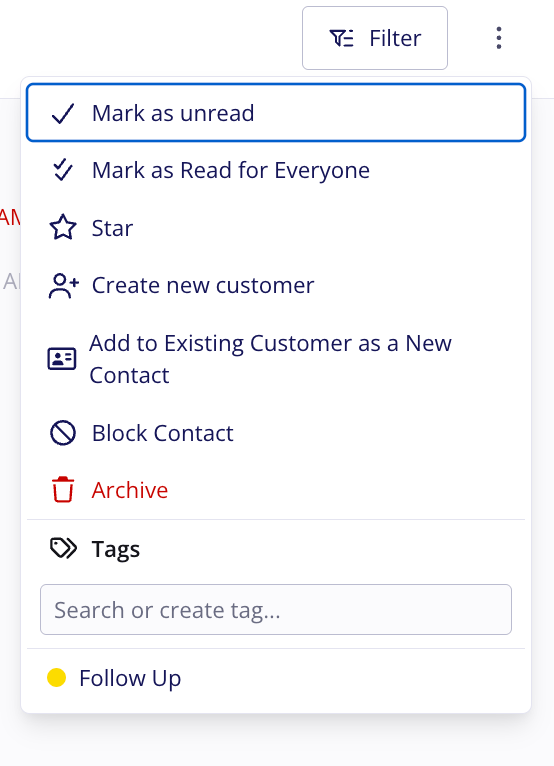
Who uses this: Admins use Mark all as read. Any user with access to a conversation can use Mark as Read for Everyone. Availability: Requires the Engage add-on; Engage is available in the United States and Canada.Engage tracks read and unread status for each user, so opening a conversation clears the unread badge only for you. Two actions clear unread items for the whole team at once. Mark all as read is an admin-only action that clears every unread record on a page. Mark as Read for Everyone is available to any user and clears a single conversation. Both show a confirmation before anything changes.
Overview
Marking all notifications as read clears every unread record on the selected Engage page — Conversations, Voicemails, or Calls — for every user on the account. The action is built for high volumes of messages or calls: when a busy stretch leaves the whole team with a pile of unread records, clearing the backlog in one step lets everyone focus on the communications that still need attention. The action applies to all users, not only the admin who runs it, and a confirmation popup appears before anything is finalized.Mark all notifications as read
- In Engage, open the Conversations, Voicemails, or Calls page.
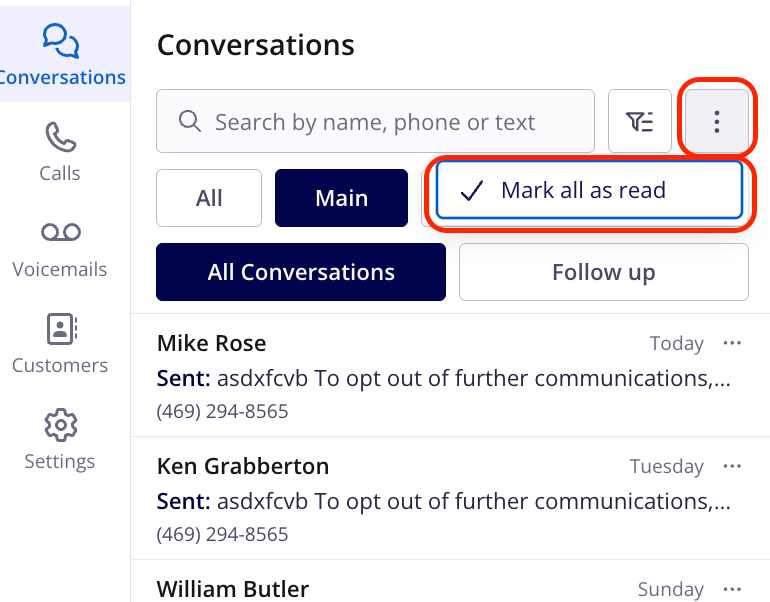
- Select the three-dot menu to the right of the filter icon.
-
Select Mark all as read.
- Review the confirmation popup that appears.
- Confirm to apply the action. Every record on the page is marked as read for all users.
Mark a conversation as read for everyone
Mark as Read for Everyone clears the unread messages, calls, and voicemails in one conversation for everyone with access to that line. Use it when a conversation has been handled and your teammates don’t need to open it to clear their own badges, for example a message that needs no reply or a customer you called back from outside Engage. Replying to a text or calling the customer back in Engage already clears the customer’s missed items for the whole team, so you only need this option for items handled another way. No setup is required, and any user with access to the conversation can use it, including non-admins. It works the same way on the web app and the mobile app.- In Engage, open the Conversations page.
-
Open the three-dot menu for the conversation you want to clear:
- From the conversation list: select the three-dot menu on the conversation’s row. On mobile, press and hold the conversation.
- From an open conversation: select the three-dot menu in the conversation header.
-
Select Mark as Read for Everyone. The option appears directly under Mark as Read or Mark as unread and has a double-check icon. It shows whether or not you have already read the conversation, because teammates may not have.