
Who uses this: Admins, Team Managers, and Service Agents, for calls on the Engage lines they can view. Limited Agents have no access to Engage. Availability: US and Canada · Engage add-on.A call journey in Engage shows every line a call rang, in the order it rang, with each line’s status, ring time, and the agents it dialed. You see it in the Calls view and on a call’s Call Log Details page.
Overview
A call journey is the full path a call took through Engage, from the moment it started ringing to the moment it ended. A call that reaches only one line stays a single call record with no journey. A call that rings more than one line, whether through sequential call ring, a phone tree, or a transfer, groups every line it touched under one parent call record with expandable child legs. A single caller never shows up as more than one missed call.Call statuses
Every call and every leg carries a status. Parent calls and legs use different status sets, since a parent describes the outcome of the whole call and a leg describes only its own part in it.
A call is never Missed once any line answers it. Once a line answers, the parent call can only end as Answered or Abandoned.
Parent calls and call legs
A parent call record represents the call as a whole. Its status is the outcome of the entire journey. A child leg represents one line’s part in that journey; its status is the outcome of that leg only. In the Calls view, a call that rang more than one line shows how many lines it rang, such as 2 lines. Select it to expand the list of every line the call passed through, in the order Engage dialed it, with each line’s status and ring time. Select a line in that list to open its own Call Log Details page, including that leg’s recording and transcript. A phone tree appears in a call journey as the entry method a caller passed through, not as a leg of its own.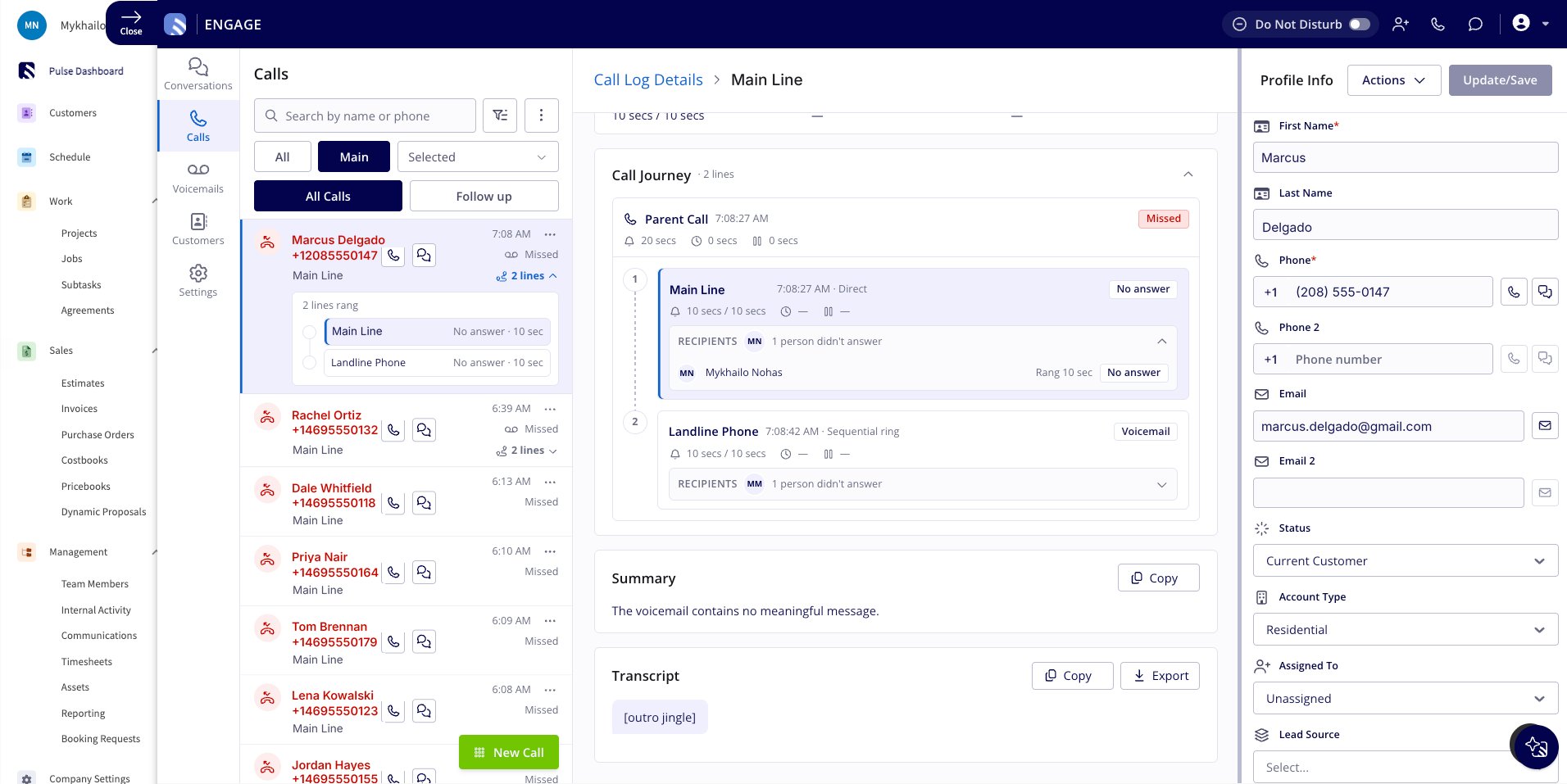
Call Journey section
The parent call’s Call Log Details page includes a collapsible Call Journey section, labeled with how many lines rang (for example, Call Journey · 2 lines). It starts with a Parent Call card that shows when the call started, the parent call’s status, and its total ring, talk, and hold time. Below it, one numbered card per line that rang follows in dial order. Each leg card shows:
Expand Recipients on any leg card to see every agent dialed on that line and whether they answered. A phone tree never appears as a leg card in this section.
Recipients
Each leg card includes a collapsible Recipients list that summarizes the outcome, such as 1 person didn’t answer. Expand it to see every agent assigned to that line who was dialed.
For an agent who answered, the list also shows how long that agent talked and how long that agent’s portion of the call spent on hold.
The recording and transcript for a leg’s conversation play from that leg’s own Call Log Details page.