
Who uses this: Engage users manage their own message tone and manual ringer silencing; Admins control the company-wide auto-silence setting. Availability: United States and Canada. Requires the Engage add-on.Engage notifications are the settings that control incoming call and message tones in Engage — letting you toggle the message tone, silence the ringer on your own device when a line is shared, and decide whether a missed call marks a conversation as unread. They matter most when several people share one phone line and every device rings at once.
On the web app, incoming calls ring through the device chosen as Ringtone in Setting Up Engage Audio Devices.
Overview
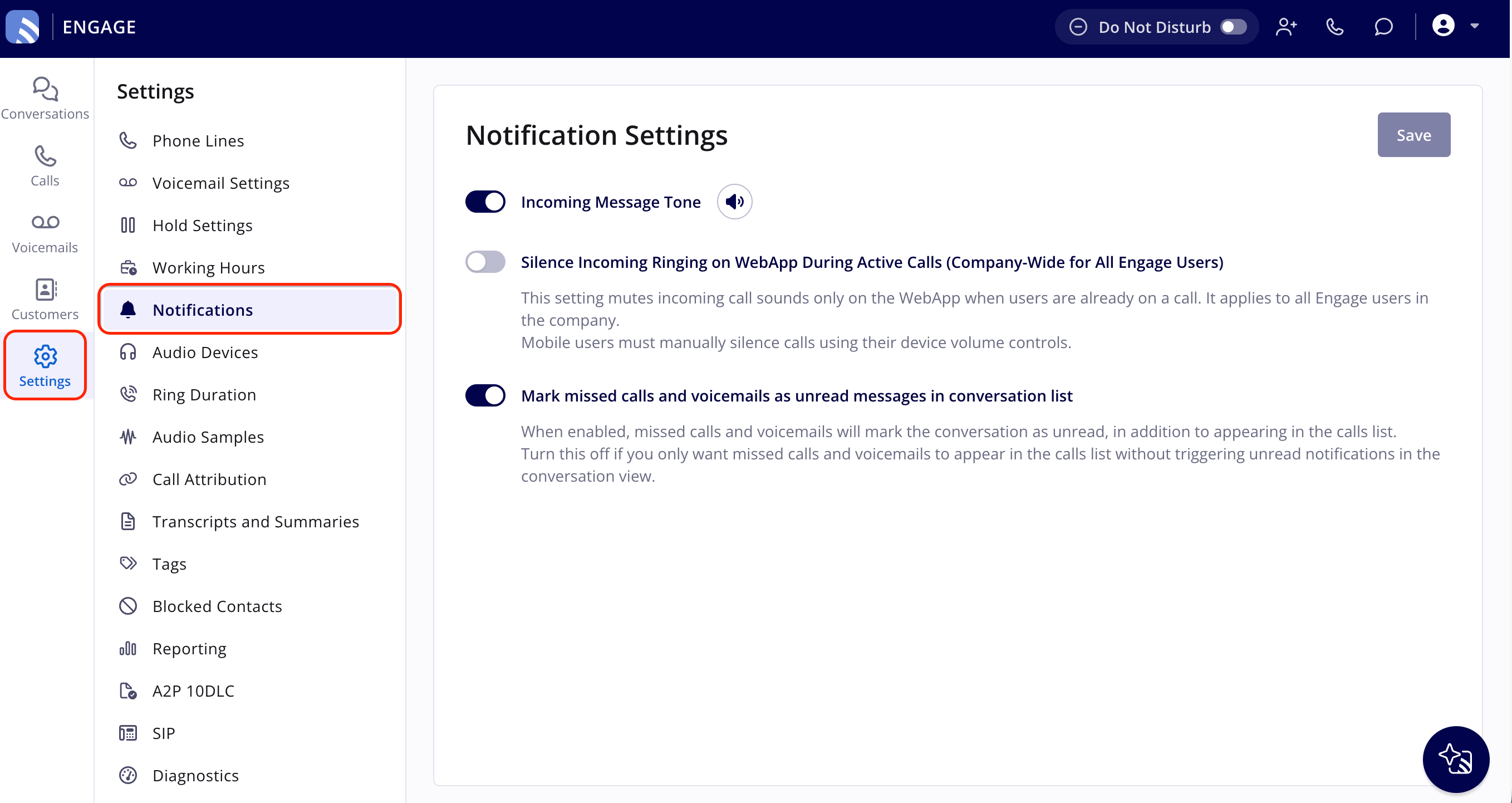
Engage notification settings let you toggle the incoming message tone on or off to match your preference. On top of that, Engage gives you two ways to manage a ringing line — silence it yourself, or have Engage silence it automatically while you’re on a call — plus a setting for how missed calls show up in your conversation list. The toggles live in the Engage web app under Settings > Notifications; manual ringer silencing happens on the incoming call pop-up itself.Step-by-step setup
1. Open your notification settings
- In the Engage web app, open Settings in the left navigation bar.
- Select Notifications from the settings menu.
- Toggle Incoming Message Tone on or off to control the message notification tone.
- Select Save to apply your changes.
2. Silence the ringer manually on a shared line
When multiple users share a line, the manual ringer silencer mutes the ringer on your specific device — the call alert continues for other line assignees and managers, so you cut your own distraction without cutting theirs.- Select the arrow icon on the incoming call pop-up to silence the ringer.
- To respond to the silenced call, select the pop-up again to see the accept and end options.
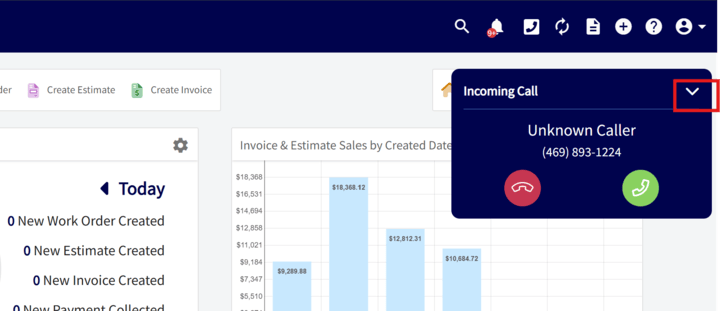
3. Silence incoming ringing automatically during active calls
Admin users can turn on Silence Incoming Ringing on WebApp During Active Calls to automatically mute incoming call sounds on the web app when a user is already on a call. The setting is company-wide — it applies to all Engage users and phone lines in the company. When it’s on:- Users on an active call do not hear ringing for new incoming calls.
- Visual notifications for incoming calls still show on both the web and mobile app.
- Calls still appear in reporting and in missed-call lists.
4. Decide how missed calls appear in your conversation list
Mark missed calls and voicemails as unread messages in conversation list is on by default. When the setting is on, missed calls and voicemails mark the conversation as unread in the conversation list, in addition to appearing in the calls list. Turn the setting off if you want missed calls and voicemails to appear only in the calls list without triggering unread notifications in the conversation view.Read and unread status is tracked for each user. When you open a conversation, it clears the unread badge for you but stays unread for teammates who haven’t opened it. To clear a conversation for everyone with access to the line, use Mark as Read for Everyone. See Mark a conversation as read for everyone.